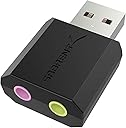
Desertcart purchases this item on your behalf and handles shipping, customs, and support to Sri Lanka.
🎧 Elevate your sound game instantly—because your audio deserves an upgrade!
The SABRENT USB External Stereo Sound Card Adapter (AU-MMSA) is a compact, driverless USB audio device featuring a 3.5mm stereo headphone output and a separate 3.5mm mono microphone input. Compatible with Windows, Mac, and Linux, it provides a quick, plug-and-play solution to restore or enhance audio on laptops and desktops, reducing noise and interference from onboard sound cards. Backed by a 1-year warranty (extendable to 2 years), it’s a top-ranked external sound card designed for professionals seeking reliable, high-quality audio connectivity.


| Asin | B00IRVQ0F8 |
| Audio Output Mode | Stereo |
| Best Sellers Rank | #2 in External Sound Cards |
| Brand | SABRENT |
| Built In Media | Sabrent USB External Stereo Sound Adapter |
| Compatible Devices | Gaming Console |
| Customer Reviews | 4.3 4.3 out of 5 stars (40,523) 4.3 out of 5 stars |
| Global Trade Identification Number | 00819921011138 |
| Hardware Connectivity | USB |
| Hardware Platform | Linux |
| Item Dimensions L X W X H | 1.5"L x 0.4"W x 0.9"H |
| Item Highlight | USB audio adapter; no drivers needed; for Windows & Mac; 3.5mm headphone & mic jacks; usb to 3.5mm jack audio adapter |
| Item Type Name | EXTERNAL-SOUND-CARDS |
| Item Weight | 9 g |
| Manufacturer | Sabrent |
| Maximum Sample Rate | 48 KHz |
| Mfr Part Number | AU-MMSA |
| Model Name | AU-MMSA |
| Model Number | AU-MMSA |
| Number Of Items | 1 |
| Number Of Packs | 1 |
| Platform | Windows |
| Signal To Noise Ratio | 98 db |
| Surround Sound Channel Configuration | 2 1 |
| Unit Count | 1 Count |
| Upc | 819921011138 |
| Warranty Description | 1 year limited |
User
Does what it claims. Greatly reduced pre-existing noise from on-board sound with some fine-tuning
I bought this after a junk Cudy Bluetooth/WiFi card (also reviewed - would not buy THAT again) caused serious noise and feedback issues between wifi and audio on my gaming PC. Troubleshooting had revealed that the RealTek driver required for certain functions was also exacerbating the issue, for those with the same problem. This item installed in seconds with no drivers required, though I recommend a USB extension cable to prevent the pull of gravity from excessively heavy audio cables damaging your USB ports or motherboard.NOTE: My audio runs through the GPU HDMI out to a TV, then from a TV back to the sound card. Output is split to a home theater system and a Bluetooth transmitter box (also reviewed here, couldn't be happier with it) for my headset. I had huge issues with a buzzing noise that came and went with varying intensity that is now gone on my headset, and all but gone on the home theater system.One difference here is that while I used Line In on the onboard sound, this has only a Mic input, which requires a bit of finesse to properly set levels without distortion. And the Mic input does indeed work, I am not sure what others are complaining about. I have noticed that with my usage, I don't need the gain up as much for what I am doing with it. AND I am running Win10, so it's clearly not a Win10 issue.Right out of the box, I was fairly impressed. The noise was all but gone, and after adjusting the more obvious sound levels and enabling some enhancements, it wasn't even noticeable anymore for the most part. Then I discovered that I could separately adjust sound levels and enhancements for the HDMI out the same way, and voila -- the noise is all but gone, and almost seems to have better sound than the factory onboard audio embedded in my Bazooka B450M Gaming motherboard. The fine-tuning, by the way, can be accessed by right-clicking the taskbar sound icon, clicking Open Volume Mixer, then select your HDMI monitor speakers or Speakers (this item will show up simply as "Speakers (USB Audio Device)"). You can then double-click its icon in the Volume Mixer, which will open another dialog box with tabs for Enhancements, Levels, etc.What I found to work best is as follows:For monitor pass-through back to this item, I set monitor volume to 100% and enabled Loudness equalization ONLY. I then switched to the USB audio mixer settings, setting mic input gain to 30% and enabling Bass Boost and Virtual Surround ONLY.After the above adjustments and fine-tuning, the aforementioned noise is still VERY faintly there in games, but it is now unnoticeable in other functions. I want to be clear that the noise is NOT a fault of this product, it is an annoying pre-existing issue that I bought this to solve, and it has helped greatly in minimizing it. It's not perfect, but has made huge improvements in noise reduction, which is, of course, the whole reason I bought it -- and there has been no noticeable sacrifice in sound quality.Side note here -- I believe an old friend used this exact item to run karaoke shows from his laptop, which speaks volumes for the quality. I couldn't tell the difference between the CD+Gs when he ran entirely from disc and the MP3+G files he played through this item.It's been less than six hours since install, but I am blown away by how good this thing sounds, considering it is truly plug and play and fits in the palm of your hand. You really can't beat this thing for the price, and if you're experiencing noise and feedback from your wifi with onboard audio - this will indeed solve the problem with a few adjustments. Order with confidence - this thing does what it claims to do and more.
User
Nice product
Worked fine !
User
Perfect for Mac computers, Easy to use! Plug and Play!
I have an iMac and wanted to use an external microphone with it but with a Mac you only have the one audio plugin which serves as a headphone and microphone jack and that this may cause an issue when adding a microphone. So I researched a bit and found that others with a Mac that wanted to get a microphone also bought this little external sound adapter gadget, so I did too. I wasn't totally sure I would need it but it was cheap (under $6) so I figured I better get it just in case and I did end up needing it so I am glad I got it.It's super easy to use, there's no files or software to install. Just plug this into your USB port and then plug in your plug from your microphone or headset. Then if it's not working you also may need to go to settings ( on a Mac: System Preferences, Sound and select USB Audio Device) to have it work with an external microphone. If it doesn't work for you for some reason when choosing USB Audio Device, select the other device you may have listed in the box ( which would be the headset or microphone you're using with it). I'll attach a screenshot so you can see what to pick. Really that's all there is to it. It's basically Plug and Play, although in some cases you may have to go to the Sound settings so just a little extra step...Plug, Settings, Play...no biggie!I got this microphone by the way : Excelvan BM-800 Condenser Studio Recording Microphone and Shock Mount Holder Blue and it works great with my iMac for blogging or videos. It comes with the mount holder which you can then add to an extendable arm like I did and it was an additional $15 or so. You will also need an external power adapter with it. You can hopefully click on my other reviews to find more info if you're also looking for a microphone and all that you'll need to go with it.*I bought this adapter and the microphone and all the stuff I had to get with it with my own money. No freebie, no discount for a review. This is all 100% my honest review with nothing given to me in exchange for it and I hope it helps you! ;)
User
Works well but not durable enough
I bought this for my son's HyperX Cloud Alpha headset which uses the 3.5mm connectors, and we're preferring to use the USB port on his computers since he takes it back and forth all the time from notebook to desktop and the desktop has difficult to reach audio ports.Sound quality with that headset is excellent. The volume is good and it sounds great. We compared to direct analog connection through the 3.5mm ports and there wasn't much difference. Also, it seems to be coming through in full stereo as it should. No issue here with it playing in mono as some have noted. I suspect that YMMV and that all of these things will depend on the headset you're using with it. Seems like a bit of a gamble still, though, if there is a chance you could buy this interface and have only mono sound or low volume or whatever. We had good luck for it to work with this headset. I cannot deduct a star for what "might" happen with others because I didn't experience that. Had I, though, I would have rated it poorly as others have done.My one complaint, which is why I deducted a star, is that he's only used the headset for 3 months and the adapter has already broken. When he's using the notebook, he's often reclining on a bed with the computer on his lap, and no doubt there is tension being put on the adapter from the blanket underneath or whatever, because some bending right where the metal sleeve that goes into the USB port meets the plastic body of the adapter is what broke it. You can see that the metal part is angled relative to the plastic, and it's worked itself to be quite loose. Electronics inside must have also been stressed. While some might say "be more careful and don't put stress on the plug", I would suggest that it isn't impossible to build a connector like this so that this potential stress point is reinforced better and resistant to that kind of stress, so it certainly could be built to prevent that from happening.Could we expect such a higher quality construction from an $8 piece, though, when a lot of the others cost more than $8? Probably not. That's why I only docked it a single star instead of knocking off 2 or 3 stars. It is hard to expect a highly durable high quality part for the $8. Still, I do expect at least more durability than to get only 3 months out of it. I have bought a replacement but if the replacement also only lasts a few months, I suppose I'll spend more on the next one and try another brand. I don't intend to buy another of these every few months.
User
Plug and play
Exactly what I needed to interface West Mountain Radio Rigblaster to computer. Thanks
User
Solved my problem and works great!
I had my doubts about this. I replaced my 2 monitors and used HDMI cables to connect to them. They worked great but for some reason I lost all audio. No matter what I did, I couldn't get the audio to work. I started looking at sound cards to possibly bypass the built-in audio of my Dell computer. I saw this and thought, what the hell. I got it, installed it, turned the computer on and it found it and my original speakers. Turned on Spotify and BOOM! I got my sound back and it sounded better than ever. I would give this 10 stars if I could. Sure worked for me.
User
DON'T BUY! Doesn't work. Product was changed. Extremely low microphone volume.
I recently bought a Sennheiser Game One gaming headset (https://smile.amazon.com/gp/product/B00KK8ZLEC/ref=ppx_yo_dt_b_asin_title_o01_s00?ie=UTF8&psc=1) and bought the Sabrent USB Adaptor since it was a suggested buy with the headset. It had many great reviews. It didn't work right. I have a Mac, and also have Windows 10 on Bootcamp where I play some Windows only games such as Overwatch and Destiny 2. Using the Sabrent USB device with the headset, there was decent sound, but mic input was extremely low on both macOS and Windows 10. I googled all kinds of fixes and even downloaded a volume booster that just made my voice sound like crap. I reread the reviews more carefully and found one critical review, that had an explanation of why these USB adaptors don't work anymore. He explained that Sabrent lowered the voltage on their product and obviously didn't tell anyone, or offer the difference in the description. Now if you had a dynamic mic headset it might work since it needs no power.Anyway, I bought the Sennheiser PCV 05 Combo Audio Adapter from Amazon (https://smile.amazon.com/gp/product/B00IM36VU0/ref=ppx_yo_dt_b_asin_title_o00_s00?ie=UTF8&psc=1) and when plugged in on macOS there was a HUGE world of difference and sounded fantastic. Everything worked including the microphone. When I rebooted into Windows 10, headset sounded awesome, but Windows 10 would not recognize the microphone and had generic recognition of the headset altogether. I had to use Mac computer built-in mic to talk to people. I called up Sennheiser directly. They explained that the wiring on Mac and PC's are different, and even though the Windows 10 is on a Mac, it still sees devices differently than Mac. They sent me out their brand USB adaptor for free since I already bought their headset and another adaptor of their brand.I received it today, and I am blown away from the difference. It flawlessly works on both macOS and Windows 10. I had to lower headset volume and microphone volume input because it was so loud. So there is no excuse for Sabrent USB Adaptor not to work. I called Amazon and was refunded the money since Sabrent has a no return policy.Pay a little more and by the brand instead. Not sure if the good reviews are bought or from the previous product design, but again DON'T BUY to save money. It's not worth it.
User
Seems to work ok
I bought this because new tv did not have an audio jack. USB audio to a headset seems to work ok, but it cancels the tv speaker audio. This is not a problem with the device. It just didn’t work in my particular application. Inexpensive attempt.
User
Funciona perfectamente y soluciona problemas de audio
Compré este adaptador porque mi puerto de auriculares dejó de funcionar y necesitaba una solución rápida. La instalación es plug & play, lo conectas y en segundos está listo sin necesidad de instalar drivers.El sonido es claro y sin interferencias, tanto para auriculares como para el micrófono. Lo he probado en Windows y en PS4, y en ambos ha funcionado sin problemas. Además, la construcción es robusta y no da sensación de ser un producto frágil.Si tienes problemas con la entrada de audio de tu PC o consola, este adaptador es una solución económica y efectiva. Muy recomendable.
User
🎧 Erweiterte Audiooptionen mit dem Sabrent USB auf Klinke 3,5 mm Adapter 🎶🔌
Der Sabrent USB auf Klinke 3,5 mm Adapter, auch bekannt als AU-MMSA, ist die ultimative Lösung, um deine Audioerfahrung zu verbessern. Egal ob du auf der Suche nach besserer Klangqualität oder erweiterten Audiooptionen für deine PS4, PS5, Windows oder Mac bist, dieser Adapter bietet vielseitige Möglichkeiten.Erweiterter Klanggenuss:Mit dem Sabrent USB auf Klinke 3,5 mm Adapter kannst du dein Audioerlebnis auf ein neues Level heben. Genieße 3D Stereo Sound und tauche in eine Klangwelt ein, die dich begeistern wird.Vielseitige Kompatibilität:Dieser Adapter ist vielseitig einsetzbar und kompatibel mit PS4, PS5, Windows und Mac. Egal welches Gerät du nutzt, du kannst problemlos hochwertigen Sound genießen.Einfache Handhabung:Der Adapter lässt sich mühelos anschließen und benötigt keine aufwendige Installation. Stecke ihn einfach in den USB-Port deines Geräts und verbinde deine Kopfhörer oder Lautsprecher mit der 3,5 mm Klinke.Kompakte Größe:Der Sabrent Adapter ist kompakt und leicht, sodass du ihn problemlos überall hin mitnehmen kannst. Er ist ein praktischer Begleiter für unterwegs.Verbesserter Sound:Dieser Adapter bietet eine klare Klangqualität ohne Störungen oder Interferenzen. Er ermöglicht dir, deine Lieblingsmusik, Filme und Spiele in bester Soundqualität zu genießen.Hochwertige Verarbeitung:Der Adapter ist solide verarbeitet und sorgt für eine langanhaltende Leistung, die deinen Audioanforderungen gerecht wird.Erweitere deine Audiooptionen:Mit dem Sabrent USB auf Klinke 3,5 mm Adapter kannst du auch Kopfhörer oder Lautsprecher mit einer 3,5 mm Klinke an Geräte anschließen, die nur einen USB-Anschluss haben. Das eröffnet dir neue Möglichkeiten für deine Audioausgabe.Fazit: Audioerlebnis auf nächster Stufe:Der Sabrent USB auf Klinke 3,5 mm Adapter (AU-MMSA) ist die perfekte Ergänzung für alle, die ihre Audioerfahrung erweitern möchten. Mit seiner vielseitigen Kompatibilität, einfachen Handhabung und hochwertigen Klangqualität ist dieser Adapter eine lohnenswerte Investition. Egal ob du Filme anschaust, Musik hörst oder Spiele spielst, du wirst von der verbesserten Soundqualität begeistert sein. 🎶🔌🎧
User
役に立ちます
ウェブ会議等で使用するヘッドセットをPCに接続するのに、たいへん役に立っています。リーズナブルな価格で購入できてよかったです。
User
kısa süreli
Bence bu ürün kısa süreli. Eğer laptop kullanıyorsanız kesinlikle almayın. Çünkü diğer usb girişini net kapatıyor ve bence bu çok kötü.Bir süre sonra zaten kendiliğinden usb girişi yamulduğu için kullanmayı bıraktım ama baya götürdü.
User
Received items in good working condition.
Trustpilot
3 weeks ago
3 days ago