


Desertcart purchases this item on your behalf and handles shipping, customs, and support to Sri Lanka.
โจ๏ธ๐ฑ๏ธ Cut the cord, not your flow โ wireless work just got sleek!
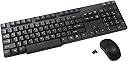
The Inland ProHT Wireless Optical Mouse and Keyboard Combo offers a professional-grade 2.4GHz wireless connection with up to 10 meters of range, a spill-resistant 104-key keyboard with quiet membrane switches, and an ambidextrous optical mouse featuring 1000 CPI precision. Designed for Windows PCs, this combo includes a convenient 2-in-1 USB receiver for effortless plug-and-play setup, making it an ideal choice for millennial professionals seeking reliable, stylish, and efficient workspace peripherals.
| ASIN | B0026PTO1I |
| Antenna Location | Office |
| Best Sellers Rank | #3,147 in Computer Keyboard & Mouse Combos |
| Brand | INLAND |
| Color | Black |
| Compatible Devices | Laptop |
| Compatible Operating System Family | Windows |
| Connectivity Technology | Bluetooth, Radio Frequency , Usb |
| Customer Reviews | 3.8 out of 5 stars 302 Reviews |
| Global Trade Identification Number | 00012405701192 |
| Hand Orientation | Ambidiestro |
| Item Weight | 16 ounces |
| Keyboard Description | wireless |
| Keyboard Layout | QWERTY |
| Manufacturer | Inland |
| Mfr Part Number | 70119 |
| Minimum Required Operating System Version | Windows XP |
| Model Number | 70119 |
| Movement Detection | Optical |
| Number of Batteries | 2 AAA batteries required. |
| Number of Keys | 104 |
| Number of Packs | 1 |
| Operating System | Windows |
| Other Special Features of the Product | 2-in-1 USB Receiver |
| Power Source | Battery Powered |
| Special Feature | 2-in-1 USB Receiver |
| UPC | 012405701192 124057011922 |
| Unit Count | 1 Count |
| Warranty Description | 1 year warranty |
O**Z
Durable and Comfortable
good product worked really nice when I used
C**T
Very inexpensive wireless KB & mouse combo
Tiger Direct is a newbie in collection of my money. They are big enough, so I was not hesitant to purchase a computer product from them. The wireless KB/mouse combo were the cheapest on the market, and I shopped for a week or two. This is the same product Wal-Mart stocks at a slightly higher price. I paid just under $15.00 total, delivered. Two problems however, the mouse failed within a couple of weeks and within the Christmas season. Tiger Direct said they were sending me one immediately, and sent me a return postage label that day for the return of failing pair. No Sweat! The other problem, is I have grown fond of a keyboard silicon skin. The space bar on this keyboard makes this KB a unique key layout. I will purchase a flat generic KB skin, once I test the new mouse. I might have shopped longer for another KB layout had I better understood keyboard skins style and availability. If you do not budget as much as I you can find a custom KB skin for about $20, else $2 to $5 with shipping included for the skin.
T**B
Mouse does not work
The mouse does not work - keyboard works for Windows 7. There are no instructions in the box, except a small picture showing that the usb plug, confusingly called the "nano receiver" is inside the mouse. The usb is tiny, less than 1/2 inch. Plugging it in a get the plug and play icon on all three computers, and a pop up that says the software installed successfully. The keyboard worked beautifully. Very light weight. Worked from 8 feet away. The mouse did not work for two Windows 7 computers and one Vista computer. Instruction manual to activate mouse: I had to go to [...] model number 70119 to find the information in an attempt to activate this mouse. I downloaded a zip file with three PDFs. Two of the PDFs are for a older model. You want >>> New Model Style 70119 Pairing instructions.pdf <<< The PDF instructions state: >>Pairing instruction for 70119 Keyboard Mouse Combo >>Pairing Mouse instructions: [DID NOT WORK] >>1. Install batteries in the mouse and turn the power on. >>2. Plug in the USB Nano receiver to any available USB port'press down on the mouse right-button and wheel-button both at the same time for 15 seconds. When the red light shows the pairing was successful. >>Pairing Keyboard instructions: [NOT NEEDED] >>1 Install batteries in the keyboard. The keyboard will automatically be on. >>2 Plug in the USB Nano receiver to any available USB port, press down the "Esc key" and "K key" both at the same time before 15 seconds. After that let go and try testing keys on keyboard. Mouse never worked I was never able to get a red light on the mouse. The mouse did not work for two Windows 7 computers and one Vista computer. I switched out the batteries three times: once with the two supplied AAA keyboard batteries, once with two dollar store batteries AAA, and once with some top of the line Energizer ultimate lithium batteries. You have to be careful to install the batteries correctly because the battery picture is so faint. There is an off on switch on the bottom of the mouse, played with that several times. I unplugged my wireless router and my Xbox 360 controller, the mouse still never turned on: no red light. I notice the keyboard has an inspection sticker but the mouse does not, maybe it was never inspected? I am returning this mouse keyboard set and buying a name brand.
I**N
Great and Cheap ***
I was actually not expecting much when i bought this combo. But it does out perform my expectations, I use it to play poker while sitting across the room from my big screen. It never messes up from 20-30 feet and I have actually never replaced the batteries since i bought it a YEAR ago!!! It have never missed a key like others have and it is super lightweight. There are only 2 things that some might not like but don't bother me at all 1. No lights at all on the keyboard, no caps lock or num lock light 2. not a nano receiver so its the old school rf receiver type 2.5" or so. That is it, if you can get by with out a light that actually drains the battery this keyboard is amazing. EDIT*** It has been a long time since I reviewed this and it is still working perfectly with lost of abuse from my learning to walk son who grabs everything in sight. I have recently changed the batteries after some distance decline but it still works amazing.
G**Y
?Pro? Keyboard - nah
A "pro" keyboard - me thinks not. A residential/home keyboard maybe. It's simply lacks the heft, look, and feel of something someone is expected to bang on all day, everday. For the price, it's ok. Bought it for an XBox. Worked ok with XBox - but, the XBox still needed special navigation keys from a controller. Bought a keypad for the controller - moved wireless mouse/keyboard to new smart tv. The Combo ?didn't? work. Or, more accurately, worked intermittantly. Keys had to be pressed multiple times. Mouse movements were spastic. Added a USB male to female extension cale (~ 1 meter) This allowed to tiny USB Transceiver plug to dangle below the tv screen. With straight line of sight to the transceiver plug, the keyboard and mouse work as expected. It appears that whatever an LED smart tv screen is made of, it can block 2.4 GHz signals. ?who knew? It works, not terribly expensive, not professional grade - ok.
H**S
You get what you pay for.
I was going to write an unsatisfactory review of this product, but I first read a few reviews to see if others had the same concerns as I did. It's a good thing I did, too because one person who had the same issues as I did also found an easy way to fix it. That said, it still only deserves 3 stars. I purchased this set specifically for an HTPC built. I wanted a wireless option to be able to do initial configurations and also to surf the web on my TV and play a little Minecraft. I was originally disappointed at the limited range of the wireless dongle and became frustrated at the erratic behavior of both the mouse and keyboard, especially when playing Minecraft. My couch is only 4-5 feet away from the HTPC, so it really shouldn't have been an issue. Thanks to reading some other reviews, I discovered that the 2.4 GHz dongle operates somewhere between channel four and six. Turns out, my wireless router was pushing out on channel six. I changed the channel to 10 on my router and I have since had no problems with the erratic behavior of the mouse and keyboard. The keyboard and mouse itself feel fairly cheap. They feel flimsy and made of cheap material and certainly aren't ergonomic. On the other hand, it's also about as cheap of a wireless keyboard and mouse combo as you can find, so there's not much to be expected. It works for what I bought it for, so I can't ask for more than that. I think this set is perfect as a temporary solution or for an initial setup for a Kodi build or a Raspberry Pi. That was my original intention, but I find myself playing Minecraft and surfing the web on my TV more than I thought I would. If I had to redo my purchase, I would spend the extra $5-10 on a Logitech set.
T**N
New Version Windows 7 Compatible
Hi just got this the other day and had it up and running in no time! I was a little hesitant because some people were reporting that the mouse would not work with Windows 7 well apparently they have updated the set because the one I received has a nano receiver which is located inside the mouse itself not the larger one pictured. I also emailed Inland before the purchase with my concerns and sure enough they said it was compatible with Windows 7 . Installation is a snap no software or drivers in the box just follow the directions on the box there are no instructions in the box itself. I actually like the smaller size of the keyboard just using it for a system I have hooked up to the 40" LCD we have in the bedroom. Keyboard seems fine the mouse is a little larger then a laptop mouse maybe just a little. But response of both mouse and keyboard seems OK will give an update as soon as I have a little time to play with them. just wanted everyone to know that there are no compatibility issues with Windows 7.
S**L
Everyone Needs One (UPDATED 4/8/16) -- Repeat Customer
I have used this keyboard mouse combo every day for over five years (including right now) and I have to say it's one of the BEST buys I've ever made. It's dropped onto hard wood floors (not recommended) and I'm not exactly soft when I type -- yet it's taken all the punishment I've inadvertently dished out and keeps on going. The only problems I've had is when the battery in the mouse runs low, but that's very infrequently and I've learned the warning signs at this point. With daily use, the single keyboard AA battery lasts about a year for me. I replace the mouse battery (also AA) at shorter intervals, but that's partly due to the fact I neglect to turn it off (it has an on/off switch) and sometimes it's ended up on its side, reducing longevity. At about the 4-1/2 year mark, my left "shift" key started to stick, but a quick cleaning remedied that. GREAT product at a GREAT price. Absolutely no complaints! If this set ever does go belly up, I'll be coming back for another. Everyone should go wireless with their keyboard and mouse -- you'll be so glad you did. UPDATE: After 7-1/2 years, the scroll wheel on the mouse finally came loose, which as much as I use that functionality, made the mouse nearly inoperable for me. I've actually since repaired it, but I'm more confident fixing dead things that are destined for the trash than things I need to use. I looked around at all the options available since I first purchased this item and realized I really didn't need to be researching. I happily reordered the Inland once again , but unfortunately it's not the same model at all. The keyboard layout is different, the scroll wheel had a mind of its own at times, and the keyboard often missed characters and lags. I used it for a couple years despite the glitches, but finally purchased a replacement, a Victsing (https://smile.amazon.com/gp/product/B082KB9T78/ref=ppx_yo_dt_b_search_asin_title?ie=UTF8&psc=1).
Trustpilot
2 weeks ago
2 weeks ago