Buy anything from 5,000+ international stores. One checkout price. No surprise fees. Join 2M+ shoppers on Desertcart.
Desertcart purchases this item on your behalf and handles shipping, customs, and support to Sri Lanka.
⚡ Capture Every Frame, Own Every Moment
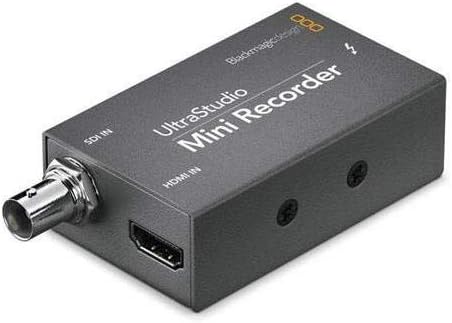
The Blackmagic Design UltraStudio MINI Recorder is a compact, Thunderbolt-powered video capture device delivering ultra-fast 10 Gb/s connectivity. It supports both compressed and uncompressed video formats, ensuring professional-grade quality for everything from commercials to feature films. Compatible with all major editing software via open-standard DPX and QuickTime formats, it includes a developer SDK for custom workflows. Lightweight and reliable, it’s designed to handle extended recording sessions without overheating, making it the go-to choice for millennial pros demanding speed, versatility, and seamless integration.
| ASIN | B009D91314 |
| AV Output | MPEG-4 |
| Best Sellers Rank | #1,051 in Video Converters |
| Brand | Blackmagic Design |
| Customer Reviews | 4.3 4.3 out of 5 stars (932) |
| Global Trade Identification Number | 00531479667215, 09338716001846 |
| Hardware Interface | Thunderbolt |
| Item Dimensions | 5.2 x 5.2 x 1.6 inches |
| Item Weight | 8.48 ounces |
| Manufacturer | Blackmagic Design |
| Mfr Part Number | 001846 |
| Model Name | Ultrastudio MINI Recorder |
| Model Number | 9338716001846 |
| Other Special Features of the Product | TV Input |
| Platform | Linux, Windows |
| UPC | 780746824015 531479667215 695637340744 |
F**N
Download the current Desktop Studio software from Blackmagic Support page.
So I bought this on Amazon in 2015, I really never used it. I bought for a specific job and didn't need it I didn't have the time to learn it - until now June 2020. My company had a huge live streaming show to make. We had up to 40 different phones from all over the world feeding into a switching truck. My boss asked me to get a device that we can capture the live feed that was going to YouTube. The truck gave me a feed with all the graphics just like the stream. Previously I downloaded the latest Desktop Studio (11.5.1) and installed it. Blackmagic uses this software for many of its capture devices. I was using an older Mac Pro "the trashcan" it was great for this because it has the Thunderbolt 2 connections which are the same as the Mini Recorder. Install the software before you hook up the Mini Recorder so when you connect it can find it. When you plug in the T-Bolt cable you will see a little light on the box. That is the power indicator. I had to give the Mac permission to install as the Sys settings were set semi tight. The drive I was using for capture is a small 2 - 2.5" SSD drive enclosure that has a hardware RAID. I opened the utility and change the setting from HDMI to SDI as that was my feed. I left that window open just to always confirm it hadn't changed. Connected the box, added the SDI cable, and the drive. There is a simple piece of software in the install that you can use, Blackmagic Media Express, this will allow you to do a capture of the feed. In BM Media Express preferences, pick the Capture Video format you want, and the destination disk the files go to. That is about it, I had a couple of days to practice because the tech team did rehearsals. It is tricky in this program to name the files but I finally found the answer buried in BM support forum. The name is a combination of the Description, Reel all the things below name. You hit the little plus sign to the right of these choices and it populates the name. You can't just type the name, I kept it simple. It was frustrating and took me a while to find the answer. You are welcome. There isn't much documentation on this software. But it works really well, it did for me. Our 2 day program was divided into 6 events 3 a day. So I just made sure I hit capture before the show started and then stopped it by hitting capture again to stop it recording. Practice with it so you know it works before showtime. One annoying thing is you cannot monitor the audio while recording (if somebody can do this - post it please). But I did so many tests that I knew the embedded audio was there on the recording. Make sure to check your Mac audio input System Preferences to make sure the BM box is selected. I wasn't fed timecode but if I was it was supposed to be in the feed as well. So the 2 day show was streamed live and I found out after the first event my recordings were the source of the posted videos. Our editor took the files and trimmed stuff they didn't need and prepped them for YouTube upload. So these event recordings have been watched by over 100K of people. It worked really well. Only other thing is after I got familiar with the capture utility, I started using the box with - BM Davinci Resolve 16. It is more complicated than the included app, but that is what I used. I like the naming workflow better. The picture looked the same after I dialed in Resolve, but Resolve has way too many settings for someone starting out. Oh yes one of the captures was over 2.5 hours long and the Mini Recorder never overheated. Not super simple but it worked really well.
M**H
Works excellent, use quality equipment and cables always.
This is an update after my review below. Customer support evaluated the unit, it was working fine all along. Sometimes you test cables and other equipment and it stuff stops working, that's what happened, it worked well and support confirmed it wasn't their product at fault. So it's back and does work with new equipment. Also, support did excellent and was very helpful throughout the process, which was quick. Good job Blackmagic! OLD REVIEW: Very disappointing, only lasted 6 months of weekend use. So that's like 30 days of use. It does get hot. We tested the cables and other macs and determined this unit just flat out died. Will be working on returning for refund or exchange. Only gets a star because it worked very well. But not cost effective, maybe we got a bad unit. I hope Black Magic can restore faith in this product. OLD REVIEW, SEE UPDATE ABOVE.
S**O
The UltraStudio Mini Recorder just works like a champ and I am grateful for that
I bought one of these Blackmagic Design UltraStudio Mini Recorders because I needed a low cost way to capture HD video. The unit is truly no-frills but does what it does extremely well. In typical Blackmagic fashion, there is some tedium to installing the latest software and making sure the settings are correct each time but I don't find it too unruly to deal with. Such a simple device yet also so important to my video podcast. I may buy another of these because the price is right and I still have several Thunderbolt ports open on my Mac Pro. I haven't run into any problems yet. The UltraStudio Mini Recorder just works like a champ and I am grateful for that.
M**O
Does what it's supposed to do
I purchased this in the hope that I could connect my Canon VIXIA HF M500 Full HD 10x Image Stabilized Camcorder with One SDXC Card Slot and 3.0 Touch LCD to my computer and be able to live stream and use it as my webcam for Skype and Google+ Hangouts. I had originally looked at the Blackmagic Design Intensity Shuttle Thunderbolt . But all I really needed was a box to convert my HDMI signal to Thunderbolt. I didn't need the pass thru ports, nor all the other inputs on the Shuttle. Once I saw the Mini Recorder I was convinced I found what I needed. If you expect it to work straight out of the box, then you'll be disappointed. There is software to download to get you to the latest version. I tested it with Skype, Quicktime Broadcast, Adobe FMLE, justin.tv (using QT and FMLE), CamTwist, and Google+ Hangout. They all worked. I do have to say that using QT Broadcaster wasn't ideal. The frame rate was very slow. All the software except Skype worked on first try. OK, not exactly first try, which I'll get to later. Skype, as of this writing, only works with version 6.0.0.2946. It won't work with the 6.3 version of Skype, so be careful about upgrading. The key to all of this is to make sure you have the latest and greatest computer software from the website. Next, make sure you set the frame rate coming in to match the camera's native rate. Google the video about this to see. Use the search phrase BlackMagic Ultra studio Mini Recorder to see how someone got it to work. It WILL work if you follow his instructions.
L**O
Super produit on s’en sert pour une utilisation professionnelle intensive et aucun souci. On en a un sur un gh5 en hdmi c’est parfait et un pour une Sony fs7mII en sdi et franchement ça envoie grave bon par contre faut prendre le temps de tout régler mais c’est top nous streamon avec obs qui reconnaît directement les boîtiers. Par contre nous sommes sur Mac et câble Apple obligatoire car on a tester avec d’autre et de notre côté cela ne fonctionnait pas mais avec les câbles Apple c’est ok ça fonctionne nickel chrome. Attention aucun câble n’est fournis. Voilà de notre côté c’est 5 étoiles.
O**N
Für vergleichsweise kleines Geld bekommt man einen super verarbeiteten Digitalrecorder. Er ist sehr klein und braucht nicht mal einen Stromanschluss weil er vom Thunderbolt gespeist wird. Ich verwende ihn um von einer Nikon D800 das unkomprimierte Videosignal direkt auf dem MacBook Retina aufzunehmen, was reibungslos klappt. Die mitgelieferte Software ist auf Profi-Niveau. Als einzigen Kritikpunkt habe ich vorzubringen dass der Recorder ziemlich warm wird; also nicht Richtung Finger verbrennen, aber schon ordentlich. Das mag allerdings auch an Thunderbolt liegen, denn die beiden Stecker des Thunderbolt-Kabels werden ebenfalls ziemlich warm. Daher kein Abzug in der Bewertung. Ich habe in den Einstellungen gesehen dass er wohl auch in Echtzeit SD-Material hochskalieren und HD-Material herunterskalieren kann. Dazu kann ich aber nichts sagen da ich diese Funktionen nicht nutze. Noch ein Tipp für jemanden, der ihn auch mit einer DSLR benutzen will: Man muss anfangs etwas herumprobieren bis man funktionierende Einstellungen für die Bildwiederholrate gefunden hat, wobei ich nicht herausfinden konnte, ob das an der Kamera oder am Recorder liegt Ich würde ihn jederzeit wieder kaufen.
R**Y
I bought this so I could use my HD camcorder for Facebook live. It works as advertised. If you're using a Mac, just make sure you go into Settings > Security & Privacy, and "Allow" BlackMagic after installing the software but before launching it. I didn't do that at first, and it was their customer support that told me about that. They answered within a couple of hours of my inquiry...and on a Sunday! Great product, great service.
A**O
ottimo prodotto, subito configurato su mac book, collegamento con telecamera HD perfetto. L'ho utilizzato con diversi software e tutto ok. L'ho preso per utilizzare la diretta streaming di youtube e funziona bene
T**I
SDI映像信号-->本製品-->Mac miniのThunderboltポート と入力させるために2014年に1台目を購入し、本製品を6年利用したところで故障したため、今回は2台目を交換目的で購入しました。 今回の交換のタイミングでMac miniも買い替えたことで、Thunderboltの規格が2から3(USB-C)に変わっていたので、併せてApple純正のThunderbolt2-->Thunderbolt3(USB-C)変換アダプタも購入しました。 要するにSDI映像信号以降はすべて交換した形ですが、何のフラストレーションもなく接続が確認できました。 シンプルゆえに故障するとメンテナンスがお手上げとなってしまいますが、その分おかしな挙動や周辺機器とのコンパチをあまり気にする必要がなく、代えのききづらい製品だと思います。
Trustpilot
3 weeks ago
3 weeks ago