Desertcart purchases this item on your behalf and handles shipping, customs, and support to Sri Lanka.
๐ Upgrade your Mac Miniโs soul with speed and style!
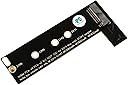
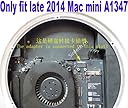
The Sintech ST-M2A1347 adapter converts M.2 M-Key NVMe SSDs into a compatible internal drive for Late 2014 Mac Mini A1347 models, supporting data transfer speeds up to 6 Gbps. Designed exclusively for macOS High Sierra and later, it offers a straightforward upgrade path to dramatically improve storage speed and capacity, breathing new life into your Mac Mini with a portable, easy-to-install solution.


| ASIN | B07Q5FBNVG |
| Best Sellers Rank | #647 in Internal Solid State Drives |
| Brand | Sintech |
| Brand Name | Sintech |
| Color | Black |
| Compatible Devices | Mac Mini |
| Compatible Phone Models | No Compatible Phone Models |
| Connector Gender | Male-to-Female |
| Connector Type | Usb |
| Customer Package Type | Standard Packaging |
| Customer Reviews | 4.8 out of 5 stars 378 Reviews |
| Data Transfer Rate | 6 gigabits_per_second |
| Indoor Outdoor Usage | Indoor |
| Item Shape | Flat |
| Item Weight | 2 pounds |
| Manufacturer | Sintech Electronic |
| Maximum Voltage | 3300 Millivolts |
| Model | ST-M2A1347 |
| Model Name | ST-M2A1347 |
| Number of Items | 1 |
| Number of Pins | 23 |
| Other Special Features of the Product | Portable |
| Part Number | ST-M2A1347 |
| Recommended Uses For Product | Upgrading late 2014 year Mac Mini A1347 MEG Series |
| Special Feature | Portable |
| UPC | 701017253884 |
| Unit Count | 1 Count |
F**E
Great way to add space and speed to your aging Mac Mini
Highly recommend if you have a late 2014 Mac Mini. Make sure you have the right tools to open up the chasis. Beyond that, fairly easy to install and works as advertised. Keep in mind, the bus on which the NVME is connected to is limted to 1000 MB/s bandwidth, so don't expect your PCIe x5 to run at 7000+ MB/s
A**T
Upgraded 2018 Mac Mini & Load Times Are MUCH Faster!
In 2023 I decided to finally try out a MAC. I initially bought a used 2018 Mac Mini off eBay. Load times weren't that great & as I upgraded to newer versions of MacOS they got worse. Had read how installing an NVMe SSD drive could speed things up. Well, let me tell you -- it's night and day! What's I'm doing is probably a bit untypical. I'm using the 2018 Mac Mini as a thin client basically, connecting to a more powerful desktop PC that I call "The Beast!" through Microsoft Remote Desktop. I also bought a Mac Mini M2 in 2023 a few months after I had upgraded the 2018 Mac Mini. And I can connect to the Mac Mini M2 from the 2018 Mac Mini as well. So basically I have the option of working on a powerful computer from the basement, either a Windows Desktop or Mac Desktop through this thin client. It's worked out wonderfully. I even have dual 24" monitors setup on the 2018 Mac Mini and have it kicked into the highest resolution (non-4k). I'm actually very surprised how well the remote desktop connections work these days -- no different than being right at the PC itself as long as you're on a wired connection. In any case, this adapter helped me try out a Mac and going forward I'll probably do more of these thin clients as I upgraded to newer versions of the Mac Mini. The adapter was pretty straight-forward to install. It's best to verify you buy a compatible NVMe SSD first, so do a bit of research. Oh and, in my case I got the screws needed for installation in the package. I don't think I had noticed the description mentioned including screws, so I had purchased some, but turns out screws were included.
J**.
Solid Product...
If you have a 2014 Mac Mini, this is a solid product upgrade if you are coming from a spinning HDD or even an SSD SATA drive. Easy to install - and if you remove your SATA cable/drive for this upgrade, simply use the screw retainer hold down on the PCIE coupling. I was a bit skeptical of the tape to hold the board in place, but - it's 3M brand and Sintech also adds the screws for the rear hold down as well - so your SSD will be fixed properly... As for performance? It drives my WD NVME at nearly full speed of the bus design - or just under 500Mb/s for read/writes. It's a definite upgrade over either a SATA HDD or SSD... Again - well done product that does what it says it will do....
S**B
Upgraded late 2014 Mac Mini - excellent results
This adapter & results were amazing. The procedure to add an M.2 NVME using this adapter was so easy, compared to a complete disassembly of the mac mini to replace the hard drive with a sata ssd. My late 2014 mac mini with low specs of 4 GB (non-up-gradable) ram,1.4 Mhz processor, & a possible failing 500 GB 5400 rpm hard drive was barely usable. The addition of the M.2 NVME drive made a marked improvement even on this low end late 2014 mac mini. Also the TRIM function was turned on when I checked to make sure.
K**M
Works like a charm :)
If you have a 2014 series Mac Mini, this is a must have. Works like a charm. Beats a SATA SSD by far. One small technical flaw (and forgive me, I am an engineer :) ) is the fixation support is made with a small adhesive foam bar as opposed to a screw - which screw has its dedicated hole about 1/10" away from the scerw's location on the sintech board. So very typical. This is not a disadvantage, just a picky observation. Anyway, the product is really great, does what is should and does it perfectly. Not to mention the fact that if this was an Apple adapter, the price would be well in the hundreds :) As for the NVMe SSD, I am using it with a Samsung EVO 960. Most likely it will work with the EVO 970 as well (if you upgrade the 970's firmware to the latest one - the 970 worked like this in a 2016 Mbook Air). So again, buy with confidence, it will considerably beef up your Mac's performance and that will bring new life to it - and that will make you happy for sure.
T**Y
A great addition to Mac Mini
I purchased for a Mac mini I was upgrading. Unfortunally the Mac was broken beyond my skill level.
W**9
Inexpensive way to wake up a (late 2014) MacMini
Had an old MacMini (late) 2014 that was just too tired with its 5,400 RPM 1 TB drive, so decided to get the inexpensive Sintech M.2 NGFF NVMe SSD adapter and a Crucial 1 TB SSD NVME SSD (as it was on sale). Install was a breeze (I've dabbled in the MacMini dozens of times), but a few issues to highlight: a) depending on the alignment of the PCIe connector on the motherboard, you might have to gently 'struggle' to get the screw holding the adapter in place at the far end. b) try the adapter is place first, no adhesive exposed. Then just remove one corner of the adhesive cover so you can grab it with a pincer or a pair of pliers later. Then mount the adaptor, ensuring that is aligns smoothly with the PCIe connector. Once it does and the screw has been placed in the slotted hole, pull away the rest of the adhesive cover. c) do not rely solely on the included adhesive strip. Highly recommended to use a bracket (similar to what Apple uses for their PCIe connected adapter) or place to place a piece of temperature resistant foam as padding between the adapter and the mini's cover. You DO NOT want this adapter to suddenly fall out of its connector due to some micro tension when mounting it. But when all was done, the SSD stick in place, and after a fresh install of MacOS Monterey and eventual migration of user profile from the old HDD, this previously sluggish aluminum 'puck' is now again a perfectly usable, even speedy, computer. I have now installed SSDs of various type in a dozen computers or more, and if there is one 'upgrade' that truly changes the experience on a PC, SSD must be the top choice. For those looking to working the MacMini; carefully review what HW version you have, as they differ quite a bit in regards to what can be done and not in terms of upgrades.
P**D
Works Perfectly
I utilized this to install a Crucial P2 NVMe SSD in a 2014 Mac Mini. Fit was excellent and the connector mated up without looseness to the logic board. The adhesive on the card held it firmly in place. It is nice to have the screw set and screwdriver included as unless your Mini has an existing PCIe type drive there is no screw to hold the drive to the logic board. Mac OS High Sierra and above will recognize the drive and you may work with the drive via Disk Utility. This adapter is a quality low cost solution allowing one to install NVMe M2 SSD drives in 2014 Mac Minis and avoid the high cost Apple solution to adding their proprietary drive. Recommended.
Trustpilot
2 weeks ago
1 month ago