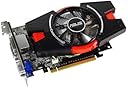
🎮 Elevate Your Game with ASUS GT640!
The ASUS GT640 2GB DDR3 Graphics Card is engineered for gamers and professionals alike, featuring 2GB of DDR3 memory, advanced cooling technology for extended lifespan, and support for multiple HD displays, ensuring a top-tier visual experience.
A**T
Great Bang for your Buck
Pros:2 DVI, 1 HDMI, 1 VGA - can run up to 4 monitors at the same time!!!!Excellent card for running multiple monitors, video editing or as an intro gaming card.Can handle 1080p video editing without lag and the giant fan keeps it really cool and quiet.Runs most games in 1920x1200/high graphics (mainly depending on the game)The software that comes with the card is excellent (props to ASUS) - allows for multiple profiles and to over-clock your card automatically when you start up your pc.I believe my power supply is a 350 Watt, and its more then plenty for over-clocking this card + running 2 high-res monitors.300+ Watt should be enough to run it without any issues if you're not planning to over-clock.Cons:The main thing that you will have to watch out for is the card's physical size (if you have a tight space around your pci-e slot). It doesn't look like it but it's as big as its more powerful cousins.As you can tell from the picture the fan extends past the card itself and is simply put huge, in my case (stock hp) I had to move all the power wires around to make this card fit comfortably (100% worth it). It will take up 2 slots worth of space in your pc.This card doesn't have an sli connector so aside from over-clocking it you won't be able to get higher performance in the future (this shouldn't be an issue for anyone looking to spend less then $100 on a graphics card).I figured this out after purchasing the card, but 2 gbs of video ram is overkill and is more of a selling point then anything: you will never use more then 800-900 mbs simply based on the limitations of the gpu itself. If I could buy this product again, I would probably go for the (faster) 1 gb DDR5 version of the 640 gt or 650 gt card with the same awesome fan and over-clocking software from ASUS.Conclusion: Easy to install and use, awesome quiet fan, excellent overclocking software, (physically) HUGE CARDThis is an excellent card for anyone looking to upgrade a stock system, run (many) multiple monitors, or do some mid-level gaming.Great Value for your money.
B**.
Multiple Display Support is Suspect
I've lost one of the video outs.Everything worked fine for a couple of months and then one of the HDMI ports quit working.I reconfigured my desktop and switched things around and it started working again.Now it has dropped off again and I'm too sick of messing with it to fuss with it any further.Since I don't want a dead 27" display I'll probably have to go buy something to replace this beast.Really disappointing.
N**S
Buy this for Home Studio Mixing and Mastering
I love this card. The bang for the buck is incredible. Where else can you find a video card with 4 simultaneous video outputs and 2 GB of DDR3 memory for right around $100?For my purposes (I use this on my Digital Audio Workstation - DAW) it is PERFECT because I can have my audio tracks spread out across two monitors and I can have all the plugin control-panels visible all the time and easily accessible on the other two monitors. I know there are many other uses for the 4 outputs, but for a low cost home recording audio-studio you can't beat this video card!The only thing I could suggest to improve this card would be to have two different versions: the ONLY difference would be version A (the existing version I bought) stays exactly as it is. Version B (which as far as I can tell, doesn't "YET" exist) would have the fan and second DVI port on the left side of the card (as viewed from the back of the computer) instead of on the right side. Having two versions of the card would allow it to work on any computer box with an EXTRA back-port on either the left or the right side of the PCI-e video slot.This card is WELL WORTH buying, but make sure it will work with your motherboard and case before you order it because the fan and second DVI port are currently only on the right side (as viewed from the back of the computer).
T**K
Works well after odd issues were sorted out
I installed this on a new Windows 8.1 based PC.Initially, I had an odd issue of my PC not displaying anything on a monitor hooked up to DVI port. Then I connect another monitor to a VGA port and suddenly the display comes back to both monitors. Same thing happened again when upgrading video driver versions. Windows 8.1 tries to switch video driver versions then I lose my display. I connect something to VGA port and I get my display back. I also noticed, when BIOS boots, it did not display manufacturer's logo. I've called ASUS tech support but the agent I spoke with kept beating around the bush and did not assist me. According to him, it is working, so I had nothing to worry about.It took me 3 days of research and logical deduction to figure this out. Apparently, this video card shipped with a firmware made for traditional BIOS. So when connected to UEFI based machines (which Windows 8 requires), security verification fails, then it goes into this odd behavior. There are two ways to resolve this.1) Upgrade the firmware on this video card to UEFI ready version2) Turn off UEFI in BIOS and go back to traditional modeI took the latter route as it was easier. Now everything works as it should. Performance is perfectly acceptable for my use. Having an ability to do dual display is great. I may hook up a third in near future.Conclusion is, this video card, as shipped, is not truly Windows 8 compliant. At least mine was not. If anyone is having odd issues, my suggestion is to verify the BIOS version, then try disabling UEFI bios if possible.
Trustpilot
3 weeks ago
1 month ago