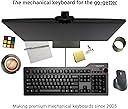
⌨️ Elevate your workspace with the keyboard that means business.
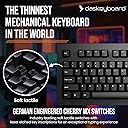
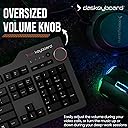
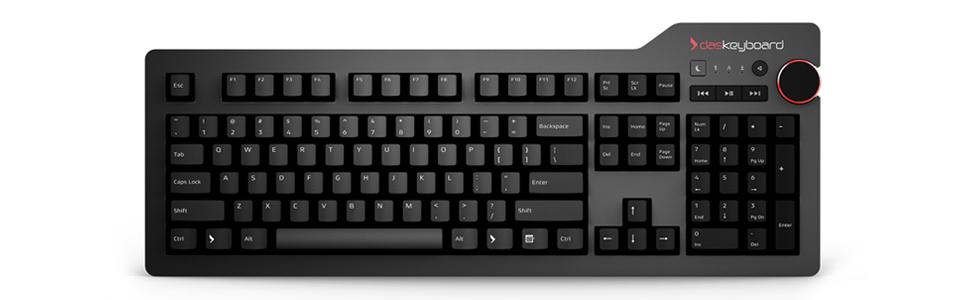
The Das Keyboard 4 Professional combines premium Cherry MX Brown mechanical switches with a sleek aluminum design, a 104-key layout, and a fast 2-port USB 3.0 hub. Engineered for professionals and power users, it offers tactile precision, durability rated for 50 million keystrokes, full N-key rollover, and dedicated media controls including a large volume knob, making it the ultimate tool for productivity and style.


| ASIN | B00JG01QTY |
| Additional Features | Media Controls, USB Hub |
| Antenna Location | Gaming, Programming |
| Best Sellers Rank | #748 in Computer Keyboards |
| Brand | Das Keyboard |
| Built-In Media | USB Cable |
| Button Quantity | 104 |
| Color | Soft Tactile - Cherry MX Brown Switches |
| Compatible Devices | Laptop, PC |
| Compatible Operating System Family | Linux, Windows |
| Connectivity Technology | USB-A |
| Customer Reviews | 4.3 out of 5 stars 1,042 Reviews |
| Enclosure Material | Aluminum |
| Generation | 1st Generation |
| Global Trade Identification Number | 00855800001432 |
| Hand Orientation | Ambidextrous |
| Item Dimensions L x W x H | 18"L x 6.8"W x 1.3"H |
| Item Type Name | Das Keyboard 4 Professional Soft Tactile MX Brown Mechanical Keyboard (DASK4MKPROSIL) |
| Item Weight | 2.9 pounds |
| Keyboard Backlighting Color Support | Single Color |
| Keyboard Description | Mechanical, QWERTY |
| Keyboard Layout | AZERTY |
| Keyboard Plate Material | Aluminum |
| Manufacturer | Das Keyboard |
| Mechanical Keyboard Switch Model | Cherry MX Brown |
| Mfr Part Number | DASK4ULTMBRN |
| Model Name | 4 Professional Cherry MX Brown |
| Model Number | DASK4MKPROSIL |
| Number of Items | 1 |
| Number of Keys | 104 |
| Number of Packs | 1 |
| Number of Sections | 3 |
| Power Source | USB powered |
| Recommended Uses For Product | Gaming, Programming |
| Series Number | 4 |
| Special Feature | Media Controls, USB Hub |
| Style Name | Professional w/ USB 3 Hub |
| Switch Type | Tactile |
| Theme | Technology, Gaming, Programming |
| Total USB 2.0 Ports | 2 |
| UPC | 855800001494 855800001432 |
| Unit Count | 1 Count |
| Warranty Description | 1 year limited manufacturer warranty |
M**E
Lexus not a Hyundai - don't fool yourself.
I feel as if this keyboard makes me want to type all the time. Not only is the build quality great, it's heavy, sturdy, and requires little or no pressure to type. It still have the "clicky" feel that everyone desires from the old IBM days with way more features. I turned on the n-key rollover (shift+mute), and my typing seems to be faster than ever before. ***Sliding Issue fixed*** Some people claim that the keyboard slides around. I did notice mine was sliding around a bit, especially with the ruler in place. Then I started pressing on the corners of the keyboard and noticed that the keyboard wasn't level with my desk (glass top). The keyboard had a slight tilt and would flop around a bit. So I took one hand on the top left corner and one on the bottom right, applied some pressure, Voila! It's super level, and there is no give anywhere on the keyboard. The keyboard is heavy enough to apply enough pressure to the rubber feet that it doesn't move an inch. It seems that the aluminum top bezel probably caused it to bend in production or shipping, just slightly, which caused the rubber feet to not connect to the desk. Simple fix, just don't over torque it AT ALL, it just needs a millimeter down or so (mainly on the bottom right corner - at least on my keyboard). I am enjoying this keyboard, and I wouldn't buy another company. It looks professional, especially with the letter fonts, and I love the volume knob! I went with the Cherry MX Browns due to the lesser noise, it's just my preference. I love the click, but not to the point where it would drive me nuts, I love having just enough feedback. Type like you never typed before, buy this keyboard, you won't regret it. Btw, those who complain about prices, I used to buy gaming keyboards to have that fast and better typing feel for $100 or more. This keyboard isn't far off with the volume knob and Cherry MX switches. Cherry keyboards were always expensive, due to the process of manufacturing the keyboard, but they are a higher quality and last much longer. The mechanics of this keyboard is the equivalent to buying a Lexus vs. a Hyundai. Sure you get 4 tires, leather, and some of the same features. But once you start driving, you notice every bit of a difference. Build quality is a completely different beast, and the transmission is made of Amish butter. If you want a Hyundai, buy a cheaper keyboard. If you want a Lexus, buy a Das, simple as that.
D**O
The luxury vehicle of keyboards.
Growing up as a kid in the late 70's and early 80's, keyboards were mostly crisp, clacky, and sturdy. They evoked feelings of working on something special. Computers *were* special back then. Keyboards had well designed actions, built around techniques such as leaf spring mechanical switches, buckling springs, and a number of other innovations. But over the years that followed mass production techniques and tightening profit margins led to the industry-wide adoption of lightweight, plastic-feeling keyboards with keystroke actions built upon rubber domes. Nowadays a typical OEM keyboard might have a production cost of a few dollars, and a spongy, rubbery action to match. We sailed right past midrange scissor switch actions into the low end rubber dome action with barely a thought, arriving at mediocrity. Mid-range keyboards from reputable manufacturers still build upon the rubber dome actions, so even upgrading from OEM or $12 keyboards to the $40 - $50 range significant improvements in the action are not found. So again, we are duped into settling with mediocrity. There is hope out there. Cherry MX switches, Topre switches, and other mechanical style switches are being manufactured for keyboard actions. They're expensive compared to rubber dome keyboards. Each key has a mechanical switch of some sort beneath it, rather than a sheet of heat-molded rubber domes. And the mechanical switches are made with precise characteristics -- softer, firmer, clicky and tactile, non-clicky and tactile, and smooth linear. Each style is designed with a different market segment in mind; linear being the preference of gamers, tactile (clicky or quiet) being the preference for those who's keystrokes produce text, softer for light-press typists, and firmer for mashers. The Cherry MX Brown is a soft, tactile, quiet key, with a subtle bump at the actuation point. With practice muscle-memory is able to get accustomed to that bump, and users become able to type without bottoming out the keys. Typing speed and accuracy often improve, and finger fatigue is reduced compared to typing on keyboards where you have to bottom out each stroke (rubber domes, for example). I debated back and forth between this keyboard and one from WASD, and ultimately went for the Das-4 because of the sturdy aluminum face and USB3 hub. It arrived today and I've had a chance to put it through its paces. While it may take a day or two to get used to the feel, it's going to be a pleasure getting there. Lifting it, the keyboard feels like a tank. Typing on it, the keyboard feels absolutely fantastic. However, I may still add 2mm O-rings to reduce clatter, though I'll wait until I've gotten more accustomed to the tactile feel of Cherry MX Browns. It's possible I'll develop more of a habit of not bottoming out my keystrokes. This sounds too predictable, but when I first plugged it in and began typing on it my first notion was "Wow!" Pros: Heavy and sturdy like you might imagine a keyboard in a 1960's NASA mission control center. A light, tactile, pleasing touch with ample stroke and precise response. The tactile bump of Cherry MX Browns allows me to type without bottoming out the strokes. Already with a little practice my typing is feeling more effortless. USB 3 hub. Nice, sturdy media controls with a well-engineered volume knob. Beautiful design. If there is a better feeling and better engineered keyboard on the market, I sure can't find it. The keycaps are crisply engineered, flawless, and elegant. Cons: Because it is built to last, and made of metal, bottoming out keystrokes makes a bit of clattering that you wouldn't be accustomed to if you have spent years obliviously enduring the misery of rubber-dome keyboards. A set of 2mm O-rings would alleviate that issue, and they are easy enough to order. It's too bad the keyboard manufacturer doesn't make O-rings a special-order option as WASD does. Another con is that the keyboard's elevated support is a little on the low side -- the keyboard sits slightly flatter than I would prefer. But after a few hours I'm already getting used to it. Nearly every mechanical keyboard has a spacebar that seems to stick up a little higher in the air than space bars for dome keyboards. That takes a little time to get used to as well, but after awhile will begin to feel normal. Conclusion: If quality and feel are more important to you than price or RGB lights, this keyboard must be on your short list. The keyboard seems to strive for elegance, feel, and function while eschewing trendy light shows and annoying color schemes. Updated 2/4/17: I've been using the DAS Keyboard 4 Professional with Cherry MX Brown key switches for a few months now. And I even installed first WASD red, and later WASD blue O-rings to further customize the feel. The keyboard feels so nice to use I barely notice it's there. It's a pleasure to type on. ...and then I go home from my office, and when I sit down at the home computer I place my hands over the mid-range "rubber dome" style keyboard, and loathe every moment. The solution? I ordered a second DAS Keyboard 4 Professional and a set of WASD blue o-rings. One at work, one at home. Great keyboards! Updated 9/30/2017: I've been using one of these at my office, and one at home. The one that has had the most use is in my office. I'm a software engineer, and type all day long. The key caps have become a little polished, but the symbols have not faded at all. The key strokes feel as good as the day I got the keyboard. ...maybe even a little better with age. It's my "daily driver". Recently my company provided a second office for me a little closer to home, with the understanding that I would split my time between the offices. For my third mechanical keyboard I ended up going with a Logitch Professional (tenkey-less, with Roamer-G switches). The Roamer-G switches have a slightly shorter keystroke, and the overall feel of that keyboard is more plastic. The Roamer-G switches don't allow for o-ring installation, so it clatters a little more too. But I had to try something new. One thing I can say for the Roamer-G switches is that they feel smoother right out of the box than Cherry-MX Browns. But with age the MX Browns acquire that smooth feeling too. Overall I'm convinced that I like the Das Keyboard better. (A few weeks of use and I have to conclude the MX browns are smoother, and feel more high-end. Sticking with browns in the future.) Update 12/2018: I now have the same keyboard with Cherry MX Blue switches. I put blue O-rings under its key caps to reduce bottoming-out clatter. It took longer to get used to the click blues than the subtle browns, but I also like them very much. If it weren't for the fact that the noise level using blues is higher than when using browns (disturbing to others but gratifying to the typist) I would have to say for typing I prefer the nuanced qualities of both. The blues feel a little more crisp, slightly firmer. Browns a little less tactile, and a little softer touch. Both are excellent. If you don't care about making some noise typing, and want additional crispness, get the blues. If you are a gamer do not get the blues, as their reset point is higher in the stroke than the contact point, making them slower switches for rapid bouncing on a single key. Totally irrelevant for typists. Browns: softer touch, more subtle tactile bump, quieter. Blues: clicker, more crisp feel, slughtly firmer spring. Both, excellent. Update 6/30/2020: I have three of these, now. One at each if my two offices, and one at home. Two of them are MX Brown switches (soft tactile) and one is MX Blue (soft tactile&clicky). I got the blue on accident (thought I was ordering a brown), but kept it and love it too. I've now been typing on these since 2016, and they're still as good as new. The key caps are easy enough to remove for the occasional deep cleaning, but if you avoid spilling drinks on them these keyboards are built to last. They get plenty of use, but aside from the key caps having a more polished look to them you would barely know they're several years old. And the laser etching is still intact. The switches still feel great too.
A**R
My First Mechanical Keyboard
This is my first mechanical keyboard and I have to say that it is awesome... been using it for about a month. Really solidly built and I love the simplicity of the layout and media controls. I have previously used wireless keyboards, so still getting used to the fact that there is a pretty heavy duty cord running across my desk. On-board USB ports are pretty handy as my computer is under the desk and the USB ports there are not as easily accessible. I went with the brown switches as opposed to the blue, as I wanted a tactile response, but didn't want the "clicky" sound. I must type pretty heavy handed, as there is still quite a bit of noise that comes from them... Enough that when I am typing longer emails or coding, I get cheers of "FASTER!", and "You are really working hard!" from the people in the office next to me. I'm sure I could get some spacers to prevent me from bottoming out the keys. Nothing too annoying, just wanted to make a note of it. 4 stars only because of the cost. The experience of a top-end mechanical keyboard is pretty amazing... but still feeling conflicted if it justifies the cost. I will say that I seem to type a bit faster, with less errors since I started using this keyboard. I think the tactile response subconsciously adds a bit of confidence as my fingers dance across the keys.... so from a efficiency standpoint, maybe the cost is worth it.
P**T
Very high quality keyboard with nice features and clicky-tactile feel
I am a big fan of the classic clicky-tactile keyboards such as those found on the old IBM PC keyboards. My main computer at home still has a Unicomp "buckling spring" keyboard, which is my favorite to type on, but unacceptable if other people are around (those key switches are too noisy for crowded office environments). At my work office, I hated the feel of the generic rubber dome keyboards of the sort that come with practically every computer. I bought a Matias Quiet Pro keyboard, which had the tactile feel and excellent response, but was quiet enough to avoid complaints from coworkers. But the key switches used by Matias seem to have a high failure rate, and I had the first keyboard replaced under warranty, then the second one started to have increasing problems with switches that would not reliable register when pressed, or which would double or triple register when pressed once. Matias seemed unconcerned and actually told me on the phone that these keyboard could only be expected to last about one year! So I dropped the Matias keyboard and looked for a high quality keyboard with mechanical key switches yet a fairly quiet sound level. I settled on this "Das Keyboard 4 Professional Soft Tactile MX Brown" keyboard. It uses the Cherry brand MX Brown series key switches, which are the quieter of the two MX models that have the clicky tactile feel and response ('brown' is the designator of this switch version, and the key switch top and stem are colored brown). At the advice of Das Keyboard (a company in Texas), I also ordered an additional quieting kit from Mechanicalkeyboards.com, which consisted of a bag of clear/white rubber O-rings and a key cap pulling tool. I inserted the O-rings under every key cap, and this cuts the noise of a keystroke by perhaps half, making the overall keyboard even quieter. It is still noisier than the typical generic rubber dome computer keyboard, but it is within reason. This is a very expensive keyboard, so there needs to be performance and physical quality. This is a heavy and solid keyboard, and feels like it is glued down to the desktop when I try to pick it up. The top plate is a heavy thick metal plate with a frosted/matte black anodized finish. The key caps have white lettering, which Das Keyboards says are laser etched; so they are not decals like the cheap keyboards use, and there should be no problem with key cap lettering wearing off. All of the wider keys have mechanical 'bails' underneath, so no matter where you press the kay cap, if moves down smoothly as if you had pressed it dead center. The keyboard also has a very nice 'media center' control panel at it upper right. One key puts the computer to sleep if you press it for a few seconds. Another key toggles sound 'mute' on and off. Three keys act for return-to-start (of a sound file or other sound media), go to end of file, and play/pause toggle. A large volume control knob can be turned from the top or 'rubbed' along its right edge. The keyboard connected to the computer over a USB cable, and the keyboard has two USB pass-through ports on its rear edge just behind the Das Keyboard logo (near the media controls). My one real complaint is that instead of using the traditional legs to tip the rear of the keyboard up to a higher level, this keyboard has a red plastic bar that attaches to the bottom rear of the keyboard using magnets. This just seems kind of dumb, and not an advantage over the conventional way of doing it. Worse, the keyboard actually seems to tilt backwards slightly when the bar is not installed, and is only flat when the bar is installed. To raise the rear for a slight forward slope, as most people are probably used to, you need to put a couple shims of some sort under that bar to make it taller.
A**I
An incredibly well-built keyboard and well worth the investment!
For the last few years, I had mistakenly thought I understood the joys of the mechanical keyboard. I had been using a Razer Black Widow Ultimate. It's not that there's anything "wrong" with that keyboard. I do have my issues with Razer and their products, but this isn't a Razer review, so I'll just stop there. I found it important to bring up because that keyboard uses Cherry MX Blacks and for the longest while, this was the only switch that I knew. Enter the Das Keyboard 4 Professional Soft Tactile (the one with MX Browns). I think half the reason I am even writing this review is because I was looking for an excuse to use this keyboard. It is an absolute joy to use-- both for typing and for gaming. I am a software engineer by day and a gamer by night, so I have recently been putting a lot more emphasis on a good keyboard given how much I use them every day. I am really glad that I did. The Das 4 is not a cheap keyboard. That fact was a little off-putting at first and I wondered if I would feel like it was worth the purchase when it finally got here. Spoiler alert: it ABSOLUTELY does. I want to start with build quality. This is something that deserves a lot of attention especially if you want to consider the value that you're going to get in the long-run with this purchase. The Das 4 is outstanding. It's a very solid keyboard. It doesn't flex at all, despite me giving a reasonable amount of effort. The keys are laser-etched (of course), so you needn't worry about the caps fading or anything like that. Not that you ever should with a keyboard of this caliber. Next I want to talk about the keys and the layout. The keyboard feels just a tad more compact than usual. It took me all of about an hour to get used to typing on it. The spacebar length is just perfect. It has a standard numpad. The overall layout in general is no-frills, and that's exactly what I wanted in my keyboard. I also find it pretty cool that there is no "Windows" key. There is a key in lieu of the Windows key, and that key functions exactly the same as the Windows key, but I like that there's not a Windows logo etched onto my keyboard. There are media controls. A big knob for quick access to volume controls. Prev, play/pause, next, and mute. All of the essentials and none of the fluss. There's also a button for putting the system to sleep. That's literally all of the "extra" keys on this keyboard. I love that. The keyboard comes with a footbar that doubles as a ruler. It props the keyboard up just enough to be at a nice angle for me, personally. It's magnetic and pops right off if there's ever an emergency need to measure something. We are all thinking the same thing about the ruler, trust me. I haven't tried the MX Blue version of the keyboard, but I imagine it's quite similar to the MX Brown version but with the added clicks. I have fallen in love with the MX Brown switch, so I am quite happy where I'm at now. After using hundreds of keyboards over the last 20+ years, I am happy to recommend the Das 4 and am confident in saying it's my all-time favorite so far. When I'm done with this one (which might be 10 years from now because of build quality) I will immediately look back to Das for a replacement. Cons: I tried to find some. I thought I would miss backlighting but I don't. I find backlighting distractive and non-helpful. I got nothing. Buy this keyboard. Edit: April 2019: I have heard that since my review ~5 years ago, the quality of this keyboard has taken a serious hit. I can't speak to it personally, but it's worth mentioning. I've since moved on from Das.
G**T
Decent Keyboard - But Not Sure I'm Sold Yet
First, I'm coming from a Unicomp Model "M" buckling switch keyboard based on the IBM original from way back. I've been very happy with the experience of using the Unicomp but I have gone through several so far. I use my keyboards in my daily work and write code as a significant part of that work, so having a key that doesn't work isn't just an annoyance, it's actually a show stopper - to the point that I always have a spare keyboard on hand just in case. Nothing worse than a looming 5 pm deadline and not being able to submit code changes because of a keyboard malfunction. Anyway, this is the "brown" version of the cherry switches. Frankly, they seem soft to me and don't have the tactile sensation I'm accustomed to. This keyboard also seems very slightly smaller, though this seems to be a "tactile illusion" because they measure the same - I have large hands that take up a lot of real estate and using a mini-keyboard is a no-go for me, I need the space for these big mitts and fat fingers. Something weird about this one... it makes a sound. I don't mean the click-clack of the keys but rather a subtle but unmistakable tone of some kind (resonance?) while typing, that becomes louder as one builds up a respectable typing speed. It's a high-pitched sound that reminds me of someone playing the water-filled glasses (as is sometimes done as a novelty demonstration) by running a dampened finger around the rim. At first I hardly noticed this noise, but now I can't help but hear it and frankly I am finding it quite annoying. Just push one key, you hardly notice, but type a couple of paragraphs at about 35 wpm (my admittedly modest top speed) and it comes out in full force. It's not the volume I find annoying, but rather it's the pitch of the tone that makes me want to stab myself with a Q-tip. This noise is likely not enough to bother someone in an adjacent cubicle, and over-all the keyboard is quieter than my Unicomp, significantly. So if over-all noise is your top concern, this keyboard is not "noisy" in the way we typically think of with regard to a mechanical keyboard. My Unicomp sounds like a four horse team galloping down the cobblestones... fortunately, I'm a remote worker and the noise does not bother me in the slightest. The keyboard works exactly as advertised, and the volume knob is a nice touch. However, for daily use, I think I will be sticking to my Unicomp and reserve the Das Keyboard as my emergency backup.
A**K
Excellent for a developer; possibly not as great for a gamer
I changed from a mechanical gaming keyboard to Das Keyboard when one of the keys just plain fell off. I thought I had hit the mother lode when I purchased the gaming keyboard, but Das Keyboard is truly amazing. This keyboard supports my typing habits extremely well: I type more quickly and accurately than I ever have. That may not sound like much, but as a software developer, every keystroke counts, and Das Keyboard has likely saved me time. The less desirable part, however, is that the keys do not light up. I didn't expect that to be a big deal. In fact, I was happy to uninstall a piece of software that did nothing aside from set an LED color and ask to be updated every couple of weeks. Having said that, the first time I went to my office to work without turning on the lights (which is typical, as I have a window behind me), I found that I wasn't really sure where to put my hands. In the past month or so, I've figured that all out, but after having a lighted keyboard for so long, it was jarring not to have it. For gaming itself, I've been really happy with Das Keyboard. I play puzzle games typically, like the Portal series, Talos Principle, things like that, so quick reflexes are almost never necessary. Das Keyboard has supported me very well with those games. Since I had never used the gaming software from the other keyboard that allowed me to set macros or whatever else it did, I can't comment on feeling any loss there. But Das Keyboard is a keyboard. That's it. There aren't any snazzy features to help you pwn n00bs with a single click. I don't care about that, but others might. In closing, I will say that I'm very pleased with my Das Keyboard purchase. The price seems high, admittedly, but the quality of the keyboard is just nuts. It's heavy and feels like I will be using it long into the future. For a developer, this keyboard has been a dream come true. For a gamer, this may just be another lackluster set of Cherry Browns. I lean toward the former, however, and recommend Das Keyboard unreservedly.
T**.
Well built and a great daily keyboard for work.
I bought this keyboard to use for work, as the ones they have here are all really cheesy OEM keyboards that are light and mushy feeling. This keyboard uses Cherry MX switches, which are still great despite a lot of boutique key switch manufacturers that are coming out with some really impressive stuff, but if you're not a mechanical keyboard nerd you'll appreciate the improvement over a standard rubber dome key switch. The build is super solid and has very little flex, the ruler that doubles as a lift for the back of the keyboard is a very nice touch, and the big knob for quickly adjusting the volume comes in handy when I get somebody on the line who thinks they have to yell into their phone. Overall a great typing and work experience and I can't go back to my old HP OEM keyboard that came with my computer. One thing to note is that I wasn't super impressed with the keycaps. The legend on some of the keycaps started to fade after only a couple of months and they had a slick/insubstantial feel to them, so I got replacement keycaps and learned that this keyboard doesn't use standard Cherry MX stabilizers. It uses Costar wire stabilizers for every longer key except for the space bar, which does use the standard Cherry MX stabs. I tried to pull the little inserts out of the bottom of the included keycaps so I could reuse them, but they were in there pretty well and many of them broke, so I ended up having to order some inserts from another website - search "Cherry MX keycap stabilizer insert" and you should be able to find some. I ordered 20 inserts to account for any accidental breakage and had a few left over when I was done. I'm not docking a star, because I'm just picky and it's the kind of thing that most people won't notice or care about. If you're looking for a good work keyboard, this is a stellar option. If you're looking for something to upgrade later on down the line or that offers more customization, you might want to look elsewhere.
E**A
Eccellente
Ho usato questa tastiera per un mese circa e posso confermare che la qualità dei materiali e della costruzione è ottima. Il feedback è quello che ci si aspetta dagli switch cherry mx brown, morbidi con un leggero feedback all'attivazione. La tastiera è silenziosa ma come ogni altra tastiera si sente quando i tasti vengono premuti fino in fondo (praticamente sempre) ma anche in questo caso il rumore è paragonabile a quello di una tastiera a membrana (decisamente più sommesso rispetto agli switch blu). Come è stato fatto notare da altri utenti anche la mia è arrivata leggermente storta (giusto un paio di millimetri) e dopo avere contattato il supporto mi è stato detto semplicemente di piegarla. Inizialmente avevo paura di romperla poi ho provato a piegarla e sono riuscito a fatica. La placca in alluminio che fa da superficie non è solo per stile, rende la tastiera incredibilmente robusta. All'acquisto la tastiera ha il layout standard di windows ma i tasti ai lati della barra spaziatrice sono tutti delle stesse dimensioni quindi io li ho scambiati per rendere più semplice l'utilizzo con mac (è consigliato l'utilizzo dello strumento apposito per rimuovere i cap ma volendo con un po' di attenzione si può fare anche senza). Conclusioni: La tastiera è probabilmente una delle migliori tastiere meccaniche disponibili (non retroilluminata), è comunque un prodotto premium. Come rapporto qualità prezzo non la consiglio, 180 euro circa per una tastiera sono troppi e normalmente non giustificabili. Ma se quello che cercate è un prodotto premium nella cotruzione, feeling e prezzo, allora questa è la tasiera giusta! P.S. Non ho preso la versione Ultimate perché la uso in ufficio e potrebbe essere un ostacolo in caso dovesse usarla qualcun'altro ma anche per quella valgono tutti i punti sopra.
D**Y
Excellent keyboard for gaming and work
I had it for a couple of years typing all days long 8h a day. It does what it says - gives you premium feel, pleasant and accurate typing experience. SOLID. The quality is excellent. I love laptop keyboards with a short travel distance and it toom me some time to get used to it - not a deal-breaker. The things a love ❤ about it: 1. Heavy. It sits tight on you desk. 2. Super-premium look 😎 and feel 3. Build-in USB 3.0 ports 4. Mute button is super-handy when it comes to listen to some one. Easy to reach - one light click and you are listening to a person who is talking to you. 5. Toggle when - extremely pleasant to use. It have a nice feedback when you scroll it. Excellent location. Easy to reach whatever your hand is on mouse or a keyboard. 6. Ruler - there is red magnetic ruler on the back or the keyboard which is used as a stend. Nice little feature. It's plastic but feels as a solid piece. 7. Anti-ghost. No interference with any keys. Things I don't really like 😤: 1. After a couple of years surface of the most used keys weared our and become smooth instead of having the same "gripping" texture. 2. Ruler don't have slipping pad and keyboard moves some times (not a deal-breaker). 3. I had to buy wrist pad to make my wrist comfortable and level it up with they keyboard. 4. No O-rings in complect. Without it keyboard sounds to me too plasticky. With O-ring the sound is deeper, more quiet and more suitable for the office. No complains sound level is ok. 5. No RGB or any other backlight. Overall it's a great keyboard which is a bit overpriced. However this is a solid piece of professional equipment suitable for day-to-day work and decent gaming. Worth its money.
C**N
Exelente artículo
Con respecto al producto solo puedo decir que es excelente. Personalmente me gustan las dimensiones, la sensación de las teclas. El acabado denota mucha calidad, ya lo he estado usando por un par de semanas al momento de escribir el review y de verdad no tengo ninguna queja al respecto. Se siente algo pesado lo cual ayuda a que no se mueva por accidente en la mesa, no es muy ruidoso, de hecho se escucha bastante al tipear porque tengo la mala costumbre de presionar las teclas hasta el fondo y se escucha el impacto. Con respecto al envío: El envío fue sin contratiempos, el producto era el que esperaba, bien embalado y sin detalles.
P**T
Excellent
Tout simplement excellent. Je l’ai pris en clavier US pour diverses tâches dont le clavier ne peut être autre que US, et ne le connaissant pas, j’ai donc choisi la version imprimée. Pour ce qui est de l’objet, il n’y a rien à redire. C’est beau, propre, solide grâce à sa plaque en alu, le bouton de volume est un petit plaisir de gadget, la barre d’inclinaison est tout simplement indispensable de par son fonctionnement : c’est une barre, pas des bouts de plastiques amovibles qui se cassent en un rien de temps. Comme je m’y attendais, les touches font un peu de bruit, mais je m’attendais à ce qu’elles fassent plus de bruit. Et c’est finalement très acceptable (Cherry MX Brown pour le "Soft Clicky") et j’ai tout de suite adoré. Entre les claviers de PC portables dont la qualité est très aléatoire selon les modèles et fabricants, les claviers de bureau classique "fins" qui sont suffisamment mal fabriqués pour se coincer ou ne pas répondre de façon très limpide, les touches mécaniques sont vraiment super confortables et sûres. De plus, ce genre de clavier est un investissement mais le fait de pouvoir changer sois-même les touches en fait un objet qui durera longtemps. Le retour aux objets démontables et réparable a un coût plus élevé à l’achat, mais un coût bien moindre sur le temps. Bref, ce clavier est parfait. Il répond en tout cas à mes attentes : travaillant activement avec un clavier, je sens la différence.
D**N
It's very good!
It is good to type with, as to be expected from the Cherry switches under the keys, and it is sturdy, that being attributed to its weight, there is a lot of metal in the chassis. But the best features are the ones that are not common on other keyboards, and that being the USB Hub, the media keys including a rotating volume control nob, and the one-touch sleep button, something that I had never used before, but now do regularly. It is not as inexpensive as other keyboards, but it well built and and has valued features which justify the cost.
Trustpilot
1 month ago
2 days ago