Some deliveries may take a little longer than usual due to regional shipping conditions.

DOWNLOAD THE APP


Customer Services
Copyright © 2025 Desertcart Holdings Limited
DOWNLOAD THE APP


❄️ Cool, Compact, and Quiet — The Ultimate Low-Profile Power Move
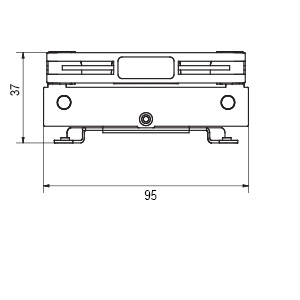
The Noctua NH-L9i is a premium ultra-compact CPU cooler designed specifically for Intel LGA1200 and LGA115x sockets. With a minimal 37mm height and a 95x95mm footprint, it fits seamlessly into small form factor builds without blocking RAM or PCIe slots. Its high-performance 92mm NF-A9x14 fan operates quietly at 23.6 dB with PWM control and a Low-Noise Adaptor, delivering efficient cooling airflow of 57.5 m³/h. Included premium NT-H1 thermal paste and SecuFirm2 mounting system ensure easy installation and optimal thermal transfer. Trusted by professionals and backed by a 6-year warranty, it’s the go-to cooler for silent, space-conscious Intel Core i3, i5, and i7 builds.


| ASIN | B009VCAJ7W |
| Air Flow Capacity | 57.5 Cubic Meters Per Hour |
| Best Sellers Rank | #145 in Computer CPU Cooling Fans |
| Brand | Noctua |
| Brand Name | Noctua |
| Compatible Devices | Desktop |
| Cooling Method | Air |
| Customer Reviews | 4.6 out of 5 stars 3,411 Reviews |
| Global Trade Identification Number | 00842431014269, 04716123314875, 07967907179310 |
| Item Dimensions L x W x H | 3.74"L x 3.74"W x 1.46"H |
| Item Weight | 443 Grams |
| Manufacturer | Noctua |
| Material Type | Copper (base and heat-pipes), aluminium (cooling fins), soldered joints & nickel plating |
| Maximum Rotational Speed | 2500 RPM |
| Noise Level | 23.6 Decibels |
| Power Connector Type | 4-Pin |
| Product Dimensions | 3.74"L x 3.74"W x 1.46"H |
| UPC | 842431014269 731215283291 039281014277 115970979550 739197641290 163120668250 803982961730 872182807933 807320189206 168141422058 |
| Unit Count | 1.0 Count |
| Voltage | 12 Volts |
| Warranty Description | 6 year manufacturer’s warranty |
G**S
Small Package With Quiet Cooling
I was building a custom NAS, I purchased a used mini ITX mobo. The fan that came with it worked, however it was extremely loud and I had to quiet it down. From my previous experience I knew I had to replace the drive caddy fan and the CPU cooler fan with Noctua versions. I was impressed with the massive change in the sound of the NAS currently. The loudest noises now come from the hard drives! I am currently using this to cool an i7-4790 that is generally running near idle unless I am running VMs. The fans barely move and yet the temperature never goes above 30°C. Pros: -Extremely low/no noise from fans -95x95 mm size allows for small dense mobos that have extrusions near the CPU. -37mm height means you can fit it in small cases and is really useful if you are designing/building your own case -Noise conscious; the fan has rubber feet, the fan is properly balanced, the fans have aero features to help limit noise -LNA cable if you really want it to be quiet, in multiple builds I have yet to find a need for this though -Good performance, putting this cooler on decreased my CPU temps by 2 to 5 degrees compared to the cheap one that came on my used mobo Cons: -Price is higher than other options, but this is a high quality cooler -The fan does bring in air from the top, which may make some use cases finicky Overall: I would recommend this cooler if you are in need of a low profile silent solution to keeping your temperatures in check.
J**E
Easily the best cooler for Micro ITX build.
Best low profile cooler I have ever brought. Firstly Noctua is known for there amazing products. I was going to buy the recommended Cooler Master 130 case suggestion then seen this. The design is pure gold for spacing in a micro itx case. You don't have to worry about ram size or hitting the GPU. It actually makes cable management easier with the saved space. I was confused by no brackets no brackets includeded for all the different cpu styles then realized this is strictly for the LGA 1151, which it fit like a glove. I coupled it with some ARCTIC MX-4 Thermal Paste, which I have been using in my builds for years, basically since it came out. Easiest paste to install and way better than many other brands. Noctua does include thermal paste, some quiet cable, some screws, and a badass little metal sticker in the box. The only thing I wish that they would do is have spacing around the fan corner for cable insert for better management. you can either run it under the heatsink since wire is thing or just up above tied off. Little grooves on corner to catch it would of been cool though. Temps wise I have yet to go over 54c on a single core, for gaming/benchmarking my GPU(Heaven/FurMark used). I haven't stress tested the CPU but I also have no reason to since this is primary for gaming. I am very happy to be anywhere under 60c while gaming.
B**N
Bought this for a "Gigabyte H77N-wifi"
First comment, this cooler kicks-ass!! I installed it into a "Cooler Master Elite 120 Advanced - Mini-ITX". The fit to most ITX motherboards will seem snug to many people, however the Noctua works very well. People who are new to the ITX world are going to have to get accustomed to a new way of doing computer builds. The Noctua does come very close to many parts on the mobo, however, that is a choice one has no control over if one wants to install a top of the line Processor with a High End video card,high end RAM and plans on having a proper power supply run it all inside an ITX container. I was thoroughly impressed with how well the product was shipped. All the parts are separated and snugly fit into a rubber/foam material. It also comes with a tube of thermal paste (The heatsink does not have any pre-applied thermal, awesome). This allows you to do a "dry" install to make sure the fan will fit properly for your motherboard. The ease of install is 10 out of 10. YES, It requires having access to the bottom of the mobo (like a proper heatsink does). What I liked the most is that there is NO pain in the ass rear mounting plate. You simply bring the screws up from the bottom and twist them into the heatsink. The fan is quiet and can ramp up quite well when needed. I have an Intel i5-2500K rated at 95W. I constantly run Handbrake and play games, I do not have any over heating issues! -Cons: The product was delayed in its shipping. However, Amazon did refund the shipping fee and the product was in perfect condition upon arrival. Great product so far!
J**E
Another exceptional product from Noctua; a low-profile piece of art
Wow... The quality of this product is apparent at the moment of unboxing. This is meticulous attention to detail at it's finest. I am not acquainted with Noctua's customer support, but I imagine this is one of those companies which prides itself on over-delivering there as well. The box contains the 95mm by 95mm heat-sink with the fan attached, proudly displayed at center in very secure packaging. You will notice, quickly, the folded note in the lid of the box. The note is from the Noctua CEO, and it unfolds into the instructions. A nice touch. Also contained therein are four quality mounting-bolts; a metal square-inch case sticker; a four-inch "Low-Noise Adaptor (L.N.A.)" cable; and a 1.4mL tube of Noctua's own NT-H1 thermal compound, which would run you another ~$6 on it's own. There is also a pack of four elongated screws, provided as an option for those looking to replace the included fan with a 92x92x25mm, higher-performance version. The heat-sink and fan combine to create a very solid unit. It is minor details such as the rubber pads at the eight corners of the fan, reducing vibrations, which enable this product to stand out among it's competitors. The tooling of the heat-sink itself is superb, and even the wrappings on the 4-pin cable exude excellence. The L.N.A. cable is equally well-crafted, and while I cannot speak for the quality of the thermal paste myself, the general consensus on Amazon tends to be laudable. The 95x95x37mm design allowed me to squeeze this into a tightly-wired super-micro case, which I have fabricated as a custom blade-system for two independent mini itx boards. It isn't even fair to say it was a tight squeeze, as despite the small area to work with -- approximately 102mm x 122mm x 78mm -- it only stands 37mm tall, so has plenty of clearance. I found the included L.N.A. cable to be unnecessary, but if you find yourself in a situation where you could afford a few degrees for a bit less noise, it would be the part for the job. The fan is already so quiet anyhow though, so I feel it is probably more often misused as an extender. While I am building/fabricating this dual-chassis mostly as a personal project (experiment?), I have had to sacrifice nearly all of the design aspects in the rack-mount case which contribute to proper airflow. Gone is the array of deafening aircraft turbines that attempted to present themselves as commercial fans, albeit poorly; instead replaced with more subtle cooling techniques. The Noctua NH-L9I has proven to be a key component in that design. How does it perform though? Quite well, in fact. Closed in the super micro case, which has been segmented into two air-tight halves, it does not seem to go above 68 to 70 degrees celsius at the absolute highest for an Intel i7 4770. A similar build of mine in a larger case with a Corsair H70 runs at about 58 to 65 degrees celsius under load, so it is doing a respectable job. I let it idle in a game overnight with my switched PCI cooler off, and the logs say it never went above 72 degrees celsius. This is under entirely non-ideal circumstances, akin to a multiple-fan-failure, so an additional 2 degrees celsius over previously-recorded heights is frankly impressive. If you are not confined to the 37mm of vertical clearance within which this fits, swapping the 14mm NF-A9x14 fan for a 25mm replacement is something to consider. It is honestly not necessary from what I can tell; though we shall see if the so far exceptional cooling ability stands up to heavy use. Verdict: The Noctua NH-L9I is a phenomenal product. It squeezes better manufacturing and performance into a 95x95x37mm space than many other brand-name products can accomplish with 120+ millimeter tower-sinks. Perhaps the best testament to my satisfaction with this product is this simple fact: just 24 hours after receiving this product, the morning after the "stress-test," I purchased a second for the other half of the super micro chassis. Noctua makes what I feel are the finest quality cooling products on the enthusiast-circuit today, and the NH-L9I just proves they can do amazing things with tiny spaces; the latter of which are becoming more commonplace these days.
P**Y
Compact but Effective
I crammed an i7 4770K into a micro ATX set up, and saw about a 5 C difference (cooler) with the Noctua over the stock CPU fan. It seems the amount varies under different conditions (more at idle, less at load), but 5 C is what I'd say is an "average." It could be due to the limited space in the small case that is a contributing factor to the diminishing difference at load. There is one thing I did do differently than the instructions suggested, though. Rather than applying the thermal paste as a dot, I followed Arctic Silver (which I've used before) recommendations and applied the paste in a ribbon. I did this because the diagram in the Noctua instructions appeared to show a single core CPU rather than the multi-core depicted (and what I have) in the Arctic Silver instructions. I can't say this made a difference since I didn't try both ways for comparison, but just something to consider when you install the fan for yourself. Another thing to note is you will have to install this fan BEFORE you mount the motherboard in the case--unlike the stock fan which just snaps in. The Noctua screws in from the bottom. In my case, I had everything in when I switched the CPU cooler, and consequently had to disassemble everything--which was kind of a pain due to the restricted space. Otherwise, the Noctua cooler looks and "feels" like a high quality item. There is even an adapter to quiet the fan if your TDP is low enough (I'm guessing some sort of capacitor to limit power to the fan and thus slow/quiet it down). I left that out myself. The fan is quiet anyway, and since the Asus motherboard I have seems to have a mind of its own as to when to overclock (the AI suite settings keep resetting after a reboot), I thought best to leave maximum cooling capacity in place.
L**B
Hear That? Neither Do I...
I purchased this cooler to replace a low-profile Zalman CPU cooler, which started off perfectly fine but, after about 20 months of continuous duty, started making rattling noises. Everyone loves to make fun of Noctua's iconic color scheme (some odd shades of brown), but none would dispute that Noctua's coolers are A) very effective, and B) very quiet. Since the machine in question is a self-built NAS with a windowless metal cover, I was more concerned about temps and noise than about appearance. And I've had good experience with Noctua before -- my main PC has a Noctua cooler on it that has remained virtually silent during its four years of service. The cooler is well-packaged, and includes very clear instructions, mounting screws, extended screws if you want to swap the low-profile fan with a full-profile fan, a speed-reducing extension cable (for people who want _very_ quiet machines), a tube of thermal grease, and a vanity badge. My only complaint is that the heat sink face did not have a protective cover on it, leaving it free to pick up dust prior to installation. Though it probably wasn't necessary, I wiped it down with isopropyl alcohol just before clamping it down. Cooler installation is almost disquietingly easy, as it is essentially screwed directly to the motherboard. Apply a thin, even layer of thermal grease to the CPU. Place the cooler upside down on the table, heat sink facing up. Then turn the motherboard upside down and gently lower the CPU on top of the heat sink, sighting through the mounting holes to line up with the cooler bracket on the other side. Insert mounting screws and gently but firmly tighten. Plug the fan cable into the appropriate header on the mobo. When I powered the NAS back up, even with the cover off, the Noctua was _silent_. I could _see_ it spinning, but I couldn't hear a thing. CPU temperatures also seem to be a hair lower than they were with the Zalman. It will be interesting to see how easy it is to clean the dust out of it in a few months but, for now, I'm quite happy with it.
M**H
Great CPU fan if you are tight on space (fractal node 202). Installation could be better.
The fan assembly mounting is a bit awkward: (1) Apply heat compound to CPU (2) Set fan assembly on CPU (3) Flip the fan assembly & motherboard over in order to secure the fan assembly with four screws The "flipping over to secure" required several attempts because the fan assembly was moving/sliding around when flipping. It would have been much easier/nicer if the screw tightening can be done from the top side of the motherboard (no flipping). NOTE: This fan assembly does NOT exhaust hot air from the CPU. It takes the surrounding (cooler) air & blows the air onto the CPU. Since the surrounding air inside the computer case is significantly warmer than the air outside the case, it is best to take air from outside the case. I did this by making a simple paper cardboard duct/shroud which extends from this fan assembly to the case cover (see picture). This way the air for the CPU is taken directly from outside the computer case. Once you managed to secure the fan assembly - this CPU fan is very quiet & effective. However, you'll need to add some type of GPU cooling if you are gaming. I added two 120mm x 15mm intake fans to the fractal node 202 case (blows outside air onto the GPU) and was able to game fine with a GTX-1070 (not overclocked).
M**L
I had bad one before that is why I can tell this is the best cpu cooling fan.
I had built Jonsbo N4 with i5 11600 cpu and matx mobo, was having hard time finding the right low profile one until I had Noctua, before that was using Dynatron K2 1U Server & Workstation Active which was never able to keep this i5 cpu cool less than 45c always over heating and it was a mess with that cooler. After installing Noctual it is like a breeze with the temp of the cpu as well as how well this was build and quality. Thank you so much Noctua. You definitely rock saved me so much headache and time ever since I installed you.
Trustpilot
2 months ago
1 month ago