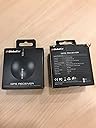
🚀 Navigate smarter, not harder — GPS precision that keeps you ahead of the curve.
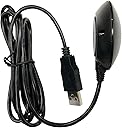
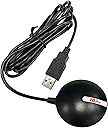
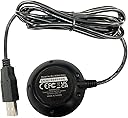
The GlobalSat BU-353-S4 USB GPS Receiver is a compact, highly sensitive device powered by the SiRF Star IV chipset, delivering superior 48-channel satellite tracking with ultra low power consumption. Its built-in roof mount magnet and advanced CGEE technology enable rapid satellite acquisition and reliable positioning in challenging environments, making it the perfect companion for professionals seeking accurate, real-time GPS data on any USB-enabled device.
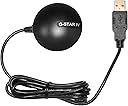
| ASIN | B008200LHW |
| Batteries | 1 Lithium Ion batteries required. |
| Best Sellers Rank | #885,135 in Electronics ( See Top 100 in Electronics ) #952 in Handheld GPS Units |
| Color | Black |
| Connectivity technologies | USB |
| Customer Reviews | 4.4 4.4 out of 5 stars (1,285) |
| Date First Available | March 15, 2012 |
| Human Interface Input | Buttons |
| Is Discontinued By Manufacturer | No |
| Item Weight | 2.08 ounces |
| Item model number | 05-BU-353-S4 |
| Manufacturer | USGlobalSat, Inc. |
| Other display features | Wireless |
| Product Dimensions | 2.08 x 2.08 x 0.75 inches |
| Special features | USB GPS receiver |
| Whats in the box | main unit |
C**F
A simple, inexpensive, but accurate GPS receiver
I wanted a simple, inexpensive, but accurate GPS receiver to use with Google Earth's "real-time GPS" function. This GlobalSat BU-353-S4 USB GPS Receiver works perfectly for that use. It is small and unobtrusive and the long cord allows it to be placed on the dashboard of my car. With my laptop in my car and the GlobalSat BU-353-S4 plugged into its USB port my position is shown very accurately in Google Earth. I have taken a number of test drives and this GPS receiver updates my moving position with just a little delay (it may be Google Earth that is causing the delay). This GPS receiver is so accurate that if I drive one direction on a two-lane road and then drive back the other direction, the route lines in Google Earth can be seen to be separate and right over the corresponding lane used. Please note that for this setup to work - without any currently active internet connection - the satellite imagery must have been previously loaded into the Google Earth cache (do an internet search for "google earth offline" and follow links from there; it is possible to create multiple caches of different areas). The GlobalSat BU-353-S4 USB GPS Receiver comes with a small but handy application, GPS Utility, which can be used to check the functioning of the receiver. The app displays a sky map of all of the GPS satellites detected and the signal strength, as well as the raw data stream from all detected satellites. It also provides data for current longitude, latitude, heading, elevation, and speed. Please note that it appears that the computer port used by this GPS receiver cannot be used by two applications at the same time - only one app can access the GPS satellite data at a time - so if running Google Earth "real-time GPS" the GPS Utility app will not receive the GPS data at the same time. In summary, this GlobalSat BU-353-S4 USB GPS Receiver works perfectly and is exactly what I was looking for. It should work for any "GPS aware" application (such as Google Earth).
-**-
I am very happy with it -- and for only 34 bucks!
This is by far the most pleasant surprise I've had in an electronic purchase in a long time. The unit it smaller than it appears to be on the photos, but that's a good thing. I realize this kind of device is at the mercy of whatever software is used, and I was lucky enough to borrow a few tablets, phones, and laptops with different navigation programs to test. For our vacation trip, I ended up choosing my wife's Surface as the hardware with Microsoft Streets & Trips (Not one of the programs we tested was excellent, and the MS product was the lesser of all evils). The one other thing I'll say about the Surface is, even though the screen is large, the "touch" part was maddening in a moving car, and the attached keyboard was also hard to use. Now, the GlobalSat: 1. I tested it at home, first inside, away from any windows. It pulled in enough satellites to put me about 10 feet from my actual location. (I was in the middle of the room, and it placed me on a wall). I used Google Earth here, but did not choose to use it in my car later. 2. In comparison with my phone GPS, the GlobalSat was always 10-20 feet better. 3. The weatherproof GlobalSat has a magnet that should withstand hurricane winds, and the USB cord is plenty long. On the trip, I sometimes forgot to put it back on the roof when I got back to the car. While I drove, it was dangling near the floor. The accuracy was about the same, but I would lose the voice-directions (not the fault of the GlobalSat). 4. It took the device around 30 seconds to give me a location after a cold boot. 5. I dropped it several times on macadam and concrete and it never skipped a beat. 6. It was recognized by all the programs I tried. My endorsement of the GlobalSat BU-353-S4 is unequivocal. If you don't want the limited real estate of a Garmin or Tom Tom screen, this is the unit to pair with a larger Android or a Windows device (Never used an Apple product). It worked with my 7" Acer notebook and my wife's new 10" notebook. The car we drove didn't have the optimal space for these, but other cars may.
K**R
Bu-353-54 GPS receiver works well
I had misplaced or lost the GPS receiver that came with Microsoft Streets and Trips. I ordered this as a replacement. There was no problem installing it to my Windows XP laptop and Streets & Trips Version 2013. With my Microsoft receiver, my house appears to be a couple of hundred feet east of its actual location. With the Bu-353-54, it was on the button. For the short period that I have had it, I noticed that it is placing my car on the road rather than very slightly to one side as with the Microsoft receiver. That's plenty close enough for navigation. And the Microsoft version is less expensive when purchased with Streets & Trips. But based on my experience, the BU-353-54 is accurate. That may the because I was able to place it on the top of the car instead of on the dashboard. There is no good way to put the Microsoft version on the roof of the car and it is not designed to be water proof. I like placing it on the roof of the car because that gets it out of the way when I have my laptop computer in the passenger seat. The receiver has a magnetic base. It appears to be plenty strong enough to stay put. The receiver has a low profile and appears to be aerodynamically shaped to hold itself down in addition to the magnet. I haven't tested it at 100 mph yet, but I would be willing to bet that I would stay put. There is a rubber-like ring on the bottom to protect the car's finish. The cable is just under 5 feet long. I wouldn't really want it any longer. But that can be extended with a USB extension cable. No real complaints so far.
Trustpilot
4 days ago
1 week ago