Desertcart purchases this item on your behalf and handles shipping, customs, and support to Sri Lanka.
🎬 Elevate your AV setup — because your sound and vision deserve the spotlight!
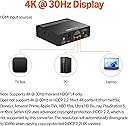
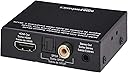
The Amazon Basics 4K@30Hz HDMI to HDMI Audio Extractor Converter delivers flawless 4K video pass-through while extracting high-quality stereo or SPDIF audio. Compatible with a wide range of devices including Apple TV, Fire TV, and Blu-ray players, this compact metal-encased device offers plug-and-play convenience and audiophile-grade sound enhancement, making it an essential upgrade for any modern home theater or professional AV setup.
| ASIN | B07KRWYN4R |
| Best Sellers Rank | #3,429 in Our Brands ( See Top 100 in Our Brands ) #34 in Video Converters |
| Brand | Amazon Basics |
| Color | Black |
| Compatible Devices | Cameras |
| Connector Type | HDMI, RCA |
| Current Rating | 1 A |
| Customer Reviews | 4.1 out of 5 stars 5,776 Reviews |
| Finish | Hdmi |
| Global Trade Identification Number | 00192835000345 |
| Input Voltage | 5 volts |
| Item Dimensions | 2.79 x 0.79 x 2.4 inches |
| Item Weight | 0.16 kg |
| Item dimensions L x W x H | 2.79 x 0.79 x 2.4 inches |
| Manufacturer | Amazon |
| Mfr Part Number | CEHFAE0101 |
| Model Number | CEHFAE0101 |
| Number of Items | 1 |
| Number of Ports | 1 |
| Package Quantity | 1 |
| Power Plug Type | No Plug |
| Specific Uses For Product | TV |
| UPC | 192835000345 |
| Unit Count | 1 Count |
| Warranty Type | No Warranty |
M**O
Works great on Apple TV 4K
I have been looking for an audio extractor for the Apple TV 4K, for reason that my (old but good) AVR only has HDMI pass through. It does not decode audio. And unlike the previous Apple TV, the latest does not have optical/audio out. There are so many of these audio extractors available, and none have consistently good reviews. I purchased a different one on Amazon which I returned because the video picture was distorted and all snow. In a second attempt I purchased this Amazon Basics extractor. Works great! Picture is no different than without the extractor. And now I have optical out for my AVR. That sound is great as well. Pretty much plug and play device. The only adjustment I made was to the Apple TV audio setting. It did not recognize that Dolby 5.1 was switched on the extractor. However it did allow me to select it. Doing so, surround sound kicked in and the Dolby indicator lit up on my AVR. Sounds great! Even sounds better than the old Apple TV with optical out.
D**K
Concert quality sound
I have a very high end amplifier and speakers, and with our present at home concert requirement (thank you coronavirus), as soon as I projected to a television so my better half could see and hear too, the sound quality was just plain dreadful. I cringed, no matter what I tried. This device fits between the source and the television in the HDMI cable chain and provides "line out" audio from whatever source is sent to the television (note off the air television will not function, although cable will work fine). The impedance match is perfect. For the record every television set I have ever seen has dreadful audio, if you are an audiophile. I use a 4k Chromecast device and my concerts are live quality audio again. This is highly recommended. One misleading aspect of this particular device is that while it does have 3mm stereo out, there is only a single RCA jack, so to the best of my knowledge, there is no way that can carry both channels, slightly misleading specs. That said, a 3mm to RCA output cable performs fine, and my superb quality McIntosh amplifier is now effectively connected to the internet (via Chromecast). This box is trivial to set up. Just plug it in, set your television to whatever HDMI input you plug this box into, and the rest is completely transparent.
D**A
Works! Rescue older surround sound receivers!
I have a projector home theater setup with an older, non-HDMI compatible surround sound head unit. This wasn't an issue when I was using an old Xbox one as my media player because the Xbox had a "Toslink" is optical audio out option that could go to the stereo. However, every modern streaming device (Roku, Apple TV, etc) re just HDMI out, so when I switched to a Roku Ultra I had no way to get audio. This worked great, and the 5.1 channel DTS/Dolby surround option (press the button, light turns on) is putting out great audio. Saved me from huge expense and effort of upgrading an older home theater projection setup and stereo. Recommend. I've only had it working for a day, so I'll try to update my review if the product stops working in under a year.
J**A
works as adverised
My system is probable not tipical. I'm using a fire stick connected to my Onkyo home theater reciever and the HDMI out connected to a home theater projector. Beeing hard hearing I had trouble underestanding the dialog. So I purchased a wireless headphones and conected to the reciever's phones jack beeing that my reciever does not have an optical out.. The issue was that everytime I wanted to hear my main speakes I had to get out of my chair and pull out the phone jack. So I got this HDMI audio extracter converter. After figuring out the best way to connect it . I now can hear my main speakes or my heaphones. I connected the optical out from the extracter converter to my headpones base and that leaves the speakers on my reciever on and I can lower or raise my speakers volume with my reciever remote.. The only issue is that the volume out from the Extracter conveter is a little low . Also depending how the audio is set on your fire stick, you my not hear any sound.You have to go on the fire stick settings and change to audio to PCM. This is exactly what I needed.
C**M
Not working, connected to Sony Bravia ARC port in Stereo mode!
Search reviews for this product and Amazon reports this summary, "The product description states it supports ARC. Customers report it works well for extracting audio from the TV's ARC output to an older sound system." Based on my experience, that is not true. At least not with Sony HDMI/ARC. The extractor does not work with my new Sony Bravia X90L TV. I have the extractor connected to HDMI3 (eARC/ARC port) using a high bandwidth cable. And a 3.5mm cord connecting the extractor to my analog stereo amp and speakers. The extractor is set to 2 channel stereo. TV set to output external sound and HDMI/ARC is enabled. There is no sound from the amp / speakers. And more importantly, there is no purple light on the extractor, signifying that it's not successfully communicating TV's HDMI (ARC) port. Sony tech support networked into my TV and confirmed that HDMI3 "sees" the extractor and is trying to communicate with it, but that the extractor is not responding. After hours of troubleshooting, I returned the module.
V**V
Worked with older tv, roku stick and sonos soundbar
I bought it because my tv is older and doesn’t have toslink/hdmi ARC or anything i can use to connect it directly to my Sonos Ray soundbar. I have a roku stick that i’ve been using to stream on my tv for years, and I plugged in the roku into the adapter, and the tv & sonos into the output side. It worked perfectly, there is no lag. if you read the instructions, it tells you that clicking the button on the adapter and getting it to flash red means it is on 5.1. my sonos supports the 5.1 and it sounds nice and dynamic as if there was no adapter and it was connected straight to the tv. Definitely recommend, saved me from having to buy a brand new tv
F**3
Power on last
Out of the box, this item worked as expected. It was able to separate the audio from hdmi out of Apple TV 4K and transmit via optical cable to the receiver. However, after that first use, now we always have to make sure the Apple TV is powered in first. Otherwise, if this box is powered on first, we lose mid-range frequencies. (Usually speaking voices from whatever we are watching. )
M**4
Good sound card alternative if missing Toslink out
Sound quality is pretty good. As of writing this, I can’t notice any discernible degradation in audio quality from using this adapter vs. direct optical out to my AV receiver. But I haven’t done any uncompressed / lossless listening at high volume yet. So I’m happy with my solution, but one issue. If your video card only has one HDMI out, it will be occupied with this. Now your video WILL be transferred through this adapter if you use HDMI out, but the audio will NOT continue to play “simultaneously” as the manual states, simply because the audio out is recognized as connecting through to your secondary display. So you need to have the secondary display turned on in order to listen to the audio extracted from the hdmi if you are using Toslink to connect to your receiver. Fortunately I found 4K 60fps DP to HDMI adapter on Amazon for $15 or so. So my audio solution still costed me about $40. The ASUS Xonar SE is also $40 but Amazon sent me a faulty one the first try. I’d rather not risk it so I bought this instead. I think I’ll keep it. A proper audio card may have better audio out than the GPU / extractor but it also costs power from my PSU and potentially my other hardware.
M**C
OJO CON LAS CONEXIONES HDMI.
El equipo funciona bien, PERO OJO!: - La conexión HDMI IN a la TV. - La salida ÓPTICA al equipo audio. Esta configuración puede parecer correcta, pero no. La conexión HDMI OUT también la tuve que conectar a la misma TV. De esta forma si funciona.
E**O
Ottimo
Fa perfettamente il suo lavoro.
C**N
Buena calidad y compatibilidad
Me funcionó perfecto para extraer video y audio de un Apple TV 4K, los cuales dirijo a un Samsung Freestyle 1 y un teatro Sony HTS20R. La calidad de video parece disminuir un poco, pero nada que moleste. El audio suena increíble.
C**.
Bon produit
Parfait
L**N
Works perfect but connect the the output HDMI after you pressed the button. red for 5.1ch.
Perfect! But take notice of our use case an save yourself some troubleshooting time : Thomson streaming box 240m was unable to provide 5.1 Ch sound via optical out to a Sony Bravia Theater 6 soundsystem while the HDMI provided video to a HD projector.... (Due to the HD projector negociating 2ch pcm was the max in channels). This audio extractor fixes this but took us some hours to figure out congestion from the beamer - Thomson box (like Chromecast) --} hdmi extractor --} optical to Sony home theater, HDMI to HD beamer. Usage: DONT connect the HDMI to HD projector yet! First turn on all devices, press the button on back of the audio extractor so it turns red (5.1ch.), NOW connect the HDMI out to the projector and audio should work fine on the Sony in 5.1 channels. Perfect solution.
Trustpilot
2 months ago
3 weeks ago