Buy anything from 5,000+ international stores. One checkout price. No surprise fees. Join 2M+ shoppers on Desertcart.
Desertcart purchases this item on your behalf and handles shipping, customs, and support to Sri Lanka.
๐ Elevate your office game with wireless speed and vibrant colorโbecause your work deserves to stand out.
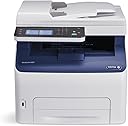
The Xerox WorkCentre 6027/NI is a compact wireless color multifunction printer designed for small offices and professionals. It delivers fast 18 ppm color printing at 1200 x 2400 dpi resolution, supports seamless mobile printing via Apple AirPrint and Wi-Fi Direct, and features a user-friendly 4.3-inch color touchscreen. With print, copy, scan, fax, and email capabilities combined in one device, plus a 150-sheet input tray and automatic duplexing, it offers versatile, reliable performance backed by Xeroxโs one-year warranty.


| ASIN | B00STQYFIU |
| Additional Printer Functions | Copy, Fax, Scan |
| B&W Pages per Minute | 18 ppm |
| Best Sellers Rank | #643,495 in Office Products ( See Top 100 in Office Products ) #931 in Laser Computer Printers |
| Brand | Xerox |
| Built-In Media | Laser Printer, Single Function Laser Printers |
| Color | Black And White |
| Color Depth | 24 bpp |
| Color Pages per Minute | 18 ppm |
| Compatible Devices | Laptops, PC, Smartphones, Tablets |
| Control Method | Remote |
| Controller Type | Android |
| Customer Reviews | 3.7 3.7 out of 5 stars (702) |
| Display Type | LED |
| Dual-sided printing | Yes |
| Duplex | Automatic |
| EU Spare Part Availability Duration | 1 Years |
| Global Trade Identification Number | 00095205867961, 00952058679618 |
| Hardware Interface | USB |
| Ink Color | CMYK |
| Item Type Name | Xerox WorkCentre 6027NI Color LED MFP |
| Item Weight | 43.8 Pounds |
| Manufacturer | Xerox Office Products |
| Maximum Copy Resolution Black and White | 600 dpi |
| Maximum Copy Resolution Color | 600 x 600 dpi |
| Maximum Copy Speed Black and White | 18 ppm |
| Maximum Media Size | 8.5 x 14 inch |
| Maximum Print Resolution Black and White | 1200 x 2400 dpi |
| Maximum Sheet Capacity | 15 |
| Maximum print Resolution Color | 1200 x 2400 dpi |
| Model Name | 6027/NI |
| Model Number | 6027/NI |
| Model Series | 6027 |
| Number of Trays | 1 |
| Other Special Features of the Product | Auto Document Feeder |
| Output sheet capacity | 150 |
| Paper Size | 8.5 inch x 14 Inches |
| Power Consumption | 330 Watts |
| Print media | Envelopes, Labels, Paper (plain) |
| Printer Connectivity Type | Wi-Fi |
| Printer Output Type | Color |
| Printer Type | Laser |
| Processor Count | 1 |
| Resolution | 1200 x 2400 dpi |
| Scanner Type | Sheetfed |
| Specific Uses For Product | Office |
| Total Usb Ports | 1 |
| UPC | 095205867961 |
| Unit Count | 1.0 Count |
| Warranty Description | One year on-site warranty |
| Warranty Type | one-year warranty |
| Wattage | 330 watts |
K**Y
Ideal compact Multi-Function Printer for a small home office environment
For reference, I have a home office network with mixed Apple and Windows computers. I connected the MFP via Ethernet to the router. With this I got full functionality across the different platforms. A few pointers: although Xerox tried to make a complex installation as straightforward as possible, you still have to know something about networks and how they operate. I ended up with several drivers on my computers, one for network, PCL6 and USB for example. I also found that it was simpler to set up my printer network settings from my PC than the Mac. One thing I discovered is that scan to email only works over USB to a PC. To get around that limitation for Macs, you can scan to a thumb drive in the MFP and then port that to your Mac. As old as Fax is, it is still used for legal documents. The fax function worked well over Comcast's VoiP phone system. Comcast has clarity in their phone lines and this is what you will need for reliable fax. I had a large 30 page fax sent from the IRS and it printed without a hitch. The color touch panel is very nice and the menus are easy to navigate through. If you are a long time Phaser user you will be in a completely familiar environment. I like the quietness of the LED print heads, there is no whine from the spinning Laser mirror. The toner cartridges come pre-installed and they are simple and hassle free to replace. I believe that my starter cartridges are full ones because we printed a lot and the gages are still up...very nice, thank you Xerox! We use our printer infrequently, but when we do we don't want to fiddle with missing ink jets. The toner based "laser" printer wins on this point, toner doesn't dry out. The prints are crisp with good character detail. Color is very nice, but don't expect photographic quality. The WorkCentre 6027 is ideal for a small office and meets my expectations, that is why I gave the MFP 5 stars. It is a very nice package.
D**E
Excellent full color MF laser printer at a fantastic price!
As a former Xerox researcher for several years I was well aware of the high quality product that Xerox puts out. So, when shopping for a new home office color laser printer I did put Xerox at the top of my shop and compare list. I was surprised to find this unit for such a reasonable price. I received in the typical high quality packing that Xerox uses and immediately set up in my home office. Yes it was a little big - compared to the MF inkjet printers and simple monochrome laser printers I had used in the past - but itโs a fully multifunctional and I add - quite high speed 4 color laser printer. In less than an hour I had it set up, connected to my home network and was wireless printing to it from my laptop and iPhone. So far have printed couple hundred pages. Fast and excellent print quality! Very impressed! In fact so much so that I have been telling friends and family about it Hell I even told a guy I bumped into in one of the office stores that was looking at much higher priced competitive office printers - and shared with him the model and link on Amazon. (I think I pissed off the salesperson in the office store ๐ )! Great printer - good bye crappy ink jet printers!
A**R
I'm glad it broke after a year so I can throw it in the dumpster!
1 Year Update: Worst color laser multi-function printer I've ever purchased. I can't even express the intensity of the frustration I've received from my coworkers over my choice to purchase this printer. It now sounds like a JACKHAMMER while printing. I'm purchasing an HP or Brother printer next. โUPDATE: Using genuine toner has the printer functioning again. It still is a frustrating printer. I'm purchasing my second $275 bundle of toner because the yellow is low. Why? Because even when I'm printing documents that are primarily line-art, it uses all of the colors to print black, if I'm printing any color at all. Why in 2018 is this printer so terrible? I thought we had these wasteful toner practices done away with a decade ago. That was indeed the case with the HP and Brother Machines I've used for the past 15 years or so. I should have put up with the replacement part requirements of those machines because it was considerably less expensive than the toner cost of this one. Original Review: I had high hopes for this, having used high production Xerox machines in the past. In my current office, we've been using Brother printers for some time. Every four years or so, they need replacing, so I thought I would try something that I hoped would have better longevity. This printer does not. The first problem is that it is painfully slow. Printing reports or checks that take seconds with a Brother machine (or an HP, I have one of those that works well) take MINUTES PER SHEET!!! My office manager would glare at me every time she needed to print something! Then, it wouldn't fuse completely on the right edge of the paper; it would place a lighter copy of the text on repeat down the side, making it useless for pretty much anything. The third problem is that it uses all four colors when I print black and white! It burnt through the toner that comes with it like a wildfire. So I ordered some third-party replacement cartridges. That was the end of the line. It started throwing an error code, โand when the service technician came out, he said I would have to put genuine Xerox toner in it for him to fix it. The set of toner is currently $50 more than the printer itself. While I wait for this toner to arrive, I am left to ponder how terrible this printer is.
F**E
I bought this for my Mom and it replaced an ancient toner guzzling inkjet. It is simple and pleasing in it's function. spits out great color prints quick enough for our meager needs.
A**A
So far, everything seems good with it. It's being used in a Home Office situation. Basically printing, and scanning. Connected to a MacOS computer by the USB Cable. I know that the unit offers other features, but for my use, I basically just need to print & scan.
A**ร
Had this printer barely 2 months before I started getting an error/fault message with the yellow toner. At this point, I hadn't done any colour printing but in order to do any printing, even just black and white, I had to change the yellow toner. So, I threw away a cartridge that was 100% unused. I put in the new yellow cartridge, which incidently cost about 1/2 as much as the printer itself, and continued printing. About a month later, I got the same error message. I still hadn't done any colour printing so at this point, I had received the same fault message twice. Again, I couldn't do any printing until this yellow cartridge was replaced. My husband scoured for info online and spent about a week working through this (incredibly inconvenient) obstacle. He finally got it working - for about 3 days until for the 3rd time, the fault occured again. At this point we called Xerox about this issue and were told that this was a known fault. That's been roughly two weeks ago and I've not been able to use this printer at all since then. I've had this printer less than 3 months and so far it's a very expensive dust collector. Xerox won't replace the 2 unused yellow toner cartridges, and other than telling us this is a well known fault, we've had no help from them. Now, I'm about several hundred dollars out of pocket AND looking for another printer. So incredibly disappointed and quite frankly, down right angry at the lack of care and concern Xerox has shown about an issue that they were already fully aware was a common issue. I will NEVER buy another Xerox product again. EVER.
R**D
This printer has stood the test of time. It isn't used often in our home, but when we do use it, we print off a novels worth of pages at a time. The toner cartridges are good for hundreds of pages at a time. The color is always quite good quality and has always been economical given the price of compatible cartridges. It is capable of network printing so you can send print jobs to it through your own LAN allowing multiple machines on your network to print to it. It does require some software and set up on the application to work, not the most intuitive set up on the app. That being said the quality and capability of this machine more than make up for extra set up time if you wanted this for a printer.
E**I
This is my second printer. The first one lasted 3 years (about 3000 sheets according to the log) and started making grinding sounds when printing recently. I searched the web and found nothing to fix this issue. I still have 3 sets of ink toners so decided to buy the same thing. We use it at home and the print quality is great for what we do. Took a bit of time to configure the scan feature for different users and computers on the home network but found most info on the web. Would have given it 5 stars but was disappointed at the longevity of the first printer. Hopefully this one lasts.
Trustpilot
2 weeks ago
2 months ago