


🖥️ Elevate your workspace, anywhere — because your productivity deserves the best!
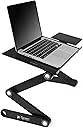
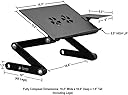
The Executive Office Solutions Portable Adjustable Aluminum Laptop Desk is a lightweight, versatile workstation designed for professionals on the move. Featuring fully adjustable 360° legs, silent USB-powered cooling fans, and a durable aluminum surface, it adapts effortlessly to sitting or standing positions. Its multi-use design includes a side-mounted mouse pad and non-slip feet, making it ideal for laptops, tablets, writing, or even TV dinners. Perfect for enhancing posture, comfort, and productivity in any environment.





| ASIN | B00RQ3JQMM |
| Additional Features | Portable |
| Best Sellers Rank | #282,754 in Office Products ( See Top 100 in Office Products ) #3,259 in Office Carts & Stands |
| Brand | Executive Office Solutions |
| Brand Name | Executive Office Solutions |
| Color | Black |
| Customer Reviews | 4.0 out of 5 stars 7,072 Reviews |
| Finish Types | Black |
| Global Trade Identification Number | 00820103124089 |
| Included Components | Laptop Desk |
| Item Dimensions D x W x H | 10"D x 16.6"W x 1.5"H |
| Item Weight | 3.8 pounds |
| Manufacturer | Executive Office Solutions |
| Manufacturer Part Number | FBA_EOS1 |
| Material | Aluminum |
| Material Type | Aluminum |
| Model Number | FBA_EOS1 |
| Number of Items | 1 |
| Product Dimensions | 10"D x 16.6"W x 1.5"H |
| Product Style | Modern |
| Special Feature | Portable |
| Style | Modern |
| UPC | 641055529940 820103124089 625376222308 |
| Unit Count | 1 Count |
M**K
Very sturdy with lots of possible adjustments
I bought this as a solution for setting the height and angle of my laptop screen so that it matched that of a second monitor. I use a separate keyboard and I did not use the included mouse attachment at all. This stand works well for a situation where you don't need to physically interact with the laptop much. It probably isn't stable enough for using the laptop keyboard because (depending on the setup) it would increase the risk of tipping. But for a hands-off stand it is perfect. Pros: Sturdy, but not too heavy. Fits my 15"-screen laptop with about 3 inches to spare (total) on the sides Can be configured to a wide range of heights and angles There are indicators on the sides for each adjustment that show the setting in degrees. This makes it easy when you find the right settings for one side to simply use those same numbers on the opposite side. Adjustments "lock" into place nicely Works well as as a platform for a drawing tablet such as Wacom. Cons Cannot be adjusted with laptop on the stand without risking the laptop falling off There is no way to simply release all pivots and pull up on the top to achieve the height and angle that you want; adjusting is very manual. Each side is adjusted separate from the other, and each of three adjustments on each side is independent of the others making it a somewhat clunky business to find the height and angle you need without trial and error Configuring it in a way that puts the laptop far forward (higher angle) does have the risk of it tipping forward; depending on the weight of the laptop
M**L
Overpriced but good
I thought this might not be sturdy and too light weight but it's fine. A friend had one so I borrowed it for a day, liked it, then bought one for myself. Works well to use as a standing desk when placed on top of a regular desk, and to use as a desk in bed. Especially since it's adjustable so whether you're larger or smaller, you can adjust it to the correct and comfortable height and angle. One drawback to using this and similar stands as a standing desk (vs a full standing desk) is it might slide around a bit on the desk surface. If you're in a busy work area with clumsy people, you don't want your laptop to accidentally slide off your desk! It comes with some stick on pads to help keep the feet from sliding on a smooth surface, but all my stick on pads fell off within a couple of months. I'll put something else there eventually. For now I use this at a desk with a wall behind it and bookcases on each side, so it's not likely to go far if it does slide. Another thing to consider when you use a stand like this as a standing desk (vs a full standing desk) is you don't have a place to rest your arms. But I still like mine and use it often. Haven't used the fan feature on mine, or the side piece for a mouse. They work, but I haven't needed them. It is kind of a pain to change the leg "joint" settings if you're going to change the height a lot. I've written down my favorite settings and keep them on my cell phone for easy access. I might eventually tape them to the stand itself somewhere, even if that looks strange. If you write down the numbers for your favorite settings, remember to include whether they were the clockwise or counter clockwise numbers. The same numbers appear twice on each "joint" - one in each direction. Although I really like this stand, I think it's way overpriced. If the price was a little lower I'd probably buy a second one so I could use one for bed and one for my desk and leave them at their pre-set heights all the time. I would also definitely buy these as gifts for people if they were more affordable. But I'm not going to spend $40-ish for another of these. I'll stick with my one! These should be in the $25 price range IMO. Maybe about $30 with the fan feature. Regardless, I like mine and use it a lot. If you're on the fence, try this one.
F**N
the product is excellent. The construction and easy of use met my ...
First off, the product is excellent. The construction and ease of use met my expectations. The bad is that it almost doesn't meet my needs. I have a 17" Asus ROG laptop. When I purchased the stand, I figured my laptop would be bigger than the recommended size. Although I can get the stand to work, I have to play a game of trying to find the center of balance at the correct height of use. For a 15" laptop or smaller, this would be perfect. For a 17" laptop, it's doable. The material is durable and I haven't noticed any flexing except for the mouse attachment. I tend to rest my hand on the attachment and I noticed a little bit of flexing. The push button system is fantastic. The buttons are easy to depress and click out at 15 degree increments. Around the outside are hash marks with numbers so it's easy to ensure both sides are at the same angle. Additionally, the bottom bar has a cutout so you can still get to the middle button when the bottom two bars are parallel. The dual fans on the bottom circulate a decent amount of air to keep your laptop cool. Then do have noticeable fan noise, but it was never distracting. There is a switch to turn the fan off and on, but I usually leave it on and just unplug the USB cord that powers it through the laptop. Additionally, the cord is long enough to reach both the left, right or top of the laptop. The bottom edge of the table surface has a lip to keep your laptop from sliding off. With my 17" ROG laptop, however, the lip is not high enough to actually hold it. Good news is, there are two little clips that slide onto the lip to extend the support. These clips are just long enough to keep my laptop in place, but not so long as to protrude out the hinder hand placement while typing. The clips can be stationed anywhere on the lip that would be convenient for use. The mouse pad attachment can clip on either the left of right side. It kind of just slides into place through a hole and leverage. The angle of the attachment is adjustable via a large screw nob. There was no difficulty in tightening or loosening this by hand. Once the angle was set and tightened, I haven't come across an instance where it has slipped even with the pressure I place on the attachment. Finally, some rubber sticker type circles came in the box. I'm not sure what to do with these and I didn't apply them anywhere. The instructions didn't mention anything about them. I would suppose you would place them somewhere on the table top so that your computer isn't touching the metal. However, the table top surface and is not abrasive...so maybe they are for piece of mind. I don't know. Improvements I would like to see is a larger surface area to better support a 17" laptop. I looked at a couple competitors and couldn't find anyone that appeared to have the quality and adjustability of this product in a size that large. If they exist, they are elusive. Additionally, and I'm not sure how I would engineer this next part, but I would like to be able to change the center of balance where the table attaches to the final arm. Maybe allow the arm to slide and lock between the center of the table all the way to the edge. I think that would help with center of balance with its current size holding a 17" laptop.
B**N
I like it well enough
I like it well enough. I've used it to set up a standing workstation for myself. I'm 6'2", so I have this sitting on top of a 47" bookshelf. It's let me elevate my laptop an additional 10" above the shelf, which puts it just about eye level. So really, it's done what I want it to do. There are a few negatives, though, which keep me from rating it higher: I don't know how comfortable I'd be extending this thing beyond 10" or so. It seems pretty sturdy at this point, but I don't think I'd trust it all the way extended to 20". The base isn't wide enough to fit a standard size keyboard underneath. Since I've used it to raise my laptop up to eye level, I need to use a USB keyboard with it. This is fine, except the base is too narrow and so I can't slide the keyboard underneath like I would like to. How hard would it have been to make the thing an extra inch wide? There are 6 individual hinges--3 on each leg--that you need to adjust when you want to change the angle. It's not the easiest thing in the world to do, and it can be kind of a pain to get everything just right. So it's fine if you're planning on setting it and leaving it. But if you think you'll need to adjust it regularly, it might get to be more trouble than it's worth. I've seen some reviewers saying that the lip isn't thick enough to hold their laptops...this isn't the case for me (my laptop is fairly thin), but I can see how a thicker one might cause problems.
M**6
At Last! Laptop Stand That Keeps User Cool
I just got this today, so far I am very pleased. I'm using this for a 17" laptop, it supports the weight and size easily. There is a mouse pad that attaches for left or right side. The mouse pad can be tilted to a different angle than the tray if you wish. The legs do require a bit of fenagling, They lock into place at 15 degree increments. If you tlt the tray on one side, adjust and then repeat process, you can adjust with the laptop on the tray. Another hint is to adjust it on the floor to make sure it's not crooked. I'm surprised other reviewers did not mention the clips which go on the front of the tray to help prevent the laptop from slipping off. I found it very helpful. At first, I thought they went on the mouse tray, but then saw how they matched the groves on the front tray. Very good idea. The fans are noisier than I'd like. I can hear the hum over the room fan. Will have to see if they are really even needed since the lap top is now elevated off my body, I may not need them at all. Another downside to the fan is that it uses up another USB port. Something to think about, but I'd rather do that than have an AC/DC adapter plug. The cord is short, but does not need to be too long since the port is just inches away. I may even tape the cord down so it does not dangle or get caught on anything. All in all, very pleased with this. It replaces countless other things I've tried to keep laptop off body, it's sturdy enough to use in recliner or on desk, a lot of possible variations on the angles you select. 4.5 stars out of 5, but since I cannot rate 4.5, I am rating it a 5. The price, ease of use and versatility of this give it overall 5.
W**N
How it all fits
I can’t write a review till I use the desk. I found it a little confusing till I found the things on the end of the arms that let me move till it fit me bast. I bought your desk as opposed to other desk because I saw you had a small desk attachment for my iPhone or whatever. When I opened the package I was delighted with the size and weight. It was going to be perfect for me (I broke my back and now I am totally paralyzed from the mid-waste down. I write two different blogs on cooking and canning. I have many many readers. I set the desk up and got out the sidecar. I figured out how to attach it with only a little trouble. I have two things that look like they fit on the sidecar (hopefully to hold my iPhone in place). I tried every way possible and could not get those things to fit or attach anywhere. I want to know how they work and do they really hold what I want in place??? I think you should really take a good look at the sheet you send with the unit. Does it tell you how to make the arms move to a way they will work. And the sidecar thing, no where does your sheet help with how it fits and the pieces of whatever, how do they fit, how do they work. I think you have a great item that will do the job that I need it to. But show me how all of it fits and work. Do that and I will write you a review that you can use everywhere telling everyone about your desk!!! Please let me know what to do with the little things. Contact me at [email protected] Or 770-861-0900 my name is Pete Austin Thank you for your time
W**F
Sciatica Saver, Great Product, Great Seller - buy two or more before they become unavailable again!
After ordering these stands, I received an email from "Eric" of Executive Office Solutions (EOS) to welcome me and to help in any way. The stands are very helpful for my sciatica. When I asked for an extra part, Eric was quick to mail it! These stands are sturdy and the right size for my 16" wide laptop. I recommend EOS and the stands for their quality! Thanks ERIC and EOS! The previous paragraph was a Seller Review and I was limited to so few words. I've had my stands for only a week and it is actually FUN to work again. I am more productive and do not tire like I did before. In fact, the first time I used it I worked 4 hours straight on my computer and enjoyed it! No more icing myself, then having to rest in bed after a session of working on the computers; nor having to stand up from my chair every 20 - 30 minutes! The reason I bought two is because we have a family computer. My husband is much taller than my daughter and myself and he has adjusted HIS (which was MY) laptop stand to the proper height. They are lightweight, yet sturdy and VERY easy to assemble and adjust. These stands should be in medical equipment stores for us ailing baby boomers who think we are still young and will have no health issues! However, it is great for ANY age and I wish I knew about these stands 2 years ago when I was in my 20's (joke - my daughter is 15 years old.). Don't wait until you become injured being so sedentary (I breathe in my abdominal muscles and it adds to good posture and a smaller tummy!) Again, I cannot begin to thank Eric for his friendly welcome and prompt, professional and personal service. Before you buy other stands from other sellers, buy this one first from EOS, a family-run business, to save on the hassle of having to return products you aren't satisfied with or did not hold up (no pun intended) to your expectations. 10 Stars and Happy Laptopping (hmmm - maybe it should now be called "Stand Computers" since we don't put them on our laps anyway.
R**L
Can't beat it for the price
When I got this desk it was on a lightning deal for ~$30, so I'm writing this review based on the price I paid for it. Final acknowledgement up front: this is everything you could ask for with the price tag. Out of the box I noticed the legs are a cheap plastic that audibly creaked as I set it up. The actual plate the laptop sits on is thin and the English on the instructions was... rough. But I got this for work since the desk I inherited was low and it was incredibly awkward to hunch over my laptop. I saw a similar stand a coworker had ordered for somewhere near $200. It was aluminum framed, very sturdy and had a greater range of motion; when I had mine set up she was jealous over how functional mine was and found out how much (little) I paid for it. I've had it for months now and don't have a single complaint. So, as said, out of the box this is underwhelming. There's minimal assembly but the instructions aren't very helpful, although they do have some helpful pictures to assist with figuring out what angle to set the legs at to achieve different results. The plate the laptop sits on has a nice, subtle texture that helps the device grip and two small plastic clips that go on the minimal lip on the front end to keep heavier laptops from sliding off. The side-table is fiddly, but a nice addition that slots into place. It's awkward to put a mouse up there, but you could, for me it's a comfy place to keep a notepad, desk calendar, pens, etc. Desk knick-knacks. The fan works well and plugs in via an included USB to get power from the laptop but also has an on-off switch on the underside of the stand. The major issue is the angle of the legs, and its a pro and a con. There are three legs at each side, and each adjusts to a nearly 360 degree angle at the joint. This gives it a great range of motion (though the legs are short, so it's small to rig this into a standing desk depending on where you put it, but it will get it into any comfortable position for sitting), but this freedom makes getting this thing sitting evenly and in the position you want it is a puzzle, and each joint on each side must be set to its angle independently of the rest. Set-up time for assembly is about ten minutes, but I spent nearly an hour figuring out how to arrange the legs for a comfortable position. This thing will absolutely do what you want it to do and you could do worse for more money. My only gripe here, months later and long-past setting it up, is wishing I had two of the side-tables instead of only the one it comes with. For a budget model this one is a solid choice.
S**P
Excellent alternative to full standing desk furniture
Knowing that I was sitting at my desk at home for far too long each day, I've been curious about standing desks and read up on the health benefits. However, I didn't want to replace my existing desk and so the Executive Office Solutions Portable Adjustable Aluminum Laptop Desk was an ideal solution. It raises to a good height (although I'm only 5ft 8inches tall), is sturdy and yet light enough so it can easily be lifted and moved to the back of my desk, so that I can place my laptop on my own desktop, when I've had enough of standing. I was pleased with the fact that the portable desk top has 2 integrated fans, powered by a USB cable, to cool the laptop, although the cable that came with my stand has a dodgy cable connection and I have asked the seller to investigate a replacement from the manufacturer. Otherwise, very happy with this arrangement.
L**Z
Good quality
This is the second style I have bought for laptops in the home. This one is slightly wider than the first one I bought from a different company. They work well and are easy to adjust. I am not sure why other people have had problems. I bought it to elevate the laptop on my desk to prevent neck strain. However I do use a separate wireless keyboard under the stand, as it would not be comfortable to raise your arms to the built in keyboard unless you had it on the lowest height setting. I don't use the side extension as I use a wireless mouse on the desk. I haven't used it on my lap or elsewhere as I tend to us a boob support fusion for that.
A**Y
good and sturdy
good foldable and useful
G**O
Soporte Portatil
el soporte que he comprado es muy bueno, gracias a la cantidad de posturas diferentes que se pueden adoptar y muy comodo para trabajar con él
S**A
Versátil
Trustpilot
1 month ago
2 weeks ago