
DOWNLOAD THE APP


Customer Services
Copyright © 2025 Desertcart Holdings Limited
DOWNLOAD THE APP


🚀 Build Bold, Game Hard, Stay Cool — The Ultimate Ryzen Powerhouse
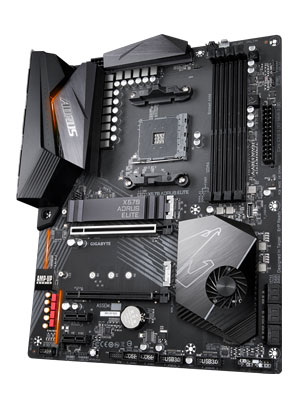
The Gigabyte X570 AORUS Elite is a premium ATX motherboard designed for AMD Ryzen 2nd and 3rd Gen processors, featuring PCIe 4.0 support, dual M.2 slots with thermal guards, and up to 128GB DDR4 memory capacity. It offers robust 12+2 phase digital VRM power delivery, front USB 3.1 Gen2 Type-C connectivity, and advanced audio noise protection, making it a reliable and future-ready foundation for high-performance gaming and professional builds.







| ASIN | B07SVRZGMX |
| Best Sellers Rank | #1,215 in Computer Motherboards |
| Brand | GIGABYTE |
| CPU Model | Ryzen 3 |
| CPU Socket | Socket AM4 |
| Chipset Type | AMD 570X |
| Compatible Devices | Personal Computer |
| Compatible Processors | AMD 2nd Gerenration Ryzen , AMD 3rd Generation Ryzen |
| Customer Reviews | 4.6 out of 5 stars 2,749 Reviews |
| Global Trade Identification Number | 00889523018101 |
| Graphics Card Interface | PCI Express |
| Item Dimensions L x W x H | 10.62"L x 3.14"W x 13.18"H |
| Item Type Name | X570 AORUS ELITE |
| Item Weight | 3 Pounds |
| Main Power Connector Type | 24-Pin |
| Manufacturer | Gigabyte |
| Memory Clock Speed | 2133 MHz |
| Memory Slots Available | 4 |
| Memory Storage Capacity | 128 GB |
| Model Name | X570 AORUS ELITE |
| Model Number | X570 AORUS ELITE |
| Number of Ethernet Ports | 1 |
| Number of Ports | 3 |
| Platform | Windows 10 |
| Processor Socket | Socket AM4 |
| RAM Memory Technology | DDR4 |
| Ram Memory Maximum Size | 128 GB |
| S/PDIF Connector Type | Optical |
| System Bus Standard Supported | SATA 3 |
| Total PCIe Ports | 1 |
| Total Usb Ports | 2 |
| UPC | 889523018101 889523017494 |
| USB 2.0 | 2 |
| Warranty Description | 3 |
I**N
Simple, Solid, Board
This is the first machine I've built that when I plugged in the Microsoft Windows 10 Pro USB into the front panel it booted and installed with not a single issue anywhere and haven't had to open the ancient, but serviceable, Lian Li ATX case even once. The manual is decent, but the prize is that everything that is labelled in the manual is also written on the board. It was very easy to identify all of the various connections, big and small, on the board. Gigabyte claims they used "Twice the copper as others" and from the heft of the board, it feels like they did - I installed the CPU onto the board out of the case feeling no flex getting it installed. Back panel fit fine with no goofy thin metal case-piece as with others. I paired with a Aorus PCIE4 M.2 (so much copper on the heat sink, don't stub your toe dropping it) and a cheaper Intel (where I used the single M.2 heat-sink that the MB comes with). Both worked fine as did an old LG DVD and a newish RX480. Windows 10 Pro installed easily, the MB came with the latest BIOS, the drivers on the CD were fine and installed easily - even uninstalling the inevitable "extra stuff" went quickly and easily. The GIgabyte website is simple to navigate and confirm I had the latest drivers. Switching on XMP by clicking Profile 1 in the BIOS was straightforward and boom, my memory is running at the rated 3600 spec. I have no interest in over-clocking, but all the features needed to pursue this are there. I didn't need wifi and chose to go "inexpensive," but as I came to realize, I did not go "cheap" - very pleasant experience building a 3800x using GIgabyte's X570 Aorus Elite.
C**W
Really great x570 board that is really affordable
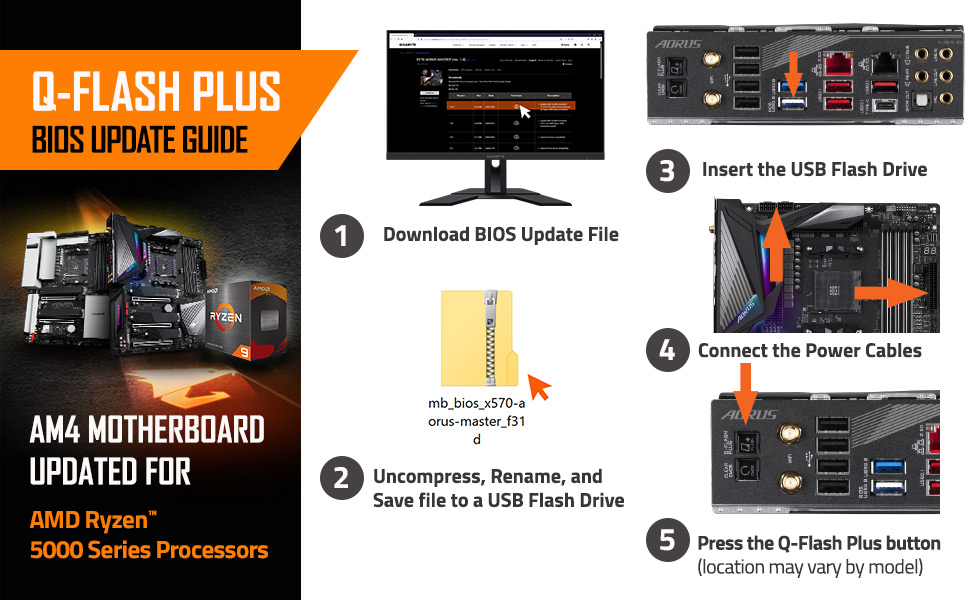
For anyone who is still interested in using this board for a late Ryzen 5000 series build, I just wanted to mention that the one I received was running version F32 of the BIOS, out of the box. It was able to boot with a Ryzen 5 5600G, so I was really happy about that. I used the @BIOS application inside of Windows to get the motherboard updated to a newer version. I think that this board is still a great value for anyone who needs to build a PC today and doesn't have time to wait for Ryzen 7000 series processors coming in the second half of the year. I chose this board specifically because it was really affordable for an X570, AND it had the USB C header that I needed for my Corsair case. I am really happy with it and have had zero issues that are the fault of the motherboard. I ran into a few headaches here and there, but nothing I couldn't fix in a few hours, and nothing related to the motherboard.
P**H
Longivity and build quailty.
Alright, nearly 6 years of use (45700 on hours currently) and still a kicking. Chip-set fan finally started to act up last year, longer then most but no overheating issues (in fact it stay at 35c thru most of my use without the fan even going) but finally got to ordering a replacement part the other day. I'm skipping AM5 and upgrading to a 5700x and 9060xt on this board in 2026 for 1440p gaming. Hope to get another 5 years and 50000 on hours out of this guy. I doubt anyone is still looking for a am4 mb going into 2026 but for the price this one really cant be beat. For reference I paid 180 it then.
D**X
Slow Buggy Bios Version F10
I think the board is great but the Bios is slow. When turning on the power it can take up to a minute for the Bios to load. Sometimes it will load in 10-15 seconds when it should always come up in less than 5 seconds. Windows 10 loads faster than the Bios. Another thing it does is it resets the Bios if any little thing has changed. It will probably be fixed with a new bios version but it's on the fourth release now. Other than that, it's a very fast board. I'm using 4000 memory and it works fine. The manual says to use 3200 but the ads say it can use 4000 and beyond so I decided to try 4000. Mine runs at 3990 all the time with Patriot Blackout Profile 1. Edit. After running it a few days, it seems to have settled in with it's settings and boots up fast... Bios comes up in about 6 seconds, maybe just a little slower than what I am used to. Also want to say and this is important: *** When you first start your PC after putting the board in, wait, wait, wait, and it will start up. You might think you have a bad board but for some reason, on the very first start up, it can take a couple minutes for it to get up and running to the point where you can press DEL and get into the Bios. ***
J**F
Nice Motherboard but it may have died in less than 1 year. Update: MB is good.
I chose this Motherboard because it had the features I wanted and looked like it had no RGB lighting, turns out it has some but I just used it as an indicator it was on. I had not built a PC in years and it took some time to find and identify what some things were for. The instructions are very informative and helped out. I thought at first I was missing the second support and screw for the second m.2 but I found it, The MB has a nice clip for your front panel audio and switched to clip into before connecting to the MB to make things easier. I placed the order on 12-1-2019 and on 9-9-2020 the computer died. A quick Google search has led me to think its either the Power Supply or the MB. My screen went black and I lost sound while watching a video on Youtube. The MB LED lights stayed on and the fans kept spinning. I reset using the reset switch and the power switch but got no result so I pulled the plug for a few minutes. Now when I turn it on I get a white flash behind the I/O area, Had that when I first turned it on and thought that it was a LED flashing, and the fans spin but no image and the mouse and keyboard have no power. I'm waitin to hear back from Gigabyte Tech Support but fear I may have to buy a new MB and Power Supply. Update 11-17-2020 Gigabyte says it tests ok and will be sending it back. I'll see if I did something wrong when it gets to me. I had to call customer service because I was afraid I had missed a E-Mail, the Customer Support web site has a "Ask a question feature" Even with covid my total phone call time was only 9 minutes and the answer from teh support question gave me the option on the phone tree. Very helpful. Update 12-15-2020 I received the other RMA parts and the MB is fine. As it turns out the Power Supply had gone bad. I could only test it on PCs with 4 pin CPU connectors and they booted fine. I Very much thank Gigabyte for testing the MB. I do wish the MB had 1 or 2 more fan headers.
M**F
Not sure why all the negative reviews...my upgrade journey in a nutshell...
I read through all the reviews before purchasing this board. I had decided a few months ago that my old FM2+ build with the AMD Kaveri A10-7850K was getting long in the tooth and it was time to upgrade. Yay! So this is my 3rd and final revision. Revision 1.0: I went to the Ryzen 5 3400G APU on an MSI B450M Pro VDH Max, Corsair CX500 PSU, with TEAMGROUP Dark-Z 3200mhx 32GB RAM. HUGE upgrade from the old tech, lol! Then I was like, you know, I would love to do some gaming, and since I just upgraded the monitor to a 32" Acer 2k 75hz display, wouldn't it make sense to get some hardware that can take advantage? Don't get me wrong, the 3400G is a great APU and can be perfect for some entry level gaming or non-gaming PC use, but I needed more! Revision 2.0: Got the Ryzen 3600x and MSI 5500XT Mech OC GPU. NICE! Gaming was fun again! I could even play Gears 4 at 2k High settings for the most part. Gotta say, that little GPU surprised me with it's performance for the specs it had...but it wasn't enough! So I decided to use that build for a family member, and went to my current version: Revision 3.0: Went from mATX to ATX, got the Fractal Meshify-C ATX case, Thermaltake Toughpower 750W Gold PSU, Ryzen 3700X CPU, WD BlACK 500gb nvme M.2 drive, and Sapphire Pulse 5700XT GPU (same RAM), and put it all on the Gigabyte X570 AORUS Elite. OK now that we're all tracking, back to the actual review! Like I said, I was worried about all the negative reviews...DOA boards, no POST, 20 hour initial boot, turtle-like BIOS load speed, used being sold as new, etc...I was like My God... But two things sold me on this board...the nearly unanimous reviews that said the VRM was excellent, and the price point. Also, I had a Gigabyte F88A D3H for years that never let me down. Package arrived in excellent condition, ALL NEW, SEALED. Board looks great, I love the design, and it has a quality feel to it, some real weight, which I appreciate. The LED strips are nice, low profile, not too gaudy at all and compliment my RGB fans perfectly. I like the connections too. 2 CPU fan headers, 2 SYS fan headers, 2 3-pin 5V RGB headers, and 2 12V 4-pin RGB headers, 6 SATA ports, etc...nice and versatile. I don't even need the RGB headers, as I have 6 Thermaltake Riing 12 plus premium case fans wired to two controllers via one of the USB headers. Only RBG header I'm using is LED C2 for the Wraith Prism CPU fan. Setup went without a hitch. Initial boot took maybe 30-40 seconds. Booted into BIOS to set XMP profile and rebooted to Windows 10 Pro. And my one and only issue had arrived. My Seagate Firecuda 2TB SSHD storage drive was gone! Like...gone! BIOS saw it just fine, but windows couldn't see it at all. WTH? Tried DISKPART cmds, Disk Management, Partition software, nothing worked. I went to Device Manager and saw that "AMD SATA Drives" drivers had hardware conflicts. I tried installing latest chipset drivers from Gigabyte and AMD, still nothing. Finally I just uninstalled via Device Manager, removed drivers, and rescanned, and that worked! All good now. This is the nicest build I've ever done. Looks amazing, love the LEDs (so do the kids), and runs fast and smooth as butter. Now I can play games on 2K resolution and all Ultra settings with no issues, and I love knowing I have quality power (Gold rated PSU) going to quality power management (MB VRMs), for my system. My goal was performance and longevity, as I don't want to spend over $1,500 on building a family PC for at least another 5 years. And I cannot understate the importance of the right power delivery system for a system to run at it's optimum levels, which will ensure that longevity. As for boot times, it's fast. I don't even notice what people were complaining about, my system loads to Windows login in like 10 seconds. I also was able to OC the CPU and tighten the timings on my RAM, using the Ryzen DRAM calc software, which is a nice bonus. This board runs cool, also, the board fan hasn't even spun up once, even during stress tests. I highly recommend this board for those looking for a nice, solid, reliable, but not exorbitantly priced X570 ATX board. Happy hunting! UPDATE 3/6/2021: Still going strong, no issues whatsoever, boot up time is ridiculously fast compared to my old system.
B**Y
It works. Though I do have 2 cons.
The motherboard is so-so. Pros: Love the built-in IO shield. Cons 1st CON - Boot problems. Sometimes, it boots up correctly, and other times it does not. I have un-plugged my power-cord, held the power-button down to shut off and wait 5 seconds to turn on, re-seated my graphics card many times while pressing down firmly to make sure it is straight in the slot (instead of leaning from side to side). I searched the internet for any similar problems, and came across a post on Reddit. I have done other solutions as was listed in this Reddit post like re-seat the ram. If the display turns off automatically due to no activity, I have to shutdown the system 2nd CON - Sometimes the motherboard will reset your bios, and you will have to re-enter everything you had beforehand. 3rd CON - Display problems. If the display shuts off due to inactivity, The monitor will not come back on whether I type on keyboard or use my mouse. I have reconnected my display cable (Display port cable) and still no go. I have to shut off the system and power it back on. UPDATE - I did fix some booting issues (It booted 5 times straight), but sometimes the motherboard will not boot all the way. It varies. I re-seated the ram. I disabled XMP profile and let it run by by default. Tried to boot 4 more times and it did not work at all. So I pulled the power-plugs from the video-card and reconnected them. Then it booted normally. The ram and the disabling the XMP profile were listed by other users. I also bought a GPU bracket or support-handle to keep the video-card from not hanging to one side. The video-card has to be straight in the slot. There is much more weight to the video-card (xfx 6700 xt) than my last (sapphire 580rx). Last card booted flawlessly. The new card does not always boot correctly but the bracket helps it some. Scratch the Con #1 and 3. Cons 2 still remain though which I guess i will live with it.
D**N
Great Motherboard
I was easily able to install all of my parts on this motherboard and has been keeping my pc running very well. The lighting is very nice, and I love how many ports are on the back along with a decent soundcard. The bios is also easy to navigate, and updating the bios was not hard at all.
Trustpilot
1 week ago
2 weeks ago