Some deliveries may take a little longer than usual due to regional shipping conditions.

DOWNLOAD THE APP


Customer Services
Copyright © 2025 Desertcart Holdings Limited
DOWNLOAD THE APP
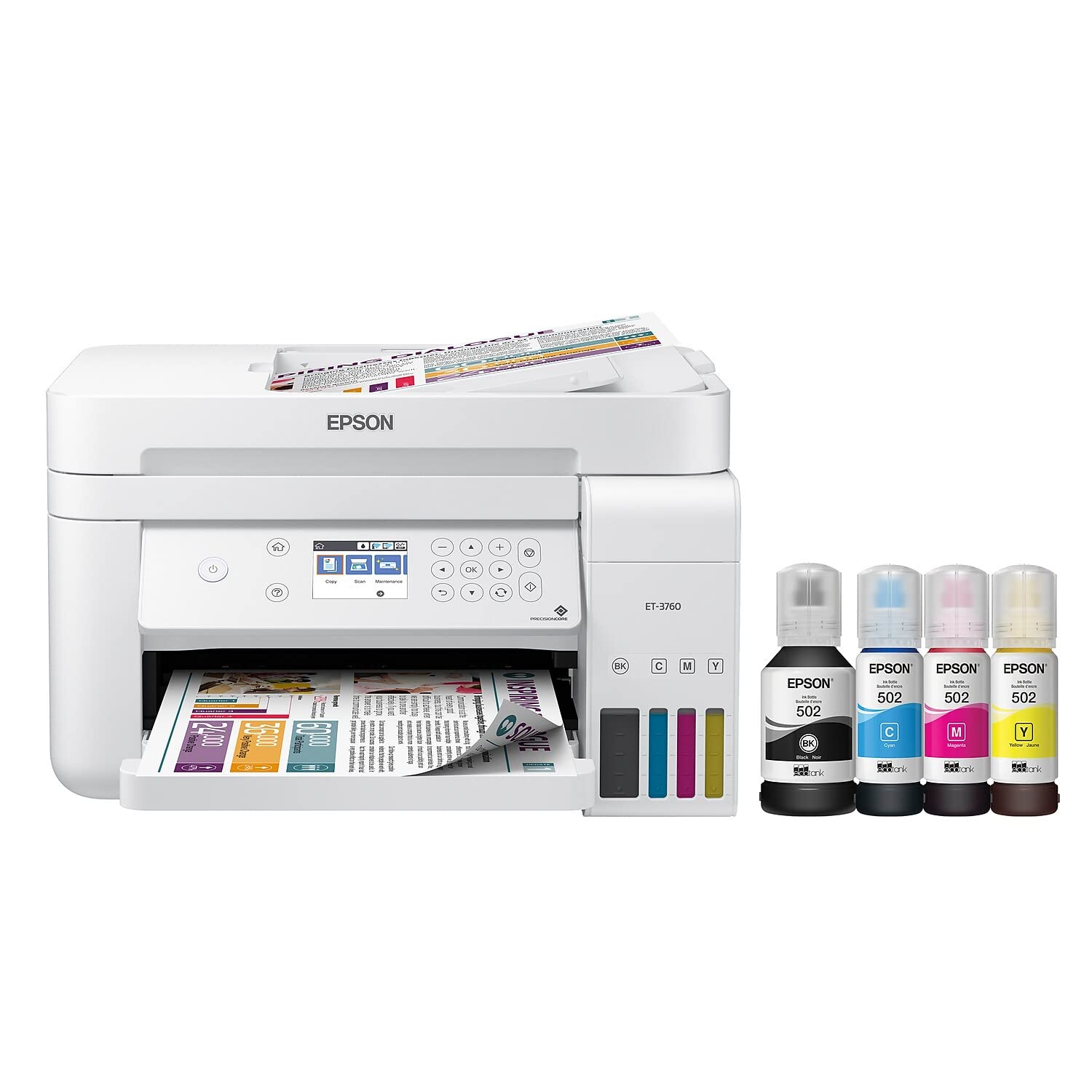
🖨️ Print smarter, save bigger, and stay effortlessly connected.
The Epson EcoTank ET-3760 is a wireless all-in-one inkjet printer designed for cost-conscious professionals who demand high-quality color and black-and-white prints. Featuring cartridge-free supersized ink tanks that last up to 2 years, it delivers up to 15 ppm black and 8 ppm color printing speeds with 4800 x 1200 dpi resolution. Equipped with PrecisionCore technology, automatic duplex printing, a 150-sheet tray, 30-sheet ADF, and versatile connectivity options including Wi-Fi, Ethernet, and voice activation, it combines eco-friendly efficiency with professional-grade performance.




| ASIN | B07NK8PM4D |
| Additional Printer Functions | All In One |
| B&W Pages per Minute | 15 ppm |
| Best Sellers Rank | #64,375 in Office Products ( See Top 100 in Office Products ) #70 in Ink Tank Printers |
| Brand | Epson |
| Built-In Media | EcoTank ET-3760 all-in-one, manual, CD-ROM for product setup, power cord, 1 bottle of 502 Black (127 mL) and 1 bottle each of 502 Cyan, Magenta, Yellow (70 mL)(3) |
| Color | White |
| Color Pages per Minute | 8 ppm |
| Compatible Devices | Smartphones |
| Connectivity Technology | Ethernet, Wi-Fi |
| Control Method | Voice |
| Controller Type | Android |
| Customer Reviews | 4.2 out of 5 stars 2,528 Reviews |
| Display Type | LCD |
| Dual-sided printing | Yes |
| Duplex | Automatic |
| EU Spare Part Availability Duration | 2 Years |
| Global Trade Identification Number | 00010343939950, 00010343949058 |
| Hardware Interface | Ethernet, USB |
| Ink Color | Black, Cyan, Magenta, Yellow |
| Item Dimensions D x W x H | 13.7"D x 14.8"W x 9.1"H |
| Item Type Name | Multifunction Printer |
| Item Weight | 0.26 Pounds |
| Manufacturer | Epson |
| Maximum Copy Resolution Black and White | 4800 x 1200 dpi |
| Maximum Copy Resolution Color | 4800 x 1200 dpi |
| Maximum Copy Speed Black and White | 15 ppm |
| Maximum Media Size | 8.5 x 14 inch |
| Maximum Print Resolution Black and White | 4800 x 1200 dpi |
| Maximum Sheet Capacity | 150 |
| Maximum print Resolution Color | 4800 x 1200 dpi |
| Model Name | EcoTank ET-3760 |
| Model Number | ET-3760 |
| Model Series | EcoTank |
| Number of Trays | 1 |
| Other Special Features of the Product | Auto Document Feeder, Voice-Activation, Zero Cartridge Waste |
| Paper Size | 3.5" x 5", 4" x 6", 5" x 7", 8" x 10",8.5" x 11", 8.5" x 14", A4, A6, half letter, executive, user definable |
| Print media | Glossy photo paper |
| Printer Connectivity Type | Ethernet, Wi-Fi |
| Printer Output Type | Color |
| Printer Type | Inkjet |
| Printing Technology | Inkjet |
| Processor Count | 1 |
| Resolution | 4800 x 1200 |
| Scanner Type | Sheetfed |
| Special Feature | Auto Document Feeder , Voice-Activation, Zero Cartridge Waste |
| Specific Uses For Product | Business |
| UPC | 010343939950 010343949058 |
| Unit Count | 1.0 Count |
| Warranty Description | 2-year limited warranty in the U.S. and Canada, 2nd year requires product registration |
| Warranty Type | limited |
J**O
Never buy ink cartridges again!
When I saw an ad for this printer I thought it had to be too good to be true! Although I loved the quality of the output on my HP printer, I really hated to be raped for those low-capacity ink cartridges over and over again. When my old printer finally broke down I purchased this one and I am so happy with it, I would have gladly tossed my old one in the trash even while it was still working. If you are used to purchasing standard ink cartridges, the economics of this device will boggle your mind. It does an excellent job with standard printed pages and color graphics. I have not yet tried to print photos on actual photo paper but when I printed out a few pictures for a kids project on standard copier paper the results were really quite good, at least as good as my old printer. Even though third-party ink is available for this printer at a lower price, it is so economical to use I will continue to buy the Epson ink. My only concern is whether the dot-matrix printhead will stay clean in the years ahead since it is not replaced every time you add ink. So far I have run about two reams of paper through this printer and it has performed like a champ, and I have barely noticed the ink level drop. Which is another nice feature. The ink tanks are translucent and visible from the front of the printer. You can see exactly how much ink you have in each of the tanks. I never really trusted that the software-driven ink monitor on my old printer was really giving me all the pages that the cartridge was capable of. Once that old OfficeJet printer said that a cartridge was ready to be replaced, you simply were NOT going to do any more printing until you replaced it. The 3760 that I purchased does not come with a touchscreen however the menu is still very easy to navigate using the arrow keys and the enter button and I personally don't think it's worth the extra expense just to be able to tap the screen instead of a separate button. This will be a matter of personal preference. It is reasonably fast and quiet although there are undoubtedly faster inkjet printers. Quite honestly, I have never understood why so much emphasis was placed on speed. If you are really doing that much printing that a few extra pages per minute are going to be a big deal, you probably should be getting a laser printer anyway. I highly recommend this printer to anyone who is currently shelling out exorbitant amounts of money for those stupid plastic print cartridges. UPDATE: After four months I still have not had any problems with clogged printheads and print quality remains good. I don't use the printer every day so this was a concern. I can barely tell that I've used any ink. . I did take one star off because of the document feeder. Let me state categorically that in my opinion, THE DOCUMENT FEEDER IS COMPLETELY WORTHLESS. The instructions say that you can't feed a folded or creased page. The reality is you cannot feed ANY pages through the document feeder. Not even one brand-new completely blank page will go through the document feeder. It jams every single time. Now, for me, this is not a big concern which is why I only took off one star. I very rarely have to copy or scan more than a couple of pages at a time. I would have purchased the printer even if it had no document feeder however in my opinion if a device has a certain feature, there should be a reasonable expectation that it's going to work. If having a functioning document feeder is important for you, I would strongly suggest that you look elsewhere. If this is a feature that you would rarely if ever use, I believe it still is a good choice. Update: I am increasing my rating to five stars. My biggest complaint about this printer was the document feeder. I have discovered that while it is extremely finicky, it is possible to get it to work. The most important thing is to get the paper feed width Adjustment said precisely. If there is even the slightest play from side to side, the documents tend to feed at an angle and jam. If it is too tight they will curl and jam. After a lot of tinkering, I finally got it adjusted perfectly and now the document feeder works about 90 to 95% of the time. The other reason for the upgrade is because of the ink usage. I have now owned this printer for 2 1/2 years and have printed almost 3500 pages. Only once did I notice some degradation in the printing and I performed a printhead cleaning cycle and now it's back to perfect. I am just now for the first time refilling the black ink. Don't do a lot of photo printing or extensive color printing so I still have not had to refill any of the colors. After years of spending a small fortune on cartridges for printers, this is undoubtedly the best, and in my mind to be only choice for most users.
C**Y
Great printer- many reviews discuss older versions or 2760
Contrary to many bad reviews, the set up was exceptionally easy compared to HP, older Epsons and Brother. All devices on network immediately found and worked on 3760. Color graphics quality is as good as any all in one- and we’ve had many. Also cartridge head alignment is easy and you’re automatically guided through it during setup. Paper choices are more variable than more expensive brother and hp models. This is perfect for home use or school use. With only one paper tray, it’s not ideal for business use. Or at least businesses with differing card stock and paper sizes, envelopes and most businesses would need full duplex scanning, which this doesn’t have- does have full duplex (double sided) printing though which is great for school use and home projects. We also have a business-oriented laser printer, and I’m considering using this instead . It’s a little slower, but I usually don’t have to print 20 color sheets per minutes, and I expect I’ll save a lot on in ink, enough to fully payback the cost in 3 - 4 months. I saw one review that complained that photo-quality copies aren’t as good as as dedicated photo printer. Well duh! Only a very slow photo-only home machine can do that or a $15k commercial photo printer used at major drug retailers can do that. Best value ever for theses uses! Only issue was that the on screen navigation is different than anything we’ve used before and causes a few minutes of confusion. It’s not a touch screen and it’s not “line driven.” One has to use arrows to highlight the choice in a faintly discernible red outline then choose with “OK” or a diamond shaped function key. It’s not always straightforward which to use, but as long as one Tries “OK” first, there’s no problem. If you choose “OK” when it wants the diamond for confirmation, nothing happens- bad or good.
C**R
VG Home Printer
I am re-writing my review for this Epson printer. I have been using my Epson ET-3760 all thru the Covid-19 period, or about a year. I recently had a photo print problem, but I will cover that in a minute. First of all, I was attracted by the cartridge-less ink feature. This is an incredible feature, as I recently added some ink after printing B&W and color for a year. Try that with cartridges. The Epson ink is not that expensive and adding ink is very simple. No mess. Thanks to Epson for that. I've had no problems with paper jamming; no problems with the automatic document feeder (ADF). The printer feels like a quality product. The info screen is a little small, but it is clearly readable. It is not a touch screen. When you change paper, say from document paper to photo, you have to make a reset on the screen. It is not intuitive, but fter doing this once or twice it is not difficult. Photo printing is slow, but this is not basically a photo printing machine. Photo color quality is quite good. Recently, my photos were printing with half the picture whited out. Online, I reached a "Contact" screen, and it lead me to a phone call. After the usual press 1, press 2, I was connected to a live voice. The tech was patient and walked me through a process of reinstalling drivers, which seemed to correct the problem. She stayed with me the whole process. I have not received better tech support from any other product team. The Epson ET-3760 works well for me and it is wireless. Hookup was a cinch, even for a manual typewriter guy like me. The features I like best are: it is wireless, it has automatic feed, it does not use cartridges, it is cheap on ink, and it is reliable.
E**R
Quality printing, great ink management, NOT A TOUCHSCREEN
Pros - Ink management is great. I used this both for my work-at-home device, for a lot of my schoolwork, and for my own home use (the occasional recipe or knitting pattern, scanning/copying old family photos, etc.) and it's been fantastic. With probably heavier-than-average use, I've only had to refill the ink once over the course of a year, and it's also oddly satisfying to just upend the refill bottles into the tank (and immensely cheaper than replacing the cartridges which also drain much, much faster!) Print quality is also good, and reasonably fast, even when going double sided. Neutrals - There is the occasional problem in making my devices communicate with it, usually in scanner mode. I think this is a factor of the fact that my personal laptop is a Mac and my work laptop is a PC. Occasionally, when printing from my cell phone, it will only print the top-level parts of a document/webpage and not the text itself. (On the upside, it does communicate with a cell phone, a Mac, and a PC!) Cons - My biggest gripe is with the screen. It's really so small (like 2 inches by three inches), which (especially if you're of the progressive lenses wearing generation, can make navigation difficult. Compounding this issue is that it's NOT a touch-screen, instead you have to use a set of buttons directly to the right of the screen, and it's not intuitive at all. Overall, I'm willing to sacrifice the less-than-stellar user interface for the fantastic ink management and the quality (and double-sided) printing!
@**P
Keep Shopping Around
Pros Filling the tanks was easy and mess-free. Some users said this was a messy process and I don’t see how. It was very simple. You can set this up to print via wi-fi, network cable, or USB, which is very convenient. Two-sided printing worked nice, and the alignment was spot-on. Setup was user-friendly. If you have been to an eye exam, you’ll be able to calibrate the print heads. It’ll print out multiple images and you have to choose which one looks best and hit next. There are five pages total in the process. Unfortunately, it did not stay aligned very long. Three pages later, there was a noticeable shift in vertical lines. Cons Software is cumbersome. After downloading four different software packages, Epson was still recommending that I download a couple more. Then, you have to register for each one and give them all your personal information. If you want to print wirelessly, you’ll need to download another software package and set up an account. The software should all be inside of one package (program), and wi-fi printing should not require registration. I sent a 5-page scan job to my PC and it took over eight minutes to process. Also, it only recognized four pages even though page five was already 2/3rds the way through the auto doc feeder. The multi-page auto doc feeder for scanning was the number one reason I purchased this printer, and it didn’t work. The print quality was below average. I expected more from a $400 printer. Look at the closeup of the printer test page I included with this review. Black words on white paper and there are blots and splashes of color everywhere. It is an inkjet, so I wasn’t expecting perfection, but I had a $30 inkjet printer that printed much better than this printer and that $30 printer would send a scan to my computer almost immediately. Borderless printing does not allow you to print in 2-sided, multi-page, or color (the options are all greyed out). It also forces you to print in standard quality, which is really bad. Conclusion This would be a good printer if they combined the software packages into one and fixed the auto doc feeder. Still, it wouldn’t be worth more than $250 in my mind, due to the poor print quality. Ultimately, I ended up sending this printer back because it did not work. The printer is extremely slow, especially when scanning, and the print quality is below average. They list many features, but most of them cannot be used together. The biggest issue was that the auto doc feeder did not function correctly. I saw another review that mentioned this, but I figured it was just a fluke. Apparently, it wasn't. Keep shopping around. This one isn't worth it.
J**N
A Wonderful Printer
I waited for years to buy a color printer and I'm glad I did. The Epson ET-3760 is a very intelligent printer and equally well designed. I bought the slightly more expensive model so I would have a paper tray. My initial impressions after having only used it for one day are: 1) the setup was simple. Loading ink to the wells is an ingenious design. The tubes of ink are placed in their respective wells upside down and automatically fill to the proper level. The instructions warned about spillage, but one would have to work hard at screwing this up. 2) The printhead adjustment is easy. It includes 4 or 5 printings and review which was somewhat like going to the eye doctor. 3) The integration with my wi-fi was straightforward and clear. The printer recognizes your network and you only have to enter your network password. My printer was then connected and my various devices around the house were able to use it. 4) For me, the print quality is excellent. For color, I print mostly recipes and metro maps and the resolution for both is crisp and clean. Bottom line: The printer performed exactly as I was expecting and I look forward to many years of usage. I would highly recommend it.
P**M
2nd ET-3760 - first one lasted over 6 years! Winner!
This is the 2nd ET-3760 we've had and we LOVE it!! The first one lasted over 6 years and was a workhorse! It does everything it claims to do and more. It's super easy to set up and the wireless connectivity is perfect! You CAN'T go wrong with this Epson model!
J**A
Worst Top Feed Scanner
Purchased this printer in June of 2020. Thought I would give it a year to be sure I had the chance to use it a while before I decided to write my review. The print quality is ok. If you are looking for image quality and printing photos, this is probably not the printer for you. But when I purchased this I was not expecting pro image quality so I will simply leave that part alone. What I mentioned in the title is what I want to share with anyone willing to read this. I have never been able to scan using the top scanner. Not one successful feed. The first page of 10 pages would get stuck half way in. I tried with 5 pages and got the same result. I ended up getting a single page ALMOST all the way through but alas that jammed as well. If you are looking for an ALL in ONE printer. This is not it. Unless of course you don't mind scanning one page at a time on the flatbed scanner.
Trustpilot
1 month ago
2 weeks ago