
DOWNLOAD THE APP


Customer Services
Copyright © 2025 Desertcart Holdings Limited
DOWNLOAD THE APP
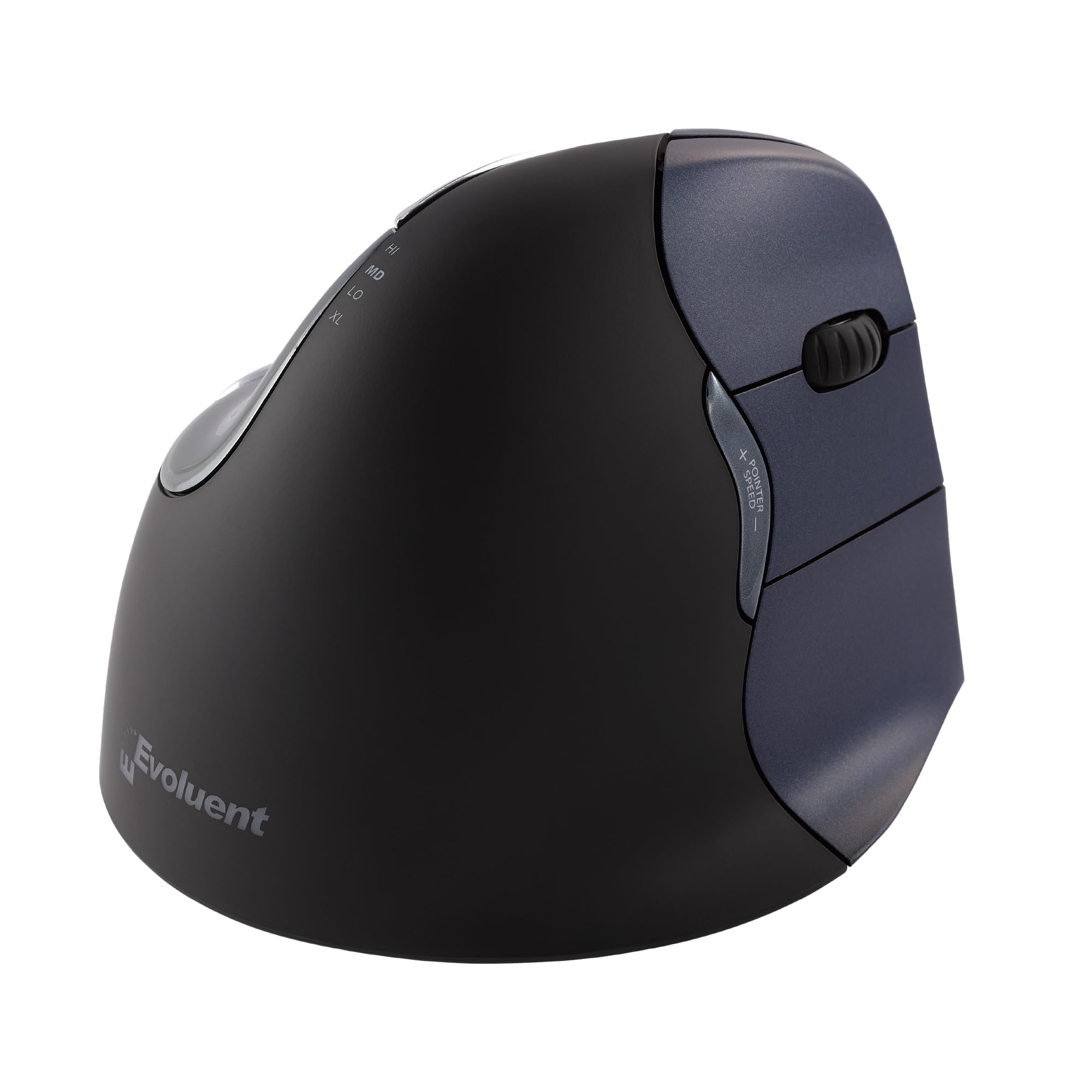
🖐️ Elevate your workflow with the mouse that puts comfort and control first!
The Evoluent VM4RW Vertical Mouse is a wireless, right-handed ergonomic mouse designed to reduce wrist strain by supporting a natural handshake grip. Featuring 6 customizable buttons, 4 adjustable pointer speeds, and a precision optical sensor, it offers superior comfort and productivity. Backed by over 30 years of ergonomic innovation, this mouse combines advanced functionality with wireless convenience and a sculpted design that prevents finger fatigue, making it a top choice for professionals seeking health-conscious tech.


| ASIN | B006P2594Y |
| Additional Features | Ergonomic Design |
| Antenna Location | Indoor |
| Are Batteries Included | No |
| Are Batteries Required | Yes |
| Battery Average Life | 3 months |
| Best Sellers Rank | #374 in Computer Mice |
| Brand | Evoluent |
| Button Quantity | 6 |
| Color | Metallic Blue & Black - Wireless |
| Compatible Devices | Personal Computer |
| Connectivity Technology | USB Wireless |
| Customer Reviews | 4.3 out of 5 stars 2,383 Reviews |
| Enclosure Material | Plastic |
| Finish | Glossy |
| Global Trade Identification Number | 00172302698459, 00852153014416 |
| Hand Orientation | Right |
| Hardware Platform | PC, Mac, Linux |
| Item Dimensions L x W | 0.04"L x 0.04"W |
| Item Type Name | Gray Star TRIBE DC Comic Catwoman USB Flash Memory Drive DC comics Cat Woman FD031404 |
| Item Weight | 7.2 ounces |
| Manufacturer | Evoluent |
| Model Name | Evoluent Vertical Mouse 4 Right Hand USB Wireless |
| Model Number | VM4RW |
| Mouse Maximum Sensitivity | 2600 Dots per Inch |
| Movement Detection | Optical |
| Movement Detection Technology | Optical |
| Number of Batteries | 2 AAA batteries required. |
| Number of Buttons | 6 |
| Operating System | Linux |
| Power Source | AA battery |
| Range | 5.0 meters |
| Special Feature | Ergonomic Design |
| Style Name | Right Hand |
| UPC | 172302698459 803982895967 807320188254 852153014416 132017583372 852153010661 168141474217 851905121662 163120778263 887611945285 887611929179 |
| Unit Count | 1.0 Count |
| Warranty Description | manufacture warranty |
M**®
Not at all what I expected, actually better!
I'm pretty amazed by this mouse. It's not at all what I had pictured it would be. I assumed it would be big and bulky, but it's not. At first, I thought they had sent me the small version by mistake. I started getting pains in my hand and wrist both working and gaming. This mouse was so comfortable right out of the box and I have yet to notice any pain (except switching back to my keyboard). It didn't take long to get use to the feel of it. The one drawback is that now my hand seems to rest completely on my pisiform bone. I'm just used to having the mouse closer to me. Guess I need to learn to rest my arm on the desk too. I've been using a Logitech Performance MX mouse for years, so I can only compare this Evoluent to it. It's lighter than my Logitech and easier to move around. The Logitech seems a lot heavier. The Evoluent is actually smaller in length than the Performance MX by almost an inch. If you stacked 2 MX mice on top of one another, that's about how high the Evoluent sits. But, your hand sits almost vertical. For me, it's the perfect size of my hand and fingers. I think this is a very good looking mouse. The grip has a slight rubberized texture to it and the dark blue on the click buttons is very nice. The mouse clicks are actually more sensitive than my Performance MX. I also love the third button. I have mine programmed to right click on the 2nd button and show desktop on the 3rd (it's pre-programmed to right click on that 3rd button). At first I did squeeze that 3rd button a lot by accident, but I'm getting used to not hitting it. You could just disable it, if it bugs you. I only had one hitch with the software. I use Emsisoft Malware & Online Armor. When I tried to open the Evoluent control panel, Online Armor would block it and freeze my system (which it never does). I had to reboot and setup Online Armor to ignore the Evoluent folder, before I could use the software. So just FYI, if you use Emsisoft. Was it worth $109? To me yes. I remember when I bought my Logitech Performance MX new, it was $99. This isn't a cheaply made mouse and it helps so much with my hand and wrist pain. I'm happy with it.
B**K
Very Comfortable
Best mouse that I have ever had. It is very comfortable to use and my hand and arm does not hurt after using it all day.
J**N
Great and comfortable mouse!
This mouse is so comfortable and ergonomic because your hand sits relaxed, not turned. I have been using it for many years and it is still as comfortable and I have not had any issues with its performance! This one connects via Bluetooth, very easily. You can adjust the scrolling speed and the click quality is nice because you don’t have to press hard for it to click and the sound is not too loud. It’s overall a pleasantly comfortable and fantastic mouse!
D**F
You get what you pay for.
I have gotten pretty profound lateral epicondylitis from a year of graphics and animation work, and healing is slow. I bought this mouse because it was the most consistently rated. I have to say that, if I watch my arm position, etc., I can work a good long day with this mouse and have no ill effects. I can't say that for any of the other mouses I have, including two, good rollerball mice. The touch is great, the fit is great. It responds very well. I love that I can program any of the multiple functions to do whatever I want (long list). Cons: sometimes my computer forgets (7-year-old MacBook Pro) that it has this mouse (wireless) and sometimes the mouse works but the buttons don't. In either case, I pull the USB unit and put it back in. Usually fixes it right there. Many don't like the height of the mouse for housekeeping reasons (I can't shut my tray with the mouse on it), but that may be because it's a vertical mouse. :) I give it 4 stars for it's cutting out on occasion and for the fact that I can't swap it over to my left hand for a change of pace. This is not a complaint, however. It's a quality unit and I would buy one again. I've used many configurations of mouse in my time and this is the finest quality in both feel and responsiveness I've ever owned.
S**I
Wrist Pain Gone!
I just bought a second one of these for my home after my employer got me the first one about a year ago for my office use. I'm a software developer and naturally the majority of my life is spent with computers. I was starting to have a lot of pain in my wrist area last year, when I took an ergonomic assessment and found out about this mouse. I have a pretty big hand, so most other ergonomic mice would not fit properly in my hand and I had to hold my fingers in a cramped position all the time. Furthermore we all know the natural posture of human body is not to twist your wrist to have your palm facing the desk. With this mouse you will maintain the natural posture of your wrist at all time. and your fingers could remain relaxed on the mouse, and it will provide a pretty good support for them. There are various sizes available so make sure you get the one that fits your hand the best. Wireless works flawlessly. Battery life is pretty good. It is a bit heavy, and since it fits completely differently in your hand than any other mouse, it will take some getting used to. If you often have visitors who would want to work with your computer in some way, they will get really confused with the mouse, so I have ended up having two mice connected to my machine. One for myself, and one for all the other people who don't know how to handle this mouse. On the bright side, you have something "cool" to show off ;-) Immediately after I started using this mouse, my wrist pain went away, and after having used it for a year I couldn't be happier with it. I will definitely recommend this mouse to whoever has long hours of interaction with computers.
E**A
HORRIBLE
I have purchased several over the years. First the mouse drifts all over the place as if you are fighting with the mouse, or someone else is trying to control your mouse. The technology is dated. If you turn the mouse to the bottom side there are several design flaws. You will see 4 "pads" on the bottom, 2 larger on front & back and 2 very small on the sides. Well, if you think about a bicycle with training wheels, it's the same concept, so if you try to move left or right or kitty corner, it's like tipping over. Very straining on the arms. AND over time the pads wear. So, if you imagine your bottom shoes where it wears on one side, guess what... the same idea. Again it makes it very straining on your hands.... like tires wearing out. It's only designed to go forwards and backwards. Second, the mouse drive is so outdated. It has not been updated since 2015 and uses your system application, which it just again fights with each other. Third, Evoluent appears to have minimized cost in material. As mentioned, I have purchased several and the size of the mouse is smaller than in the past. So small the it is at a 90 degree slant and puts strain on your bottom side hand and two smaller fingers. The mouse again drifts so widely and you have to literally move it 5 inches to span your screen. I want minimal movement. NOW, let's talk about the pointer! Ugghhh, the pointer fights with you, it takes forever to "snap" or locate where you are at and drifts all over the place other than where you want it to go..., it again hurts the hand. Tracking is is horrible. WIth technology today, I want something that meets the fast paced environment, not a scooter. This used to be a top -rated mouse, just another pain on your ergonomics. ONE last note. BIGGEST upset... every time I start my computer, the mouse is is not recognized. I have to take out the adapter from the USB port out and re-attach. REALLY? I do not want to wear my USB port out for a dysfunctional operating system. Depending how you connect the USB port to mouse back in, it appears the mouse control ability degrades more than the above mentioned.
C**R
Excellent thus far, small improvements
Nearly everything I have to say is positive, such as an instant feeling of relief in my forearm and wrist. Takes 20 minutes to get used to, then you're fine. It does keep me from "lazy searching" on my couch which is generally good. The only bad thing I have to say is the thumb rest should be a different material. The chrome plastic used is a bit slick and I would suggest something less smooth as the handshake position naturally doesn't have as much control as the twisted position. For this reason alone, I sometimes revert back to using one or two other mice if in a hurry. Granted I may not be fully adjusted, but I do believe this is a problem with the material. I have very slender yet long fingers ( I'm a tall, slender woman) and my thumb is just not quite big enough for the space provided. I still think this mouse is worth every penny and that is saying something as I'm an industrial design graduate student in need of a mouse with a high level of precision and sensitivity. My carpal tunnel flairs up within thirty minutes using a standard mouse, but this mouse keeps it at bay for at least 2 hours. I have yet to try it for longer because I still make myself take breaks. Keep in mind that this mouse does not change the angle to the surface you are sliding across, so a wedge mouse pad or tilting desk might be a nice combo.
A**A
It really works incredibly well!!!
This is the only vertical mouse that I've tried that actually works, and I have tried at least 4 others. What seems to be special about this one is the degree of vertical slope on the mouse. Every other one I've tried is not vertical enough. It seems to be a difference if only a degree or two, but this mouse nails it. This is the second one I've bought in 4 years vecause I kept dropping the first one. And the first one still works , I've just had to tape it together. Honestly if you're suffering from repetitive stress injuries due to the use of a mouse, you really need to get this one.
Trustpilot
3 weeks ago
2 months ago