![ClearClick Video to Digital Converter 2.0 (Second Generation) - Record Video from VCR's, VHS Tapes, AV, RCA, Hi8, Camcorder, DVD, Gaming Systems [Requires Working VCR/Camcorder & Tapes]](https://m.media-amazon.com/images/I/91c1O5fWJfL._AC_SL3840_.jpg)


Buy anything from 5,000+ international stores. One checkout price. No surprise fees. Join 2M+ shoppers on Desertcart.
Desertcart purchases this item on your behalf and handles shipping, customs, and support to Sri Lanka.
๐๏ธ Preserve your past, stream your memoriesโdigitize with ease!
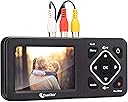
The ClearClick Video to Digital Converter 2.0 (Second Generation) is a plug-and-play device that converts analog video sources like VHS, VCR, Hi8, camcorders, and retro gaming systems into digital MP4 files. Featuring SD resolution recording (640x480 or 720x480), a 3.5" preview screen, pause/resume, and auto-stop functions, it records directly to USB flash drives or SD cards (up to 512GB). Designed for ease and durability, it requires no computer or software and comes with a 1-year warranty and US-based tech support.


| ASIN | B07V9JNRZY |
| Best Sellers Rank | #21 in Video Converters |
| Brand | ClearClick |
| Brand Name | ClearClick |
| Compatible Devices | Camcorder with 3-RCA or S-Video, VCR with 3-RCA or S-Video |
| Customer Reviews | 4.5 out of 5 stars 5,402 Reviews |
| Included Components | 3-RCA Cable, Power Adapter, User's Manual, Video2Digital Converter 2.0 |
| Item Weight | 6 Ounces |
| Manufacturer | ClearClick |
| Material | Plastic |
| Material Type | Plastic |
| Model | Video2Digital Converter 2.0 (Second Gen) |
| Part Number | Video2Digital Converter 2 (Second Gen) |
| Smart Home Compatibility | Not Smart Home Compatible |
| UPC | 798578763372 |
| Unit Count | 1.0 Count |
| Warranty Description | Full 1-Year Warranty From ClearClick |
T**J
Amazing Little Device!!
Like many people in my age cohort, I have a collection of old videotapes on obsolete formats - About 52 Mini-DV tapes taken of my kids from birth to age 10 on my 1990's-era Sony camcorder, and about 16 old VHS tapes taken by me and other family members. I was considering sending off my tapes to be converted to digital format, but hesitated on sending my only copy of precious family memories out to a conversion service, and then paying the really high price for the conversion. As I looked at options, I originally thought about converting my tapes on my computer, but it involved buying and installing a video capture card, buying and learning the appropriate software, etc. Then I came across this device and read the reviews and took a chance on it. Best decision I ever made!!! This device is amazing - Incredibly simple to operate, and produces great quality video, especially for the price. You literally plug the RCA cables into the device, put in your memory stick, then press play on your old device, and record on this device, and you're on your way. Best of all, it doesn't tie up your computer to do all of this work, and lets you see the progress via the built-in screen (you can also listen as you record it if you want). I would generally just set a tape to record while I was at my computer doing other things, and found I could knock out this whole project in the matter of a few weeks, vs. the months I was expecting it to take. That said, here are a few things I learned along the way in working with this device: - The device has a way to stop recording after a certain period of time. My mini-DV tapes are all 90 minutes, so I though the 90-minute setting would work great. However, I found that my tapes ran 4 minutes longer on average than the 90 minute timer on the device, so you can't necessarily rely on that (not sure if the discrepancy came from the actual recorded length of my tapes, or from the device itself). - When you have finished recording, a counter shows your full recording time. I found that if I removed the memory stick while this was still displayed, I got a corrupted file message when I tried to transfer the file to my computer. However, if I waited until the recorded time counter disappeared (just takes a few additional seconds) this problem went away. - The device lets you record at 720x480 or 640x480 (the old 4:3 format that cameras used in order to be compatible with old tube-style TVs). I found that if I tried to use the higher-resolution 720x480, the image appeared stretched/widened. I found that the 640x480 worked great to record all of my older-format tapes. - I initially an into a bit of a hitch when I started to record my VHS tapes. I got a "signal not detected" message that I initially couldn't resolve. I tried using the included RCA cables, and then cycled through several of my own cables, and eventually found a set that (apparently) made this problem go away. - I believe the device's specs said that a 128 GB memory stick was the max, but I used a high-speed 256-GB stick from Samsung, and it worked fine. Anyway, I can't say enough great things about this device. I usually don't leave reviews on products, but I was so enthusiastic about this one that I just had to share. Hope this helps.
T**S
Very easy to use, and the results seem rock solid
I had a software-based video digitizer years ago, and my experience with that left me cold on the whole DIY approach to digitizing video. This product, however, sure changed my experiences. This thing is great. Setting it up is easy, figuring it out is easy (it even comes with a paper instruction manual and a QR code that leads to a handy 7 minute how-to-use video), and using it is easy. And the resultant video is tightly synced with the audio and has been easily playing back on a variety of platforms. They recommend a particular brand of USB memory (the product itself has zero memory, and that's what I did.
A**R
VHS to Digital, Easy!
I purchased this to convert my VHS tapes dating back to the 1970's to a digital format. I am 69 years old and was able to figure this out. I also took video from the oldest Sony camera ever and it worked. The instructions were easy to follow. I watched the company provided videos on their website and it made it much easier. Was able to save 50+ years of memories. Don't hesitate...Good product!
D**N
Good basic unit with some issues
I bought this because the adapters that connect directly to the computer sometimes do not work when Windows updates interfere with the feed. After familiarizing myself the unit is easy to use and produces reasonably good video files. I found the results were often a bit superior to video transfer devices and occasionally slightly inferior. Pluses: 1. Easy to set up and use. The buttons are actually quite responsive, so don't make my initial mistake of holding it down for a few seconds. 2. Good results. 3. Easy to transfer to a PC and use the video files. 4. The unit can be set to record for specific time periods. 5. It is supposed to sense when the video signal stops (Signal Loss detection) and shut off the recording. Minuses: 1. Sometimes the audio is out of synch with the video and I have to re-record it. If you use this for live video feeds that cannot be re-recorded you may want to consider something else. 2. The unit can be set to record for specific time periods. This works fine, but I wish there was more flexibility, either with several more selections or the ability to enter a custom time. If I have a source that's 61 minutes long I have to record 90 minutes. The longest setting is 150 minutes, so longer sources may just keep recording blank/unwanted video until you shut it off. 3. The unit is supposed to sense when the video signal stops, but it doesn't seem to work that well. 4. It is supposed to sense when the video signal stops (Signal Loss detection) and shut off the recording. This sometimes works. Fortunately it creates a series of video files that splice together just fine, so you just delete the empty ones. 5. When the power is unplugged the unit reverts to 1/1/2019. Not that important (to me), just an annoyance.
A**R
quality converter!!!
works as advertised, quality is great, simple to use!
J**Y
worth every penny and simplistic to use
I am an I.T. professinal and have been trying for years to capture my VHS tape to digital media.I have tries may USB devices by multiple companies and internal $800.00 capture cards with codec buiilt in. After several trys over many device across many years I always have the same or similar problems - Dropped frames during capture - dropped, corrupt or otherwise missing. This causes one or more problems depending on the device you are using. Some throw up color bars, some just stop capturing video but keep capturing audio thus putting the audio track and video track out of synch on the concluded capture and other similar issues. Mush of this is NOT any one devices fault but rather is result of the VHS tape format or the tape degrading over time. The results vary form device to device however depending on how each specific device handles such situations. Now for the GOOD NEWS - This device captures the video no matter what - missing or corrupt frames are recorded and mere blips or squiggles due to the degraded source material and the audio track is kept in synch with the video. In the end you still have some blips or squiggles in the capture where the source signal has degraded BUT the overall capture is intact and in sych and viewable. You need to learn that these blips can NOT be fixed as it is a cause of the aged tape and it original format of VHS etc. I have invested thousands in sophisticated technology devices that have not gotten the job done. This gadget gets it some as best as could be expected when dealing with inferior source materials that have substantially aged. I highly recommend it. When capturing later and or higher quality ANALOG source materials the device delivers a flawless capture. If your intent is to capture digital source a different device is needed. Also note neither will capture copy protected materials in violation of copyright laws. This is not intended to cheat copy written materials or to pirate such! For the intended purpose of capturing and digitizing analog personal materials I highly recommend this device and while more costly than other devices that claim to do the job this device actually gets the job done!!
J**E
A great memory saver, easy to use, a top-notch service department, I highly recommend
I had emailed ClearClick Support Department in December 2024 concerning this converter and my old Sharp Viewcam that we had purchased in the mid 90โs and have used ever since! I received an immediate reply stating that Video 2 Digital Converter would work for me but that I would need a splitter (the email showed the exact splitter required from Amazon). It only took me a year, but I finally ordered the converter and splitter on December 1, 2025. It was delivered 5 days later. I was a little uncertain how to hook everything up, So I sent another email to ClearClick Support Department with a little background information from 2024. Within 3 hours, I received a reply from the same individual from 2024 with detailed instructions as to how to hook everything up. I followed the instructions and PRESTO, I was converting and saving our memories. The unit is simple to use, ClearClick support is second to none. The quality of the digital output is amazing! I will convert as many memories as possible between now and Christmas Day. I will have a laptop setup on the kitchen island, and my family will be able to the view the past thanks to ClearClick and the Video 2 Digital Converter. I should add that I am 77 years old, my wife is 72. She was diagnosed with the early onset of dementia in 2017. I have shed many tears as I convert and save these memories. She will sit and watch the video as it is being converted, she says she knows the people and she smiles โ so that is great. Thanks, ClearClick for allowing me to save these memories.
J**.
GOOD LITTLE GADGET!! DOES THE JOB!
GOOD LITTLE GADGET!! DOES THE JOB! For the sake of this review, please keep in mind that I am not a connoisseur of audio or video signals! Personally, I canโt tell the difference between HD, hi-def, ect. I can tell basic differences in picture quality and sound if those differences are pretty big, but thatโs about the extent of my โexpertiseโ. With that said, letโs get to the actual review! Over the years, I have tried several different products and have had very little success and much frustration. To name a couple, I have tried โDazzleโ, as well as two different โRoxioโ pieces of hardware. Both gave me the same frustrationsโฆ they worked for a minute or two, but then I started getting a lot of picture static, as well as frames freezing and skipping! Also, after the โrecordingโ was finished, it would then lock up my computer for quite some time while is โsavedโ the transfer conversion. Sometimes it would even freeze my computer and I would have to reboot it. At that point, I would lose the 1.5 hr film I just tried to convert and save. Lastly, both of those programs would not allow me to save it directly as an mp4. I would have to save it as their file type, then convert it later. (or at least I didnโt know how to save it directly as an mp4 file type from those other products. My current project is converting about 30 old Hi-8 tapes of family birthdays/Christmasโs to digital for safe keeping and watching later. So far, I have completed about 15 of these so far without any problems since getting this converter. It has not disappointed and has worked as expected. There were a few glitches, as well as some pros and cons, but all in all, well worth the money. I will explain a little more further. 1) make sure you have the needed wires to connect your video source to this converter. It does come with RCA jack cables, but in my case, I'm using my old camcorder as the source to play the hi-8 tapes. My camcorder only has 2 output typesโฆ one is a 3.5mm a/v port, and the other is an โs-video slotโ. Just an fyi for those who might not know, the s-video cable will only transmit video, it does not transmit sound. (I did not know this until I read it in someone elseโs review ๏ ) 2) it seemed like a got a little bit better of a picture using an sd card to record on rather than on a usb drive. However, I then transferred it to a usb drive to save for later. I would recommend to get 2 sd cards.. that way while you are recording on 1 card, you can put the other card in your computer to work with the file. 3) the unit itself is nice and compact. It is about the size of a โlargerโ cell phone. It seems to be sturdy too. 4) with this device, it does not tie up your computer. As you are recording directly on the unit itself 5) it does save the recording in โreal timeโ as an MP4 file. Therefore, no need for the conversion or the save to take another 1.5 hours after you just got done playing the full tape into the unit. After you push โstopโ, your file is ready! **important note.. i read reviews where people were having โcorrupt fileโ error messages after trying to record/convert. After doing multiple experiments, I discovered that if you press โstopโ on your source device while you are still trying to record on this device, you will get a corrupt file every time. Itโs as if the loss of signal causes the file to error out. 6) this is very easy to use, right out of the box. Which is good, because the directions seem to be lacking. 7) Other reviewers were complaining that the โauto-stopโ function causes โdead spaceโ which then corrupts the file. On my version of the unit, I was able to turn off this โauto-stopโ function, therefore I have not had this issue. 8) Other reviewers stated they were having problems with the media card not โclickingโ into place, therefore not able to record on. I will say this was an issue at first until I looked a little closer. Normally when you try to insert an sd card, you push it till the pad of your finger touches the computer ect. At that point, the sd card typically clicks into place. However, with this unit, the card actually ends up being โinsideโ the unit after it clicks into place. Therefore, I have to use my fingernail to push it into and out of place. This is a bit annoying, but once I figured it out, no problems. I'm assuming this is for the safety of the card? 9) other reviewers stated they were getting โcorrupt fileโ error messages after converting. As I mentioned above, it is IMPORTANT that you stop recording BEFORE you press stop on your source device. The converter itself senses an input video signal and will not allow you to record until it does. Therefore, I'm assuming that when it stops sensing this signal, it stops recording but doesnโt finish the file out correctly. 10) this is the same for when you start recordingโฆ the unit will not allow you to start recording until it senses the input video signal from your camcorder, ect. This wasnโt too big of an issue, but I did occasionally miss a second or two of my original tape due to this lag in recording. 11) as far as the โqualityโ of the recording.. I wasnโt really able to notice a difference. Again, I do not have a trained eye eitherโฆ I will say this though.. Remember, you are recording from an old TAPE of some sort (aka, non digital)โฆ it is not of extremely high quality to begin with. 12) some reviews said to make sure you update the firmware once you get it. I was not able to figure out how to do this. However, it doesnโt seem to actually need an update. I donโt remember where I saw it, but I saw somewhere that stated if you ordered your unit after a certain date, then the unit is already updated. I know this was a pretty lengthy review, but I hope it helps yins make a good informed decision. Happy converting ๏
Y**.
INCREรBLE! รSTE ES EL PRODUCTO QUE BUSCAS!
En el pasado comprรฉ una "capturadora" de USB... Pero no funcionรณ como debรญa, aparte, necesitas tener un programa que capture bien (ya no existe casi ninguno, y los que hay son del aรฑo de la canica) asรญ que finalmente decidรญ comprar esta capturadora... Y MIS RESPETOS. Al principio me doliรณ el codo por el precio, pero vale completamente la pena! Ya he digitalizado varios VHS y VHS-C y puedo decir con toda seguridad que es la opciรณn que buscas. Es fรกcil de usar, en el instructivo te guรญan a un video de YouTube que te enseรฑa paso a paso como empezarla a usar. En cuestiรณn de 10 minutos ya sabes todo lo que tienes que saber y estรกs listo para empezar a capturar tus videos. Algo muy bueno es que aquรญ no requieres de una PC. Literalmente todo lo puedes trabajar en dรณnde estรฉ tu reproductor. Yo lo que hago es poner a digitalizar algรบn video en lo que trabajo en mi oficina. Es una maravilla, es un producto maso menos del tamaรฑo de un celular de los grandes. Si quieres digitalizar y no sabes la opciรณn correcta, crรฉeme que es esta. Aunque sea mucho mรกs caro que otras opciones, es una excelente opciรณn. Mis respetos para la marca.
C**M
No 16:9
This was quite an expensive experiment. For those who are not so tech savvy, don't want to spend time in front of a video editing program and have shot there videos in either 3:2 or 4:3 format I guess this is the easiest way to archive precious family memories. I have still my old Sony Digital8 camera which had allowed to shoot in 16:9 but this device only allows 3:2 or 4:3 capturing so the videos will be "squashed". Now you can manually change the aspect ratio in a video editing program or when you use VLC player on a PC you can change the aspect ratio for playing to 16:9, but that's all not the ideal solution after spending this money. I may go back to firewire before the tapes "die"...
S**S
Fantastic machine.
I transferred all 50 of my mini dv tapes to usb without a single problem. I am not very computer literate but all went very well. I had done a lot of research and I'm so happy I found this product. And no, I'm not an employee of the company!
L**.
Amazing product, amazing support.
I run a digitizing business and have many of ClearClicks products, including 3 of these. They work amazing, and if there is an issue of any sort - their support is quick to respond and resolve. I did have an issue with one of the units, they replaced it without issue. I will not purchase other products, they works great, they're reliable, and do a great job.
S**M
Easy to use
Easy to use and great for transfers. Did all of our VHS to digital. Quality is great and multiple inputs are useful.
Trustpilot
1 month ago
1 month ago