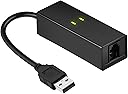
📠 Stay Connected, Stay Classic — The Ultimate USB Fax Modem for Modern Pros
The DriverGenius USB 2.0 Fax Modem (UM02) is a compact, plug-and-play external modem delivering up to 56Kbps dial-up internet and 14.4Kbps fax speeds. Compatible with Windows 10/8/7, MacOS Intel, and Linux, it supports a wide range of data and fax protocols (V.92, V.90, V.34, and more). Perfect for professionals who need reliable fax and dial-up access on demand, it comes with a 2-year warranty for dependable performance.


| ASIN | B00XW5QYWS |
| Best Sellers Rank | #443,641 in Electronics ( See Top 100 in Electronics ) #348 in Computer Networking Modems |
| Customer Reviews | 4.0 4.0 out of 5 stars (394) |
| Date First Available | October 11, 2016 |
| Is Discontinued By Manufacturer | No |
| Item Weight | 1.16 ounces |
| Item model number | UM02 |
| Manufacturer | Fly Kan Tech Co., Limited (H.K.) |
| Product Dimensions | 5.91 x 3.74 x 1.18 inches |
R**S
Great Fax Modem
My Windows 7 fax modem would not be function on Win 10. I do not frequently need access to a fax but it is one of those it is one of those things that when you need it you need it! I ordered this item which arrived promptly, plugged in the USB connector ans access to a phone line and Win 10 did a plug and play and I ws sending faxes in less time than it took less time than it took me to write this review. It worked perfectly.
W**T
Good product & brand
Just plug n play, it automatically install the driver. No need to install the disk driver. Good product & brand. It works fine with my windows 10. I have Ooma line and it worked great. I have faxed 10 pages so far and working like it should.
M**T
It worked, but not right out of the box
This item was easy to install. It was quickly recognized by my window running Windows 10. However, it did not operated. It was supplied with a disk full of drivers, but it wasn't readily apparent which files on the disk were needed or appropriate for my computer. After asking Windows to go out and search for drivers, twice, the item is now working as expected. I'm happy, but wish more specific written instructions had been provided.
R**Y
So Glad I Bought This
When I upgraded to Windows 11 a while back, my free fax software stopped working.I couldn't find a compatible free fax software. I figured I was doomed to pay a monthly fee for faxing software, which I rarely do. I occurred to me it might be my old external fax modem, so I took a chance and bought this. It is easy to install and now I can fax for free again!
K**R
Apparently the reviews for this item got mixed up with ...
Apparently the reviews for this item got mixed up with the one I needed, does not work with mac or windows 10!
D**E
Old school 56k modem.
Modem worked with no issues. Be aware that this will not fit in the smaller desktop cases without cutting the metal bracket that is screwed to the modem. It is made to fit into the larger ATX computer towers. I had to cut the metal part with a pair of tin snips so it would fit into the case.
S**O
Works on Windows 7 for caller id, IF...
Modems have changed over the years. Once upon a time you'd plug it in, send it a few "AT" commands, and it was good to go. I'm not sure when that changed, but nowadays the modems I get seem to have a "feature" of ignoring initial AT commands while they go check for carrier. Once they prove there isn't any, then they are willing to accept AT commands - like the all important AT VCID=1 command, that turns on caller id detection. Caller Id is why I buy these things, and why I replace them when they inevitably burn out. So the trick I use now is to query them every few seconds with an ATE0 command, and on getting the first "OK" back - takes a while - then I send the enable for caller id and I'm ready to go. This device works when used that way, on Windows 7, so it gets 3 stars. There's no reason why modems can't be designed to handle AT commands right off the bat, so it doesn't get 5. How good it is as a modem I don't know. If I could spend 20$ for a device that only detected ring, caller id, and could be commanded to hang up the line, and could survive lightning storms, I'd never buy a real modem again.
J**Y
Works without additional drivers on Rasberry PI 3
These were plug and play on my Raspberry PI 2 and 3. I had bought 3 of them, one failed after about 4 months of use, but customer support was great and they shipped me a replacement with no hassles. Overall I am happy with they were easy to get running on Raspberry PI
F**D
Modem vraiment pas cher, très sympa pour créer un point d'accès 56k maintenant que la plupart des FAI ne le proposent plus. Vous pouvez aussi envoyer et recevoir des fax, ainsi qu'accéder aux serveurs Minitels amateurs (oui, ça existe encore !). Par contre, il n'est à priori pas possible de l'utiliser pour téléphoner, ce n'est pas un modem vocal. Enfin bon, il existe aujourd'hui des solutions plus efficaces. Il fonctionne de Windows XP (nécessite de modifier le pilote) à Windows 10. Sur les Windows récents, laisser le pilote par défaut sous peine de provoquer des bugs (cela explique l'étoile en moins sur la facilité d'installation). Fonctionne aussi sur Linux et sur Mac OS à condition de ne pas dépasser la version Sierra. Bref, un bel appareil qui ne vous ruinera pas et vous permettra de faire un bond "utile" vers le passé.
G**S
Excellent device worked perfect and came on time. I was happy with the purchase. I want to add that this item was for a laptop of my wife's and having it so it was portable and easy to carry was a big plus. Now all she needs is a phone line and she can fax right off her laptop when e-mailing is not an option. I looked at many different devices prior to this purchase, mostly trying to use the Ethernet port, but in the end this was far the easiest and most cost effective. I recommend this product and the company that makes it, as both were good to work with.
O**R
Das Modem wird beim Anschluss am USB 2.0 Port eines Win10-Computers automatisch als „Conexant USB CX93010 ACF Modem“ installiert und von „Windows-Fax und -Scan < Extras < Faxeinstellungen“ erkannt und kann dort konfiguriert werden. Das mitgelieferte 96 cm lange RJ11-Kabel mit 2 Westernstecker und den 4 mittleren Kontakten belegt (6P4C) habe ich nicht verwenden können, sondern durch ein TAE-N Modularkable mit den beiden mittleren Kontakten belegt (6P2C) ersetzt. Von diesem Kabel habe ich den RJ11-Stecker mit dem Modem verbunden und den TAE-N-Stecker mit der TAE-N-Buchse eines TAE-Verteilers, der mit dem analogen TAE Anschluss eines Speedport-Routers verbunden ist und an dessen TAE-F-Buchse außerdem noch eine analoge Basis eines DECT-Schnurlostelefons hängt. Die auf diese Weise über eine analoge TAE-Buchse eines Speedport-Routers am IP-Hausanschluss angescchlossenen Geräte (analoges USB-Modem und analoges Telefon) funktionieren jedes für sich ohne Probleme, sie können aber nicht gleichzeitig betrieben werden. Da ich Faxe nur versende und der Empfang über die Fax-Nummer meines E-Mail-Kontos läuft, habe ich den Eintrag für den analogen TAE-Port im Einstellungsmenü des Speedport-Routers unter der Rubrik „Telefonie < Telefonbuchsen < Angeschlossenes Gerät“ als Telefon belassen, denn ich benutze die für diesen Anschluss zugeteilte Nummer hauptsächlich als Telefon. Daher kann ich über die Funktionsfähigkeit des Faxempfangs dieses Modems kein Urteil abgeben, sondern nur über den Versand, der völlig problemlos direkt aus dem zu versendenden Dokument über das Druckermenü abläuft.
M**O
Costruzione abbastanza solida con buoni materiali. Va collegato ad un pc via usb ed alla linea telefonica (nel mio caso all'hub fibra di TIM fisso, 100 mega). Su W10, Inserito lo spinotto USB sembrava non succedere nulla. Non si è aperta alcuna finestra di dialogo per l'installazione. Ho inserito il minicd a corredo ma non erano presenti driver per W10. Aprendo la finestra della gestione hardware tuttavia il modem risultava presente ed attivo. Quindi con scan e fax di Windows ho provato ad inviare un fax. Inserito il numero del destinatario (800 numero verde) ed allegato un file pdf ho provato ad inviare. Si è aperta una finestra di dialogo che chiedeva luogo e numero di telefono da cui si inviava il fax. Ho riempito i campi, dato OK ed il fax è immediatamente andato in trasmissione. Come rilevato in altre recensioni non si ascoltano i classici suoni di un fax in partenza ma dall'applicazione si seguono perfettamente le fasi dell'invio. Al termine, cliccando su fax inviati, si ha una ricevuta virtuale con il contenuto inviato. Insomma tutto semplice, senza necessità di configurazioni ostiche e molto rapido. Prodotto consigliato a chi non voglia avere l'ingombro di un fax a telefono o di una multifunzione fax.
J**N
Great bit of kit, hrd to get the old tech working with the modern pc's..Works with Windows 10, Great company to deal with, they sent me a different modem to try as I had some difficulty's with the first one..pls note driver is all ready installed for win 10, no need to run the disk..(pretty sure that's why I couldn't get the first one to work)
Trustpilot
1 month ago
5 days ago