Desertcart purchases this item on your behalf and handles shipping, customs, and support to Sri Lanka.
🔄 Keep your classic gear alive in a USB world!
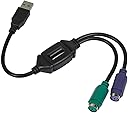
The Monoprice PS/2 Keyboard/Mouse to USB Converter Adapter is a compact, driver-free solution that lets professionals connect legacy PS/2 keyboards and mice to modern USB-only computers. Ideal for specialty devices and KVM extender setups, it preserves your investment in high-quality peripherals while ensuring seamless compatibility and instant plug-and-play functionality.

| ASIN | B00IACID2C |
| Best Sellers Rank | #751 in Computer Cable Adapters #5,415 in Computer Cables & Interconnects #9,059 in Televisions & Video Products |
| Brand | Monoprice |
| Built-In Media | USB Converter Adapter |
| Color | Black |
| Compatible Devices | any USB equipped PC |
| Connector Type | USB Type A |
| Customer Reviews | 4.6 out of 5 stars 3,348 Reviews |
| Finish | Black |
| Global Trade Identification Number | 00757901808647 |
| Item Dimensions | 4.8 x 7.1 x 0.7 inches |
| Item Type Name | Converter Adapter |
| Item Weight | 2.24 ounces |
| Item dimensions L x W x H | 4.8 x 7.1 x 0.7 inches |
| Manufacturer | Monoprice |
| Mfr Part Number | 110934 |
| Model Number | 110934 |
| Number of Items | 1 |
| Number of Ports | 2 |
| Package Quantity | 1 |
| Power Plug Type | No Plug |
| Specific Uses For Product | computer peripherals, KVM extenders |
| UPC | 701904057731 810689069478 757901808647 |
| Unit Count | 1 Count |
| Warranty Description | 1 Year |
G**R
Great PS2 to USB Adapter.
This adapter works as advertised. Connect the purple plug on the adapter to the purple cable on a PS2 keyboard. Plug in the adapter to a USB port. PS@ keyboard now works - Yea!!! I am using it on Win 10 Pro. It didn't work on a rear USB port. It's probably a setup problem in my computer.
U**D
Economical way to preserve investment in favorite older PS/2 keyboards and mice like Kinesis Classic
Pros - Economical - Works to adapt older PS/2 style round plug keyboards and mice to modern USB computers I have an older Kinesis Ergo Classic keyboard that is around 20 years old and has the older PS/2 style round keyboard connector. I hadn't used it in years since those PS/2 ports went away and switched to USB. I had actually purchased a newer Kinesis USB keyboard to use with newer computers because I didn't realize that these PS/2 to USB adapters exist. Once I bought one and tried it, I was able to use the 20-year-old keyboard again with all my current USB computers. It's been working well on all Mac computers that I've tried it on. No drivers are needed. The Mac just sees it as a standard USB keyboard. And Monoprice makes great economical cables and adapters that I've used in the past with no reliability problems. I highly recommend this PS/2 to USB cable adapter to anyone who loves their old PS/2 keyboards or pointer devices and wants to keep using them!
M**T
WORKS with an RT9470 Multimedia Keyboard.
Plugged my RT9470 Microsoft Ergonomic Keyboard in to this adapter and then into a USB port. All functions seem to work, at least the ones I use the most. Other adapters didn't seem to work. Very Happy with this.
B**E
Works with Windows 10 Pro - Random Keypresses?
Update: After a week of daily use I've noticed, very infrequently, that sometimes random keypresses and repeated/multiple keypresses of the same key can occur with this adapter. It's happened three times in 7 days. After looking over reviews, it seems this is a known issue. It's not enough to deter me from using it, but for gaming and order entry (or other highly accurate keyboard needs) you might want to look into a true USB keyboard. Deducting one star for this erratic behavior. I'm typing this review on a Windows 10 Pro PC with a HP KB-1156 Keyboard running through the Monoprice PS/2 adapter. Given the negative reviews, I was skeptical it would work... but I took a chance and I'm happy I did. Details on how I got it to work (the first time) are below Pros: - Takes a single USB slot for both PS/2 Keyboard & Mouse --> You can plug in just a keyboard, just a mouse, or both at once - OS Compatible (listed on package) with all versions of Windows from Windows 98/SE to Windows 7, Mac OS9 & OSX, and Linux - Works with Windows 10 (at least the Pro version) - Inexpensive! Cons: - The only con I have is it didn't have 2 day shipping... but at this price and functionality, it's worth it. Mine arrive in about a week HOW TO INSTALL ON WINDOWS 10 (Probably why you are still reading this!) Note: This most likely works on all versions of Windows Bottom Line: You have to let Windows fully detect the device BEFORE you connect your mouse and keyboard. If you initally try to attach the converter with a keyboard and/or mouse it has a high probablility of failing to detect. 1.) Boot Windows 10 fully 2.) Do NOT connect your keyboard or mouse to the adapter yet 3.) Plug the adapter into a free USB slot, Windows 10 will detect and install the device 4.) Once it's installed (takes a few minutes), connect the keyboard and/or mouse and it should work perfectly This will get daily use (from November 2018) on. If it has any issues in the coming months/years, I will update the review accordingly. For now, it's a solid 5 star product. If this review helped you, please give it a thumbs up so it can help others!
V**K
Yay! My 30yo keyboard is back to life
Received an obviously used adapter, but it works! So no complaints. Finally my 30yo IBM keyboard is happily clacking again.
S**Y
Works great!
This is a great way to use an old keyboard on a modern computer. Works on Mac, Windows, Linux. It would be nice for it to be in a smaller form factor, but that's just a nitpick. I've had it for 3 years using it occasionally, but continuously for 6 months. I am ordering a second one to replace the first as it started becoming flaky such that the frequency of brief disconnects or stuck keys has increased, so overall not bad. Hoping the next one lasts longer. Update: No improvement with the new one. I'm also using this on a KVM, which is another variable in the equation.
E**R
Plug and play. It does what it promises!
My new company is a Windows shop. I needed a keyboard to plug into the new laptop they gave me, because life is too short to argue with tiny keypads. I found an old Microsoft keyboard that I had liked... from at least 10 years ago. Actually, I think it was the one that plugged into my OS/3 system. Needless to say, the old connector doesn't work with a current USB port. I tried a few other keyboards (thanks, Amazon Vine!) but they weren't comfortable. I decided it was worth the $8 expense to use a comfortable old keyboard -- and I'm glad I did. There's not much to say here. The old connector plugs into one end of the wire, and the other plugs into a USB port. Ta da! It's not exciting, but honestly I don't want excitement from these things.
S**Z
Perfect gadget - Exactly what I needed!
I was looking for an adapter in order to use my PS2 mouse with my USB laptop. A while ago, I bought a single PS2 to USB small adapter from e-bay and it turned out to be so useless. It didn't work at all. Granted, it came on an improvised plastic wrap package. My guess is that it might have been used and the owner wanted to be rid of it and I was the fool that fell for it. Recently I saw this one that is actually a cable, which includes both the PS2 mouse and keyboard adapters, and decided to order it. I am pleased to announce it works! The item comes in its original package and is brand new. I am happy that I am able to use my optical mouse again with this adapter. It is a must have! If you are looking for a gadget that allows you to extend the life of your still-working obsolete items, you really would not want to miss out on this. I recommend it. I'm a happy camper!
D**N
Working
Good product 👍🏻
A**.
Funciona muy bien
Llegó a tiempo y en buen estado, en las ultimas semanas no ha dado proble alguno y me permitio dar uso de nuevo a mi viejo teclado
D**Y
This one actually works!!
I have an IBM PS2 keyboard, 1984 model. I have tried 3 other adapters from Best Buy, a drug store, and even my computer tech, none of them would recognize the keyboard, but this one does, and all the keys work. A big five thumbs up.
A**.
It's ok but
Its ok but it doesn't have the appropriate scancode for the scroll lock key
R**E
Works fine for basic keyboard and mouse use
Works fine for basic keyboard and mouse use. Don't expect to get full media control functionality (if your keyboard supports it) from your keyboard though.
Trustpilot
1 day ago
2 weeks ago