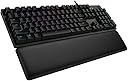
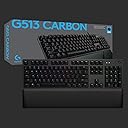
🎮 Elevate your game with precision, style, and comfort — the G513 Carbon is your ultimate keyboard upgrade!
The Logitech G513 Carbon LIGHTSYNC RGB Mechanical Gaming Keyboard combines advanced GX Brown tactile switches with customizable per-key RGB lighting across 16.8 million colors. Built with a durable aircraft-grade aluminum chassis and featuring a memory foam wrist rest, it delivers premium comfort and performance. Additional perks include a USB pass-through port and dedicated media controls, making it a top-tier choice for gamers and professionals seeking both style and substance.


| ASIN | B07QRGGCGP |
| Additional Features | Customizable per-key RGB LED backlighting |
| Antenna Location | Gaming |
| Best Sellers Rank | #56,522 in Video Games ( See Top 100 in Video Games ) #2,640 in PC Gaming Keyboards |
| Brand | Logitech G |
| Built-In Media | Keyboard |
| Button Quantity | 16 |
| Color | Carbon |
| Compatible Devices | PC |
| Connectivity Technology | Wired |
| Customer Reviews | 4.5 out of 5 stars 1,850 Reviews |
| Enclosure Material | Aluminum |
| Global Trade Identification Number | 00097855151681 |
| Hand Orientation | Ambidextrous |
| Item Dimensions L x W x H | 18.31"L x 7.28"W x 2.36"H |
| Item Height | 7.28 inches |
| Item Type Name | Gaming Keyboard |
| Item Weight | 4.2 Pounds |
| Keyboard Backlighting Color Support | RGB |
| Keyboard Description | Gaming |
| Keyboard Layout | QWERTY |
| Language | English |
| Manufacturer | Logitech |
| Model Name | G513 Carbon RGB Mechanical Gaming Keyboard, GX Brown |
| Model Number | 920-009321 |
| Number of Keys | 104 |
| Power Source | Corded Electric |
| Recommended Uses For Product | Gaming |
| Special Feature | Customizable per-key RGB LED backlighting |
| Style Name | Brown Tactile |
| Switch Type | Tactile |
| Theme | gaming |
| Total USB 2.0 Ports | 1 |
| UPC | 097855151681 |
| Unit Count | 1.0 Count |
| Warranty Description | 2 Years Limited Hardware Warranty |
R**E
Best performing mass-production mechanical keyboard I've owned. Linear switches and LEDs are top notch.
I pre-ordered this before launch and have been using mine since launch. It has been a wonderful month or so with the board. The Romer-G linear switches are incredible and I prefer them to the Cherry MX reds they are typically compared to. These are some of the quietest switches I've come across and offer exactly the feel I have been after. They have virtually no wobble, super smooth feel, faster and shorter activation/travel compared to MX reds. Superior to my keyboards with reds by far. The LEDs are exactly what I've been waiting for. I cannot stand the other LED mechanical keys that bleed light under the caps. The control software is powerful and is capable of far more than I need with custom profiles and lighting patterns. The small footprint and brushed metal chassis look great. This is a stylish minimalist keyboard. I'd love to see the same thing released without the number pad, as I know many gamers prefer not to have one. The wrist pad is extremely comfy and stays put. So glad it isn't attached. For those who are frustrated with the sound the space bar makes, this is super common with many of the mechanical keyboards today and is not isolated to this board or switch. I do believe the metallic ringing from this model is made more pronounced due to the metal chassis under the keys. The sound is coming from the stabilizer, which I believe is still a chery mx stabilizer. There are a few very simple solutions. A lot of people put cotton or small foam piece under the 2 stabilizers of the space bar. While this does eliminate some of the ringing and rattle from the bar, I find it stiffens things up too much for my taste. I've done the following, which is common throughout the custom mechanical keyboard community. I put some dialectic grease on the stabilizer bar at the bend and some under the stabilizers themselves. You can do this without taking the board apart and just pulling the space bar cap. Once done, the feel is still fast and smooth, but the rattle/ringing is nearly gone and sounds like the other keys without stabs. Speaking of caps...this is one real gripe, but one I'm sure will change. Right now there aren't really any custom key cap offerings since the romer-g is a proprietary design. So unlike the ubiquitous cherry mx, one cannot customize caps to their heart's content. This is not a deal breaker for me as I like the stock caps as they are, but it is worth mentioning. I do expect this to change as companies work to make compatible caps. Overall this is an excellent keyboard with my now favorite linear switch and LED system. It's perfect in gaming and my typing is as fast as ever, even with a linear switch.
D**S
Amazing and Comfortable!!!
I love this Keyboard. I got the red Switch version. The keyboard is a full size board and looks amazing. Super high quality materials and has a built in USB pass through on the top right rear side. The cable is braided, thick, and high quality. The lighting is amazing and each key is individually lit. You can of course pick any color of combinations you like as well as change the lighting patterns and intensity. The switches themselves feel fantastic and still make a very satisfying but quiet noise. Great for both gaming and typing though red switches are best for rpgs and mmos imo. I personally use it for gaming. The included wrist wrest is high quality nice thick leather with 4 padded edges under it to hold it in place. It can be moved and does not attach to the keyboard but will stay where you place it. This makes it way better than attached ones imo. It has a built in pass through under the wrist wrest for your headset/mouse cables as well. It also comes with 12 extra notches keys to replace the standard ones for 1-5, QWER, and ASD. Basically all your gaming keybinds and they feel super nice. I wish I could replace all the keys with them as they feel that good but the standard ones are also great. Overall for the price this keyboard is a 10/10 for me. I love almost everything about it. The only downside I can think of is the volume controls. There is no dedicated volume nobs or switch so you have to use the FN function to control your volume which isn’t a big deal for me but may be to someone else. I’d say if you’re in the market for a comfortable, high quality, full size gaming/typing keyboard you can’t go wrong with the Logitech G513. Included pics of the keyboard and wrist wrest as well as the lighting on and off and included extra switches in place. Hope this helps you out.
A**R
I feel like I could beat a man to death with this board.
I was apprehensive to purchase this keyboard at first. I came from a Logitech G910 and I loved that thing to death, I was worried about the lack of media controls, but you can use the F9-F12, print screen, scroll lock, and pause keys as media controls by holding down the "FN" key. You can also just make those keyes into media keys via Logitech's software. PROS: + Very durable and hefty. As the title says, I feel like I could use this to fend off burglars in the night. It's made of aircraft-grade brushed aluminum which may or may not be overkill, but I'm not complaining. + The keys sit directly above the metallic plate, there is no dip or trench into the frame. This makes the keyboard much easier to clean and maintain. + Removable keys. The board comes with a key remover and replacement keys for the Q, W, E, R, A, S, D, 1, 2, 3, 4, and 5 keys that give them a more distinct feel than the other keys. + Small and compact. + The board is quiet if you don't have heavy fingerfalls. + The LED lights are RGB-adjustable, so just about any color is possible. (Though if you set the color to white you will notice a slightly blue tint) You can also program the lighting to have various effects such as a rainbow or make the keys light up when you press them, leaving a ghost of what you type that fades after a second or two. CONS: - No media control keys (but see above). - If you're like me and you do have heavy fingerfalls while typing, there is a little metallic ringing sound. Its still not too distracting, though. - The board uses two USB ports. One of the ports is for the keyboard itself, and the other is for the USB port located on the keyboard itself. This keyboard doesn't give you an extra usb port, it basically just moves it to where the keyboard is. Which is still convenient if you have a wireless mouse. Note that you can just plug in the keyboard and not the extra-USB chord and the board will work just fine. - The palmrest is not attached to the keyboard, and as far as I can tell can not be bought separately, so hopefully it doesn't break. It is very comfortable though. All in all, this board is fantastic. I would recommend it to anyone and everyone for either gaming or conventional uses. It feels fantastic to use and is definitely durable. It could also serve as a makeshift shield if you find yourself in a post-apocalyptic wasteland, so bonus!
M**S
A solid keyboard with good keys
This keyboard is pretty good overall- it's solid and heavy, and the keys are crisp and comfortable. PROS: Solidly made Flexible lighting control Programmable Has media keys even though I never use them Can be made to work under Linux Comes with a decent wrist rest Has a USB port on the back (although it's not quite that simple) "G Hub" software config app actually works CONS: It's a little expensive ($140). Not insanely expensive, but still... Windows only "G Hub" software Two USB plugs on the cable (see below) Keys are bright head-on, but not so much when in typing position The manual is virtually worthless and incomplete, hiding several important features The long and short of it is this: It's a great keyboard even if it's a bit expensive. In addition to all the cheesy animated lighting effects, the color and brightness of each key can be set individually. The keys can also be set all to a solid colors, bars, stripes, patterns- whatever you want. All I want is for all the keys to be solid red all the time. The downside is that the G Hub software only runs on Windows, so if you have a Linux PC you'll need to run it in a VM or on a pet Windows box. 1) In the G Hub software, set the color(s) the way you want them, then go into the Settings section (under the gear icon at the upper-right.). 2) Select "Set a new default". A banner should appear confirming that the settings have been saved. That's it, you can unplug it and use it on another PC and the color you set will appear. Finally, the cable that comes from the keyboard terminates in two (2) USB plugs. One of the is for the keyboard (and has to be plugged in). The other plug is not mentioned anywhere but it looks like you're supposed to plug it into a USB port too, and that 'activates' the pass-through port on the back of the keyboard. Some people may find that useful (gaming, maybe?) but I don't use it. I knocked a star off because a) the keyboard is a wee bit spendy, b) the 'manual' is utterly worthless, and c) the G Hub software is is a bit invasive. Set the keyboard the way you want and then uninstall it- it's bloatware. But with that said, this is a pretty darn good keyboard. If $140 isn't out of your price range then give it a try. You can certainly pay more and get less.
X**C
No non-sense, extremely functional, enjoyable keyboard to own.
I've had my G513 Carbon for about a month now and I am already extremely fond of this keyboard. I've been using Razer Blackwidow's for the last 5 or so years and they've been taking a noticeable dip in quality with my last 2019 version arriving with a malfunctioning 'P' key that left me making typos for over a year. I finally got tired of it and decided to go Logitech due to my previous history with their headsets & gaming mice. Glad I made the jump. The Blue switches feel just like Cherry MX Blue's which is something I've been after since they stopped being the standard for the market due to cost, it's not as loud as I was expecting for something with such clicky keys, which is great for when the girlfriend is sleeping 6 feet away from me.. and I can pump out 125 words per minute on this thing no problem anytime I need to. The armrest was a big selling point for me and it is firm, yet comfortable, and I feel like it is doing great work for my wrists, especially since I spend 10+ hours in front of a monitor for work & gaming. My only desire would be for it to be magnetic, but it doesn't drift too far away with its grippy rubber feet. The LED's are crisp, and it even has a sync profile for certain games like CS:GO, illuminating only the keys that are bound for items, and alerting you of your health bar by way of the function keys showing green/red. Another big highlight is the material they coated all the keys with, its a not-too-rubbery coating that allows for superior traction to the keys, and they don't get greasy when you're sweating during a match, which was a HUGE problem for my blackwidow. Overall, this is a fantastic product and I highly recommend it to anybody who is an enthusiast when it comes to your keyboard.
S**T
Great Keyboard
Figured I would wait until I've had it a while before reviewing. This keyboard is better than I personally expected. Coming from a steelseries gaming membrane keyboard, mechanical switches are much better in regards to gaming. Th GX brown switches on this keyboard are perfect for me, although can be a tad noisy if it's too quiet in the room. My steelseries membrane keyboard is just as loud as this one so it doesn't bother me. The included wrist rest is a plus as it's soft and doesn't have a magnet to keep it on the keyboard. You can move it where ever you like and the rubber grips keeps it still. I paired it with my G502 mouse and couldn't be more happier with it. Keys are easy to actuate and responsive. The keyboard itself doesn't flex, at all. A little heavy but feels like quality was priority. Previous keyboards i've had all had flex and felt cheap regardless of price. I recommend it based on quality and the GX switches feel good.
J**E
Must buy!
The GX keyboard is a dream to type on. They strike the perfect balance between tactile feedback and a quiet keystroke, making them ideal for both gaming and productivity. The actuation force feels just right. The app allows for a dizzying amount of lighting variations - I chose the soft white. The build quality of the G513 is exceptional. The brushed aluminum top plate not only looks sleek but also feels incredibly sturdy. It gives the keyboard a premium and durable feel. The wrist rest that comes with the keyboard is a thoughtful addition, providing comfortable support during long gaming or work sessions. It's a small touch, but it makes a big difference in terms of comfort. Overall, the Logitech G513 has exceeded my expectations in every way. It's a top-notch keyboard that offers a fantastic typing experience, stunning RGB lighting, and a robust build quality. Whether you're a gamer or a professional who spends hours at the keyboard, this keyboard is an absolute winner. I can't recommend it enough!
K**L
Honest first time mechanical keyboard review
I upgraded from a $15 keyboard to the G513, Ive never used a mechanical keyboard till now. I was looking for something that wouldn’t be to loud and obnoxious. The Brown tactile is perfect for that, I was also hoping for the keys to be a little easier to press but with the brown tactile it’s pretty similar to a regular keyboard only downside if you want the keys to be easier to press compared to a regular keyboard. The Logitech app for controlling the RGB, macros, and keys is so incredibly smooth with no flaws! Made me want more Logitech products to improve my gaming, which I did! The quality of the keyboard is great, the price point makes sense for the materials used. So sleek with the Metals used on the side’s, the keys themselves almost have like a alloy feel which makes it comfortable and smooth to every press of the key. I highly recommend if you’re looking for a mechanical keyboard that is sturdy with no flaws for RGB control and macros! ALSO the wrist rest is AMAZING all i have to say!
Trustpilot
2 weeks ago
3 days ago