Buy anything from 5,000+ international stores. One checkout price. No surprise fees. Join 2M+ shoppers on Desertcart.
Desertcart purchases this item on your behalf and handles shipping, customs, and support to Sri Lanka.
🎥 Elevate your video presence — never miss a moment, never compromise on clarity!
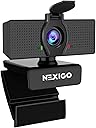
The NexiGo N60 is a compact, plug-and-play 1080p HD webcam featuring a 2MP CMOS sensor and 110° wide-angle lens optimized for indoor use. It includes a built-in noise-cancelling microphone and a physical privacy cover for security. Compatible across multiple OS platforms without driver installation, it delivers crisp video at 30fps, making it ideal for professional conferencing, streaming, and remote collaboration.


| ASIN | B088TSR6YJ |
| Antenna Location | Video conferencing, online school, streaming, gaming, recording, video calling |
| Are Batteries Included | No |
| Best Sellers Rank | #4 in Webcams |
| Brand | NexiGo |
| Built-In Media | webcam |
| Camcorder Type | Video Camera |
| Color | Black |
| Compatible Devices | Devices with USB connectivity and software support for webcam features |
| Connectivity Technology | USB |
| Customer Reviews | 4.3 out of 5 stars 52,357 Reviews |
| Digital Zoom | 4 x |
| Display Resolution Maximum | FHD |
| Effective Still Resolution | 2.07 MP |
| Effective Video Resolution | 1080 Pixels |
| Exposure Control Type | Automatic |
| Features | 1080P, Adjustable FOV, Low Light Correction, Privacy Cover |
| File Format | JPEG |
| Flash Memory Speed Class | C10 |
| Flash Memory Type | Internal flash memory |
| Flash Memory Video Speed Class | Class 10 (U1) |
| Focus Type | Fixed Focus |
| Form Factor | Compact |
| Has Image Stabilization | No |
| Image Aspect Ratio | 16:9 |
| Image Capture Speed | 30 fps |
| Image stabilization | Digital |
| Item Dimensions D x W x H | 2.55"D x 3.14"W x 2.16"H |
| Lens Type | Wide Angle |
| Manufacturer | NexiGo |
| Maximum Aperture | 2 f |
| Maximum Focal Length | 1 |
| Minimum Aperture | 1 Millimeters |
| Minimum Focal Length | 2 |
| Model Name | N60 |
| Model Number | N60 |
| Operating System | Multiple (Windows, macOS, Linux, Android, Chrome OS) |
| Optical Zoom | 2 x |
| Photo Sensor Size | 1/3-inch |
| Photo Sensor Technology | CMOS |
| Screen Size | 19.6 Inches |
| Sensor Type | CMOS |
| Shooting Modes | Automatic |
| Style Name | 1080p Webcam |
| Supported Audio Format | MP3, WAV, AAC |
| Supported Image Format | JPEG |
| UPC | 766214622888 |
| Unit Count | 1 Count |
| Video Capture Format | ASF |
| Video Capture Resolution | 1080p |
| Video Resolution | 1080p |
| Viewing Angle | 110 Degrees |
| Warranty Description | 1 |
| Water Resistance Level | Not Water Resistant |
| White Balance Settings | Auto |
| Zoom | Digital Zoom |
A**R
Good, except for one thing...
This camera has many pros, and that's why it's rated so highly. The quality is good, and for the price it's a great value. However, it is NOT a 120 degree camera! I've worked with security cameras for over 20 years and the FOV (field of view) is a common technical specification that describes exactly that, the field of view. A 90 degree camera can see an entire room when mounted in the corner. And a 180 degree camera can see an entire room when mounted in the middle of a wall, (a half circle). So a 120 degree camera is somewhere between. It's a wide angle camera designed to show more room than a standard camera. This camera, actually has less FOV than the built in camera on a Microsoft Surface Pro 7 tablet. Although the camera is very good, it is NOT the wide angle camera with 120 degree FOV as advertised, which is why I ordered it in the first place. We'll keep it because the price is too good to be bothered to send it back. However, if you're truly looking for a wide-angle camera, this isn't it.
C**.
Mac Users Read This
I have the latest Mac mini running Ventura 13.4.1. The Mac has a feature called Continuity Camera where you can use your iPhone as a webcam. I also have a 2022 MacBook Air running the same version of MacOS. The Air has a built in camera so really no need to use the iPhone except that if you do you have some control over lighting, depth of field and Center Stage where it keeps the subject centered (within reason) if you move around. Continuity Camera works fine on the MacBook Air but does not work at all on the Mac Mini. The phone is not even recognized in FaceTime. After several long phone calls with Apple support I finally reached a senior advisor who knew exactly what the problem was. He said now this going to sound strange but in order to use your iPhone as a webcam on your Mac (this also applies to all versions of the Mini, the Mac Studio and the Mac Pro) you must first have a third party webcam attached. What? That made no sense. So taking him at his word I ordered this webcam. I first connected it through my hub and it didn't work. Not a big surprise because a lot of USB devices balk at being connected through a hub. I connected it directly to the Mac and it immediately popped up in FaceTime with a very good picture. I looked at the drop down menu in FaceTime for available video devices and it was listed with a check beside it indicating it was the one in use. To my surprise also listed was my iPhone 11Pro two rooms down as an available device. I unlocked my 14 Pro Max and it popped up as another available device. So the advisor was right. Once I connected the Nexigo all the other phones became available, even my SE 2020. So I had 4 cameras available where before I didn't have any. So why the one star review? When I exited FaceTime and then restarted I had a black screen and no menus. A notice popped up that no video was being received from the Nexigo and restarting the computer may solve the problem. This despite the fact the green LED was on indicating it was in use. So I restarted the computer and problem solved. All the phones were listed and the Nexigo was working as my default. So I exited FaceTime and noticed that the green LED was still on even though no app was using the camera. So I restarted FaceTime and no image but I did get the popup again that restarting may fix it. It did. I went through this at least 10 times with the same results. I never turn my computer off so having to restart every time I wanted to use FaceTime was a pain. The image quality from the webcam was excellent, so much so that I really didn't see a need to use the iPhones as a webcam. But having to restart every time I wanted to use it was a pain. Additionally the software you can download from the App Store that gives you a lot of control over the webcam has not been updated in over a year. The Mac has been through two major operating system updates in that time frame. When I downloaded and installed it wouldn't even open. That speaks volumes about the company's committment. Even when it is working it does not show as a device in the Mac's system information report. It is important to note that all of this pertains to Mac. I have no experience with it in a Windows computer.
M**N
Returning - Poor Value, Not Adjustable
With such good reviews, I had high hopes for this camera. Unfortunately, as a webcam needed for Zoom presentations and meetings, it failed. The biggest issue was the scope of picture. It had a wide frame, with no zoom control. I was stuck with a wide angle, showing a great deal of background. Even getting closer to the camera didn’t really help as there was still a lot of wasted space on either side. Some had said there was zoom control by downloading and using the app. I did that, and the zoom option is listed, but grayed out on this model. So no, it is NOT adjustable. The picture quality was ok, but not much better than the 12-year-old webcam it was replacing. The colors were closer to the actual ones, but that is not enough to keep this. Same with sound quality. Okay, but not great. I am returning. I already have the replacement which was an obvious upgrade right away. This one is not worth the money. You can get the same or better with one of the $30 webcams.
Z**I
Disappointing Support and Early Hardware Failure
I’ve been using this webcam for over a year, very lightly (about 1–2 times per week). Recently it started malfunctioning and the system frequently does not recognize it, and I have to restart it multiple times to get it to work. I went through all standard troubleshooting steps, but nothing resolved the issue. I contacted their support and was told the product only has a one-year warranty and is no longer covered. After escalating again, support then claimed that extended coverage was unavailable because I didn’t register the product within 14 days of purchase, something that was never clearly communicated at the time of purchase. At this point, I’m receiving no meaningful support or resolution. For a device that fails with such light usage and a company that refuses to stand behind its product, this is disappointing. Based on my experience with both reliability and customer support, I would not recommend buying this webcam. Needless to say that its Microphone is useless with low quality output so I am using a separate Microphone.
O**N
no longer works
When I first got this webcam in december of last year it worked fine, it didn't look fantastic, but it was good for the price. However about a month into owning it it suddenly stopped working. I could not get it to be recognized by Windows when plugged into the back ports, and windows would constantly detect the device disconnecting and reconnecting when plugged into the front IO ports. I could not replicate this issue with the older webcam that I was using previously. Since then I just shoved this away and stopped using it. I have upgraded my machine several times (cpu and gpu) and I have also reinstalled Windows. I tested again for a bit and, when plugged into the front usb ports, it worked fine for around an hour before it started having the same issues again. I wish I had gone through the first time around and refunded the product instead of just putting it away and forgetting about it. I would not recommend this webcam, I am likely going to go back to Logitech for my next Webcam as my old one that I have been using is a Logitech, that has worked fine it is just very old
A**N
blurry, disconnects, unusable
I bought this webcam for proctored exams for remote coursework. The first annoyance was that if I wanted to put the camera on the side and didn't have something to attach it to, the thick cable makes it very hard to point it the way you want to. Second, the camera is too blurry to read something like your ID card. Third, after just one use, the next time I found that the camera kept disconnecting every few seconds, which made it completely unusable. Now it's a piece of junk, which I can't even return because it's been just over a month. Don't buy.
H**3
You get what you pay for
Very disappointed. I hooked it up immediately upon receipt and in the camera settings section of my computer, things seemed great. Picture quality was acceptable for what I needed it for (mostly online meetings). I was happy with the relatively minimal adjustments that were available, and it seemed to be working well, until...I tried to use it with video conferencing apps. Didn't matter whether it was Teams, Google Meet, or Zoom, there was a horrible lag between the audio and video, and a 2-second lag between when I moved, and when the movement was reflected on screen, and it didn't play well with blurred or virtual backgrounds (it would unblur large areas around me every time I moved). Tried to troubleshoot from Nexigo's website (like unplugging from the dock and plugging directly into the computer, shutting down other programs, and unplugging unused USB devices). Nothing worked. I repackaged and returned it immediately. Will gladly pay more for something better.
J**M
Count on it as a barely functional camera only
I needed a Webcam for a work function. This one is OK but you'll need to have a lamp in your face to be seen as a room with 3 windows, the overhead light and 37" screen wasn't enough on their own. Not only that, the microphone didn't pick up hardly at all and for some reason the system didn't work with the computer nor my screen speakers so you couldn't hear anyone. Thankfully I had a plug in headset that I had to use to speak, be heard and to hear them. It's a truly dreadful device
C**O
Adapts well to environment
It adapts well to the lighting conditions of the room and moderates the video image
F**S
Preis/Leistung Perfekt
War wirklich überrascht von der Qualität der Kamera. Verschiede Licht Farben ob Kalt oder Warm, per Touch einstellbar. Qualität für Stream etc. Wirklich sehr gut. Das Mikrofon ist eher für kleine Räume gedacht und nicht für große Räume (hall).
M**O
Acima das espectativas
Qualidade e densidade de pixel igual ou superior a 1920p
P**E
This webcam and company are a winner!
This webcam is affordable and absolute quality. I use for Zoom, Skype, Teams etc in working from home. It provides a fantastic picture and sound quality to do so. The company also provide at no cost an extended warranty AND free software for if you wish to adjust any camera settings. That set the camera plugged in and set up no problems and the default settings were perfect. They also have a great website and unlike Logitech they actually seek to please and want to hear from you and ensure you have all the assistance you need to derive the full benefit of the product. I am now throwing out my Logi C920 & C922, neither of which ever worked for me and encourage anyone to use NexiGo as everything from start to finish was provided and they truly appear to want your business and ensure you have a great experience. THANK YOU
J**E
Hay mucho mejores por un precio mas accesible
Esta bien. No queda totalmente fija en donde la pones ya que no tiene soporte. Cuidado si la mueves sin querer pue esta se caera. El tripie es inútil realmente no sirve. Actualización Lo compré para dar clases en pandemia hoy 2023 oficialmente no sirve el contra peso. Ya es completamente inútil debo ponerle cinta adhesiva para que se mantenga en su lugar.
Trustpilot
2 weeks ago
2 days ago