We remain fully operational. Our teams are working around the clock to ensure your deliveries continue safely.

DOWNLOAD THE APP


Customer Services
Copyright © 2025 Desertcart Holdings Limited
DOWNLOAD THE APP
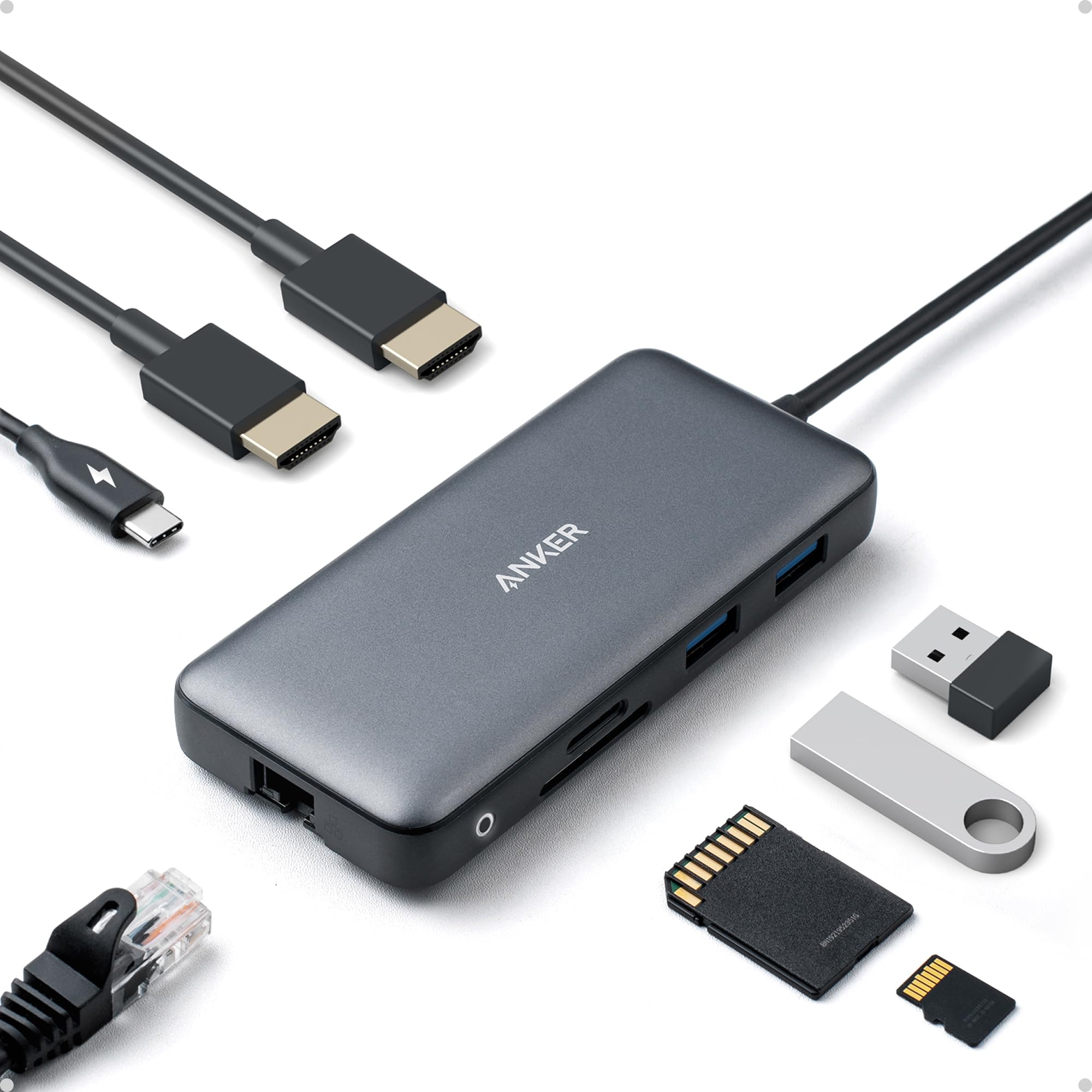
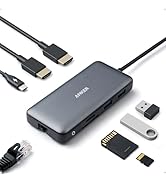
🚀 Power your productivity with the ultimate 8-in-1 docking station!
The Anker 8-in-1 USB-C Laptop Docking Station delivers versatile connectivity with dual 4K HDMI outputs, 85W power delivery, and a 1 Gbps Ethernet port. Designed for professionals using MacBook Pro, XPS, and more, it consolidates multiple ports into a sleek hub, enabling seamless multitasking and fast charging through a single USB-C connection. Backed by Anker’s trusted technology and an 18-month warranty, it’s the perfect upgrade for a clutter-free, high-performance workspace.


















| ASIN | B0874M3KW4 |
| Are Batteries Included | No |
| Best Sellers Rank | 485 in Computers & Accessories ( See Top 100 in Computers & Accessories ) 6 in Docking Stations 726 in Climate Pledge Friendly: Shop All |
| Brand | Anker |
| Colour | Gray |
| Customer Reviews | 4.3 4.3 out of 5 stars (6,009) |
| Date First Available | 15 April 2020 |
| Guaranteed software updates until | unknown |
| Item Weight | 90.7 g |
| Item model number | A83800A1 |
| Manufacturer | Anker |
| Operating System | Mac OS X 10.0 Cheetah |
| Product Dimensions | 11.8 x 5.1 x 1.75 cm; 90.72 g |
| Wattage | 100 watts |
Y**N
Great Product
Thanks to the seller for the fast shipping. General: In short, recommended It is a cable terminal point for me. Some details: Happy to have Anker 8-in-1 device. Because I connected all my devives to one and all cables are less visible now. No connection problem with usb connected devices, monitors (2x27" monitors) and charging cable.
E**C
It works straight out of the box.
This dock has 2 HDMI ports, 2 USB 3 ports, and an Ethernet port. It has a USB C power input and a USB C connection to a PC. Only a single USB C connection to the PC is needed for power and all the signals which makes it ideal for connecting and disconnecting a laptop where it uses all the ports (I.e. Dual Displays, Ethernet, Wireless Mouse and Keyboard). The dock has a power feed through functionality but my laptop complains it needs more power to charge rapidly as the dock must take some out. It still charges but maybe the CPU does not operate at full speed. One aspect of docks I have come across is the USB ports don't always work until Windows has started up so the dock has to be unplugged and plugged back in. This appears to be the case. The USB C cable to the PC can be extended by means of an extension cable if required.
M**K
Great docking hub, but don't unplug while your laptop is in sleep mode
I've been very happy with this, except I've knocked a star off because my laptop often crashes if you unplug it when the laptop is in sleep mode. To be fair, this could well be a software problem with my laptop, and it's not a big inconvenience – I just have to remember to unsleep my laptop before unplugging if I want to use my laptop away from my desk.
M**K
Versatile and effective docking station.
Works perfectly for my needs. Thank you.
M**K
Great for Macbook Pros!
I've used three of these daily for over a year now and not had one issue with any of them. Speeds are great, expands the dreadful connectivity on those 'USB-C only' Macbooks perfectly and is actually rather compact. If anyone is worried about charging through these, don't be, I've charged through these all the time and had no issues. They are expensive, but I've bought cheaper ones that have died after a month so I was more than happy spending the money on multiple of these.
T**E
good, but careful if Mac user
very good.. but reminder, if you have a Macbook, check ability to use dual monitor function
G**K
Great Product - Great Customer Service - but compatibility issues with the Dell XPS13
I bought this product after extensive research on USB-C hubs that gave me USB A, HDMI and a LAN cable Connection. This was prompted by my purchase of a brand new Dell XPS13 so called '2 in 1' laptop, which only had two USB-C ports and no USB A nor HDMI. I conversed with Anker over email to check the compatibility was OK for the Dell, and they assured me it was so I ordered one. The product (as ever with Anker) was exquisitely packaged and arrived on time . No software installation was nor is necessary because it uses Windows drivers I am told. On using the Hub I was able to connect my trackball mouse (USB A dongle), my external webcam (USB A cable) my second screen (HDMI) and my LAN cable to the router. All good! However, after a while I noticed that the HDMI connection to the monitor stopped working, on almost every session, and it has been impossible to know why (I tried it with two different HDMI monitors and with two different HDMI cables. in different combinations but the connection still would fail). The USB A connections do not fail - they keep going, as does the LAN connector. The only way I could re-instate the connection is to 'eject the USB C Hub' via Windows 'Safely Remove Hardware & Eject Media' function, physically remove it, then physically reconnect it after a few seconds. Only then would the HDMI connection resume. If I start the day with this process then as long as the Dell is not powered down or goes into sleep mode, the HDMI connection remains. If not, it breaks again. Given I bought my expensive Dell and the Hub to cater for the new world of Zoom in my work on which I rely, it has proven to be very inconvenient to have these HDMI dropouts. On contacting Anker about this they sent a replacement (very good customer service) and when that Hub behaved no differently, they did refund me (again very good customer service). I cannot fault Anker for their approach to customers and will continue to buy from them, however, I am still perplexed by the reason the Hub HDMI ports (there are two of them) disconnect the HDMI monitor in this way. This problem did not improve during that period even when Dell has regular updates to Windows and the BIOS. It is a mystery to me why it did not work. I know Dell sell heir own hub, at about three times the cost! - maybe this is what I will have to do to use HDMI monitors unless I buy a new USB C connected monitor. It was difficult to know how to rate the product here in this review. If it wasn't for the disconnections I would give it 5 stars, no question, as I do give Anker 5 stars for their customer service, no question. I did wonder if it is just a peculiarity about the Dell XPS 13 and this Hub, but I see plenty more customers have the same problem with the HDMI monitor connection who have different PC brands and types.
L**S
Not so great
Not great. Only One hdmi port works after few uses. Other completely stopped
A**I
So far, it's been a great product. It's practical, works out of the box and just makes sense to have.
B**U
The Anker 553 USB-C Hub has been an absolute game-changer for me. As someone who relies heavily on a variety of peripherals and external displays, this 8-in-1 USB C dock is perfect for my needs. First off, the dual 4K HDMI ports are incredible. I can effortlessly connect two 4K monitors, which has significantly boosted my productivity and made multitasking a breeze. The video quality is crystal clear, and there's no lag or interference. The additional ports are just as impressive. The USB-C to USB adapter allows me to connect all my essential devices like my keyboard, mouse, and external hard drives without any issues. The transfer speeds are fast and reliable, which is crucial for my work. The 1 Gbps Ethernet port is another fantastic feature. It provides a stable and fast internet connection, which is a huge upgrade from relying on Wi-Fi. This has been especially beneficial for video calls and large file uploads. What really stands out is the hub's build quality and design. It's compact and sleek, making it easy to carry around with my laptop. The materials feel premium and durable, which gives me confidence in its longevity. In summary, the Anker 553 USB-C Hub is perfect for anyone needing a reliable, high-performance docking solution. It has made my workflow more efficient and streamlined, and I couldn't be happier with its performance. Highly recommended!
V**O
This is my replacement hub for the Lention that stopped working after 18 months. I had rated that product 5 Star and it was truly great product till one day it decided not to deliver power from the PD port to laptop. Without power supply passing through, it was useless and I scrapped it. Then started my search for a new hub - the biggest challenge though how to identify one that combines good build quality and functionality with longevity. So, I decided to go with known non-chinese brands and Anker came top on the list. So far, the hub is working like a charm, just like Lention. I am hoping that this will last for at least 3 years to justify the price premium. One small gripe is that the USC C cable attached to the hub is too short (15 Cms, I guess). I keep my laptop in a vertical position with lid closed on a stand and work on the monitor. The USB C port on my laptop is on the upper end of the laptop and when I connect the hub, the hub keeps dangling awkwardly. Had to go with 0.5 M extension cable! I will update this review if this fails in less than 3 years!
R**Y
Doet exact wat het zegt te doen! Wissel eenvoudig tussen werk en prive laptop omdat ik de hub aan mijn bureau heb gemonteerd en enkel de USB-C kabel hoef te wisselen tussen beiden.
G**E
Plugged it in to my two monitors and it worked straight out of the box. I'm using a Dell Latitude 5310 running Windows Enterprise. However I could not use a 130W power adapter, but a 65W adapter works fine. I believe that is according to specifications (max 100W). Totally satisfied with my purchase.
Trustpilot
3 weeks ago
1 month ago