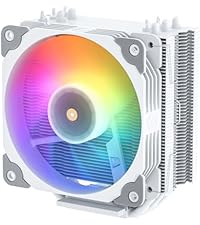
❄️ Cool your core, light your lore — Vetroo V5 keeps your build fresh and fierce!
The Vetroo V5 CPU Air Cooler combines five direct-contact heat pipes with a 120mm PWM fan capable of speeds between 800-1700 RPM, delivering exceptional thermal conductivity and quiet operation. Its addressable RGB lighting syncs seamlessly with motherboard 5V 3-pin headers, allowing full customization. Compatible with a wide range of Intel and AMD sockets, this cooler offers professional-grade performance and style at a competitive price, making it a top choice for millennial professionals seeking efficient, silent, and visually striking CPU cooling.




| ASIN | B08F2FS7SR |
| Air Flow Capacity | 52 Cubic Feet Per Minute |
| Best Sellers Rank | #52 in Computer CPU Cooling Fans |
| Brand Name | Vetroo |
| Compatible Devices | Gaming Console |
| Cooling Method | Air |
| Customer Reviews | 4.6 out of 5 stars 6,138 Reviews |
| Included Components | Fan, cooling tower, installation brackets |
| Item Dimensions L x W x H | 5.83"L x 5.04"W x 2.95"H |
| Item Height | 7.5 centimeters |
| Item Weight | 761 Grams |
| Manufacturer | Vetroo |
| Material Type | Aluminum |
| Maximum Rotational Speed | 1700 RPM |
| Noise Level | 30.8 Decibels |
| Power Connector Type | 4-Pin / 3-Pin |
| UPC | 609015786611 |
| Unit Count | 1.0 Count |
| Voltage | 12 |
| Wattage | 150 watts |
J**R
Review of - Vetroo V5 CPU Air Cooler w/ 5 Heat Pipes & 120mm PWM Fan
Review of - Vetroo V5 CPU Air Cooler w/ 5 Heat Pipes & 120mm PWM Fan - EXECUTIVE SUMMARY (2021-May Update) - still working superbly The Vetroo V5 CPU Air cooler is an amazing cooler sold at a competitive price! - As the product description and product photos illustrate the Vetroo V5 CPU Air cooler comes with a great fin stack around five (5) heat pipes, which is more heat pipes than similar products available on amazon. - COOLING PERFORMANCE HAS BEEN EXCELLENT As noted by several well known and reputable youtube computer product reviewers, the Vetroo V5 CPU cooler provides superb CPU cooling. When cooling a little AMD Ryzen 5 3400G, with tuning to run at 4,000mhz, the Vetroo V5 has been providing 31-35C idle temps and 43-50C CPU temps under load, as reported by both the Windows 10 "core temp" software utility, and the Windows 10 HWINFO64 software utility. - GREAT VALUE Since I was looking for cooling for a $99.00 (direct amazon price) AMD Ryzen 3 3200G CPU, or AMD Ryzen 5 3400G the availability of the Vetroo V5, on sale with a coupon, paired well economically with the CPU it is now cooling. - INSTALLATION WAS EASY It was valuable to do a tabletop "dry run" assembly before installing this cooler. The most important thing to get right is that the AMD AM4 brackets MUST be installed with the bracket angles ANGLED INWARD in order for the screws on the bracket to line up with the AMD motherboard backplate. It seems as though reviewers who complained that the Vetroo V5 did not fit their AM4 motherboards probably didn't have the mounting brackets attached in the right direction. Notably, the seller has included an illustration of this, with the brackets angled INWARD, within the product photos right on the amazon product page. The documentation doesn't clarify this however. Note also that it is NOT possible to install the cooler and tighten the brackets onto the AMD motherboard backplate with the fans attached, so attach the fans after installing the fin system. Having a "long neck" screwdriver is also helpful, to extend past the height of the fin stack while tightening the screws in succession. - Since I was doing a build already with NON rgb Arctic brand fans, I was able to set up this cooler with two Arctic P12 PWN non-rgb fans in "push/pull" configuration. However, according to the various youtube testing gurus, using two fans apparently does not significantly increase cooling efficiency even though push/pull fans produce a small efficiency increase. - SUGGESTIONS TO MANUFACTURER EVEN WITH THIS FIVE STAR REVIEW Vetroo should make a second version of the Vetroo V5 cooler that comes with two (2) fans. The Vetroo V5 does come with two (2) fan attachment brackets however. As a result, it is possible to install the Vetroo V5 cooler with "push" and "pull" air flow from two fans. Having an alternate version, even at a slightly higher price, would also be helpful because Vetroo does not currently have fans available for sale separately on amazon (or the Vetroo website) that match the fan provided with Vetroo V5. - CONCLUSION The Vetroo V5 CPU Air cooler provides performance which rivals fans that cost 2, 3, and 4, times as much as the Vetroo V5.
V**I
Functional and a Nice Option for Pink-PC, Non-Liquid Cooler Lovers.
Installed this for a recent cosmetic face-lift we did for my pre-built PC and so far it functions nicely. It’s honestly not the best quality and that made installing it a bit annoying, but it came with everything needed including a thermal paste (didn’t use it though) and it’s working properly, so for the price I think its overall a good value. It’s not the best design-wise, but it is pink, which is solely the reason I went with this. As a pink-lover and someone going for a pink-PC look this was virtually the only option I could find for someone who does NOT prefer liquid cooling for their PC builds. In fact, this is one of the only few pink options for non-liquid-cooling users, which is kind of sad. Regardless, I appreciate this company for offering this product in this color, and I fully recommend it.
D**O
Quite Possibly the Best Budget CPU Cooler
And that's not hyperbole. I honestly thought all the tech YouTube content creators bragging about this CPU cooler were just being over-the-top (until JayzTwoCents reviewed it, anyway) so when I got a new PC with an i7 9700F I knew I needed to get an aftermarket cooler, fast. The noise level of the stock Intel cooler, under any load at all, honestly sounds like my neighbor's cat in heat. It's horrible. This thing is damn near silent. The fan is incredibly easy to install, using a hook system that's quite literally just a piece of wire that latches onto the tower. As a bonus, they actually give you two sets of hooks (4 in total) so you can use your own fans in a Push Pull configuration and maximize the heat dissipation. I have some EZ-DIY fans that I'm going to mount to the tower since I already have another one acting as an auxiliary exhaust fan, and because my motherboard doesn't have an RGB header. Because of that, I can't really speak to the RGB qualities of the included fan. I can say that it, like the cooler tower, feels pretty solidly built. I'm legally blind, but I had no trouble installing it with my motherboard in the case. That being said my case has a cutout section allowing me to easily get access to it. You MAY have to remove your motherboard to attach the backplate, which is true for basically any cooler, unfortunately. You need a backplate, and although some coolers use the Ryzen stock backplate, many don't. The mounting system is great. Because of the size of the tower, it's fairly easy to get it mounted onto the motherboard provided you read the instructions (or look it up on YouTube - there are tons of videos on this thing). Just DO NOT FORGET to remove the little tab on the bottom before you install it! The brackets are labeled based on Intel or AMD, and the Intel specific backplate has settings for the different socket sizes (ex 1150/1151/1200 would be the middle one) and has very tacky tape to hold it in place while you mount the tower. I've also been told you can use screws to mount it, but because of my vision, when it comes to fiddly things like tiny scew holes, I prefer to just use the path of least resistance (i.e. the tape) and call it done. I'm using my own thermal paste (happened to have a tube of Arctic Silver lying around), so I can't speak to the quality of the included paste, but the reviews I've read put it at least on par with the thermal compound used by OEMs so that's a positive for it. Honestly if you're looking to cool a CPU that isn't an 11850K or Ryzen 9, and thus doesn't really need a Noctua cooler the size of a cinder block, I can recommend this one, especially over the massive pain in the butt that some coolers can be. It could *probably* handle a 5900X, especially with two fans in push pull, but honestly, if you're spending that much money on a CPU, you might as well get a proper liquid cooler with a 240 rad at least, at that point. :)
A**R
Good for Optiplex 8940, with some patience.
Like some others out there, I ordered this for an Optiplex 8940. (i7-10700 "regular" 65-watt version. Not the "F" or the "K"). Other system specs: 16 gigs of RAM, RTX 3060-Ti. Normally I don't order pre-built, but in this time of Covid, semiconductor shortages, crypto-miners, and (insert a LOT of vulgar adjectives) scalpers, it cost barely more to order this computer than to purchase a standalone RTX 3060 Ti by itself. The new Dell came with the a crappy, dinky little stock fan, not the big tower cooler pictured in their manual. With the inadequate stock fan, I loaded up Horizon Zero Dawn, and instantly got 100+ fps....and 100+ degrees Celsius on the CPU. Whatever Dell engineer thought the stock cooler was okay for an i7 processor - 65-watts or not - should immediately lose their job. I experimented by taking the side panel off and blasting a full-size box fan into the case. This lowered the CPU temperature to about 85 Celsius in-game. NOTE: The big description on this item says "Intel LGA 1200 115X / AMD Ryzen AM4 Universal Socket". What they shipped me was the LGA1366, etc, model. "LGA 1200" is not even listed on the box...but it will still work. See my notes below. This cooler does a good job. Quiet, effective. My idle temperature immediately dropped from 55 Celsius to about 40 Celsius. In game, I hover between 60 and 70 Celsius. I'm using a closed case, so I didn't bother hooking up the RGB to anything. INSTALLATION NOTES, ON OPTIPLEX 8940: 1. I used the Vetroo-provided thermal paste. It seems to work fine with the usual "pea-size" drop. 2. You do NOT need to replace the back-plate on the Optiplex 8940 motherboard to install this. The screws on the brackets will fasten DIRECTLY to the motherboard after you remove the stock cooler and clean off the old thermal grease from the CPU. If you receive an actual "LGA 1200-compatible" model, I suppose this should be really easy to fasten on. 3. For those that got the LGA1366 "Universal" model...I pushed all four adjustable screw locations all the way toward the center (LGA-775 position), then eased them out until the curved inside edge of the groove BARELY became visible past the side of the screw itself. That placement allowed me to line up the screws with the holes in the motherboard properly, and it attached without further fuss. 4. Before installing this, I removed the sticks of RAM, as well as an empty hard drive cage that was fastened on the side with only two screws. You'll need the extra two inches of room to maneuver your fingers. 5. The wires used to attach the fan to the cooler itself are a really big pain the butt to get attached in the limited space. This portion took me a good 15 minutes and a bit of cussing. I managed to get the fan mounted by getting the wire firmly attached on one side, then very carefully (and half blindly) doing the other side. Once they are attached, however, the fan is SOLIDLY mounted, and isn't going anywhere. I would gladly have paid an extra $10 for a plastic arm snap-on mounting job for the fan, though. (Like what CoolerMaster has used with more recent versions of their EVO.) Now that it's in, and done, and temperatures have dropped by 20-30 Celsius, I am happy with how this turned out. I have read that others attached extra "intake" fans to their cases and made other modifications. I was just concerned with getting the CPU temperature down, and I have accomplished that. I think I'm "done". Why didn't I just call Dell? I read a few places that the missing stock "tower" cooler might not be as effective as this one, even if they bothered shipping it to me.
R**Y
Performance at this price point is fantastic. Installation is rough, as others have mentioned.
First I'll get the bad out of the way since most negative reviews already cover it. The installation / mounting system is unrefined to put it lightly. The metal brackets that attach to the cooler itself are the main problem. I have seen others complain about the intel backplate, it seems pretty comparable to others at this price point, and the screw holes on it can be snapped into 3 positions. The biggest problem here is the sticky foam that holds it in place on the mobo is too thick, so the screw holes don't push up through the motherboard like they should without pressure on it. This in combination with the bracket issue I am about to describe make installation a struggle. The brackets do not have the snap feature, the spring screws just slide back and forth in a track that allows you to choose spacing. The problem with this is that even if you get one partially mounted, it can still slide around while you try to mount the others, so you find your self fighting with the position of the cooler (lubricated with thermal paste) to line all the screws up rather than being able to just slap the cooler down in the middle and go to work on the screws. It's just not friendly. I had to force the screws down into place wriggling my screwdriver back and forth until things lined up one at a time to make sure they would all catch the backplate. I would suggest starting with opposite corners to do this and just get them to "catch", don't tighten completely until you catch all 4 on the plate, then secure them in a standard cross pattern like you would a wheel. Having said all that, I was still able to pull my PC out from under my desk, take both panels off, remove the old cooler, install this one, and get the panels back on within 20 minutes, granted I have a cutout in my case to access the back of the mobo. It's just that if you aren't a seasoned tech like me, and don't have decent hand strength I can see this being a serious hassle. The icing on the cake is that there are not really instructions for attaching the fan, so some people might have trouble with that. ----------------------------------- Now that the installation is out of the way, let's talk about performance. I have an i5-9400f coming from a stock Intel cooler (I), to the Vetroo (V). All temps below were taken in a room ~21C. My case configuration pulls air into the front and side and exausts out the back. The fan on the cooler is configured to push air through it toward the back exhaust fan. Light office usage (browser, outlook, chat, vpn) I: 40-44C V: 33-35C Heavy gaming I: 72-75C V: 53-55C Stress testing I: 78-82C V: 57-58C Not only are the temps significantly better but also more consistent (likely a result of the bigger heatsync providing better thermal consistency). The fan is quieter than the stock cooler, which is to say I don't really notice it, at least not specifically. The only time the fan has to ramp up is while gaming, and typically the GPU gets hotter so the fans on that have to work harder anyway. ----------------------------------- The conclusion here is that the other reviews aren't wrong, the installation leaves a lot to be desired. If that's problematic for you, stay away. However, if you aren't the type that minds using a little elbow grease and dealing with mild frustration to save a few bucks, this product offers great performance for the price point once you have it mounted. Since reviews are subjective and I was vaguely aware of what I was getting into when I bought this (instead of a Noctua product), I have scored it accordingly based on cost + expectation vs outcome. 5/5
A**R
Wonderful cooling, excellent that the fan can be adjusted.
This cooler met and exceeded my expectations. Low price, but must be assembled, so a bit of a trade-off. Before using this cooler, my temperatures (Intel i7 10700KF, 8-Core / 16 thread, standard clock 3.8 to 4.8 GHz) easily exceeded 200 degrees Fahrenheit. Now averages 140 to 160 Fahrenheit under load while gaming, 89 degrees idle. Rainbow fan is beautiful and a complement to my existing rainbow case fans. Adjustable fan height made room for my RAM, as advertised. BUT be cautious about the included bracket, awfully flimsy. Reused the mounting bracket from the older cooler. Also, DO NOT apply Thermal compound until you have adjusted the mounting screws, which is easy, but takes a while to make adjustments. You will thank me later. There is little to no instruction on how to use the wire clips, the videos do not show at all how to align them so they can be used, looks like you just grab it and pull and snaps, but is not how it is when figuring it out. Took about an hour to get the wire clips on. In summary, wonderful cooler that keeps the CPU nice and cool. I highly recommend it, but beware that it takes some tinkering to assemble.
A**R
Keeps a 5600x cool and it’s pink.
Was somewhat skeptical of this brand cause I hadn’t heard of them and used them, but it keeps the 5600x in low temperatures and it matches a pink case I got for a build. Overall it works perfectly for what I got it for and it has rgb if that’s your thing. Easy to install and cools efficiently. Would recommend.
P**O
reliable and cheap
best cpu cooler. have this on 3 of my pcs and everytime it doesn’t disappoint. comes with everything and keeps it super cool all the time. i will always pick this over aio coolers
Trustpilot
2 months ago
2 days ago