Desertcart purchases this item on your behalf and handles shipping, customs, and support to Sri Lanka.
🌀 Elevate your cooling game with whisper-quiet precision!
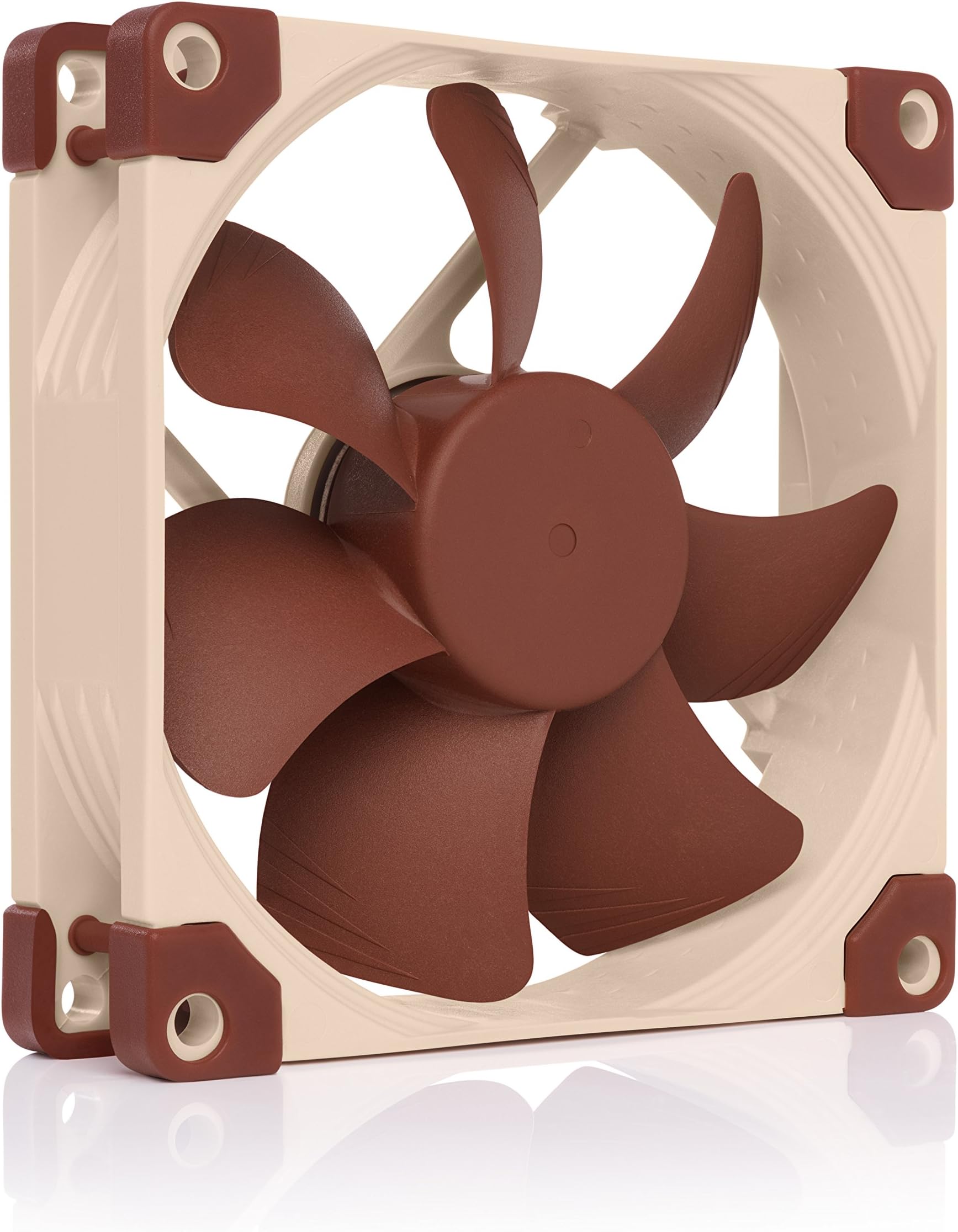
The Noctua NF-A9 PWM is a premium 92x92x25mm PC cooling fan delivering up to 2000 RPM airflow at an ultra-quiet 22.8 dB(A). Featuring advanced Flow Acceleration Channels and Acoustic Optimisation, it ensures superior cooling with minimal noise. Designed for longevity with fibre-glass reinforced blades and an SSO2 bearing, it boasts a remarkable >150,000-hour MTTF. Its 4-pin PWM control offers smooth speed adjustments, making it ideal for compact PCs, NAS, and high-performance CPU coolers. The fan comes with a rich accessory kit including anti-vibration mounts and cables, ensuring easy, silent installation and optimal performance.


| ASIN | B00RUZ059O |
| Best Sellers Rank | #46 in Computer Case Fans |
| Brand | Noctua |
| Brand Name | Noctua |
| Compatible Devices | Desktop |
| Cooling Method | Air |
| Customer Reviews | 4.8 out of 5 stars 4,208 Reviews |
| Global Trade Identification Number | 04139052263135, 04716123315513 |
| Item Dimensions L x W x H | 3.62"L x 0.98"W x 3.62"H |
| Item Weight | 8 ounces |
| Manufacturer | Noctua |
| Material Type | Fibre-glass reinforced PBT |
| Maximum Rotational Speed | 2000 rpm |
| Model | NF-A9 PWM |
| Noise Level | 22.8 db |
| Number of Items | 1 |
| Number of Packs | 1 |
| Part Number | NF-A9 PWM |
| Power Connector Type | 4-Pin |
| Product Dimensions | 3.62"L x 0.98"W x 3.62"H |
| UPC | 842431014481 731215275791 |
| Unit Count | 1 Count |
| Voltage | 12 volts |
| Warranty Description | 6 year manufacturer’s warranty |
R**N
Good little fan and worth the extra price. Quiet and lasts forever
Bought this to replace the broken stock fan in my UGREEN NAS DXP2800 and it ended up being a perfect drop‑in upgrade. Noise level: At typical NAS fan curves it’s basically whisper quiet, even sitting on a desk a few feet away. Cooling: Despite the low noise, it moves enough air that my drive and system temps stayed the same or slightly improved compared to the original fan. Cable length: The included cable is long enough to route cleanly inside the NAS without needing an extension or weird bends. Mountability: Standard 92mm mounting holes lined right up; swap took a few minutes with just a screwdriver and no mods needed. Speed and airflow: PWM control works as expected, ramps smoothly under load, and at higher RPMs you get noticeably stronger airflow without a huge jump in noise. Overall, if you’re looking for a reliable, quiet replacement fan for a small NAS or SFF build, this one is worth paying a bit extra for.
G**H
Best 92mm fan on the market
The Noctua NF-A9 PWM (92mm, 4-pin) is one of those components that quietly justifies its premium price — literally and figuratively.I've used several Noctua fans over the years, and this 92mm PWM model continues the brand's reputation for exceptional build quality and acoustic performance. At max 2000 RPM it pushes a solid amount of air (around 78.9 m³/h), yet the noise tops out at just 22.8 dB(A) — in practice, it's barely audible even in a near-silent room unless you put your ear right next to the case. With the included Low-Noise Adaptor plugged in, it becomes whisper-quiet while still providing perfectly adequate cooling for most 92mm applications.What stands out:The PWM control is smooth and responsive; the fan ramps up/down almost imperceptibly as temps change. Flow Acceleration Channels and the AAO (Advanced Acoustic Optimisation) frame genuinely reduce turbulence noise compared to generic fans. Comes with a generous accessory kit: anti-vibration mounts (the classic brown grommets), extension cable, Y-splitter for daisy-chaining two fans on one header, screws, and the LNA adaptor. Build feels rock-solid — fibre-glass reinforced PBT blades, SSO2 bearing, and Noctua's legendary >150,000-hour MTTF rating give real confidence it'll outlast most other PC parts.
J**S
Among the best case fans on the market.
High quality and very quiet. Easy to install and comes with all mounting hardware and extra cables. They have been very reliable with no problems whatsoever. A great value for your money!
S**Y
Quiet fan that does the job
Since I bought a processor cooler from the very same company, I saw this fan in particular. I wanted to replace my loud stock cooler fan. It was a struggle at first, trying to install the "silicon" screws provided in the packaging, but they didn't work on my computer, which was unfortunate but not a big deal. I ended up having to use the other packaged screws, which actually turned out to be "self-tapping screws". They're not your typical screws, so the point for them is to create its own threads onto the fan's screw holes. The fan does not have its own threads out of the box, so once you screw onto the fan's holes, the "self-tapping screws" cuts into the soft plastic. I thought this was not right, but it turned out to be completely normal based on a quick online search, which made me feel good now. The fan also comes with several extension cables. Overall, after plugging the fan in, it worked like a charm. And it is reasonably much more quieter than my stock computer fan. For a good budget fan that was inexpensive (under $20), I say it was worth it.
T**T
Noticeable Noise Reduction
I bought a 92mm and 80mm Noctua case fan and so far it really made a difference in terms of noise reduction. I switch Noctua fan with my old one and i thought my PC died on start up because of the sudden drop of noise after 1-2 second of starting up. I can actually hear what is happening inside my PC now due to the fan being almost dead silent. It feels very weird because i never had a Desktop PC this quiet before. The Installation was easy and straight forward. It still comes in a nice looking box. The fan comes with a cable attach, also comes with an extension cord if you need the extra length, the noise reduction cord which i used for both of the fans and really made a huge difference. Along with a few other things. There was no instruction manual (maybe there was) but that was not needed. All you do is plug the fan cord into the noise reduction cord if you want to use it and then plug that into the 4 pin fan slot on the motherboard. Everything should fit together nicely, not much force is needed plugging things together. It comes with 4 screws, use a screw driver to mount the fans in place. This is not really a problem but as people know the color of fans really does not match with everything else. But i don't really look at my CPU so it not a problem for me it. They do have black now or starting to sell black color Noctua Fans. My gaming rig is not big size so these fans handle it fine. The box says a 6 year warranty so that is a plus. Overall i am very impress with the presentation and the quality. It made me want to write a review for it. The CPU noise compare to before these fans is night and day. I never realized how long my CPU noise was before using these fans. Of course this is the first day i am using them as i am writing this review so take it for what you will. Hopefully these fans will last me a good few years at minimum.
S**D
Nice quiet fan that was plug and play
I have a ASUS ROG Strix GL10DH. The fan was failing and very loud. The Noctua NF-A9 PWM went in with 4 screws and pluged into the motherboard with no issues. It's really quiet and is pushing a good volumn of air through the tower case. I am pleased with this purchase and feel it was a good value for the price.
K**D
A great fan with nice accessories included, albeit a bit pricey
I set out to make a "nearly" silent PC, in that I didn't want to go fanless, but I wanted it to have the fans running so slowly (or off) during normal operation that it was silent, and it was only during intensive activities that the fans would ramp up. Through that process I ended up using 5 different fan models from 3 different companies,including this NF-A9. Long story short, I prefer NF-Bx line from Noctua as my favorite and the best value. These NF-Ax series fans are slightly better, but not so much more so to justify the 50% (or so) increase in cost unless you need the vibration free mounting hardware it comes with. (The "B" series doesn't come with that nor with the extra extension and splitter cables the "A" series does.) Some cost saving advice: don't buy a Noctua CPU cooler. Buy a Cooler Master CPU cooler (I went with the Hyper T2 as it is the biggest one that fits in a standard case) and take off the Cooler Master fan and buy one a Noctua fan. For ~$27 combined you get what Noctua wants to charge $60 for. The Cooler Master fan sucks and doesn't allow you to reduce the fan speed below ~30%, so it needs to be replaced if you want to go silent, but the Noctua NF-B9 is exactly the same size fan and it is easy to replace it once you realize you can pull off the rubber pads that obscure the fan screws. Another learning, don't trust that the fan controller on your motherboard is doing everything as it should. First, I had to go into bios and change it to PWM mode as it assumed DC mode for the system fans even though it comes with 4-pin fan headers (DC mode doesn't allow it to spin at nearly as low of a speed). Next, it appeared when I was first testing the B series fan that the lowest it could go in PWM mode is 13% based on the RPM data the motherboard was providing. But then I noticed the fan was still spinning when I put the PWM at 10%, so I figured the fan wasn't providing good RPM data below 13%. (I later noticed that the A series would show RPMs down to 10%, further giving credence to that idea.) Next I noticed it would stop spinning below 10% (both A and B series), so I assumed that was the lowest the fan would go. Not so on either count! I later hooked up the NF-B9 fan to my GPU and it could both spin the fan and read its speed as low as 5% PWM (never tried with the A series fan, but I assume it could go slower too). So apparently my motherboard has it's limits that it won't go below. For all I know, the fan could go even lower than 5%, but that's the best the GPU fan controller will do. (Luckily, even 13% is slow enough to be silent in almost all scenarios.) But the long and short of it, is that with 4 of the Noctua fans (A9 on the CPU, 2x B9 on GPU and 1 B9 on the rear of the case) and leaving the front of the case fan off unless the system gets hot (trying to save a few bucks and not replace the 12" fan unless I need to) as well as an EVGA gold power supply in "eco mode" I have a truly silent PC, where a pretty sensitive dB meter can not detect it being on. I have to do the test in the middle of the night, because even cars going by outside are detectable. But at 3 AM, it reads 21.1 dB with the PC off and 21.1 dB with it on. My stomach gurgles and the stupid thing goes up to 24 dB or I click the mouse and it goes up to over 30 dB so trust me when I say the dB meter is sensitive enough to detect pretty small readings. To be fair and give a caveat, to keep it silent, the fans are running at 13% on the rear of the case, 10% on the CPU and 5% on the GPU. But that's just enough air flow with the good heatsinks that in normal operation the system temp stays around 40 and both the CPU temp and GPU temps stay in the mid 50's. Build details: Intel Core i3-8100 CPU MSI Z370M Mortar motherboard Gigabyte GTX 1050 Ti "Windforce OC" GPU (Note: Gigabyte is the only vendor with a good fan controller on their 1050 GPU. The other companies have junk 2-pin fans.) 2 of 4 GB DDR4 2400 Kingston Fury DIMMs Samsung 960 EVO M.2 SSD EVGA 650 GQ PSU in eco mode
T**P
Simply amazing and super quiet
Got an inverter charger and it has a stupid loud fan and this saved the ears in my office . Silence and serenity ! I even used two fans instead of the oem one jet ! And still whisper quiet .
K**様
評判の通りの静音性
評判の通りの素晴らしい静音性で、大変満足です! CPUクーラーにIS-40X-v3を使っていますが、ファンがちょくちょく高回転してうるさかったので こちらに交換しました。 ※金具がないので結束バンドで固定 評判良いのは把握していましたが、想像以上でほとんど音が聞こえてきません。
C**N
Simple efficace et de qualité !
Fonctionne très bien, très silencieux et très simplement monté !
G**)
NF-A9 PWM: 92 millimetri gestiti con grande precisione
In formato 92 mm è facile trovare ventole rumorose o con una curva poco controllabile. La NF-A9 PWM raggiunge 2.000 giri ma mantiene un comportamento regolare, con rumore massimo dichiarato di 22,8 dB(A) e un buon margine di regolazione tramite PWM. La confezione Noctua è completa e i gommini antivibrazione aiutano nei case o dissipatori che trasmettono risonanze. Prima dell'acquisto vanno controllati spessore da 25 mm, interasse dei fori e spazio intorno al connettore. Non è la scelta più economica, ma la qualità del motore e la prevedibilità della curva si notano. Cinque stelle per equilibrio tra portata, pressione e silenziosità, soprattutto in sistemi compatti.
A**T
zeer stille ventilatoren die goed koelen
Inderdaad zeer stille ventilatoren, minstens zo goed als de eveneens kwalitatief goede E.M. Pabst fans van Duitse makelij. Voldoende luchtverplaatsing om je pc van binnen mee te koelen als je een paar in de pc kast zet. In de verpakking zaten nota bene nog extra aansluitkabels met ingebouwde potmeters om de snelheid van de fan mee te kunnen reguleren.
G**.
Silent, Efficient, and Perfect for NAS (or other small) Enclosures
I bought a few Noctua NF‑A9 PWM fans to replace the standard units in my NAS enclosure, and the improvements are noticeable from the moment they start spinning. The stock fans were noticeably loud, especially in a quiet room, but these Noctuas immediately brought the noise level down to something barely audible. For a device that runs 24/7 in a living space, that alone makes them worth it. Cooling performance is actually better than with the original fans. Temperatures dropped a few degrees under load, and the PWM control keeps everything smooth and stable without sudden ramp‑ups. Installation was straightforward, and the build quality is exactly what you expect from Noctua: solid, reliable, and engineered with care. If you want to keep your NAS (or any small enclosure) as quiet as possible without sacrificing cooling, this is an excellent upgrade. Highly recommended.
Trustpilot
3 weeks ago
3 days ago