⚡ Slide, store, and soar with Transcend – your fast lane to flawless file freedom!
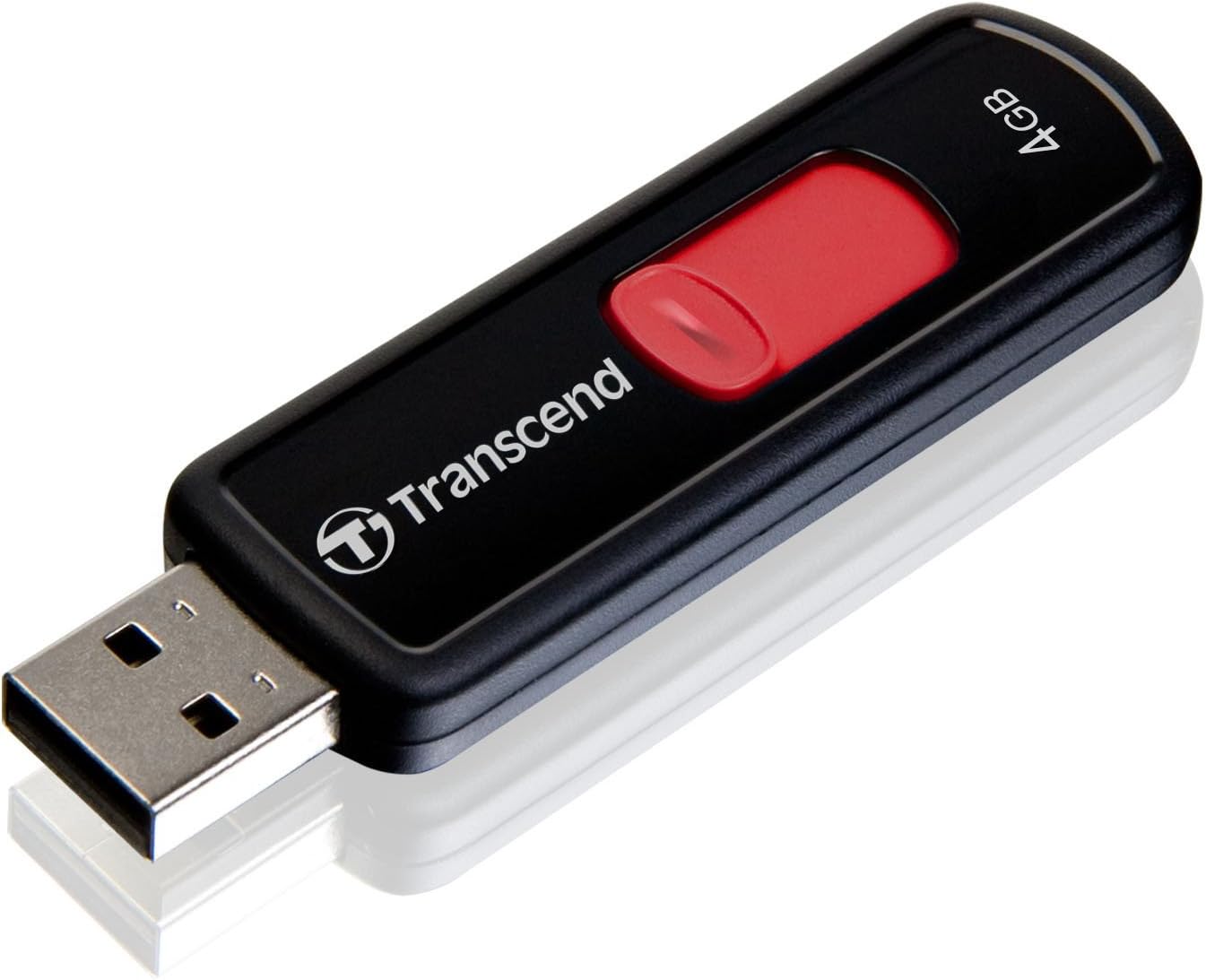
The Transcend 4GB JetFlash 500 USB 2.0 Flash Drive combines a compact, capless retractable design with reliable 14 MB/s read speeds and lifetime warranty. USB-powered for effortless plug-and-play use, it includes free JetFlash Elite data management tools, making it a durable, fast, and user-friendly storage solution perfect for professionals on the go.
| ASIN | B003EO328Q |
| Additional Features | Compact, Lightweight |
| Best Sellers Rank | #6,432 in USB Flash Drives |
| Brand | Transcend |
| Color | Black |
| Connectivity Technology | USB |
| Customer Reviews | 4.1 out of 5 stars 3,920 Reviews |
| Flash Memory Type | USB |
| Global Trade Identification Number | 00041566786847, 00760557817574 |
| Hardware Interface | USB 2.0 |
| Item Weight | 10 Grams |
| Manufacturer | Tristan Pub |
| Memory Storage Capacity | 4 GB |
| Model Number | TS4GJF500 |
| Read Speed | 14 Megabytes Per Second |
| Special Feature | Compact, Lightweight |
| UPC | 041566786847 760557817574 778890702167 638865609030 777104569466 |
N**R
Looks just like the Sandisk Cruzer Micro - but a whole lot FASTER
Physically, this Transcend 16 GB JetFlash 500 Retractable USB 2.0 Flash Drive looks almost identical to the SanDisk Cruzer Micro 16GB drive . The retractable USB plug on the Transcend drive also works EXACTLY the same way as the Sandisk (I'm surprised that somebody hasn't got sued yet). But that's where the similarity ends, because the Transcend JetFlash is a whole lot faster! A bit of background information: I own both the Sandisk Cruzer Micro 4GB and 16GB versions. What I noticed is that the 16GB version is much slower than the 4GB version, especially when witting data. I even contacted Sandisk customer support, trying to find out what is the speed of Cruzer Micro. The response I got was quite useless: "There is no guaranteed speed for SanDisk Cruzer Micro flash drives, as the speed for these flash drives have not been tested. If you need a flash drive with fast data transfer speed, we recommend SanDisk Extreme Cruzer Contour for this." Prior to ordering this JetFlash drive, I visited the Transcend USA web site to search for information. Surprise, surprise! The data transfer speed of JetFlash 500 (under the 'V' series) is actually specified as: "Read 15 MByte/s, Write 7 MByte/s (16GB)" Once I received this Transcend JetFlash drive, I put it through several benchmark programs, to compare against the Sandisk Cruzer Micro: - For typical photo files, write speed of the Transcend varies from 6.8MB/s (for 1MB file) to 11.3MB/s (for 5MB file). In contrast, the Sandisk only ranges from 2.0MB/s to 3.5MB/s. That means the Transcend is about 3x faster than the Sandisk! (See my Customer Images for details) - For very large video files, the Transcend writes at about 7.8MB/s, while the Sandisk only reaches 5.1MB/s. The difference in smaller but still significant. In terms of storage space: The Transcend drive reports 15.1GB of total capacity, while the Sandisk drive reports 14.9GB. Note that it is normal for a '16GB' flash drive to show only 14.9GB of storage, because 14.9GB for computer people (where 1GB = 2 to the power 30) actually translates to about 16,000,000,000 bytes. So that can be called '16GB' according to marketing people (where 1GB = one billion bytes). In summary, the Transcend JetFalsh 16GB drive looks and works just like the Sandisk Cruzer Micro, but its write speed is +50% to +200% faster than the latter. As of this writing, both drives are available at similar prices, so this makes the Transcend a much better value. [Update on Nov 3, 2010]: - The price of this Transcend USB drive dropped further during the past two months. So now it is an even better value. - Several reviewers have reported bad experiences using this USB drive on the Xbox 360. Right now your only safe bet is to get the Xbox 360 - 16 GB USB 2.0 Flash Drive by SanDisk , which costs twice as much. - If you don't intend to use the software supplied by Transcend, simply rename the file "Autorun.inf" (located at the root directory of this drive) to something else, such as "Autorun._inf". Then you can use it as a simple USB storage device. [Update on April 7, 2012]: I have my Transcend USB drive connected to my desktop PC as secondary storage most of the time, only occassionally remove it to transfer files. So far it worked perfectly fine for 1.5 years. It should be noted that I have used at least half a dozen USB drives and at least 20 flash memory cards in the past decade, and none of them ever failed on me. So it could be that I am just more careful with semiconductor devices (I always discharge myself of any possible electrostatic charge before handling memory cards, for example)
D**N
Transcend 64 GB VS SanDisk Cruzer 64 GB
I am a SanDisk fan. I have always used there products and have been happy with the speed and reliability that they offered. Recently I upgraded from the SanDisk Cruzer 16GB to the 32GB. Right away I noticed it was taking longer to move files. Also from time to time it would just stop during transfer. I left it on all night thinking it would finish and it never did. I Decommissioned that one and bought another a few months later locally this time. I figured I must have gotten a hold of a bad one. The new 32GB Cruzer did the same thing. I just worked around the issues and continued using it. I figured the 32gb model must be flawed in some way. Still being a fan of SanDisk Cruzers I just recently upgraded to the 64GB model. So far it hasn't stopped during transfer but it still seemed to be taking to long. I decided to try a little test. I Purchased a Transcend 64GB thumb drive. I made a folder on my desktop and put 70 files of varying sizes equaling 4.03GB. I copied the folder to my SanDisk and timed it then I did the same with the Transcend. Here are the results: SanDisk Cruzer 64GB USB Flash Drive SDCZ36-064G-B35 transferring 70 files equaling 4.03GB it took 18.34 minutes Transcend 64 GB JetFlash 500 Retractable USB Flash Drive - TS64GJF500E transferring the same took 13.43 minutes I can't speak for the long term reliability of the Transcend thumb because this is the first I've owned. What I do know is that it has a good solid feel, it's cheaper then the SanDisk of the same size, and it's considerably faster. I'm going to continue testing this drive and if it works out and I grow to trust it I will post again and let everyone know. For now I'm going to lean toward Transcend. ** Update as of 01/30/2013 ** I continued using both the Sandisk 64 and the Transcend 64 daily at work. The Sandisk is still significantly slower and occasionally stops responding during transfer. Unfortunately there is no safe way to remove it because technically it's still in use and will not respond to safe ejection procedures both in Windows and Linux. I just do a system shutdown hopping the OS will safely close the open files. I then remove it, restart the machine and try again. This may sound a bit extreme but I do it for a reason. One time it stopped responding on a 3 gig transfer so I let it sit for an hour. When I came back it was still unresponsive so I removed it and took it to another machine I was updating. When I inserted it the new machine I was asked if I wanted to format the Sandisk. I lost everything. Fortunately I had the same data on the transcend so it was just an inconvenience. If however I had been relying solely on the SanDisk it would have been a very long night. The Transcend 64 still continues to surprise me with it's reliability and speed. It is used at work in the daily grind and shows no signs of instability or speed loss. Seven month tested daily, head to head- Transcend 64 GB JetFlash 500 Retractable USB Flash Drive TS64GJF500E VS SanDisk Cruzer 64GB USB Flash Drive SDCZ36-064G-B35. And!... It's Transcend for the Win! Sorry SanDisk, this was a complete miss match. With all your resources, funding, and experience You should have stomped transcend into the ground. You need to get your staff into one room and discuss who dropped the ball and what your going to do about it. Your pro's, this should never have happened and because it did you've introduced doubt into the minds of consumers you had won over years ago. This leaves me wondering was it a shameful loss for SanDisk or is there a new player in the game. In my opinion Transcend just stepped out of the background and into the foreground. They will be given serious consideration during my purchases in the future.
W**M
Very good!!
[...] Specifications Click to Enlarge This USB drive weighs a slight 0.4 ounces and stretches to about 2.74 inches. The drive components are encased in a shiny black case that has a removable cap. It is a USB 3.0 drive and is compatible with legacy USB technologies, including 2.0 and 1.1. It has a small hole on one end that can be used to attach the drive to a lanyard. The Transcend JetFlash is available in 4, 8, 16 and 32 GB memory capacities. This drive is certified with the Conformité Européenne (CE), Federal Communications Commission (FCC) and Bureau of Standards, Metrology and Inspection (BSMI). Though these certifications might not mean much to you, it does prove that Transcend has taken the effort to comply with accepted U.S. and world market standards. Features Click to Enlarge There are two features included with this USB drive that can help you secure and organize your files. The two features are data management tools and security software. This drive comes with the JetFlash software pack. This package includes tools to help you back up, restore and synchronize your files. It can also compress and password protect your files. The software can make your JetFlash a key to your computer, and it can back up your emails and save your favorite website links. This flash drive also comes with free access to the Transcend Elite data management tools. This software can be downloaded free from their website and includes backup and restoration tools, data encryption for securing files, backup management tools and a tool for syncing bookmarks. Encrypted files are password protected in a secure folder. In addition, others that use your USB drive cannot see the file list inside the vault that are secured with 256-bit AES encryption. The backup tools are particularly useful if you are using one of the larger-capacity drives as your backup storage device. The Transcend JetFlash 700 is a USB 3.0 flash drive. In their labs, the 32GB version tests as fast as 70 Mbps for read speed and 30 Mbps for write speeds. This means you can transfer a full-length movie from the drive to your connected device in a matter of seconds. It is also fast enough to stream video so you can watch it directly from the device rather than having to download it. Help & Support Click to Enlarge This flash drive comes with a limited lifetime warranty. The warranty terms require that you register the product within 30 days of purchase, but it's a comprehensive warranty and they will even try to help you recover lost data should the product fail. Online they post a volume of warranty information, and you can contact them by email if you have further questions. They do not post a technical support telephone number and they do not provide chat support via their website. However, we did find the information they post on their website useful. For example, they provide a comprehensive user manual for the Transcend Elite data management tools. Summary The Transcend JetFlash 700 balances classic, simplistic beauty with the power of a high-performance race engine. It can easily manage your business files such as PDFs or PowerPoint presentations as well as demanding media files such as video and high-resolution images. There are only two minor oversights that have kept this drive out of the top spot. One is that it does not have an integrated cap, so it is easy to lose. Then Transcend does not provide technical support by telephone. But these two omissions do not affect the performance of this device - it is fast and sleek.
J**S
The Price Was Too Good To Be True
Transcend 32 GB JetFlash 500 Retractable USB Flash Drive - TS32GJF500E (Black) I should know by now to avoid "add on" items. You know, after you complete a purchase up pops a message that reads something like "Today Is Your Day To Save" or other wording designed to make you think the message was formatted just for you. There are always what seem to be great items at greatly reduced prices. I have found there's always a catch. So as I said, even though it was Amazon offering this Transcend USB Flash Drive, 32BG, at a greatly reduced price, I ought to have listened to the voice of experience and just clicked "No Thanks". Instead I received a Flash Drive that can best be described as "rinky-dink". The construction of the casing is so poorly glued together that dried glue is visible in the purple area where you push the retractable part out and into your computer. Then you discover, if you get one like I did, that the actual USB insert is off center and does not make a firm connection with the port. Until this happens Windows will not be able to recognize the drive and display it in Devices and Printers or activate Auto Play. Realizing this was a Technical Problem requiring skill and training, I jiggled the Transcend until it did connect and a blue light flashed on. Windows recognized the drive. That is until I let go of the drive and the light went out. The"jiggle" step is missing from Transcend's Instructions for Inserting of the Drive. I have figured out a way to keep the light on and the drive correctly aligned in the port. But because of the potential for a break in the connection, I have not transferred anything of importance to the USB Drive. At that was the whole reason for buying it. I'm guessing with USB 3.0 already available,manufacturers will be unloading USB 2.0 drives at lower prices than before. The problem is if the price is right and the product is poorly made. What good would it have done me to have saved some money and lost my files? I would not purchase anything from this manufacturer again and would recommend my friends avoid this company. I will go back to saying "No Thanks" when an offer seems to good to be true.
T**K
Good product cheaply priced
As every other buyer I was vary about the performance of this USB and also the legitimacy of the product. So the first thing out of the box I did was put to test with h2testw. Very simple testing program, well acknowledged across board for detecting bad sectors and corrupted drives(even fakes). The following were the results which well confirm other reviewers about this drive. -------------------------------------------------------- H2testw v1.4 Transcend 16GB USB Flash Drive - Test 1 Warning: Only 15461 of 15464 MByte tested. Test finished without errors. You can now delete the test files *.h2w or verify them again. Writing speed: 9.88 MByte/s Reading speed: 12.7 MByte/s -------------------------------------------------------- Transcend 16GB USB Flash Drive - Test 2 Test finished without errors. You can now delete the test files *.h2w or verify them again. Writing speed: 9.93 MByte/s Reading speed: 13.9 MByte/s -------------------------------------------------------- As some might have noticed in Test 1 about some less bytes than complete capacity, that was due to some initial program on the drive as it came shipped. I didn't care much about it and formatted the drive on the second test. Conclusion: 1. The drive is near pinky finger sized. A Little bigger in size when you touch n feel, since its hollow inside and you sense that it could have been smaller & slimmer. 2. The drive has 15.1GB net available space. As other reviewer has noted; in terms of 1KB=1024B it shd be near 14.9GB but this has more than that, so no complaints. 3. The plastic casing does feel a little cheap but for the sturdy chip and controller inside I'd overlook that little con. All in all good product. For 7 bucks and change I'd say a solid flash drive. Will try to update the review if I run into errors or problems in future. I hope to see a good years of life from this drive.
J**C
I lost all of my data!
I read some other reviews where the users had some issues where it would slow down after a while, but I thought it will never happen to me! I purchased this item two months ago to the day. At first it was great, fast, held a lot of data. Easy to use, but I always thought it was big and kind of bulky. Then after about a month I started seeing issues where it would cut in and out when I was on my laptop and I kept getting an error saying that the disk was not ejected properly when I never even touched it. I started making more frequent backups after that point. LUCKILY. Then tonight when I put it in the USB slot and walked away from the computer for a minute, I came back to the error message which I hadn't seen in a while. So I thought I would do another backup just in case. Well it took me a good twenty minutes for the computer to recognize the disk and when I went to open the disk so I could backup the files, it was empty! All of the data is gone. I also took it to another computer just in case it was an issue with my laptop and while there were no issues getting the disk to load on my desktop, the files were not there either. It wouldn't be a big deal, I did just do a backup about a week ago, but I also had work files on it that I only have on my computer at work and I'm leaving in an hour for a trip. OVERALL: The speed and data storage capabilities are great but it's really big and bulky and the faulty design caused me to lose all of my data. It erased itself! Now I don't have a working flash drive nor do I have any data that I need. I used to have an Angry Birds novelty flash drive that worked 100 times better than this and I've had that for two years. I just switched to this one because it had twice the storage as the Angry Birds.
P**T
Exactly what you pay for
Just got the 32GB version in the house, just wanted to add some additional words on performance: Cystalbenchmark scores 50MB transfer size, 5 runs: Sequential: Read 21.12 MBps Write: 8.657 MBps 512K: Read 19.65 MBps Write: 6.617 MBps 4K QD 1 : Read 3.524 MBps Write: 0.990 MBps 4K QD 32: Read 5.222 MBps Write: 1.112 MBps The drive came with no software on it, just a 32GB fat32 partition, and 9MB of space left unpartitioned, the software must e downloaded from a link on the back of the package. I ran the benchmark without doing any new formatting. I should also note that I saw some quite big variation in the scores, particularly in the 4KB tests, but it should give you a good impression. Overall I think this is quite a decent performance, even though I don't have many scores to compare it to. Also I don't think this thing looks particularly good, but it feels solid enough, it is reasonably small and easy to use, and there is no annoying software preinstalled. Overall this is a great drive provided that you get it at the right price, but probably not worth paying a big premium for.
M**E
Won't know how good it is until later
What makes some flash drives better than others? Capacity, of course. But other attributes that are really important aren't measurable until they're used for a while. For instance, how rugged is the hardware? Does it continue to connect reliably, does the casing protect well... and most important, how many file saves and retrieves will it do before it fails? Flash is great technology but it doesn't last forever. I've had this drive for almost a year but still don't know how many stars to rate this product until I've done oh, at least 100 or so saves and retrieves. Update: Oct 31, 2012 Several people have rated my review as not helpful. My intention was to inform naive users that storage capacity is not the only important selection criterion. Of course transfer speed is important but this item and its packaging give no information on its speed. A commenter of this review gives some help with how to measure speed, if you want to know. I thought it might be useful to point out features that are unknowable until you've used the drive for a while. Another important features that buyers might seek, that I would like to mention now, in the spirit of enriching this review, is on-board security software. Most flash drives have a lock; some are fancy locks with encryption to lock the entire drive Lexar LJDSEP8GBASBNA JumpDrive Secure II Plus 8 GB USB 2.0 Flash Drive . I mean more sophisticated software. Some flash drives offer secure partition(s) or software that lets the user password-protect files. Such drives are in use for medical records to be worn as medical alert items. This drive does not offer any security features. I haven't found one such on Amazon, at least not by reading the product descriptions.
Trustpilot
1 week ago
2 months ago