


๐ฎ Elevate your game with precision, style, and unstoppable durability!
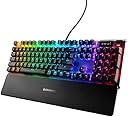
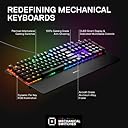
The Steelseries Apex 7 Mechanical Gaming Keyboard combines a robust aircraft-grade aluminum frame with tactile brown switches rated for 50 million keypresses. Featuring an innovative OLED Smart Display for real-time updates and 16.8 million customizable RGB colors per key, it delivers both performance and personalized style. Designed for gamers and professionals seeking durability, comfort, and seamless control integration.



| ASIN | B07SRCWNFY |
| Best Sellers Rank | #2,124 in Videogames ( See Top 100 in Videogames ) #147 in PC Gaming Keyboards |
| Customer reviews | 4.3 4.3 out of 5 stars (648) |
| Item model number | KB-00010 |
| Product Dimensions | 13.97 x 43.69 x 4.06 cm; 952.54 g |
A**G
Not as quiet as I'd hoped
I ended up going with the Apex 7 Brown version of the keyboard. I was coming from a Logitech G510 rubber dome keyboard. After using it for a while, I've noticed a few things: The keys are a little bit higher, so my hand sits at a slightly different angle than I've been used to for almost a decade; so that has been an adjustment. I never used the G510 wrist rest, and I currently don't have it on the Apex 7. I may need to start though because it does compensate a little bit for the shift in key height. Despite the description of the keyboard, the "tactile/quiet" doesn't quite accurately describe the sound. Playing games can be quiet if you're only using a smaller subset of the keys (WASD type deal) and press them less frequently, but if you are typing fast (or even average speed), the keys are noticeably louder than the rubber dome keys. I'd say so much louder that I cant imagine the clicky keys on the blue is much louder when typing. My wife has complained about the loudness of my typing now that we share an office. In terms of key feel, I really like it compared to the rubber dome. I wouldn't say it is similar in feel by any means though. It takes less force to push a key down, but because it feels less "mushy" I feel like my typing is more precise. If you were to go with the clicky blue version, I'd say you'd get more of that "key pressed" feel you get on the rubber dome when you push past the force required to activate a key. On the brown switches, you can push a key slowly down and only feel a minor bump when activating the key. Having per-key color customization and profiles is a neat feature especially if you're going for A E S T H E T I C S on your build. Definitely an improvement over the G510 in terms of brightness and color definition. The inclusion of 6 macro keys is a nice carryover option from the G510, and I definitely didn't need 18 of those. Haven't really had an opportunity to use this feature yet, but it is nice that it is there. One feature I miss is having a clock on the LCD screen. I'd say that as of now, the LCD screen is useless for my purposes with the current app options available. I currently just have a gif on it and the screen serves no functional purpose. The only apps available for the LCD screen from steel series are games I don't really play, or visualizers I won't ever use. If you want a clock, or to display song info (from things like spotify), you're going to have to find someone that has made it and install it manually, or code it yourself. The volume slider is exactly as it was on the G510 and I'd say its even better since you get a little tactile bump each time you spin it. This is a feature I'm glad is exactly the same. The single play/pause/skip key under the volume wheel took a little bit of getting used to, but works as intended. The only negative I'd say is that unlike the G510, when you use the button to play/pause/skip and your monitor is asleep (but PC is still playing music in the background) it wakes your monitors up. The G510 buttons did not do this, and it is something I miss from that keyboard. Final thoughts is that this keyboard has enough features (that I wanted from my G510) to warrant the upgrade. It is a nice keyboard that should hopefully last me the next 10 years. The difference between brown and blue switches is probably just feel and not necessarily noise level (and the reds didn't interest me at all).
A**R
Perfeito de mais
Teclado perfeito!!!
A**.
Equipo entregado en tiempo y forma
Como tip fijense en el color de los switches que trae el teclado, yo por guiarme por precio mas bajo ordene los cafes que segun son "silenciosos" y preferia los azules que "hacen mas click". Buen producto de calidad, es muy pronto para decir su duracion de vida. Producto llego en empaque original y cerrado, todo nuevo.
S**T
Great for gaming, beautiful LEDs. OLED display is pretty useless.
Pros - Excellent LED lighting - tactile feedback is great - keys aren't loud when pressed - wrist rest is comfortable Cons - OLED display is pretty much useless. Under normal use you can't even see it - media keys are pretty out of the way and hard to press with just a glance Overall 4/5! Recommend for gaming 100%. Despite the cons this keyboard is well worth the price.
A**R
Amazing keyboard
The keyboard is really good. The quality of keys and everything. I like the red keys because it's smooth and easy to press. The noise is really good when u press the keys. And I love how you can customize everything on the keyboard with steelseries engine. A bit pricey overall but well worth the purchase
Trustpilot
2 months ago
3 days ago