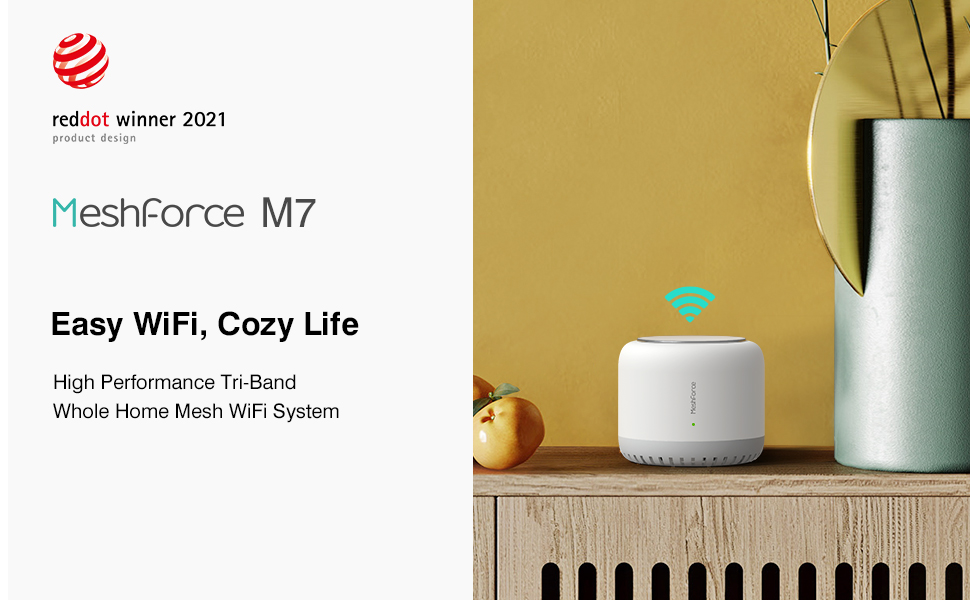
๐ Elevate your home WiFi gameโfast, flawless, and future-ready!

The Meshforce M7 Tri-Band Whole Home Mesh WiFi System (3 Pack) delivers high-performance wireless coverage across 6000 sq.ft, supporting over 75 devices with tri-band technology. Featuring easy app-based setup and remote management, it ensures seamless connectivity and robust security for modern smart homes.







| ASIN | B08LNN5372 |
| Antenna Type | Internal |
| Best Sellers Rank | #76,444 in Computers & Accessories ( See Top 100 in Computers & Accessories ) #662 in Whole Home & Mesh Wi-Fi Systems |
| Brand | Meshforce |
| Built-In Media | Adapter |
| Color | 3 Pack |
| Compatible Devices | personal |
| Connectivity Protocol | wi_fi |
| Connectivity Technology | LAN, Wi-Fi |
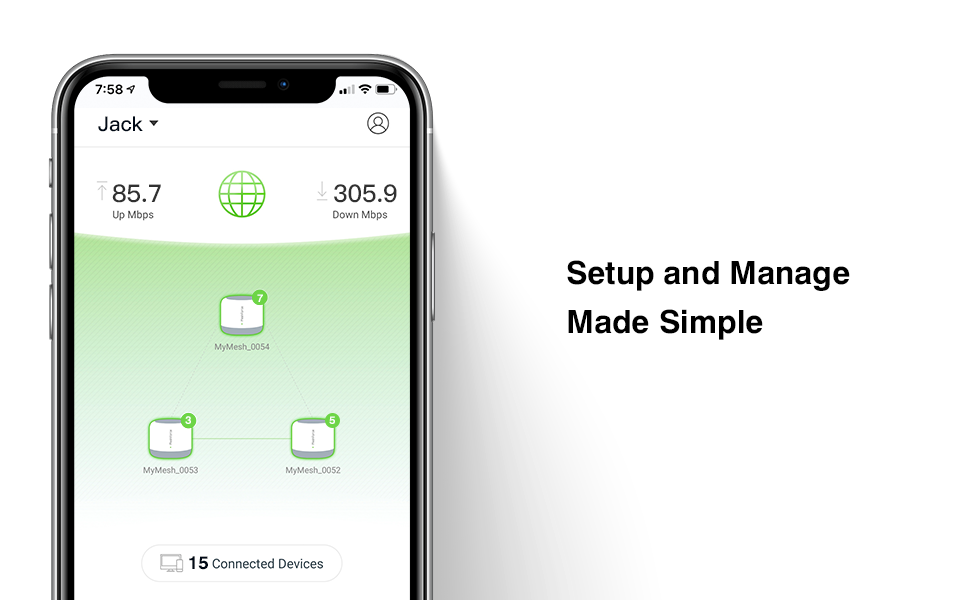
| Control Method | App |
| Controller Type | vera |
| Coverage | Up to 6000 square feet |
| Customer Reviews | 4.2 out of 5 stars 1,010 Reviews |
| Data Transfer Rate | 2200 megabits_per_second |
| Frequency | 5 GHz |
| Frequency Band Class | Tri-Band |
| Item Dimensions L x W x H | 5.3"L x 5.3"W x 4.4"H |
| LAN Port Bandwidth | 1000Mbps |
| Manufacturer | Meshforce |
| Maximum Upstream Data Transfer Rate | 2200 megabits_per_second |
| Mfr Part Number | M7-3P |
| Model Name | M7 Tri Band Mesh WiFi Router System |
| Model Number | M7-3P |
| Number of Antennas | 3 |
| Number of Ports | 3 |
| Operating System | Proprietary (Meshforce) |
| Other Special Features of the Product | WPS |
| Router Firewall Security Level | High |
| Router Network Type | Tri-Band |
| Security Protocol | WPA-PSK, WPA2-PSK |
| Special Feature | WPS |
| UPC | 769891132947 |
| Unit Count | 3 Count |
| Voltage | 240 volts |
| Warranty Description | 365 Days |
| Wi-Fi Generation | 802.11ac |
| Wireless Communication Standard | 2.4 GHz Radio Frequency , 5.8 GHz Radio Frequency , 802.11ac |
| Wireless Compability | 2.4 GHz Radio Frequency, 5.8 GHz Radio Frequency, 802.11ac |
M**W
Not Flawless, but Does the Job
I've been using this 3 node system for a few weeks now. Previous to this wifi system, I was using a single Linksys router for years which was mostly fine, but I wanted to get some signal coverage and faster speeds in further areas of the house. I read up on several brand systems but this one caught my eye due to the price and reviews. First, the overall system setup process is just a few steps. Once the first node was working, I just needed to power on the other two and they automatically got configured. I did come across a couple of issues with the setup, but was able to overcome them. 1. While going through the initial wifi setup, you are prompted to rename the SSID which I did, however, it would appear to save the new SSID & password, but the setup would not complete. I just kept showing me the same screen as if the new SSID got saved. I tried reinputting and saving it several times but it wouldn't take and complete the process. Somehow after power off the first node then trying again, it worked. I thought it was just a one time issue, but a few days later I reset the node back to factory defaults to try the setup again. This second time I had the same issue as before with saving the SSID & password and completing the setup. I had to unplug the node and try again and I think what worked was using a different random SSID and different password, letting it get saved, then changing it again after the setup completed. 2. The first node was not able to acquire an IP address from Xfinity. I tried rebooting the Motorola modem and Meshforce node a few times but didn't work. Swapping the cable between the modem and wifi node worked. The first cable was older, so that may have been a factor. With the system working and all 3 nodes online, the wifi has been working fine for the most part. I do see my phone switching between nodes when I move to different sections of my house and connection speeds have been good and I'm getting more area coverage than with a single router. But there are a couple of issues that occur sometimes: 1. A few devices (specifically Roku, Nintendo Switch, Google Home, and Dell Chromebook) have lost their connections at random times and were unable to automatically reconnect, even after restarting them. I had to manually configure them to connect back to the SSID and reinput the password. They've never done that with my old router. It happening once I would accept as a glitch but it's happened a few times for these devices. We'll have to see if it continues. 2. The app I use on my iPhone works fine most of the time. I did have issues with it freezing up the first couple of days. Every once in a while it times out while loading and I'll have to try again, but this doesn't happen often. Although there have been some issues, I still rate this product highly since it is working well for the most part, plus the iMesh customer service has been very responsive in helping to answer my various questions and issues and accepting my feedback to improve their product.
S**.
I Love It
First off, I am not a super tech savvy person, I know enough to get around. I chose this mesh after reading several reviews not just on Amazon but also looked on other websites, and compared it to other routers on the market. This was right within my budget at $249. I installed one node on each floor (Basement , main and second floor) and once I flicked the switch installation was easy. One node took over my ISP router and others were placed in dead zones and slow areas that I knew I was already having problems with. The My Mesh app was easy to use and it has a lot of features. I like the ease of installation right from the app on my phone. It walked me through what I needed to do. If I needed something explained further, I would turn to the videos provided by mesh force. The design of the My Mesh app is the best I like how you can monitor all three nodes and see how many devices are connected to each nodes. You can click on the nodes and your able to identify what devices are connected, click on each device, view the details of the device and even change the name of the device. It shows you how much bandwith each device is using at the time. You are also able to change the name of the node from its serial number to whatever you want. The ease of the nodes connecting to one another automatically was a huge plus for me I didn't have to press a button on the node to ensure that they connect. I run about 18-20 devices in the house (gym equipment, tablets, laptops, cameras, doorbell, Echos, gaming consoles, TVs... etc,), these would take a toll on my router however with the M7 I don't get slow downs or dead spots. They have been right on the money. I have run several speed test with different sites and all provide different speeds. However I have tested the M7 running several different devices at a time, and the quality of bandwidth was much better than before. I also like the fact that I can connect the LAN ports on the other two nodes that are not the primary node. The design of the M7 also looks inconspicuous, I like the fact that antennas are internal and looks more like a speaker than a router. Overall the easy of installation, the app and automation has been are the feature that I most like for me, not the mention the fact how faster my internet is.
J**.
Finally whole home coverage with no more buffering
All in all, Iโm extremely pleased with the system, It did more than I expected. After using the same Asus dual band router for the last 4 years and no longer being able to receive any of their updates I was extremely annoyed by the low speeds and dropped internet connection I was receiving, and the coverage was spotty across our 3000sq ft home. The ISP said I should be getting 200 MPS but that was never the case I always got around 30-50Mbps on my computer and 15-40Mbps on my other Wi-Fi devices. After some research and reading reviews I narrowed it down to the Mesh force system and Googles mesh system. The price of the Mesh Force system was a little lower, so I decided to go with it, and I am glad that I did. Set up was easy, I downloaded the App, and I was able to connect it and get all 3 nodes going in under 5 minutes. I didnโt know what to expect as far as speeds go because all the systems say you can get up to 300-800Mbps but most fail to deliver and since my ISP gives me 200MBPS I would be happy just to get over 100Mbps. Boy were we surprised after hooking up all our devices to get a consistent 100 MBPS+ Between a handful of computers, an multi-camera home security system, the families multiple WIFI device, kids on Zoom classes, parents on zoom meetings and at any time now with everyone being home you will 3-4 of our kids watching programs on their smart TVs, on their tablets in other devices as well as Mom and Dad working from home. This system has improved our daily internet usage and stop all the buffering and dropped connections we had before. Pros Fast Speed Super easy set up the App takes care of the heavy lifting Built in security App ease of use Great coverage No dropped connections Very light weight No internet buffering on Zoom or Netflix Cons Too large to mount on wall No Ethernet cables inside box
E**H
Limited configuration by clunky app, but powerful signal that does the job
Powerful functionality that improved our signal dramatically, and I appreciate that it doesn't matter which one is connected to the internet, they figure it out themselves. Phone app is the only way to configure - there's no web admin console or ssh connection, that I'm aware of. App is mostly idiot-proof, which also means it lacks advanced options. You can't assign a static IP to connected devices or choose whether or not to bridge the guest network with the primary (you can't, which is the safe choice). The inability to assign an IP to a device can cause issues with wireless printing, for example. This very nearly made me return this, but it works very well despite that limitation and is less expensive than similar alternatives. If you don't care about assigning IPs or advanced network config, then this is probably 5 stars.
G**N
So so, UI sucks, signal ok
For some reason they will not post my review and I have made updates to the review and they are not saved but here is another update. 11/29/21: Got the replacement and switching out stinks. I figured I could just replace the bad node that was rattling but that was not the case and I ended up having to remove all the devices and starting fresh with the new box. After running for a few days now, I am still not happy with the signal. It does drop internet a few times a day, switching between nodes sometimes does not happen without turning off wifi and back on. But for the price I am going to keep it until I get more wifi 6 devices and then I will update this for a wifi 6 router. Orginal Review: I have only had this for a day now and will update when I get the replacement and test some more but right now I am going to say pass on this item. I got the 3 pack and when I got the item and opened the box one of the nodes rattled (something is loose inside node itself). The other two did not but I went ahead and plugged them all in and the main node is great, faster speeds than my old Wifi router and so far on that node alone it seems ok connection wise. Then when I went to test the rest of the nodes the one in the next two rooms over is okish, speeds are about half of the main node. The 3rd one (the one that rattled) is junk, it switches between green and yellow and connections drop all the time. I have all of them hooked up to an ethernet cabled with POE supplying the internet connection, I have tried it with and without hooking up the ethernet cable to all of them and it works best with it hooked up. The device requires you to download the app on your phone to set it up which I hate, it should have a web interface like all other routers I have purchased in the past and having to download an app sucks. On top of that the app itself sucks as there are very few things that can be changed in it. It is lacking some of the basic feature you would expect a router to have, things my 15 year router had so not sure why they don't allow setting to be changed. I can see some people not wanting to change things and them trying to simplify the UI interface but there still should be an advanced feature spot to allow you to change settings for a more advanced setup like I require. It also seems you can only use the app when on the main node connection not the satellite nodes as it tells me it can not find the system unless I am on the main node. I did not want to create an account with them so I did not at first but did try to create and account thinking it would allow me to use the app while connected to the other nodes but not so much, it is better but still has issues connecting. The app also asks you for permission to see all your files and location. I can kind of see location (not really) but there is no reason for the app to see all my files on my phone so I did not allow either. When I called Amazon and told them that one of the nodes rattled and I think I just needed the one sent out they said they can not do that and I had to return the whole thing and reorder the new one, which is stupid but what ever. I am supposed to get the new order tomorrow and I will update my review when I have a better chance to test it on hopefully a working system. So right now over all it is ok for the price but unless the new system greatly improves my connection I would say pass and look at another brand for you Wifi solution.
L**1
Is Rated #1 On Most Online Sites For A Reason
I am a civil engineer so I tend to over-do it when I want to buy something. Especially when it is something technical such as this mesh system that I really know very little about. So I always go online and read google reviews, search for Best Rated Mesh Systems, etc., so I can get the pros and cons of each item out there for sale, no matter what I am buying. Just about everyone is raving about Netgears Orbi Mesh and Google Nest Mesh. Both do not have great ratings for many reasons including privacy issues, set up issues, limited home square feet issues, and having to reset them constantly to work. The one that kept popping up on every rating search site was the Meshforce M7 Tri-Band Whole Home Mesh WiFi System (3 Pack), which I have to be honest, I had NEVER heard of them before. It was priced right, easy to set up and worked the first time right out of the box, which NEVER happens for me when buying something like this. EVER! I have Spectrum 1 gig service at my home and when you get Spectrum 1 gig, they supply the modem and router. The router is of very poor quality and even the Spectrum Techs coming to my home told me so because I installed a Ring system with cameras around my home, and the router could not send it enough wifi signal to power them properly. Without a proper wifi signal, the cameras show nothing and are usually a 'black' screen; and they rarely ever alert me when there is movement at each camera. Plus, just so you know, Spectrum 1 gig is really only around 650 mbps and not 1 gig. I am hard wired and never got any better than that, yet the payment part each month for the 1 gig worked just fine. So after talking with the Spectrum Tech at my home trying to resolve my lack of strong wifi, it was suggested I go with a mesh and even this tech mentioned Meshforce M7 Tri-Band Whole Home Mesh WiFi System. He told me to downgrade my Spectrum internet from 1 gig to the next lowest signal of 400 mbps and turn in the router as it is not free with the lower service, but the modem still is. I did just that over the phone with Spectrum and they sent a signal to my modem to stop the 1 gig and even after that, I get 455 mbps. More than I am paying for and not far less than what I was supposed to get with the 1 gig. And with the savings of $60 per month plus tax, it pays for this new Meshforce M7 system in 4 months. Now the system is installed and my Ring system works perfectly with 3 times the wifi power that I had before as Ring allows you to see the wifi network signal power coming to each device. Why anyone has any other mesh system is beyond comprehension. My guess is people buy the big names that spend a fortune on advertising. None of them can compare to this system. Go online and look like I did. Or ask your Spectrum tech next time they are at your home. Oh yes, one more thing. The Spectrum tech told me that Netgear Orbi has had continuity issues with Spectrum service. Netgear is supposed to be working on this, but that is not a good sign.
M**S
Excellent Wifi network solution
I bought this to replace my former network solution, which was a netgear router and a few wireless access points I set up around the house. The main problem with the previous setup was the wifi signals from the devices were overlapping causing drops in wifi and the devices having to switch from router to router as you go through the house. I got the Meshforce setup and was very pleased with the ease of setup and how fast the internet speeds were. I have been using it for awhile now, wanted to give it time to see how walking through the house causing the switching to occur would work out. I have been blown away by the seamless way the devices switch and keep you connected at all times. So far I have had no issues with internet drops, having to reset the access points, "which I was having to do every couple of days with my previous setup", and the quality of signal is excellent. We have many wifi items in the house on the network at the same time and I have had no issues with any of them seeming slow or disconnecting. I would highly recommend these for any household with out a mesh network, or for anyone looking to upgrade an existing mesh network. These just work out of the box, no complicated setup needed. Took me about 10-15 min total to setup all three of the units and had everything back up and running flawlessly. Thank you for and excellent wifi solution!
H**O
Great Coverage
After about one week using the MeshForce m7 ( 3 units set) I have to say, it exceeds my expectations. The set are 3 identical units(1 WAN 2 LAN) where any of the units can be the main unit connected to your internet modem. They are a little bit on the large size but at the same time they are really lightweight without that cheap feel. The installation instructions were really straightforward and fast, the information in the instructions was more than enough, but it also has a QR code for a video installation guide if needed The app for the MeshForce is very user-friendly and I do recommend to turn off the capacity-oriented mode if you donโt have 30ish devices connected on your network. My WI-FI signal is way better and useful now. It provides coverage all around the house, without any dead spots, being a split-level that is amazing and even my back yard has WI-FI signal now LoL . In my guest room I usually have a terrible and unstable signal. It was slow, really slow ( anything from 2-10 Mbps) and no more than 2 bars but with the m7. Iโm now getting a strong and stable signal (full bars) with over 300 Mbps. Likes Easy Installation User Friendly App Stable Great Coverage TRI- BAND Parental control and Guest Network available Dislikes No wall mount Not available in Black yet App dependant
Trustpilot
5 days ago
3 days ago