

โก Power Your Productivity with Lenovoโs Ultimate ThinkPad Dock!
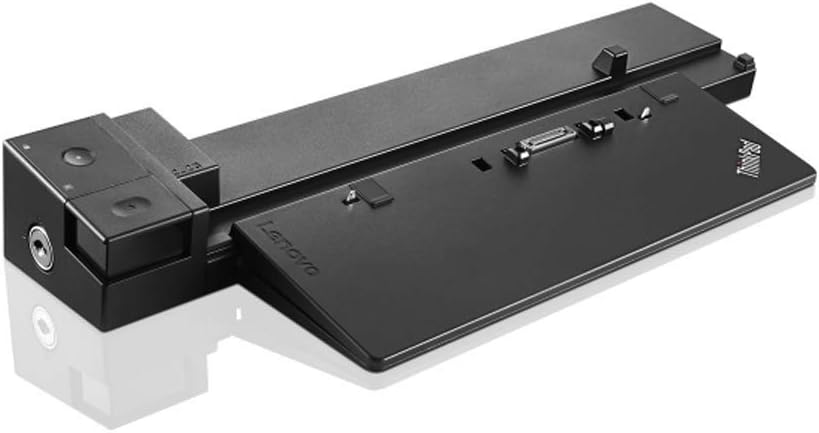
The Lenovo ThinkPad Workstation Dock 230W (40A50230US) is a high-performance docking station designed exclusively for select ThinkPad P Series models. It features 6 USB 3.0 ports (one with always-on charging), dual DisplayPort 1.2 outputs supporting up to 4K resolution, and gigabit Ethernet for enterprise-grade connectivity. This dock includes a 230W AC adapter and power cord, delivering a seamless all-in-one solution to expand your workstation capabilities and boost productivity.
| ASIN | B019K6ET24 |
| Best Sellers Rank | #67,089 in Computers ( See Top 100 in Computers ) #391 in Laptop Docking Stations |
| Brand | Lenovo |
| Color | Black |
| Compatible Devices | Lenovo Thinkpad P50, P51, P70, P71 |
| Customer Reviews | 4.6 4.6 out of 5 stars (345) |
| Global Trade Identification Number | 00779184154433, 00889233920398 |
| Hardware Interface | USB 2.0, VGA |
| Item Weight | 2.16 Pounds |
| Manufacturer | Lenovo USA |
| Mfr Part Number | 40A50230US |
| Model Number | 40A50230US |
| Number of Ports | 12 |
| Smart Home Compatibility | Not Smart Home Compatible |
| Total Number of HDMI Ports | 1 |
| Total Usb Ports | 6 |
| UPC | 779184154433 889233920398 |
| Unit Count | 1.0 Count |
| Wattage | 230 watts |
S**R
Sin duda un gran accesorio que debes tener
D**N
This works really well: After a trip, I can just place my ThinkPad P51 workstation laptop on top of the docking station, snap it into place, and be back in business with my desk's computing setup (mouse, speakers, external drive, and two monitors). It might be a bit pricey, but it was worth the investment. (Note: I understand that Lenovo's newest workstation laptop, the P52, does not have the mechanical workstation connector, so be aware if you're buying the latest incarnation of the ThinkPad "P" series.)
D**W
works as advertised
J**U
Great docking station for ThinkPad P50 and P51... it will be missed. The new models use USB-C ones, which are good, but will never meet the level of comfort, ease of use, and charging speed as this one... times change... good bye, ol' friend.
G**X
I have a P50 and have experienced one situation โ on station it will NOT fully boot up, just get a black screen. I have to remove it and once I lift the lid it will boot up and can then put it back on the station. I have tried the following to no avail: - Purchased a new docking station (I bought my P50 last march with a docking station) upon calling Lenovo it was out of warranty - The new dock station has the same problem - on the Lenovo site I found a docking station firmware upgrade but upon loading it the update log stated I already had the latest firmware - Upgraded my BIOS to the latest version - In the BIOS I did the following based on many Internet references to this problem: o Config/Display changed from Hybrid to Discreet and Boot Time to 5 seconds o Main/Security Restored Factory Keys โ this actually gave me the LENOVO screen but just sat there making me remove the P50 from the docking station, lifting the lid to finish the boot up and then replacing the P50 onto the docking station o I finally reset back to Hybrid and 0 seconds since this provided no advantage I did call Lenovo and they were kind but simply followed a standard procedure that did not help at all. So I am relegated to simply dismounting the P50, lifting the lid and do a boot up to the lock screen, reinstall the P50 to the docking station and it starts up fine from there. I can honestly say I will never buy another Lenovo product! I give this two stars only because it does work but not as it should. 01/10/2018 UPDATE: I found out that there is NO problem with this unit but rather with USBs attached to it. For me it was my USB Hub - once I unplugged it the unit worked fine. I then replaced the Hub and the new hub works great with this docking station. I have had the old hub for a few years now and I think it just went bad. If you are having the same troubles I had try unplugging one USB device at a time (start with you Hub if you have one attached) reboot and try the next.
Trustpilot
3 weeks ago
1 month ago