Buy anything from 5,000+ international stores. One checkout price. No surprise fees. Join 2M+ shoppers on Desertcart.
Desertcart purchases this item on your behalf and handles shipping, customs, and support to Sri Lanka.
🚀 Upgrade Your Network Game — Don’t Get Left Behind!
The StarTech USB 3.0 to Gigabit Ethernet Adapter transforms any USB-enabled device into a powerhouse of wired connectivity, delivering full Gigabit speeds with broad OS compatibility and advanced networking features. Designed for professionals who demand speed, reliability, and plug-and-play convenience, this compact adapter ensures you stay connected with zero compromise.


| ASIN | B0095EFXMC |
| Best Sellers Rank | #44 in USB Computer Network Adapters |
| Brand | StarTech.com |
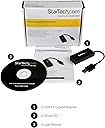
| Built-In Media | 1xDriver CD,1xInstruction Manual |
| Color | Black |
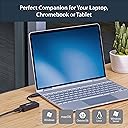
| Compatible Devices | Desktop, Laptop, Nintendo Wii / U |
| Compatible Operating System Family | ChromeOS, Linux, MacOS, Windows |
| Customer Reviews | 4.6 out of 5 stars 1,304 Reviews |
| Data Link Protocol | Ethernet |
| Data Transfer Rate | 1 Gigabits Per Second |
| External Testing Certification | CE, FCC, TAA, REACH |
| Global Trade Identification Number | 00065030848404 |
| Hardware Interface | USB 3.0 Type A |
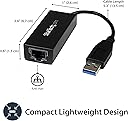
| Item Dimensions L x W x H | 2.6"L x 1"W x 0.6"H |
| Item Type Name | Gigabit Ethernet Card |
| Item Weight | 0.03 Kilograms |
| Manufacturer | StarTech.com |
| Mfr Part Number | USB31000S |
| Minimum Required Operating System Version | ChromeOs 134, Windows 7 |
| Model Number | USB31000S |
| Product Dimensions | 2.6"L x 1"W x 0.6"H |
| UPC | 065030848404 |
| Unit Count | 1.0 Count |
| Warranty Description | 2 Year |
O**D
WORKS LIKE A CHARM WITH WINDOWS 11 NO HASSLE
Most dependable of the brands that I have used. StarTech includes a 2 year warranty as well. I had to return 2 Amazon Basics USB network adapters because I unable to keep them working. FRUSTRATING!!. Usually Amazon Basics products are good quality and priced right. Must have gotten a lemon. It happens. The StarTech cost almost twice the Amazon brand, but I did not want to take a chance again. Good build quality. Connected to my Windows 11 home version and it ran properly upon install. No hassles. I'll let you know if the StarTec holds up.
J**L
Easy to install and has worked perfectly
The built in Ethernet adapter on my almost 10-year old Lenovo ThinkPad W700 get fried by lightning a couple years ago. Fortunately, the Wi-Fi adapter was not damaged, so I still had Internet and network connectivity, but at Wi-Fi speeds. That was not at problem until the W700 was replaced about 18 months ago by a Lenovo ThinkPad P71 and the Lenovo W700 was moved upstairs. Our house has a metal roof and the Wi-Fi throughput is significantly degraded in that area of our house. Not a big problem for Internet usage but moving large files, doing backups, or syncing files between the two-system using our LAN became painfully slow. So much so that I started using the old 'sneaker net' approach and began moving files and data back and forth with thumb drives. My W700 is from the days before USB 3.0 and only has native USB 2.0 ports. USB 2.0 thumb drives is certainly faster than weak Wi-Fi but still relatively slow, and always cumbersome. The first thing I did was obtain a StarTech USB 3.0 ExpressCard. The USB 3.0 ExpressCard has worked perfectly. Having one USB 3.0 port means I can use USB 3.0 Thumb drives. USB 3.0 connectivity at both ends of the LAN made moving larger amounts of data faster but I still had the hassle of physically carrying thumb drives back and forth, and up and down stairs, between the two Lenovo systems. I tried a USB 2.0 ethernet adapter, but speeds were about the same as Wi-Fi. Then I tried the StarTech USB 3.0 Ethernet adapter plugged into the StarTech USB 3.0 ExpressCard. I had no idea if this would work and crossed my fingers as I rebooted Windows 10. And work it did, and very well I might add. Now I can once again move large blocks of data such as 200 or 300 15mb-18mb photo files between my two Lenovo laptops in a minute or less. And one of my backup strategies of syncing files between the two systems is now much quicker.
M**E
Works quite well~!
My old Tower PC decided it didn't want to access the internet after years of great service. I assumed it was my internal modem so I thought I'd try this gadget and at first I couldn't get to work as I was using my old cord to attach it to my wireless modem. Turns out my cord may have been the issue all along but I had tried a different cord prior.. I plugged in the cord that came with this new adapter and everything came back to life! Was it the cord or the Adapter, I don't really know but I give credit where its due to so the adapter gets my vote. If nothing else I can use this adapter on my new PC I have yet to hook up and that ones portable! Buy it folks.. lol.
B**B
Very Handy for a Laptop
This Star Tech USB 3.0 gig adapter is worth the higher price I am using it on my highly customized Dell XPS 8960 the RJ45 socket died this saved me sending unit to Dell's depot repair in Texas I have had many Dell I also buy there premium pro plus extended warranty 2 more years to go without an adapter a new motherboard would have been in order
U**E
Security Onion Sniffer
Okay temporary sniffer for a security onion set up. The USB itself feels solid and works amazing at normal operation. In my case I’m using it as a sniffer to capture packets for the security onion. It works but not reliably, it will once in a while have issues being detected by the onion. If your comfortable constantly checking the inbound traffic rate to make it isn’t at 0 then this will certainly do!
R**R
MAJOR FLAW: ~28AWG USB-3 CABLE EASILY BREAKS!
I've purchased many types of USB to Ethernet adapter cables. First problem I encountered, were excessively heating USB Ethernet adapter chips, hot enough to cause significant skin burns along with poor power reducing/sleep capabilities. The more costly Startech makes seemed to solve the overheating problem. Second problem I encountered, the USB Ethernet adapters would routinely just fail, at times seemingly for no reason. I now realize a possible cause of failure, the very weak thin wire gauge used within the cabling is easily breaking after simple common every day repetitive bending and usage. On the latest failure of this Startech USB Ethernet adapter, the break occurred at the USB-A male connector, readily noticed by bending/pushing for the operating system to detection connect and disconnect. Upon stripping/disassembly of the USB-3 cable, there are eight connectors, with a good majority of the wires being less than 28 AWG, mostly impossible for soldering/repairing. A common USB-2 cable has typically four connectors, after re-soldering and shrink tubing, likely still usable. However, USB-3 has at least eight conductors not including the many grounds and shielded ground conductors! After re-soldering and shrink wrap, the splice will likely be extremely bulky and subjected to a high likeliness of failure due to possible grounding shield deficiencies and/or the point of splice inability to handle much stress. On this latest break, since the unit was purchased for a laptop, the cable always had an adhesive strap attaching the cable to the back of the display of the laptop. Stress on this cable was absolutely at a minimum, barely moved, and the cabling still yet experienced failure! Absolute poorly designed/engineered USB-3 cabling and non-repairable! Expensive USB Ethernet chips are pretty much throwaway adapters due to poor USB-3 cabling! Still giving the product five stars, as the unit is likely one of the better USB Ethernet adapters on the market, however, likely all others also have very poor USB-3 cabling. For my next laptop. will seriously reconsider/revert to upgrading/spending a few more dollars for a laptop with hardwired Ethernet. Rarely use wireless anyways... 2026.03.12: I continued disassembling, both the Ethernet housing and USB plug. The Ethernet housing is a crimped cable plastic end, simply use enough force on the deep end of the Ethernet plug and push out, or drill a small hole at the top of the housing (as the Ethernet/USB chip PCB board lays laterally), and use an 90 degree pick tool and pull the PCB out of the housing. I found so much time spent with installing high strength glue and Kapton tape on the plug and housing wires, and yet they utilized very cheap thinnest grade gauge USB-3 cabling throughout the market! Ridiculous! Again, just buy cheap as these are throw away adapters. Only reasonable splicing or repairing the thicker gauge 4-conductor USB-2 cabling, 9-conductor USB-3 28 AWG cabling is extremely difficult splicing, with weak conductors and subjective to breaking. Not sure if I can just repair/splice/re-solder the USB-3 Ethernet adapters with a USB-2 pigtail cable.
P**B
Great NIC for hosting CCIE lab on Lenovo laptop
At least with the latest driver(s) I have installed (circa ~ 2015-02-15), I am unable to get an Ubuntu 14.04 Server VM on Virtualbox on Windows 7 Enterprise to see 802.1q tags nor to allow setting the MTU any higher than 1500, of which both could be an issues in limited advanced networking support by Oracle Virtualbox. If interested, I am able to successfully work around this while using laptop for CCIE studies. By creating a virtual router to terminate an L2TPv3-over-GRE connection within the Ubuntu VM on my laptop, I can carry that encapsulated traffic out this physical interface attaching to the first of a few switches to get to my Lab switches. Adjacent to my lab switches, I have a Cisco 891 terminating the other L2TPv3 endpoint which then breaks out any Ethernet traffic to my lab switches, where on the attached lab switches I am seeing both tagged and untagged traffic hit the switches from virtual routers within my laptop. Being that this is all within trusted networks, I am not using IPSec although this could be done to "xconnect" virtual routers on a laptop to physical switches in a DC or lab across the Internet, albeit at the expense of further decrementing available MTU on the inner payload.
A**A
If you have an ultrabook without ethernet, you need this!
Despite the fact that my laptop, a Fujitsu Lifebook U904 has a ethernet port built in, a feat for a ultrabook, I didn't want to risk breaking it. It's one of those slide out and pop open gizmos that seems like it would break, then cost a fortune to fix. I'd much rather carry around a dongle than risk breaking anything. Initially, when I began researching USB to ethernet adapters, I found many of them suffered from poor performance, either slow transfer rates, despite "gigabit" connectivity, overheating, and an overall sense of unreliability. From that, I knew I wanted a few things: 1. a USB 3.0 adapter, to achieve gigabit 2. an adapter sold or supported by (or warrantied by, really) a reputable company 3. something with it's own processor, so it's not sapping off mine. I'm unsure if you've ever heard of StarTech... basically they sell cables for specialized uses. Maybe you need a HDMI to USB cable, for example, they'd likely have it. They're very good at what they do, and I knew this would be a good product just by the brand name. I've used it now for a few months, on a regular basis, and have had zero issue. It's actually saved me a few times, when I needed to do some advanced troubleshooting, packet sniffing, or bridging connections. It gets warm, but not hot. Transfer speeds are consistent, even over USB 2 (where you'll only get 100 meg, or I do, anyway). The only fault I find in it is the StarTech website. It's somewhat difficult finding the proper drivers for this model. There are a few variations of it. So be sure to look at the packaging or the little sticker on the back when you go to update drivers. You may end up with the wrong ones.
A**L
works on linux
works on linux, no extra drivers or config needed.
N**E
やっぱりStarTechです
エクステンダーから、さらにローカルネットワークに繋ぐという荒技の為に購入しました(天才的アイディア)。これにより地を這う長いケーブルが一本減り、たったこれだけのことですが個人的には大変満足しています。ちなみに、DAWのコントローラーのためですので、速度は全く求めないような用途です。 肝心のレビューですが、開梱すればそこはスターテックの品質。デザイン、サイズ満足です。中身はRealtekですので、NACの設定的なものもこの通りです。
D**L
Perfetto
Compatibile con TV con Google TV con USB 3.0. testato con iperf 300 mb/s
C**O
Ottimo
Ottimo
山**明
普通
使用中、結構熱くなりますが、 これは仕様範囲なんですかね。
Trustpilot
1 month ago
2 days ago