🔒 See everything, miss nothing — security that’s smarter, sharper, and built to last.
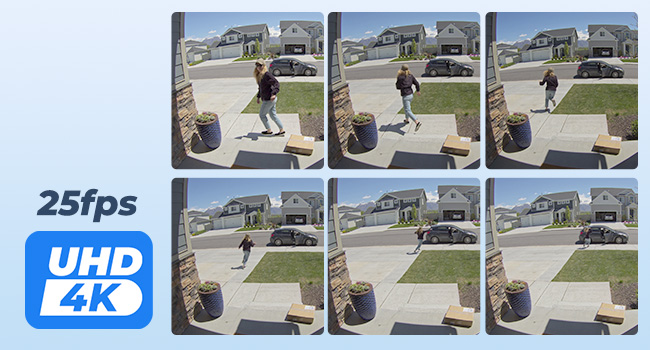
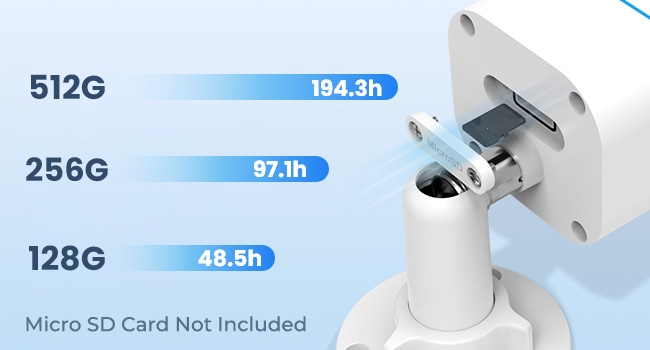
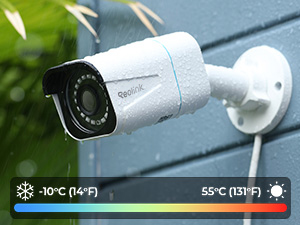
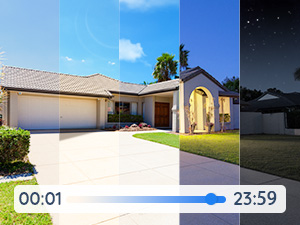
The Reolink 4K PoE Security Camera delivers ultra-high-definition 8MP video with smart human and vehicle detection to minimize false alerts. Featuring Power over Ethernet for streamlined installation and an IP67 waterproof rating, it’s designed for reliable outdoor surveillance. With support for up to 256GB microSD storage (not included) and time-lapse recording, this camera offers versatile, 24/7 monitoring backed by a 2-year warranty.


| ASIN | B08SCC5NSK |
| ASIN | B08SCC5NSK |
| Batteries Included? | No |
| Batteries Required? | No |
| Best Sellers Rank | #7,767 in Electronics ( See Top 100 in Electronics ) #67 in Bullet Surveillance Cameras |
| Color | white |
| Colour | white |
| Compatible devices | Smartphone |
| Connectivity protocol | POE |
| Controller type | Android |
| Country of origin | China |
| Customer Reviews | 4.3 4.3 out of 5 stars (2,112) |
| Customer reviews | 4.3 4.3 out of 5 stars (2,112) |
| Date First Available | 7 January 2021 |
| Date First Available | 7 January 2021 |
| Form factor | Bullet |
| Included components | Camera Body, Network Cable |
| Indoor/outdoor use | Outdoor |
| Installation type | Screw In |
| Item Package Quantity | 1 |
| Item Weight | 640 g |
| Manufacturer | Reolink |
| Manufacturer | Reolink |
| Mounting type | Wall Mount |
| Number of Items | 1 |
| Number of channels | 8 |
| Package Dimensions | 19.6 x 12.4 x 10.6 cm; 640 g |
| Package Dimensions | 19.6 x 12.4 x 10.6 cm; 640 g |
| Power source | Corded Electric |
| Special Features | HD Resolution |
| Specific uses | Surveillance |
| Style | 8MP |
| Video capture resolution | 4k |
| Viewing angle | 80 Degrees |
| Water resistance level | Not Water Resistant |
| Wattage | 8 watts |
| Wireless communication technologies | Ethernet |
| light-source-type | Infrared |
S**S
Solid build quality and superb images
Great product that can’t be beaten at this price. Good quality hardware and superb images. Very easy to setup with native software. Have it paired with a Synology Diskstation and it’s very impressive.
S**N
Good product.
Good product, good clarity and Good delivery options, recommended people to buy this camera.
S**.
GREAT ITEM
GOOD CAMERA BUT THE JOINTS ARE NOT STRONG,EASILY BROKEN
M**.
real 4K and good quality
Very good camera as always from reolink. Real 4K resolution and very easy setup. Works for indoor and outdoor. Recommend as always.
A**D
Very advanced
It is lenses 4mm, good to cover far area Has a very advanced features and options I used it directly with poe network and mobile reolink app and installed 256GB microsd No need for NVR Connected it dire To my home assistant smart home using ONVIF
Z**Z
Good 4K camera
Easy setup and good image quality
A**I
Great product
Great product
T**R
Good quality , not so great viewing angle
This is a solid camera, good quality , mobile app is acceptable, I am only giving this camera 3 star is because of the lens, security camera should be wide lens , to capture more in the frame, this camera is not wide at all, mounted on a standard height fence , it doesn’t capture half the view in front of it. The picture quality is 5MP so the picture is clear and sharp though
M**O
Buona camera
M**Z
Tuve dos malas experiencias con reolink. Primero compre una ip cam de 5 mpx que resulto no ser "ip", pues no se puede acceder a ella por la ip y configurarla para su uso como cualquier ip cam. Es una cámara que solo funciona con el dvr de la marca, no runciona "sola". Al revisar la descripción del anuncio vi que lo anterior se advertía con letras pequeñas al final del mismo. Tras perder una buena cantidad hice otro intento con la marca. Compré la de 4mpx fijadome que no fuera indispensable el dvr de la marca. Había leído unos comentarios de que la cámara es inestable y que se "atoraba" la transmisión. Pensé que sería por impericia en la operación. Me arriesgué y he perdido otra buena cantidad de dólares en un producto de muy mala calidad. Simultáneamente a la Reolink, compre una hikvisón ip 2mpx y una ip hdcamera 5mpx china sin marca . Ambas funcionan con un performance y estabilidad muy superior a la reolinñ que no deja de trabarse y funciona cuando quiere. Bueno. Ud decidirá que hacer con su dinero.
C**O
First, we have two Reolink systems at 2 houses, and have had 4 Reolink systems in the past 5 years or so. The systems have all worked well and we have upgraded all cameras to 5mp. HOWEVER, within the past few months we upgraded 3 cameras to the RLC-410-5MP. They are installed in Arizona. I would have given these cameras 5 stars. BUT Daytime images are great. Night images are great UNLESS IT HAS RAINED. We don't get much rain here. After 1/4" rain a couple of months ago, the cameras had fuzzy spots (only at night vision) for weeks until Reolink (whom I had emailed) said to clean the lenses. OK did that (not an easy task since the cameras are 12 to 15 feet off the ground). All was fine until we recently had about another 1/4" of rain - fuzzy spots back. They don't go away with time. I have contacted Reolink again. Prior I had asked if there was a different model (similar to the 5mp cameras we have at other house with same NVR model) and got no response. I asked if there was something different about exterior of lens - answer no. We had never had a problem like this with the other, different models of 5MP cameras. So now in a quandary of what to do as we can't be cleaning the camera lenses after every rain, especially since we are not at this house for part of the year. The current night vision is almost useless. We've been a big fan of Reolink as the systems are easy to set up, the app and software work fine. (We've had other security systems that were much harder to install/set up - you pretty much needed good IT skills). So I can't recommend these cameras based on the poor night vision after it rains. I will try to update this review if/when Reolink responds --------------------- Reolink has responded - they always have had quite rapid customer support response After we ran thru numerous tests on the camera and the NVR, they sent us a new camera. We had our choice of cameras and decided to get a different bullet POE model. The new camera is working extremely well So again, the system overall works very well, the cameras install easily to NVR and viewing, the IOS and Windows apps work very well. I would recommend Reolink, and especially for the ease of installation and the viewing per apps. I should add that I have emails sent every half hour (you can change frequency) when there has been any motion on cameras - this is from 10 cameras overall. We have few security issues at our houses - it is more to see the animals.
E**P
I needed to upgrade my IP cameras and I settled on the Reolink 5MP...and I have to admit...so far I've been impressed. I like the app and how easy it is to get up and running and the picture quality is really good. I like how everything I needed comes with it (my previous cameras needed some like Blue Iris to send notifications) and I have it setup up to me alerts whenever it detects motion in SMS and email formats. I have it setup up send me a picture to my email, but you can have a short video instead if you like. The nightvision works better than my previous cameras but it is limited to a narrow field of view so don't expect it to light up your entire yard at night, but if you have any light at all...the low light level tech is awesome. I did add them to an app I have on my tablet, IP Cam Viewer, and it works with my other brand of camera too...so I have them all in one place. I can even access the camera remotely when I'm away from home...which is awesome. I've not used the cloud storage feature but it's nice to know it's there. Now to the things I don't like...I can't figure out how to give it a static IP. If the power goes out...my router will usually assign it another IP address so I'll have to change it on my app I use. Another thing I don't like, which isn't really the cameras fault, is the fact that insects are draw to the infrared lights and at night...the camera is constantly detecting motion from all the bugs flying around. But... Overall...a GREAT value so far for an IP camera that works with my current setup and is a major upgrade from my previous cameras.
K**J
So these cameras are a hot deal for the price. They have pretty good night vision quality, great day vision quality, and have a straightforward web UI. Very easy to install, comes with everything you would need to get it connected. I prefer to have my cameras record on a hard drive, so I would need a camera software to do so. Pros: - Metal Construction, very rigid. - Flexible mounting joints, allows for almost any angle/orientation you need. - Decent Night Vision - Very Conical - Easy 1-Wire connection through PoE Ethernet Cons: - Software. The Reolink Client available for download from their website continuously crashes within 24 hours. - Timestamps. For whatever reason the four cameras that I have do not automatically sync to the NTP pool. I have to manually correct the time using the Reolink Client that crashes after 24 hours. - Not all settings are available in web UI. Use the Reolink Client that crashes after 24 hours to initialize and configure the cameras, where there are way more settings. Overall, I'm very pleased with these cameras. They work well with every VMS I've tried so far, minus ZoneMinder and iSpy. These softwares found multiple RTSP steams, and it's not specific on which is the option that you want. One is in 800x600 resolution, while this other is above 2K resolution. Suggestions for the end user: -Use a gigabit PoE switch - each camera can use up to 12Mbps, which doesn't seem like much. I've noticed some stuttering and tearing issues while viewing playback on multiple VMS clients. The Reolink Client, which crashes after 24 hours, is the only one that does not have these issues. I have not tried powering these cameras with a 12V external power supply, as my setup does not allow it, unfortunately. - Use a private network for recording. If you allow friends and family to connect to your wireless network, they will be able to view these cameras just by downloading the Reolink App from either the App Store or Play Store. While the chance of this happening may be small, it's still preventative maintenance to take care of if you truly want absolute security. - Find a VMS that works for you. I personally use Avigilon Control Center, as it is what I use on a daily basis for work and I know it the best. Milestone is great if you can configure it, iSpy is easy enough. Don't rely on the Reolink Software. Have I mentioned that it crashes after 24 hours? Ivideon is great if you don't mind paying to have more than one camera connected. Highly recommended, as there is an authentication layer that logs you into an account, instead of just scanning your wireless network. - Lastly, don't expect any support. The technical support staff are based in Asia (China, if I remember correctly) and will not respond until ~8PM CST. This made it very difficult to converse the problem and discuss a solution. The "solution" they gave me was to bypass having a VMS at all, and strictly using FTP to transfer footage from a microSD card to a NAS, which I was not okay with. I need playback, not a bunch of video clips.
Trustpilot
2 months ago
5 days ago