
đĄ Amplify Your WiFi, Amplify Your Life!
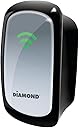
The Diamond Multimedia WR300NSI is a portable 300Mbps Wireless-N repeater featuring MIMO technology and a 10/100Base-T Ethernet port. Designed to extend and strengthen WiFi signals across homes, hotels, and mobile setups, it supports multiple wireless standards (802.11b/g/n) and offers versatile connectivity options. Ideal for professionals on the move, it enhances smartphone hotspots and wired devices alike, delivering reliable network expansion with straightforward setup.
| ASIN | B00CF030S2 |
| Item model number | WR300NSI |
| Language | English |
| Product Dimensions | 22.86 x 8.26 x 17.78 cm; 136.08 g |
A**E
I use this thing for a variety of purposes. For traveling it works well to extend a hotels wifi, or to give you wifi in a hotel that may only have an ethernet connection in the room (or in the case of some- they give you ethernet in the room for free and charge as much as $12 a day for the wifi password) It works well to improve the footprint of your smart-phones hotspot. My car has a built in inverter, occasionaly I will plug this in and extend the smart-phones footprint when I am out doing mobile stuff. At home it works well to extend the network when your cable-modem and wifi router are stuck at one end of the house and your smart-tv is at the other end of the house. I have also used one of these to connect my ethernet only internet capable blu-ray player. Two features that could be improved- a folding AC plug would make this better for travel. A TNC antenna connector to allow a user to add on an external antenna would make the unit even more versatile.
C**N
Muy buen producto a excelente precio Lo Ășnico fue que no pude configurarlo con una computadora con sistema operativo Windows 10 ProbĂ© con otra computadora con sistema operativo Windows Vista y problema resuelto!!!. Con gran facilidad configure el dispositivo
M**S
Updated review October 4th: I installed both the WR600NSI and the WR300NSI in different parts of my house, with good effect. The master dual band router connects to the ISP and covers the basement office and the North side of the house, more or less encompassing the North bedroom and the kitchen attached to the West side of the house. The slave dual band router connects to the master via ethernet cable and is in the hall closet, covering the lounge and the Southeast bedroom. That left the Northeast bedroom, shadowed by a chimney and some ducting, and the sunroom, attached to the far end of the kitchen - also outside the basement footprint so very little signal leaked in from the existing routers. I positioned the 600NSI in the kitchen, where it could hear the 5GHz signal from the basement router, and where it could radiate both bands cleanly into the sunroom. I positioned the 300NSI on the upstairs landing, where it could hear the router in the hall closet, and provided good 2.4GHz coverage into the bedrooms. Note that the 600NSI can only connect to one uplink at a time - choose the 5GHz signal if it is strong enough. The default repeated ESSIDs are [Your_Network]5(R) and [Your_Network]2.4(R) - you have two choices: Configure your PC and devices to know about the additional network names (and re-enter the security credentials) OR go to the Wireless page and change the ESSID(s) to match your exitsting network(s) so that your PC will roam between the original router and the repeater without you needing to choose which network name. I've noticed the system become confused once or twice, and it needs further investigation, but most of the time the signal boost is seamless to the devices using the repeater(s) All in all, a very useful gadget for the money. Original review September 26th: I'm in the UK visiting family, and my brother-in-law bought the UK version - we installed it today: The wanted feature was "Repeater" because he lives in an old stone house with 4 bedrooms and walls over a foot thick, even internally. The cheap and nasty Netgear ADSL router with a single antenna barely made it outside his office into the hallway and adjacent living room, and was basically unusable everywhere except the rooms directly beside and directly above the office. With this little gadget halfway up the stairs, every room got at least fair signal, most got excellent signal. For GBP16.00 (USD27.00), that is an amazing bargain - my dad's buying one,too, and I've ordered this US version to arrive when I get home! I've given it 4 stars instead of five because the quickstart guide is enough to get you going, but not enough to understand what's really going on. 1) If you just connect to the default network "Wireless-N" and set it up for repeater mode, you will typically lose touch with the administrative web page as soon as you save and reboot into repeater mode - this is because your PC will now be getting its IP address from your base router instead of the Diamond repeater, and thus will probably be on the wrong IP address range (subnet). At this point, you can leave it alone and just use it, but if you need to perform further configuration, you'll need to manually set your PC's IP to: IP 192.168.10.250; Mask 255.255.255.0; GW 192.168.10.253 - now you will be able to browse to 192.168.10.253 if you need to to configure it further. (US version or newer versions, see the user guide, but you'll probably need 10.0.10.250; Mask 255.255.255.0; GW 10.0.10.253) 2) The sample which I used, even though it was repeating a router with the ESSID (Network name) of "NETGEAR", advertised itself as "Wireless-N", which meant that the devices using the repeater had to be configured to use both "NETGEAR" and "Wireless-N" networks (both with the key/passphrase of the base router). I will experiment and determine whether it is safe to configure the repeater's ESSID to the same as the base router, and update this review with the extra information. Conclusion - do some web research to get the best out of this gadget, but it seems to deliver excellent results based on 24 hours testing.
J**E
I found set up really simple and it seemed to work great...at first. It started to lose signal. I would plug it in and it would have 3 bars, but after a day or 2 it would only have one bar. Each time I moved it, the same thing happened. Also, some of my devices started having dropped connections. I unplugged it and the dropped connections stopped.
A**R
I bought this spontaneously when I saw it as a lightning deal, but didn't have high expectations. However, I couldn't be more pleased! I have a relatively small home with a computer on one level and the router on the other. The router and computer are on opposite sides of the house. The computer utilizes a Netgear USB wireless adapter and it would receive a poor signal at best, often no signal at all. Connection speeds were topping out at only 36mbps, so I was looking for a boost. Enter the Diamond Repeater. The unit simply plugs into an outlet and the LED indicator tells you if it is receiving a quality signal from the router. After finding a good location in the middle of the house, I completed the 5 minute install process on my computer and put it to work. After install, the connection speeds are now in the 150mbps range, which is good for my level of DSL service. This was a great solution for me!
Trustpilot
4 days ago
2 weeks ago