
DOWNLOAD THE APP


Customer Services
Copyright © 2025 Desertcart Holdings Limited
DOWNLOAD THE APP
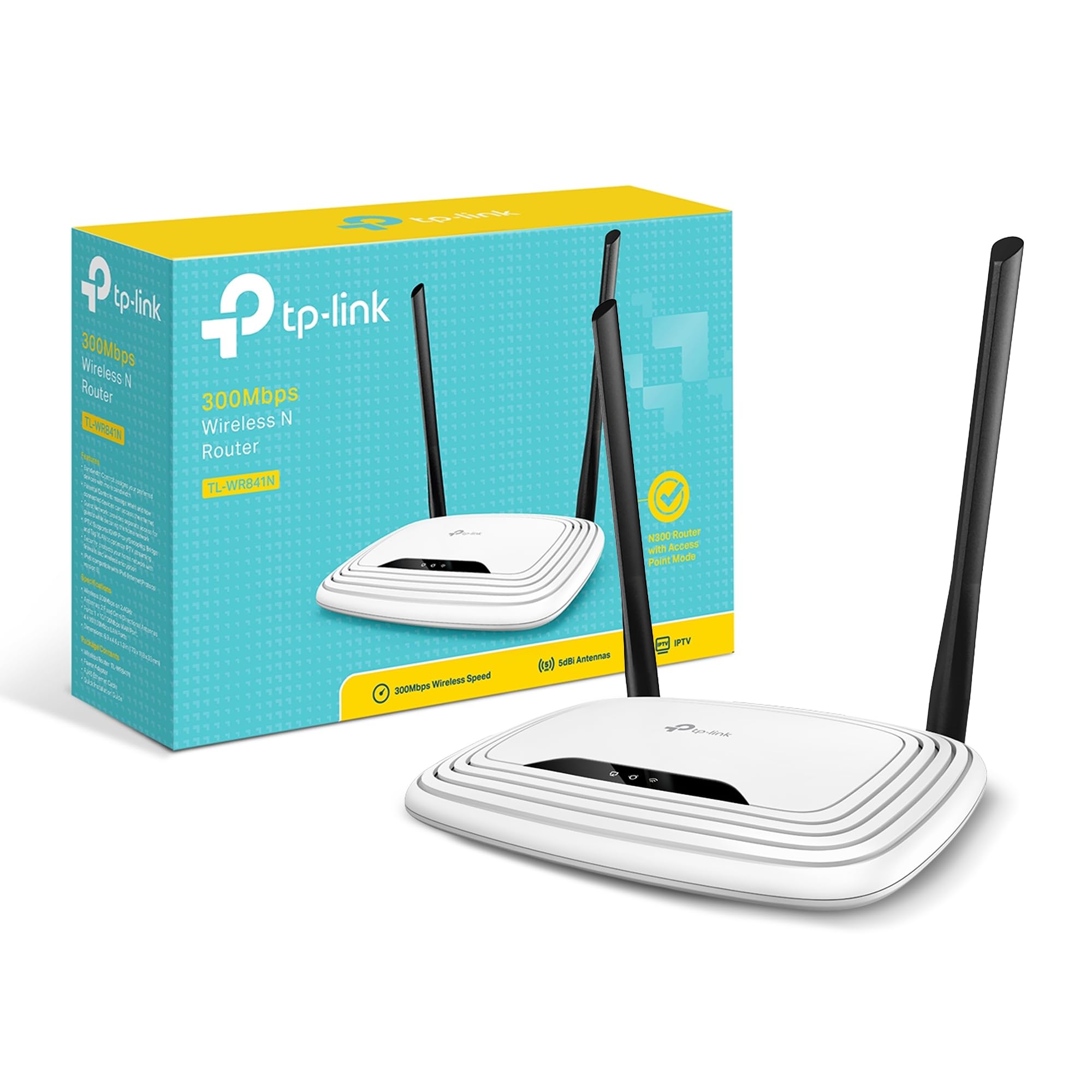
🚀 Elevate your home network—fast, stable, and secure WiFi that keeps you ahead of the curve!
The TP-Link N300 Wireless Extender (TL-WR841N) is a budget-friendly, high-performance WiFi router featuring dual 5dBi antennas for enhanced signal strength and speeds up to 300Mbps. Supporting multiple modes including Router, Range Extender, Access Point, and WISP, it offers versatile connectivity options. With WPA/WPA2 security, parental controls, and easy setup, it’s designed to deliver reliable, secure internet for streaming, gaming, and multitasking in small to medium homes. Backed by TP-Link’s 2-year warranty and 24/7 technical support, it’s a trusted choice for professionals seeking dependable home networking.













| ASIN | B001FWYGJS |
| Best Sellers Rank | #4,735 in Computers & Accessories ( See Top 100 in Computers & Accessories ) #176 in Computer Routers |
| Brand | TP-Link |
| Color | White |
| Computer Memory Type | DDR3 SDRAM |
| Customer Reviews | 4.3 4.3 out of 5 stars (77,925) |
| Date First Available | December 19, 2005 |
| Is Discontinued By Manufacturer | No |
| Item Dimensions LxWxH | 4.6 x 6.9 x 1.3 inches |
| Item Weight | 8.8 ounces |
| Item model number | TL-WR841N |
| Language | English |
| Manufacturer | TP-Link |
| Number of Processors | 1 |
| Number of USB 2.0 Ports | 1 |
| Operating System | 0, Microsoft Windows 10/8.1/8/7/Vista/XP/2000/NT/98SE,MAC OS, NetWare, UNIX or Linux |
| Product Dimensions | 4.6 x 6.9 x 1.3 inches |
| Series | TL-WR841N |
| Wireless Type | 802.11b, 802.11g, 802.11n |
E**Z
Priced right and works in minutes
Just received this Home Router with the ARRIS / Motorola SB6121 DOCSIS 3.0 Cable Modem and it took no time at all to hook everything up, sync with cable company and enjoy faster speeds than I was seeing before. The problem started when an aging DOCSIS 2.0 modem/router combo kept dropping internet connection randomly and frequently. Speeds used to be reasonable at 20 Mbps download and 10 Mbps Upload but then after the cable company activated some new cable boxes by sending a signal to the home the problem began and speeds (when working) dropped down to 7 Mbps down and 7 Mbps up. I had attached a separate older router to the modem/router combo which did increase speed but with the constant dropping of internet this was not the solution. I have a Linksys WRT54G2 router that I bought a few years ago and it worked great but now with newer technology and higher demand for wireless this router is not adequate enough for what I need. Signal started to be a problem with this router as it lacks external antennae but when I lived in a 1 bedroom apartment it was fine. I saw the TP-Link TL-WR841N Wireless N300 Home Router was not only more than what I needed but highly liked and reviewed as well as extremely reasonable in price. My old router still costs 3 times as much as this router does. Set-up was super simple. The signal was recognized by my phone, I connected to the network using the password printed on the bottom of the router and went to the set-up page that the quick install directions had instructed me to do. The quick install was very quick without needing any software. Like I said I set up the wireless network from my smart phone. You just have to set an SSID, put in a new password, and save everything and your done. The process was less than 5 minutes including opening the package and plugging everything in. Signal strength was the first thing I noticed as being strong to very strong even two stories above the router which is in the basement. The second thing I noticed was speed. I did not run this router with the older modem so I can not say that it is faster in comparison but the top speed is 300 Mbps which I do not subscribe to but I was getting 40+Mbps download (50 Mbps subscription) and about 15 Mbps upload. This is more than enough to play on XBOX live and stream HD videos to multiple devices without hesitation. I am very happy with this product. ***UPDATE*** After 2 months of use I am still happy with this product. I still regularly see speeds in the 40+ Mbps for download but I average about 35 Mbps, and I see speeds up to 15 Mbps for uploads but average about 13 Mbps. I use the OOKLA app on my Samsung GS4 more often then my other devices, and I am quoting my average and top speeds based on that device but I will note that my iPad and my Mac Mini see slightly higher speeds as I believe the wifi radio is better in those devices. I do see better results also when I am above the wireless router (located in the basement) then when I am at the perimeter of the house. This is actually great news for me as I was worried about the signal not being able to penetrate through 2 floors and remain strong but I see better speed test results in my bedroom (2nd floor) where my Mac Mini, Xbox reside then in the living room (1st floor)where my iPad and GS4 usually are at. More often with my phone lately I am having problems with my wifi dropping because it is telling me that an authentication error occurred. I merely just reselect my home wifi from the list and it connects but then randomly it will give me that error. I looked into it and it appears GS4 phones have this problem but mine just started doing this. I will reset the router and my phone and see if that solves the problem which is a common solution. Other than this small issues, which sounds like my phones problem, I really like this router. For the price it is hard to beat.
I**!
A respectable router, particularly if price is a major factor for you.
When I recently paid for higher internet speeds, I realized I was capping my speeds due to my old router. It was making my Google Chromecast HDMI Streaming Media Player nearly useless with constant buffering, and it could not keep up with all of the devices in my household. I bought this TP-LINK N300 as a replacement. I was drawn to it because the price was right, but the specs also seemed appropriate for what I was doing. At any given time in my house, I am using a smart t.v. (hooked straight to the router), a laptop, multiple phones, a Chromebook, and the Chromecast. I don't mean I, personally...there are other people in the house. In addition, I sometimes sit outside and away from the router. My old router was great for distance, but otherwise needed an upgrade. This router has been able to handle the capacity issue. As soon as I set it up, I was getting speeds of 30 Mbps or more pretty quickly. The lag and buffering of my Chromecast also reduced by quite a bit. For a router on a budget, this worked fine for speed and just handling bandwidth. The range on it was not nearly as good as I hoped. Even from my bedroom, I would sometimes drop from wifi on my phone. I tinkered with wifi settings, but it was clearly just a distance thing. I am not a billionaire real estate tycoon with a 75 room mansion. I live in a modest three-bedroom house, so there is not much distance between the router (on one end of the house) and my bedroom. As I mentioned, my old router handled distance **much** better. Nonetheless, for the most part I was always connected. Setup was a breeze, and I feel like TP-LINK setup is a bit easier than some other brands. If you know what you are doing, anything is going to be fine, but when I was setting this up I kept my parents in mind. It was easy enough that they could do it, and that is saying something. This is a nice, efficient model that is probably best for the casual user with a few devices. I wanted something a bit nicer, but the price was right. I am speaking in past tense throughout some of this review because I ended up upgrading to D-Link DIR-813 AC750 Wi-Fi Router last week and have moved to that. I prefer it, particularly because it has a 5 gHz band for my phones. Still, this TP-LINK worked efficiently. You get a bit more than what you pay for with it, in my opinion. Still, it has a few shortcomings that might be worth considering. If price is a major factor to you, then definitely go with this one!
P**N
Allt fungerade som det skulle! Snabb frakt och bra produkt!
W**S
Top produit, marche bien dans un petit périmètre.
H**1
Este router neutro TP-Link TL-WR841N es perfecto para usarlo en casa. Dado el precio y el público al que va dirigido, tengo que decir que es un equipo inmejorable tanto en precio como en prestaciones. Mención especial al Wi-Fi, pues ofrece una señal inalámbrica de gran alcance. Pasando a analizar el firmware, diría que el que viene de origen ya ofrece muchísimas más opciones que cualquiera de los routers que ofrecen habitualmente las compañías de telecomunicaciones. Al parecer, para un uso más profesional, quizás este firmware se queda algo corto. Según he leído por internet este router cuenta con un hardware estupendo que de cierta manera queda un poco desaprovechado por el firmware que lleva instalado de origen. Así que podría llegar a considerarse casi obligatoria la instalación de alguna versión del famoso firmware de DD-WRT que es completamente compatible y amplia muchas de las posibilidades de este router. Pros: - Fácilmente configurable. - Señal inalámbrica de gran alcance. - Económico. Realmente es un precio de derribo. - Soporta OpenWRT y DDWRT. Ideal para aquellos a los que les gusta trastear. Contras: - No lleva ningún puerto USB, por lo que no podremos crear un NAS o compartir una impresora. - Tanto los cuatro puertos ethernet para LAN como el puerto WAN, son 10/100Mbps (son Fast Ethernet, no Gigabit Ethernet). La necesidad de comprar un router me vino dada a una serie de viajes que iba a realizar, en los que sabía que sólo iba a disponer de una sola toma de ethernet y que obviamente no iba a ser suficiente para cubrir mis necesidades de conectar más de un dispositivo (tanto por ethernet como por Wi-Fi). Valoré la adquisición de un router de viaje, sin embargo el sobrepeso y las mayores dimensiones de este frente a las diferentes opciones diseñadas exclusivamente para viaje, no me suponían mucha diferencia, ni en lo relativo a lo económico, ni a lo relativo a las prestaciones. Por ello, me decanté por un router completamente funcional como este, y que bajo mi criterio personal no supone unas dimensiones ni peso exagerados para llevar (obviamente depende de la naturaleza del viaje, que en mi caso era establecerme en varias residencias de estudiantiles).
R**L
Cumple su función , por el precio es muy bueno , mi módem sólo tiene salida ethernet pero con este TP-LINK puedo conectar muchos aparatos vía wifi y jala excelente, distribuye muy bien el internet aparte de que tiene más salidas para aparatos vía ethernet, llegó en tiempo y totalmente nuevo y en caja sellada, así que recomiendo ampliamente a el proveedor y a Amazon, tiene varias funciones como la de escoger que aparatos wifi (con la Mac de cada aparato) se conecten a internet y también puedo seleccionar que aparatos no quiero que se conecten a internet, además de que su configuración es sencilla, y se puede poner en español para configurarlo, hasta la fecha ya a más de un mes de usarlo funciona excelente. Por el precio la verdad estoy feliz de haberlo comprado, no es un repetidor hasta donde tengo entendido, como les comento, lo conecte vía ethernet para que mis aparatos que usan wifi puedan tener internet y recalcó que distribuye bastante bien el internet , aparte de que uno puede seleccionar la frecuencia a la que llegue el internet.
M**R
I'd suffered and endured the dubious Virgin Media "Superhub" long enough. I decided I'd try a new router after reading all the similar problems on the Virgin Media forums. I didn't want to spend too much money, so reading the generally positive reviews of this router, and that others had even used it for the same reason, I went for it. Setting it up was incredibly simple, although I have had previous experience. But honestly the hardest part was probably setting the old VM box to "Modem" mode.. Anyway! Afterwards I wired in this new router, logged on to it wirelessly, went into its admin menu, clicked the automatic setup wizard and.... Bosh. Done! I didn't bother with the enclosed CD, I guess it would've installed unnecessary gunk on my PC, I have no idea what's on it. So setup took literally a couple of minutes, including untangling wires. Really easy. Performance has been fantastic. I immediately noticed a dramatic improvement over the old VM box. Before I'd have to click on a link on my wirelessly connected PC, and wait. Then perhaps click again. Same with all other devices. It was like the router just wasn't bothering to connect to the internet. Now it works properly. Ping and download speeds are epic. Before the ping could be pretty high, and download speeds could sometimes be fast, but somewhat variable and inconsistent. Now downloads are fast and rock steady. We have an xbox hooked up via wireless, in a bedroom the opposite end of the flat (It's a late 70s build with some pretty thick concrete walls to get through). It used to hover around the 1 bar of signal on the xbox "Find Wireless" section. Now it hovers around the Maximum point, occasionally dropping only by 1 bar. Playing games had gotten to the impossible point, and party chat was a stuttering mess of choppy voices and impossible to understand. Now, perfect. So signal is strong and very dependable. I stream media to a wireless radio, xbox etc. Worked perfectly out of the box. My wireless printer that had seemed very temperamental before is now fully co-operating. I read a couple of reviews where people said they had to reset... Mines been on permanently for a few weeks now without a single issue. I did ensure that I had the latest firmware on the TP-Link website, turns out it already had it installed. Maybe that helps? Anyway its behaved perfectly for me. So overall I rate this a fantastic router for my pretty basic needs. £20 for this is a bargain. It made my Virgin Media internet work how it was supposed to be. How Virgin who had such a fantastic reputation for speed could then couple that with such a poor piece of equipment is unbelievable. But this solves it. It's just a shame that I have to keep my stupid, large "Superhub" hooked up in modem mode alongside this great router. Buy it. It's great.
Trustpilot
3 weeks ago
1 month ago