Buy anything from 5,000+ international stores. One checkout price. No surprise fees. Join 2M+ shoppers on Desertcart.
Desertcart purchases this item on your behalf and handles shipping, customs, and support to Sri Lanka.
๐พ Capture nostalgia, stream your legacy โ VHS to DVD made effortlessly modern!
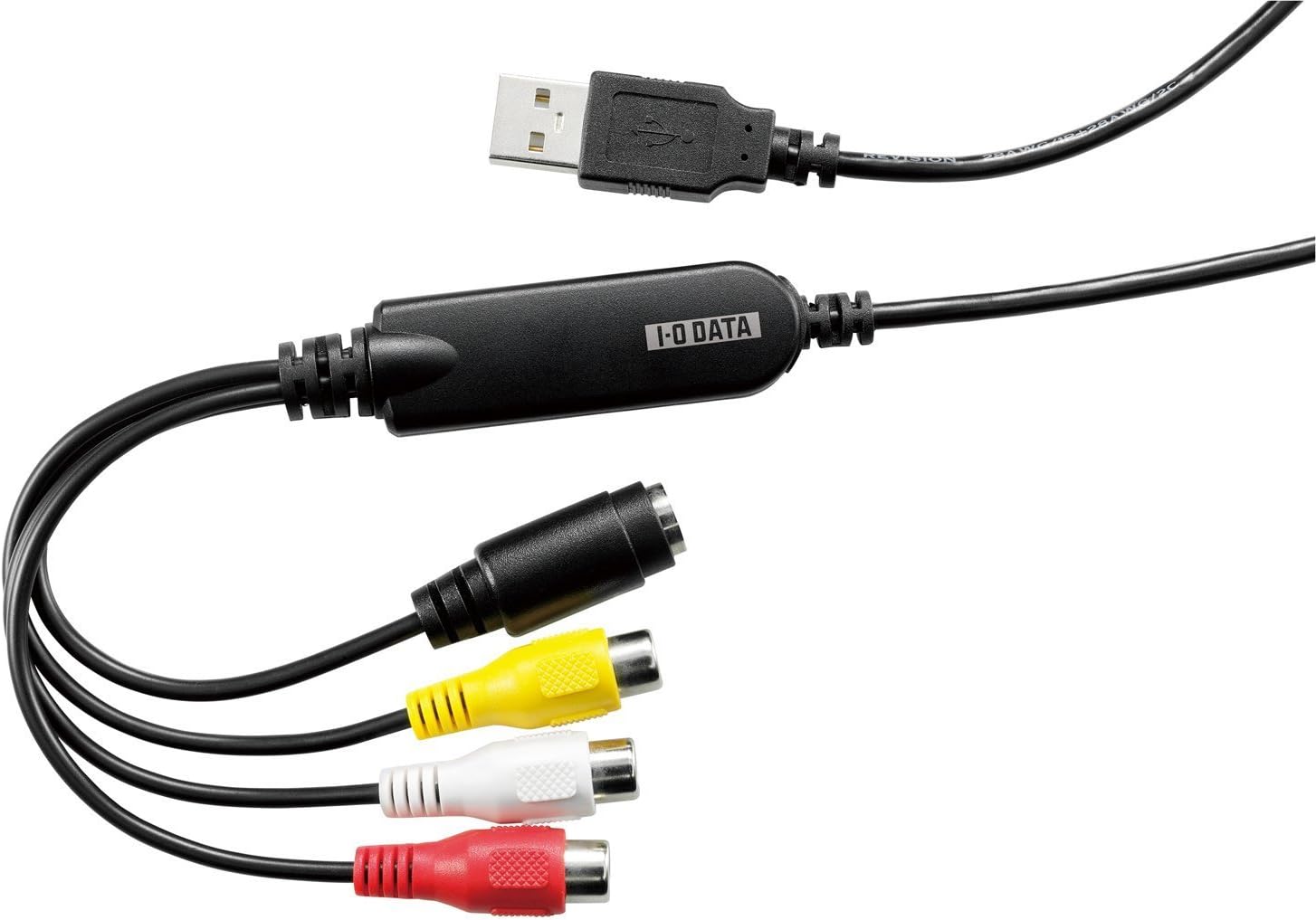
The ใขใคใปใชใผใปใใผใฟ GV-USB2 is a compact USB 2.0 video capture device designed for Windows PCs that enables professional-grade digitization of VHS and 8mm tapes directly to DVD. Featuring auto chapter creation and smart video compression, it streamlines preserving analog memories with ease and precision, making it an essential tool for managers and creatives looking to archive legacy content with minimal setup.
| ASIN | B00428BF1Y |
| AV Output | dvd |
| Antenna Location | ใใใช |
| Best Sellers Rank | #157 in Video Converters |
| Brand | I-O DATA |
| Built-In Media | Installation Guide |
| Compatible Devices | PC, Laptop |
| Customer Reviews | 4.4 out of 5 stars 4,337 Reviews |
| Hardware Interface | USB |
| Item Dimensions | 0.72 x 2.26 x 0.51 inches |
| Item Weight | 1.76 ounces |
| Manufacturer | ใขใคใปใชใผใปใใผใฟ |
| Mfr Part Number | GV-USB2 |
| Minimum System Requirements | Windows 10/8.1/8/7/Vista/XP (SP2 or later) |
| Model Name | GV-USB2 |
| Model Number | GV-USB2 |
| Platform | Not Machine Specific |
| Recommended Uses For Product | ใใใช |
| Tuner Type | ISDB-T, NTSC |
| Video Capture Resolution | 1080p |
A**S
Using the GV-USB2 to stream to Twitch.tv or record gameplay is definately the way to go [Standard Quality; NO HD]
Functionality: 10/10 (works great after you figure out what your doing) Setup difficulty: 4/10 (Instructions and Driver installation setup guide are all in Japanese. The setup is very easy, but can be tedious if you can not read Japanese. If you can not, you'll end up doing what I did and looking up a guide or a video of somebody else going through the installation steps and copying them. I used youtube for this.) Stream/Recording quality: 7/10 (not for HD/newer-gen games, but works great for older games, such as N64, NES, SNES, Ps1, etc...) Durability: ?/10 (Seems fairly durable. The cable itself is fairly short, not reaching very far from where it connects to the computer. But I have only had this for 1 day, and it works great so far. I can't say for sure on the durability of it as of yet, though.) I use the GV-USB2 to stream my console games to Twitch.tv. This particular item does NOT stream in HD, meaning you'll get, at most, a quality of around 480p on your stream. Which isn't the greatest, but its fine. For example, if you stream a game, say Monster Hunter 3 Ultimate on the Wii U, using the GV-USB2, it'll be watchable to an extent but the quality of the video will not be good, to the extent of text on the screen being hard to read by your viewers. However, it does stream flawlessly. Does not lag by any means, and definitely gets the job done. This capture card is GREAT for lower-res games on systems such as the Nintendo 64, Super Nintendo, NES, Ps1, and so on. I particularly plan to use it to stream my journey to learning to speedrun Super Mario 64, and don't think there will be any problems in the future with this capture card. Overall, I really like it. The price is fair (I paid $40 for mine through amazon on 11-12-14) and it works wonders for what its supposed to be for. This is definitely the way to go if you're searching for a capture card for the same reasons as me. Side Note: If you are also planning on speedrunning, like me, the tools found here may be of use to you! [...]
N**O
This one WORKS! Retro gaming recording. Be brave on install.
For recording my Turbografx, Genesis ,Super Nintendo, etc, I've tried another low priced usb recorder and it recorded at about 5 seconds per frame (that's not a typo). Most PCI-E capture cards don't have RCA inputs these days. I could not find anything under $150 to record video from RCA input (Composite - yellow for video, red & white for audio), so I took a gamble on this. Just tried it out in OBS Studio and it streams seemingly every frame from my turbografx, nice and smooth, and looks pretty darn good too! This is the one i've been looking for! Records RCA video nicely. You need to be a bit brave to install the drivers. Came with a full sized CD. Run the exe on the CD, then follow the pictures in the manual to decide which buttons to press on the install (all in Chinese). At the first prompt after i started the install, i decided to plug in the device to a usb port. The install software continued, spit the Cd out, then could not find a file so I put the CD back in, hit "OK" (or Chinese equivalent) and it found the file (presumably) and continued, and finished. Then the PC restarted. I said a few prayers and held a seance, PC booted up fine, started OBS Studio, picked the device and smooth video from my turbografx showed up. EXCELLENT. Also, i completely ignored all windows' attempt to install this. I just stuck with the included CD and it worked out well.
A**R
This is the one.
If youโre looking to digitize vhs tapes, this is the cord youโve been looking for. The japanese software and documentation can be intimidating if you donโt understand the language, but use camera-mode of google translate on your phone and youโll be able to figure it out. I use windows 11 and the software from their website works fine. 10/10, absolutely worth it.
J**R
Solid capture card
Using this to capture a VCR output, and it outputs a proper 480i at 29.97fps consistently. The installation isn't difficult, and with OBS it has a decently functional setup program. I would highly recommend not using any of the built in deinterlacing as it nerfs the framerate, when you could get solid 60 fps with OBS's deinterlacer. I give 4 stars because my only real gripe is that the input drops out when there isn't any signal, which is understandable, but for VHS capture if you have a tape that's too damaged it'll blank out for a few frames.
C**Y
Great image quality, good audio, overall fantastic!
I had a feeling that this could be a bad choice, and drivers were possibly a concern. But in the manual that the top critics didn't read, it says EXACTLY how to go through the setup. Super easy, took 5 minutes and then it worked great. Positives: - Great Image Quality (My AVI DVD VHS converter is 720p, but this definitely tops it for efficiency, image quality, control, and audio) - Very easy to setup (All I did is launch OBS after the drivers and it was detected easily with no issues) - 3 2 1 record, no hassle, and I can stop after it's a digital file (All I have to do is let OBS record it, SUPER convenient, with my DVD 720p converter, I had to put it on my laptop, go onto my PC and then yet render it out again, and the space was only a hour, I could do it with 1 go on here compared to that) - All-in-all, this is the most highly rated AVI Capture device on Amazon, it's also the most expensive, but if you don't want a piece of junk that records crap quality, poor audio, and is a buggy mess (My EZCap literally had solder joints break and stopped working), this thing DOES NOT OVERHEAT and start greening like the EZCap as well.) Then, you're in the right place. This capture card is a perfect investment, and I do not regret it AT all, since I am recording VERY long footage and need much more space without buying tons of $20 pack DVDs
R**3
Excellent device to capture analog 8mm video or VHS using AmarecTV
The I/O Data GV-USB2 is the best device I found for capturing 8mm video. There is no need to use the included Japanese language software. My goal was to capture my videos as accurately as possible so that I had a master copy I could use to experiment with various post-processing methods. In the review I outline some of the capture process and settings that worked for me using free capture software. I donโt know if the GV-USB2 is the absolute best capture device for analog video, but it was the best I found. I tried many capture devices from very cheap to a few hundred dollars. The colors, brightness and contrast with this device were the best of the bunch. I captured using the default proc amp settings for the GV-USB2 as many sources suggest so that all available data was recorded for post processing. It wonโt upscale or give you HD, but after deinterlacing my captures I am able to watch them on a 65โ TV as well as a standard definition TV show. Of course, Video8 only has 240 lines of resolution compared to 480 for standard TV, but the deinterlaced captures seem to come close. I imagine VHS would be similar. Hi8 would probably look much better. Watching on a smaller screen like a tablet the capture look quite good. I did not use the software that came with the GV-USB2 other than to install it to get drivers on my computer. Installation is easy. While the software and instruction manual included are in Japanese, the manual has pictures for every step of the software installation with arrows pointing to the buttons you need to click on screen. Once installed, you should be able to use free capture software like OBS, Virtualdub or AmarecTV. In Windows 10, I ended up using AmarecTV 3.10 with an open source codec to capture AVI files which I later deinterlaced with Handbrake. I recommend this method over all others. AmarecTV produced the best video and audio, and was also the easiest to use. AmarecTV is also the only software that did not drop frames during capture. Virtualdub and Virtualdub2 both had audio sync issues and dropped frame problems despite having comparable video quality to AmarecTV. I initially tried the Oldskool method using OBS on YouTube. It worked, but video quality was not as good since OBS is just a screen capture rather than direct capture of the GV-USB2 data. You can search the internet or YouTube for how to use any of these capture programs.
T**E
This is the one to get. Forget the other cheap Ezcap clones.
Donโt let the Japanese packaging put you off buying this. Itโs the best video quality AND audio quality Iโve found from a USB device or capture card. It will give you both fields per frame interlaced as itโs supposed to be. You can then deinterlace to true 60 fps for really impressive results. The cheap Chinese Ezcap and its clones will not provide this. Also they will struggle with signal that isnโt perfect. While this handles it just fine. The audio has almost no noise in the capture. While others Iโve tried, even quality devices will have a buzzing up to -40db. One caveat however. If your video isnโt perfectly clean, you should only use version 1.11 of the driver. It works with windows 10 just fine even though itโs for 7. The newer driver versions will cause some problems with stuttering and clicking after being subjected to out of synch signals like rewinding vhs tapes while playing, etc. The version 1.11 of the driver has none of those issues and is rock solid even in the torture tests I did.
B**N
works as advertised
functional, easy to set up. windows 10, obs. no complaints.
M**R
GV-USB2 device is excellent, time I bought a faster computer
The GV-USB2 device works well. My usage is to make mp4 copies from PAL recordings on VHS tapes. My first time video editing, trying VirtualDub first. I discovered that I have to change the PAL capture frame rate from 50 to 25fps for deinterlacing to work. Difficulty getting a preview picture on VirtualDub during capture but I think this is because the 8th Gen i5 in my aging laptop is not fast enough. When I did manage to get a preview picture the gui wouldn't let me stop the capture. I'll try the Esc key next time this happens or just find a way to get a picture on a separate display.
P**T
ู ู ุชุงุฒ ููุง ุชุงุฎุฏ ุงูุจุฏุงุฆู ุงูุฑุฎูุตู
ู ู ุชุงุฒ ููู ูุจู ูุตูุฑ ุงูู ูุงุทุน ู ู ุงููุงู ูุฑุงุช ุงููุฏูู ู ูุงุดุฑุทู ุงููุงุณูุช VHS
P**L
Worth every penny! Works fantastic on NTSC, PAL, and SECAM!
It took me a few attempts to get the right equipment to capture my old VHS tapes; I wasted money on adaptors to convert YPbPr to HDMI, PAL to NTSC, and even a digital stabilizer, and this device is an absolute winner! It allows you to manually over-ride the video mode (NTSC, NTSC J, PAL, PAL60, SECAM etc.) which is EXTREMELY helpful on worn out foreign tapes played on a multi-region VCR that would otherwise confuse automated devices. Commercial tapes are recorded without problems. The capture card is made in Taiwan by a Japanese brand, which is a huge plus. It's a quality device that was well thought out. The software came on a disc, and was in Japanese, but getting the drivers to work with OBS was a piece of cake with Google Translate on my phone. My only minor, minor complaint is that the choice of resolutions is a little restrictive. I'd like to have the option to record at higher resolutions, especially when capturing from S-video. If I/O Data ever releases a capture device for YPbPr video signals, I'll be first in line to buy one.
G**A
Nice Japanese packaging!
Works well. Tried various solutions. This was the best.
A**ใผ
ใใๆใๅบใๆถใใชใ๏ผ็ฐกๅใซใงใใใใใชใฎใใธใฟใซๅ
ใใๆใๅบใๆถใใชใ๏ผ็ฐกๅใซใงใใใใใชใฎใใธใฟใซๅ ๆๆฎใฃใใใใชใใผใใ8mmใใผใใๅฃๅใใฆใใใฎใๆฐใซใชใฃใฆใใพใใใใใฎใใใชใญใฃใใใฃใผใฏใใใฝใณใณใจใใใชใใใญใ็นใใ ใใงใ็ฐกๅใซใใใณใฐใใงใใพใใใ ้ฃใใๆไฝใฏไธๅใชใใไปๅฑใฎใฝใใใ็ดๆ็ใงไฝฟใใใใใฃใใงใใๅใใฆใใใชใฎใใธใฟใซๅใซๆๆฆใใๆนใใๆ่ปฝใซๆใๅบใไฟๅญใใใๆนใซใใใใใงใใ
Trustpilot
1 day ago
2 days ago