Desertcart purchases this item on your behalf and handles shipping, customs, and support to Sri Lanka.
🚀 Boost Your WiFi, Boost Your Life — Never Miss a Beat!
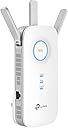
The TP-Link AC1900 RE550 WiFi Range Extender amplifies your home network with dual-band speeds up to 1.9 Gbps, covering up to 2800 sq. ft. and supporting 32 devices. Featuring three external antennas, gigabit Ethernet port, and EasyMesh compatibility, it ensures seamless connectivity and smart roaming. Setup is simple via the Tether app or WPS, making it ideal for professionals and families seeking reliable, whole-home WiFi coverage.


| ASIN | B08TLT65WM |
| Best Sellers Rank | #2 in Repeaters |
| Brand | TP-Link |
| Built-In Media | AC1900 Wi-Fi Range Extender RE550, Quick Installation Guide |
| Color | White |
| Compatible Devices | Gaming Console, Laptop, Personal Computer, Smartphone, Tablet |
| Connector Type | RJ45 |
| Customer Reviews | 4.3 out of 5 stars 18,399 Reviews |
| Data Transfer Rate | 1900 megabits_per_second |
| Frequency | 5 GHz |
| Frequency Band Class | Dual-Band |
| Frequency Bands Supported | 2.4 GHz, 5 GHz |
| Item Dimensions D x W x H | 4.9"D x 7.9"W x 3.4"H |
| Item Type Name | WiFi Extender |
| Item Weight | 8.16 ounces |
| Manufacturer | TP-Link |
| Mfr Part Number | RE550 |
| Model Number | RE550 |
| Number of Items | 1 |
| Range | 2800 square_feet |
| Special Feature | Access Point Mode |
| Special Features | Access Point Mode |
| UPC | 840030701504 |
| Unit Count | 1 Count |
| Warranty Description | 2 year manufacturer |
| Wireless Communication Standard | 802.11a, 802.11ac, 802.11b, 802.11g, 802.11n |
| Wireless Compability | 802.11a, 802.11ac, 802.11b, 802.11g, 802.11n |
D**.
TP Link is a Solid Name and a this is a Great Extender
I am writing this after about 2 weeks in use. I bought this extender as a replacement for a Linksys (RE7000) extender. This is paired with a Linksys WRT3200ACM Router. I was having fits trying to keep the RE7000 paired as I only had it on the second floor going thru 2 interior walls less than 50 feet straight line from the router. Knowing the popularity of mesh systems driving the price of extenders down, I decided to look around at them as a low-cost replacement with higher reliability than my older Linksys RE7000. The setup was very simple, as with most extenders, you plug it in close to your router and hit the WPS button to sync it. If you want to customize the SSID name(s), you can use with the phone app (Tether) or use the direct IP address via your browser, which is probably in the 192.168.1.xxx range. There are a few more options going thru the web configuration than the phone app, but I am very pleased so far. I do feel like the 3 antennas on the unit are very beneficial, as when I would take a power hit, the Linksys would take forever to reconnect with my garage door and ring camera. As a test, I simply unplugged this RE550 and plugged it back in - both 2.4gz devices connected right away after the RE550 connected to my router. And I've had NO disconnects with the companion phone apps (Ring for the camera, myQ for the garage, PLEX on my Roku, nor DirecTV). With 1gz Internet service in a 3200sf house, this extender does the trick. Someday I might go to a mesh system, but right now, the extender SSIDs are giving me 4-5 bars of signal strength throughout the back-half of the house where the main router covers the front half. Streaming on my ROKU/Plex has been perfect since migrating to this TP Link RE550.
S**.
Seems ok
setup fairly easy, signal increased from a fair level to an excellent level depending the distance to the extender. Ok so far my previous RE450 died after a year or two so giving this upgraded one a chance, not a bad price.
R**R
Some things need to be set straight
For those of you dissing this extender because it doesn't increase your speed, that's not what this is for. Like for example, you can't be paying your ISP for 50 Mbps of speed and expect to get 100 Mbps. This extender is only for extending the same signal YOU ARE PAYING FOR farther out from your router/modem. OK, I tried two other models by TP-Link, they were both cheaper and smaller. The RE330 and the RE220. I was trying to get the most bang for my buck. Even though these two smaller extenders were for 1400-1500 square foot homes, and that's what mine is, they didn't extend the signal enough for my Blink cameras on the detached garage, and I also wanted coverage to the boat dock away from the house. So I returned those and got this one instead, which is rated for up to 2800 square feet. "Up to" are the key words here that I didn't pay attention to before I ordered the others. I really didn't want to spend this much but now I'm glad I did. I live in a rural area and have fiber optic through the local REMC. I'm forced to rent their router/modem and they tried to also rent me an extender, they said I had to use THEIR brand that matched my router. They lied to me, the TP-Link works just fine. Easy to set up via the Tether app. I highly recommend it. These are the easiest extenders I've ever set up and I've probably had 10 over the years. Done in under 5 minutes. I have my Blink cameras and sync module on the _EXT 2.4 band. I changed the name of that to _EXT2Blink so I solely put my cameras on that. I'm getting the max coverage to all the Blinks now. If you don't already have a TP-Link router, this won't be like a mesh router system. You will have _EXT for both bands 2.4 and 5. So any device you want on the _EXT will have to be added onto the network. Very happy with this one. It has a huge blue circle showing that you're properly connected (you can turn it off in the Tether app if it's too bright). No dropped signals and this one has vents so it doesn't get too hot.
D**E
Half the Price, More Than Twice the Performance
Almost half the price of another brand I am returning, but more than twice the repeater. My 3-D printer is located in our detached shop-garage. The extender this replaced limped, getting me in at a bar. The "highly rated" booster being sent back took 3 minutes, or more, to load the camera, which allowed me to monitor prints, when it would load at all. Add to that, if I went and did something else, within minutes, it dropped the link. This extender has no problem sending projects to the printer, and only takes a few seconds to load the images , but has worked each time. And it continues to display the progress throughout the print. Now, I suspect my automotive code reader, which required being in the upper driveway to work, will also work in the lower drive. Add to the foregoing, I struggled a bit setting the unit up, in part because programmers cannot think past Tuesday. However, it wasn't horribly complicated and, obviously worked, since I'm, now, both sending prints to the printer and monitoring them.
T**A
Great WiFi extension for distance and area
Very easy setup. Programmed to show when the system is located properly. I bought specifically to connect devices in a garage about 100 ft from my house. Coverage is good enough for me to connect 2.4 g band devices with my StarLink router at around -70 dBm. I am well satisfied with the product and would purchase again.
J**K
TP Link technical support
The TP Link RE500 WiFi extender installed without issue using the Tether app. However I had an issue with the main network not recognizing clients. The Extended network (_ext) recognized clients as expected. I didn’t want the inflexibility of manually connecting devices to a separate (_ext) network. So I called TP Link tech support. Alexander Caberto picked up my call and quickly diagnosed my issue and had me rename the extended network to the same name as the main network. After an extender reboot, the WiFi extender now works as expected with only the main network name picking up all “nearby” clients. Hats off to Alexander for his patience and knowledge of the TP Link products. Highly recommended!
X**Y
More sensitive than the devices it is connecting to
I replaced my Netgear R7800 wifi router with a TP-Link BE12000. The BE12000 struggled to reach my detached garage 45-50' away. My house has foil vapor barrier, which probably contributed to the issue. I purchased this range extender and just plugged it into an outlet in the garage that was nearest the house. Because of the antennas (probably) it was much more sensitive than my Genie garage door opener and Google Home speaker and was able to secure a signal on both 2.4 & 5 Ghz. The opener and speaker now work reliably. Problem solved. I just tried moving it an additional 25' further to the back of the garage and it still connects. Note that you may have to unplug/replug a device to get it to connect after you move it.
G**X
Strong Coverage Boost With a Few Setup Hiccups | Fox Den Reviews
After dealing with stubborn Wi-Fi dead zones in the upstairs bedrooms and on the patio, I picked up the TP-Link RE550 — and I’m happy to report it delivered a noticeable upgrade. Streaming is smoother, smart home devices stop dropping offline, and pages load without that frustrating “spinning wheel” delay. Once connected, performance has been stable and speeds remain impressively close to my main network. I especially like the signal strength indicator LEDs on the unit — super handy for finding the ideal placement. The Gigabit Ethernet port is also a great bonus for devices that benefit from a hard-wired connection like a TV or gaming console. And being EasyMesh compatible gives me room to expand in the future, which is a nice plus. Where it fell just short of 5 stars: • The setup wasn’t as smooth as advertised — the app froze once and I had to reset and retry pairing • It’s a bit bulky, so depending on your outlet placement, it may be a tight fit Once everything was sorted, though, it’s been rock-solid. Great range, strong speeds, and no more Wi-Fi “dead zone frustration.” A solid upgrade for anyone wanting to extend reliable coverage without jumping fully into a mesh system just yet. 🦊📡 Fox Den Reviews Approved — Reliable Performance With Minor Quirks
F**H
Sinal de qualidade
Aumentou bem a cobertura e a qualidade do sinal.
K**R
Best purchase in awhile! It saved my marriage!
I live in a fairly small 3 floor (duplex) house, with a small front and back yard. My wifi router from my provider is in the basement. This left me with great reception in the basement, which I rarely spent time in. Medicore reception on the main floor and basically abysmal reception upstairs, where the bedrooms are. That means anytime I would try to use the wifi for anything upstairs I would get kicked to data. Which is immensely annoying and costly as compared to using my wifi, which I already pay for. Then when I got security cameras just outside my front and back door, the wifi is so trash that I would lose connection and be unable to view live feeds. I asked my provider how to improve this, and they sent me two eero wifi boosters, which I would rent from them at an additional $12/month. These boosters can be bought on Amazon for $100 each, but with a rental from a provider I would have paid infinite amounts for them in my lifetime. Anyway, those expensive boosters did not do one thing at all, and I had the provider take them back. When I got this booster, my whole life changed. With one unit, I paid $61 with tax to own. No forever rental fee... I immediately had amazing wifi connection. I had full bars wifi downstairs, main floor, upstairs, outside and I still had access to my wifi from 4 houses away! It was so simple to set up, I am totally unskilled in this tech but I did it in about 10 minutes. It walks you through it so easily and clearly anyone could set one up. It also seems the download speeds are much faster, although I cannot entirely confirm, this is just what I have noticed from Xbox downloads and personal opinion. The app shows you how many devices are connected to the booster, how the quality of the connection is, it has the ability to block devices from the booster and scans for safety and anti-virus. I was thinking you had to have it connected by that special cord but you don't. You can have everything connected and working properly just by plugging the machine into any outlet so long as it is close enough to pull a connection to your wifi. I put mine on the main floor when my router is in the basement and it connects everything dang near to Nantucket. Best sixty bucks spent recently, really thrilled with it. I would recommend this to anyone, especially people tricked into renting a booster from their providers. Do not spent a million dollars over your life, just spend sixty bucks and have something you own and that works. Before I couldn't get wifi upstairs or even if I stepped one foot outside. Now I can get wifi from places so far I won't even be. Buy it!
R**S
Excelente producto!!!!
Hay que seguir con cuidado las instrucciones para configurar el extensor. Lo acabo de usar en zonas de acceso limitado y funciona perfectamente. Señal fuerte y rápida.
M**S
Ótimo
Fácil configuração. Muito bom
K**R
Rapidez
Exelente producto en mi casa tenia contratado un paquete de 600 megas y somos como 15 conectados a la red, en mi cuarto llegaban solo 9mb/s y con este repetidor ahorita voy aprox a 200mb/s y conectado por cable en mi lap llego hasta los 400mb/s
Trustpilot
1 week ago
1 day ago