Desertcart purchases this item on your behalf and handles shipping, customs, and support to Sri Lanka.
🎬 Elevate your home theater game with flawless 4K and sound mastery!
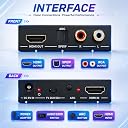
The J-Tech Digital 4K 60Hz HDMI Audio Extractor Converter delivers pristine Ultra HD video pass-through while extracting high-quality audio through SPDIF Optical and analog outputs. Featuring three customizable EDID audio modes and HDCP passthrough, it ensures compatibility with both modern and legacy AV systems. Compact and reliable, it comes backed by a 1-year warranty and lifetime US-based technical support.
| ASIN | B00YHS5E6Q |
| Audio Output Mode | Stereo, 2-Channel Stereo, 5.1 Surround Sound |
| Best Sellers Rank | #319 in Video Converters |
| Brand | J-Tech Digital |
| Brand Name | J-Tech Digital |
| Compatible Devices | PC |
| Customer Reviews | 4.1 out of 5 stars 472 Reviews |
| Interface | HDMI |
| Interface Type | HDMI |
| Item Dimensions L x W | 3.3"L x 2.4"W |
| Manufacturer | J-TECH DIGITAL |
| Material Type | Plastic |
| Maximum Supply Voltage | 5 volts |
| Minimum Supply Voltage | 5 volts_of_direct_current |
| Model | JTD4KATSW |
| Mounting Type | Tabletop |
| Number of Channels | 3 |
| Number of Items | 1 |
| Number of Pins | 19 |
| Part Number | JTD-152 |
| UPC | 766150277340 |
| Unit Count | 1 Count |
| Warranty Description | ✔𝐅𝐑𝐄𝐄 𝐋𝐈𝐅𝐄𝐓𝐈𝐌𝐄 𝐒𝐔𝐏𝐏𝐎𝐑𝐓: All J-Tech Digital products include a 1-year manufacturer warranty and free lifetime technical support from our customer support team located in Sugar Land (just outside of Houston) in the great state of TEXAS! We are available Monday through Friday: 9AM - 6PM CST. Contact us by (888) 610-2818 OR [email protected]. |
S**R
Good price. Easy to use.
I got this because of the J-Tech brand. They have their own web site, so in case of any issue, I have a way to contact them. But I did not need to. Basically, just plug and play, easy. I used the HDMI input and the RCA audio output. My setup is in a church building hall. I have HDMI source from a laptop. The HDMI video signal goes to projector in the ceiling. The audio signal goes to the building speakers in the hall. So I need to use this device to take in the HDMI from the laptop and output the audio to the speakers using the RCA output. Worked out great. No noticeable delay. I tested with 1080p HDMI signal.
J**.
exelente muy bueno!
exelente muy bueno!
F**O
Works with A/V receiver and Sonos playbar
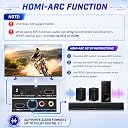
I am using this to connect a Sonos playbar to an Onkyo A/V receiver. The Onkyo receiver is a year old, and we have 5 HDMI components connected to it: a DVR, DVD/Blu-ray, Roku, and cables for occasionally hooking up the laptop and the kindle fire. We wanted to get rid of the old big bulky speakers and be able to have music throughout the house with the Sonos system. I bought a Sonos playbar to start with. The Sonos playbar is intended to replace a receiver, with your components hooked up to the HDMI ports on the TV, the audio to be output through an optical cable to the Sonos playbar. Problem is, our TV only has 2 HDMI outputs, and I did not want to fuss with a switcher. The other problem is, our receiver does not have an optical out port. So, I read the reviews and followed the advice of others who had done this, and it is working well. BUT--first make sure you are ordering the right one, as there are a couple of similar ones on amazon and I ordered the wrong one the first time. This one has support for ARC and a little button to turn the ARC on. I unknowingly ordered the other one first, and every time I switched the A/V receiver on, I had to unplug and replug in the J-Tech unit in order to have the TV work again. Ordering this one solved that problem; it takes several seconds for everything to come on, but it does work well. Two things I still regret: one is that the volume knob on the receiver does not have any effect any more--the volume is controlled by the Sonos app on your device (in our case, our iPhones), or you can control the volume with the volume buttons on your iPhone itself. The other is that I have to have the TV monitor on whenever using the A/V receiver, even when not viewing anything, like playing the local radio or music from my iPod connected via bluetooth on the A/V receiver. However, I am getting in the habit of listening to the radio over the internet right through the Sonos player, not even using the receiver, and it works great, with an incredible range of free choices. I still have to have the iPod connected to the receiver if I want to hear all my DRM (digital rights management) songs however because they will not play on the Sonos. All said, we are glad to have found this, and thanks to the other reviewers for their advice.
G**N
Great functionality and high quality sound
I used this to replace an FiiO D3 (D03K) DAC converter. Although FiiO D3 worked fine, I was bothered by the fact that it did not have HDMI input and bypass. I used FiiO D3 along with Amazon Fire TV which has HDMI output, and no separate audio output (HDMI itself carries both the video and audio, as usual). With FiiO D3, I had to rely on the TV's optical output. It worked fine, but I'm concerned that the TV's optical does not output high enough quality sound due to its limited resolution. This product, on other hand, extracts high-quality audio from HDMI, and outputs analog sound through a pair of RCA, which can be connected to the amplifier directly. Sound quality is very high. I'm not a so-called audiophile, but I do use a highly purposeful integrated amplifier with some fairly good speakers. I feel they are a good combination. I'm no longer worried about suffering from the limitation of TV optical signal.
P**E
Unit does not pass HDMI signal.
This was to take the HDMI ARC signal from the Samsung TV (which has no audio outputs except 1 HDMI ARC port) and send it to my sound bar instead of the TV speakers. I removed the HDMI cable from the back of my Samsung, plugged it into the J-Tech HDMI input. I ran an HDMI ARC cable from the output of the J-Tech to the HDMI ARC port & plugged in the J-Tech. Everything lit up. Set the config to 2CH, power was good, and data showed green on input and output. The TV could not see the source. Futzed with the setting, read the machine-translated Chinese manual c a few times... no joy. Gave up, returned it.
S**1
Works well, but with some limitations
Beware! Seems to work fine for those audio modes supported by the target device receiving the HDMI passthru, but don't expect more like I did. That is, in my case I am using a Win10 PC to stream video & audio over HDMI to an Epson Home Cinema projector which only supports 2 channel stereo and wanted to send Dolby 5.1 over HDMI so I could divert it to my audio surround sound system (leaving the projector's speakers muted). Even with this HDMI audio extractor's selector switch set for 5.1 mode, my surround sound system only received 2 channel stereo (since Windows configured the playback device according to the projector's EDID). If that's all you need, then it will work fine. Again, I was expecting the Win10 playback device to show as a 5 channel device supporting Dolby 5.1 and even with the audio extractor inserted in series with the HDMI to the projector, Windows 10 still showed this audio playback device as a 2 channel device (and my surround sound system confirmed it was only receiving a 2 channel stereo bit stream over the TosLink cable). Had to return it and get something else (went with this: StarTech.com ICUSBAUDIOMH USB Stereo Audio Adapter External Sound Card with SPDIF Digital Audio Out and Built-In Microphone).
J**P
Has optical audio output
Does what it says it does. Has optical audio output.
C**Y
Vintage Audio Gear + J-Tech = good to go
Been trying to get my PC and my vintage Marantz 1060 amp and Acoustic Research AR-12 speakers to play nice together and this J-tech box finally did the trick. I've got a HP OMEN 30L PC that I dumped Windows and installed Ubuntu on. Turns out the onboard sound is a nightmare to configure without the Windows driver (no specific driver for Linux, of course). I didn't want to buy a new sound card and hassle with it fitting in the case and being compatible etc., so I decided to try to configure the HDMI audio from my RTX 3060 ti graphics card instead. I could get it to work through my TV, but I didn't want to always have to have the TV turned on just to get sound from my PC, and also the sound quality for music was mediocre. Finally after about a week, I found this J-Tech box and decided to give it a shot at the price without expecting much. Got it about three hours ago, plugged hdmi from my GPU into it, hdmi out to my monitor, RCA plugs to aux on my Marantz amp, set J-Tech box to 2-Ch, plugged it in and waddya know-- awesome sound! I'm really impressed by how clean the sound is for music. Great instrument separation, not muddy in the mids like most TV audio outputs, and whisper quiet (no AC buzz) when nothing is playing. Also, it doesn't "color" the sound with weird bass boost or EQ settings like so many sound boxes do. It sounds almost as good now playing a Youtube music video as playing a record on my mid-range ADC turntable & cartridge. As for video quality, it looks exactly the same to me as before I put the box in the path. Highly recommended if you are rocking a vintage audio gear setup and/or have weird driver issues or bad onboard sound from your PC.
A**D
buen producto
Cumple su función, tal como descrito.
Trustpilot
1 month ago
2 months ago