🎮 Capture Every Frame, Own Every Stream!
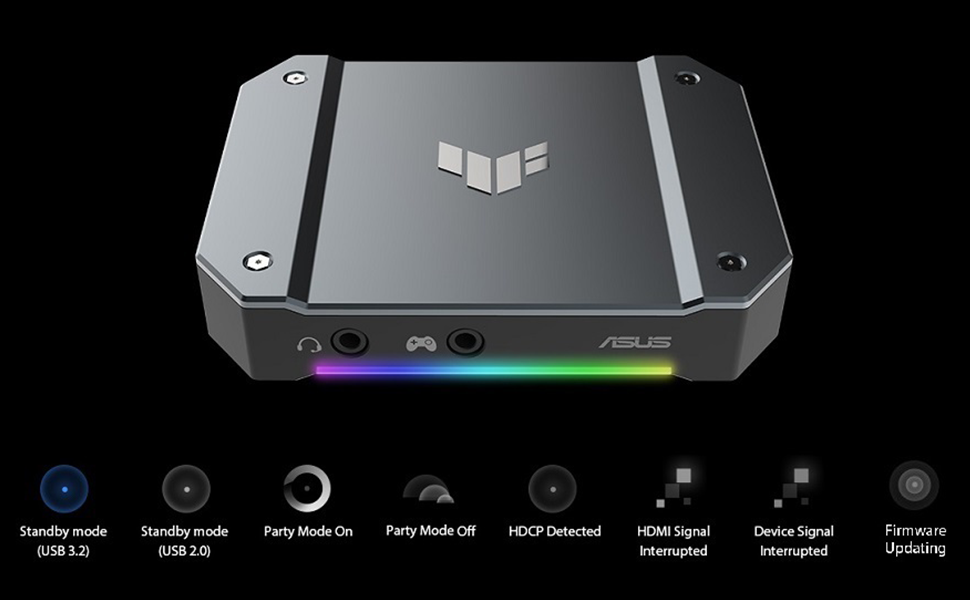
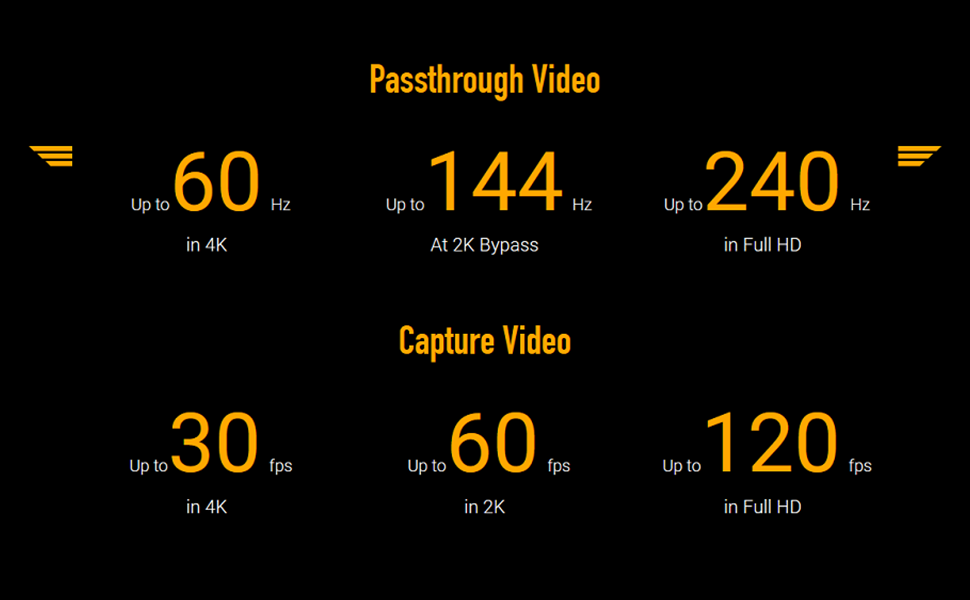
The ASUS TUF Gaming Capture Box CU4K30 is a professional-grade video capture device designed for gamers and content creators. It supports 4K HDR passthrough at 60Hz and records up to 4K at 30fps, 2K at 60fps, and Full HD at 120fps with near-zero latency. Certified for OBS Studio and featuring plug-and-play USB 3.2 Type-C connectivity, it delivers seamless, high-quality streaming and recording with durable metal construction for long-lasting use.


| ASIN | B096PPYZXV |
| Best Sellers Rank | #144 in Internal TV Tuner & Video Capture Cards |
| Brand | ASUS |
| Color | CU4K30|HDMI 2.0|2160p60 |
| Customer Reviews | 4.0 4.0 out of 5 stars (295) |
| Date First Available | May 26, 2021 |
| Hardware Platform | PC, Xbox, PS5, Switch |
| Item Dimensions LxWxH | 6.4 x 5.5 x 2.5 inches |
| Item Weight | 14.9 ounces |
| Item model number | TUF GAMING CAPTURE BOX-CU4K30 |
| Manufacturer | ASUS |
| Operating System | Windows |
| Product Dimensions | 6.4 x 5.5 x 2.5 inches |
| Series | TUF GAMING CAPTURE BOX-CU4K30 |
C**R
Absolutely AMAZING Capture Box by ASUS.
Hello Amazon! I have been a Twitch Streamer going on 5 years, and I had originally been running a Elgato HD60 Pro. Granted, there is nothing wrong with that, but I must say ASUS stepped up the game! Pros : Firstly, there is not any bloatwear that you have to run the capture box with, OBS picks up this ASUS Capture Box straight up with just plugging it in! No unnecessary slowdowns or stupid programs to run it through! Secondly, the build quality is fantastic! Solid metal casing, making it very durable for transporting if ever needed! Thirdly, I use this for a PS5, and the output is ran through to a 4K MINI-LED 240Hz panel. As I said, I have been streaming for many years, and I can truly say, this is the only capture device I have used that I truly felt ZERO latency! You can do some fine tuning in OBS for sound, toucb, and feel and it is absolutely fantastic!! Fourth, WHO DOESNT LOVE RGN NOWADAY?!?! CONS: The only con I had, was at first the sound was having an issue. The issue was that OBS was playing the sound back a solid 3 seconds late, in the end, it was just a simple click of changing the sound settings in OBS directly and it fixed it 100% For the price, it CANNOT be beat. Extremely well made product, and I would recommend this to ANYONE who content creates, or even just wants a nice way of connecting your console to your computer for a PASSTHROUGH. WELL DONE ASUS! 10/10! Twitch - MustangEd1ts
F**S
Works Great Clear Video Transfer and Seemless Set Up! Love it!
Works Great Clear Video Transfer and Seemless Set Up! Love it! Took about 2 minutes to set up, its compact so hardly takes up any room. Looks great. Nice solid metal body. Lights are great style and indicator. Im so happy I went with this one vs some of the others that had complaints. I was worried its sort of a big purchase ( comparative to other capture cards). But I am certainly glad I didn't cut any corners with this one. Its a great product well worth the money. IMO.
D**N
Not perfect, but the best I’ve tried
This is good, but it still intermittently cuts out or I find myself having to plug and unplug everything over and over until it somehow works again
B**X
Good... when it doesn't freeze...
After trying quite a few different capture cards, I landed on the CU4K30 with ASUS TUF, a brand I support all the time. However, do know that this device is NOT perfect. I wish to be part of the overwhelming group that supports this device, but I have had issues with it not long after purchase. When the device is running, it runs well. Great quality out the box. No setup needed to start streaming. And any changes to the device can be done very easily. This works well with OBS and has not given me any grief in the setup process at all. The issue is 100% a heatsink issue. This device is made of a solid aluminum casing that encloses a heatsink inside. The heatsink will, for the most part, dissipate heat if you are in a cool environment. However, if you plan on streaming for over 3 hours, or live in a moderately warm environment, then expect this device to freeze constantly. It does not dissipate heat well, and you can tell just by feeling the top of it getting uncomfortably warm. This gets rather annoying when you have to constantly stop the ASUS CU4K30 to fix the frozen video. I have already tried reaching out to ASUS support about the device. But it is apparent that this device is not something they are familiar with. I found myself giving the technician more answers on possible solutions, and even after we both agreed on what might fix the issue, there is still no sign of any replacement pieces for this device. Again, I have used many different capture cards and devices. This device has promise, but in its current state I cannot in good conscience recommend it to anyone. It works at advertised out of the box, and lots of videos give a nice 10 minute review of the product. But... give it a few hours, and the real problems will start appearing. Primarily... freezing. How did I fix it? Bought a phone cooler and set it on top of the CU4K30.
V**G
User friendly
I originally tried an Elgato capture card, which I ended up having to return because it wouldn't read the sound no matter what I did. This card on the other hand is not only beautiful but very easy to troubleshoot and correct when issues occur. First of all, it worked so quickly right out of the box, only took a few minutes to get all the cables in place. The video and sound quality is great. No latency, and the framerate and resolution pass thru with no downgrading as long as your OBS settings are correct (make sure your properties on the capture card in OBS match the resolution and framerate your PS5 is running on) One of the best features of this card that I'd like to point out is the RGB lighting. It doesn't just look pretty, it has a function! If you check the product manual, the color/pattern of the RGB will help you troubleshoot what error the device could be experiencing if it's not working properly. Such a smart idea. And sometimes fixing it when you're unsure is as easy as just unplugging and then plugging it back in or a quick restart, nothing crazy or technical. I've used this for several streams and I love it! Worth the price for the low stress!
G**L
Poor Quality, Crackly Audio, and Abysmal Support
I was looking for a video capture device which was both UVC and would be capable of capturing UHD video. I also wanted something which was currently supported. Unfortunately, I regret buying the TUF 4KPRO. Which the picture quality was good, the actual quality of the device's accessories was shockingly poor. The USB-C adapter broke in my USB-C port, but I could overcome this pretty easily with a high-quality USB-C cable. With both cables, left audio channel in OBS was constantly at -35db (even at silence) and both channels were staticky, no matter the input. When I contacted support, I kept getting disconnected from the agent and never got any help, even after describing the issue in detail, providing screenshots, and getting logs from Asus's unstable capture software.
R**J
Well designed, neat little product.
A**N
Using this since 2021 and it's still perfect for my usage Pros: Top-Notch Performance: Having previously used capture cards from Elgato and Avermedia, I can confidently say that this one outshines them. The quality of video capture and audio synchronization is impeccable. Versatility: I’ve used it both with my PC and my PS5, and it seamlessly handled both setups. Whether I’m streaming, recording gameplay, or creating content, it consistently delivers. Reliability: No glitches, no dropped frames—just smooth performance. It’s become an essential part of my streaming and content creation workflow. If you’re serious about capturing high-quality gameplay footage or live streaming, this capture card is a game-changer. It’s reliable, versatile, and truly lives up to its promise. Kudos to the makers of this gem!
U**L
Una capturadora mejor que la de elgato
T**Y
I stream from my XBSX through this capture card to an M1 Mac Mini running OBS. The ease of setup, quality of recording and streams is excellent. I’ve had no issues so far.
C**K
don't even hesitate when it comes to choosing this over the elgato. easy to connects/setup, no latency and it looks very cool. it gets very hot tho but all capture cards do, so u might need a small laptop cooler pad underneath. 10\10 product!
Trustpilot
2 months ago
5 days ago