Desertcart purchases this item on your behalf and handles shipping, customs, and support to Sri Lanka.
🚀 Elevate your mobile game with power, style, and clarity!
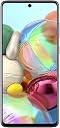
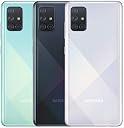
The Samsung Galaxy A71 UK version is a SIM-free smartphone featuring a powerful 64MP quad rear camera, a vibrant 6.7-inch Super AMOLED Infinity-O display with 90Hz refresh rate, and a long-lasting 4500mAh battery. Equipped with a 2.2 GHz A-Series processor and 6GB RAM, it delivers smooth performance for work and play. Its sleek Prism Crush Silver design and dual SIM capability make it a standout choice for professionals seeking style and substance.
| Additional Features | Camera |
| Asin | B083Y9F8VD |
| Battery Average Life | 48 hours |
| Battery Capacity | 4500 milliamp_hours |
| Battery Description | Lithium Ion |
| Battery Power | 4000 |
| Best Sellers Rank | #29,396 in Mobile Phones & Communication Products (See Top 100 in Mobile Phones & Communication Products) #1,653 in SIM-free & Unlocked Mobile Phones |
| Biometric Security Feature | Fingerprint Recognition |
| Brand | Samsung |
| Built In Media | Charger |
| Camera Description | Rear |
| Cellular Technology | 4G |
| Color | Silver |
| Connectivity Technology | USB |
| Connector Type | USB Type C |
| Customer Reviews | 4.5 4.5 out of 5 stars (1,958) 4.5 out of 5 stars |
| Display Pixel Density | 393 Pixels Per Inch (PPI) |
| Display Resolution Maximum | 1080x2400 |
| Display Type | AMOLED |
| Flash Memory Supported Size Maximum | 128 GB |
| Form Factor | Smartphone |
| Frame Rate | 30 FPS |
| Front Photo Sensor Resolution | 32 MP |
| Gps Geotagging Functionality | True |
| Headphones Jack | 3.5 mm |
| Human Interface Input | Touchscreen |
| Item Dimensions | 8 x 76 x 164 millimeters |
| Item Type Name | Smartphone |
| Manufacturer | Samsung |
| Memory Storage Capacity | 6 GB |
| Number Of Front Cameras | 1 |
| Number Of Rear Facing Cameras | 4 |
| Operating System | Android |
| Optical Sensor Resolution | 64 MP |
| Processor Series | A-Series |
| Processor Speed | 2.2 GHz |
| Ram Memory Installed | 6 GB |
| Rear Facing Camera Photo Sensor Resolution | 64 MP |
| Refresh Rate | 90 Hz |
| Resolution | 1080 x 2400 |
| Screen Size | 6.7 Inches |
| Shooting Modes | Manual |
| Sim Card Size | Nano |
| Sim Card Slot Count | Dual SIM |
| Specific Uses For Product | General purpose, mobile photography, entertainment |
| Unit Count | 1.0 Count |
| Video Capture Resolution | 1080p |
| Water Resistance Level | Not Water Resistant |
| Wireless Network Technology | GSM, LTE |
| Wireless Provider | Go Mobile |
User
Visible white dot found in the screen
I received the product today and found a one visisble white dot in the screen.
User
Amazing Budget Phone That Proves You Don't Need To Spend £1000
I bought this phone as I was looking for a second phone that wasn't too expensive, but wouldn't be horrible to use. I was looking at the iPhone SE 2020, however the difference between using that and my iPhone 11 Pro Max is too much; I'm too pro-big screen now!Enter the Samsung Galaxy A71; I first heard about this phone from a recommended YouTube video, and after also looking at the A51, I decided to spend the extra and get this. I'm glad I did!I'll go over the positives, negatives and experience compared to my main phone, the iPhone 11 Pro Max.POSITIVES. Very light - this phone is incredibly light for the size! It's very comfortable to hold in one hand.. Build - a lot of people list plastic bodies as a negative, but I like the change from the typical slippery glass back.. Amazing screen - the screen on this phone is incredible! It's big at 6.7", and while it may not be 1440p, I find it very sharp. Colours are amazing - it's set to "Natural" tuning out of the box, but I set it to be more saturated and I absolutely love it.. Battery - at time of review I've had this phone for a few days so take this with a grain of salt, but battery life is great. Lasts throughout the day with no issues, could easily last half way through the next day as well.. Fast charging - phone completely charges from around 30% in under an hour, close to 40 minutes. Operating System - Samsung's skin has definitely changed for the better! Last Samsung I had was the S7 edge. Lots of modifications to make handling such a tall phone easier, and the phone feels fast after changing the animation times to be 0.5 times normal.. What's in the box - if I had just been given the phone and a normal charger I wouldn't have complained since the value would still be amazing, however it comes with a fast charger in the box and a pair of in ear earphones!. Storage - 128GB storage is insane. The 11 Pro Max starts at 64! It does have expandable storage also, but I haven't used it as 128 is enough for me.NEGATIVES. No wireless charging - I really like wireless charging, I use it to charge my iPhone every night. No idea why this is a feature reserved for flagships.. User experience - this is more on Samsung/Android than the phone itself, but it just doesn't feel as smooth as my 11 Pro max. Even with animations set to normal speeds, some animations just feel jarring. Samsung's UI could do with some more polish.. Software bloat - this phone comes with a lot of apps pre-installed, where they could just offer the Google version (e.g. the Photos app). Also it comes with Facebook pre installed which I absolutely hate. Luckily you can disable it! On the flip side, some really useful Samsung apps don't come pre installed, such as Good Lock and Samsung Pass.. Speaker - the speaker setup on this is dreadful. One bottom facing speaker which is easily blocked with one finger. Should have gone for a dial speaker setup which is the norm right now.. Camera - this phones camera isn't bad. I actually like the versatility of the camera setup. What I don't like it how terrble the pictures looked out of the box. It wasnt until using it a few times that I realised that it doesn't use the 64MP sensor by default - you have to change from 3:2 to 3:2 64MP camera mode, which I found really confusing.. Performance - while this phone performs perfectly fine for 80% of the time, the 20% of the time that it doesn't it noticeable. Freezing when I go into an app (typically happens in Chrome), taking a while to realise I've turned the phone into horizontal mode. Also there seems to be a consistent bug where I'll stop getting notifications during the later half of the day, for no rhyme or reason. I have nothing set up stopping notifications from coming in. Restarting the phone fixes this issue, but even doing so made me realise that I've never had to do that with my 11 Pro Max.VS THE 11 PRO MAXThis phone makes me feel stupid for buying the 11 Pro Max. There, I said it.. While using this phone, I honestly cannot justify spending over £1000 for the 11 Pro Max, or any other phone!. I prefer holding this phone since it's much lighter, less slippery and I feel a lot less anxious - dropping a £300 phone would worry me less than dropping the Pro Max!. The display is bigger and more colourful, I actually prefer the display on this phone over the one on the 11 Pro Max!. I miss wireless charging so much. I miss the simplicity of iOS. Android is nice, but iOS makes a lot more sense and has a much more pleasant user experience. I do appreciate being able to play Pokémon Emerald on this though.. The camera quality and experience is a lot better on the iPhone.. Battery life is better on the 11 Pro Max by about 25%SUMMARYI may have listed quite a few negatives on this phone, and comparing it to an iPhone 11 Pro Max may feel unfair, but I really like this phone and it more than holds its ground against the Apple flagship, I'm honestly surprised that budget phones have come such a long way; it shows that mobile phones arent developing as rapidly as they once were.I originally intended for this phone to be a backup/holiday phone, but I might just start taking it in turns, swapping my sim from the iPhone to the Samsung and vice versa.For the A72, my advice would be to add wireless charging and a stereo speaker setup, even if you need to charge a bit more. Keep the amazing display and lightness and you have yourself a winner.(Review written on my Samsung A71)
User
I Love My A71
I remember when I was a child that there was nothing worse at Christmas time than getting a present and then finding you could not play with it because there was something missing like an accessary; or someone had forgot to buy some batteries for my gift. So, when my A71 arrived last week I left it in its box until I had everything together before I opened the box. This meant phoning my network and asking them to send a nano sim card out, it also meant buying a screen protector and it also meant doing my homework and buying a mobile phone case I would be happy with. This is not as easy as it sounds because usually I end up buying more than one case when I have a new mobile and then deciding which is more to my liking. I have found that the new generation of mobile phones can easily fall out of your hands and I will usually buy something which is tough and rugged in my hands and is not likely to damage my mobile if I accidently dropped it. After scanning a lot of the A71 mobile cases on the Amazon website I decided on the Foluu Galaxy A71 case which was a hybrid armour aluminium metal shockproof bumper frame case case with a silicone rubber covering.Well, the big day arrived and I had everything together. When I opened the Samsung A71 box everything was neatly packed. As well as the phone, in the box was a Quick Start leaflet, a 3 pin plug (USB plug) and connecting cable to re-charge the phone, some earphones and what Samsung call an ejection pin...something which you should not lose. The first thing to do was put my Tesco nano sim card into the phone. On past mobile phones I have had to open the back of the phone which sometimes could scratch the new phone if you were not very careful. Anyway, with the new A71, Samsung have gone for something new in that you put the sim card into the mobile via a little tray which pops out on your left. What you are supposed to do is put the little widget into the needle like hole and the tray pops out. On the tray there is room for two nano sim cards and a memory card. The media card goes on the left of the tray while the primary sim card goes in the middle and the secondary card fits on the right hand side of the tray. When you are finished you just push the tray back into the mobile. Keep an eye on the sim card (while on the tray) because at the first attempt my sim card fell off and I did not notice until I stood up later on to find my sim card on the carpet. Before I move on I should empathise that you should put the Ejection Pin Samsung include in the box in a safe place when you have finished inserting your sim and media cards. You are not likely to need the ejection pin any time soon but if you want to change networks, need a new memory card or you just buy a new phone so you want to retreive the cards in the A71 you will need the little widget. Personally I have put the ejection key for my phone back in the box with the 3 pin plug and the USB cable for re-charging where it should be safe and sound.I found that the A71 comes fully charged which makes a change from my previous mobile phones I have bought which have needed a full charge (usually two hours at least) before you can do anything with the phone. So as it was fully charged the next thing I did was to put the phone into the Foluu case. The Foluu A71 Galaxy case cost me £23.99 which might seem a lot for a mobile phone case but the Foluu is made of metal and comes with a screwdriver, a set of screws (and spares) and an Allan Key. I still do not know what the Allan Key is for but I have found the £23.99 well spent as the case is very robust and it does not feel like metal because the case has a silicone rubber covering which gives you a firm grip of your mobile when in your hands. It only took a few minutes to screw the top of the mobile case to the base and all I would say is that because the screws are Philips screws do not screw them too tight or you might not be able to un-screw them if you need your mobile out of the case for any reason.In the past I have always put the screen protector on the mobile before I have put the phone in the case. However I have found that if you put the mobile phone into the case, then use the case itself as a guide to were the screen protector should sit on the screen is a lot easier. I bought the Smartect Glass Screen Protector which is 9H tempered glass and is made especially for the A71. The pack is very professional as it comes with a dust cloth and lens wipe before you start the procedure of putting the screen protector onto the mobile. In the past I have found putting a screen protector onto a new mobile a bit "hit and miss" with the sight of air bubbles but by putting the mobile into the case and then using the case as a guide for the screen protector I did it one go!!! NO AIR BUBBLES!!I switched ON the A71 in the usual manner (on the right hand side) but until you become familiar with your phone you might press the two volume buttons which are above the on/off button. That is it really. I did find a few teething problems which I had to sort out in the settings which I was not happy with.One of the most annoying things I had found was that if you try to closed down the phone with the On button it will take you to Bixby instead. Now Bixby is something like Alexa by Amazon which you can talk to and in theory you can just ask Bixby to close down the phone. I might be old fashioned but I would sooner turn the phone off myself rather than talk to a machine so if you are like me you will have to go into the security settings on the phone.When you initially set up the phone you have to decide on how much security you want to open the phone. On the new A71 it has a fingerprint and biometric feature as well as password protection or if you are more laissez faire no security at all. I read some other reviews that the fingerprint feature is not 100% and you can end up locked out of your phone so I decided on a password with capitals, small letters, numbers and signs which I have found easy to remember.Something a lot of people will find annoying (me included) was that when you first get the phone that the phone will go to sleep if you do not touch the screen for 5 seconds. I had to go into the settings and change this to 2 minutes which I have found more satisfactory.I hope anyone reading this review useful.
User
Good all-rounder.
I've been a loyal Oneplus supporter for a long time, been using a Oneplus 3 for many years but I didn't like the curved screens on the new phones. I really needed a bigger capacity phone than my Oneplus. Decided to go for a A71 for its features and price. I've been using this since March. The positives, it's a big phone but I actually prefer that, the OLED screen is great. I had my reservations about the holepunch on the screen for the front camera but I don't mind it now.I got the 128GB model which is great for putting all my files on there and if I ever run out of space, it's got a microsd card slot. A key feature of the phone is the dual-sim card slot. I have one sim card for calls/texts and another for my data. I do save a lot of money by doing it like this. It also retains the audio jack which many phones have phased out.The fingerprint sensor under the screen and the face detection unlock is pretty good though more often than not, sometimes, it just won't detect your fingerprint or face. When it does work, it is very fast. It has quad cameras for various situations. I can't really judge the quality of photos. A photo is a photo to me.For the negatives, the plastic body is very off-putting - you can feel that it's plastic as soon as you touch it and I'm generally used to glass-back phones. I have since bought a glass case for the phone so I don't notice this anymore. The Proximity sensor on the phone doesn't seem very good at all. I have double-tap to wake and It frequently turns on in my pocket and starts dialling numbers. On the other end of the scale, when I pick the phone up from my desk and double-tap, it still thinks it's in my pocket and won't turn on.The biggest negative for me is the battery life. The A71 does have a huge 4,500mAh on board and the reviews and official specs said the phone had great battery life. I haven't properly tested it yet but I doubt I would be able to get more than a couple of hours of screen on time before the battery is depleted. Battery life just doesn't seem all that different from my Oneplus 3.Overall, in retrospect, there are some nice features on the phone but I wish I'd have waited for the Oneplus Nord as that's the phone I should have got. I like the premium feel of a phone and the plastic body on the A71 just doesn't do that for me.
User
Thin design
I’ve been really impressed with the Samsung Galaxy A71. The large Super AMOLED display is bright, sharp, and great for watching videos and browsing. The phone feels well built, runs smoothly for everyday use, and the battery lasts a good amount of time. The camera quality is also very good, especially in good lighting.Overall, it’s a reliable phone with a premium feel and plenty of useful features. Definitely a great choice for anyone looking for a good Samsung phone without spending too much.
User
Amazing Phone
Great phone, brand new, looks great, screen quality is great, easy to use for someone 50+, overall great value for the money you pay.
Trustpilot
2 weeks ago
1 day ago