Desertcart purchases this item on your behalf and handles shipping, customs, and support to Sri Lanka.
⚡ Print fast, print smart — your wireless monochrome workhorse awaits!
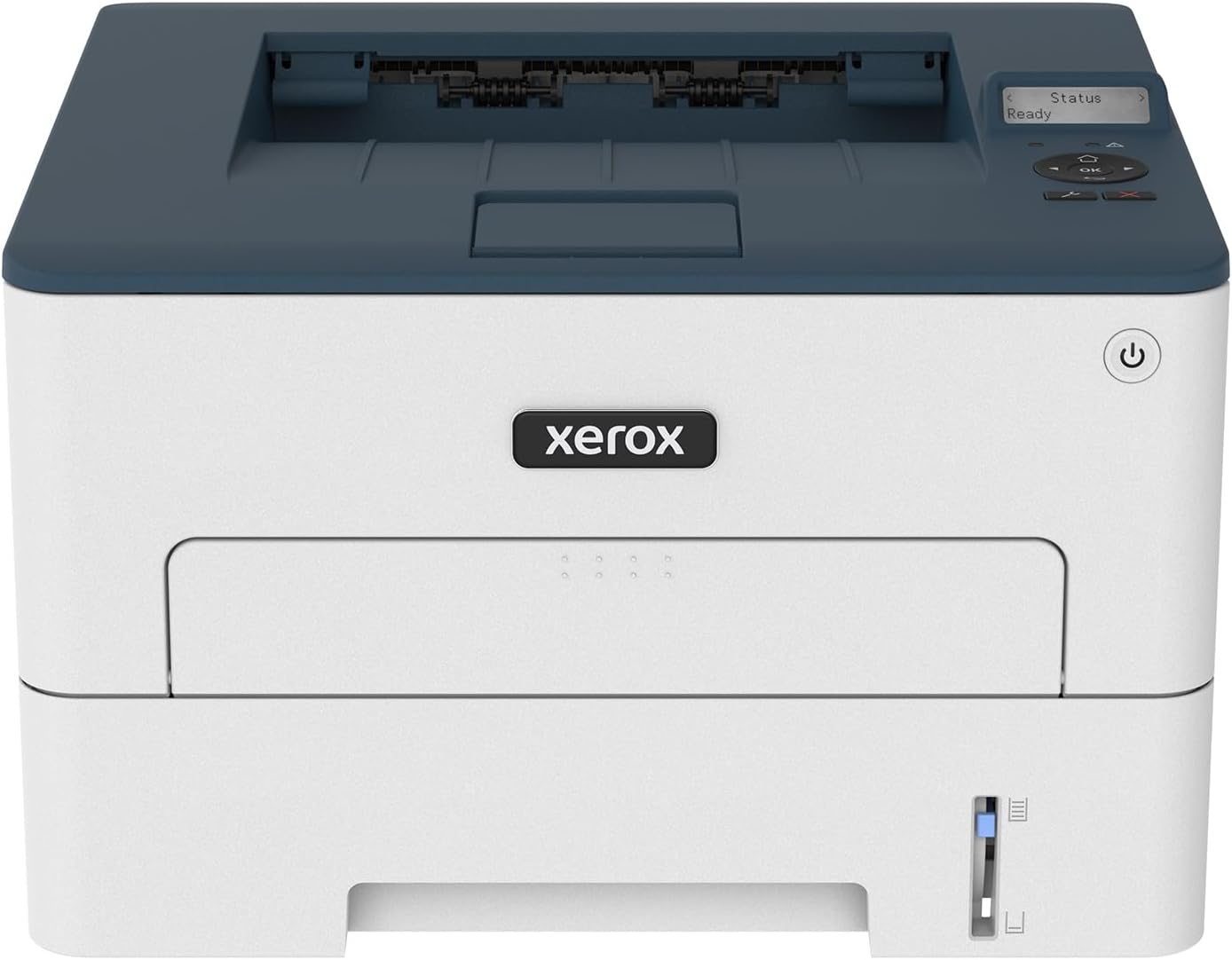
The Xerox B230/DNI is a compact, monochrome laser printer designed for small businesses and home offices. It delivers fast printing speeds of up to 36 ppm with high-resolution 2400 x 2400 dpi output. Featuring built-in Wi-Fi and broad mobile compatibility including Apple AirPrint and Mopria, it enables seamless wireless printing. Eco-friendly automatic duplex printing and a toner recycling program minimize environmental impact. With easy setup and reliable connectivity, the B230 is engineered to boost productivity in tight spaces.


| ASIN | B09HRKCKFJ |
| Additional Printer Functions | Print Only |
| B&W Pages per Minute | 36 ppm |
| Best Sellers Rank | #50,174 in Office Products ( See Top 100 in Office Products ) #54 in Laser Computer Printers |
| Brand | Xerox |
| Built-In Media | Printer, power cable |
| Color | White_Blue |
| Color Pages per Minute | 36 ppm |
| Compatible Devices | Smartphones |
| Connectivity Technology | USB, Wi-Fi |
| Control Method | Remote |
| Controller Type | Android |
| Customer Reviews | 3.8 out of 5 stars 216 Reviews |
| Display Type | LCD |
| Dual-sided printing | Yes |
| Duplex | Automatic |
| Hardware Interface | Ethernet |
| Ink Color | Black |
| Item Dimensions D x W x H | 13.1"D x 14"W x 9.1"H |
| Item Type Name | Laser Printer |
| Item Weight | 16.1 Pounds |
| Manufacturer | Xerox Office Products |
| Maximum Copy Resolution Black and White | 2400 x dpi |
| Maximum Copy Resolution Color | 2400 x 2400 DPI |
| Maximum Copy Speed Black and White | 36 ppm |
| Maximum Media Size | 8.5 in. x 14.17 in. |
| Maximum Print Resolution Black and White | 2400 x 2400 dpi Dots Per Inch |
| Maximum Sheet Capacity | 250 |
| Maximum print Resolution Color | 2400 x 2400 dpi |
| Model Name | B230 Printer |
| Model Number | B230 |
| Model Series | B230 |
| Number of Ethernet Ports | 1 |
| Number of Trays | 1 |
| Other Special Features of the Product | Wireless |
| Paper Size | 3.9 x 5.83 in/99 x 148 mm to 8.5 x 14.17 in/215.9 x 359 mm Inches |
| Print media | Paper (plain) |
| Printer Connectivity Type | USB, Wi-Fi |
| Printer Output Type | Monochrome |
| Printer Type | Laser |
| Printing Technology | Laser |
| Resolution | 2400 x 2400 dpi |
| Special Feature | Wireless |
| Specific Uses For Product | home office |
| Total Usb Ports | 1 |
| UPC | 095205069259 |
| Unit Count | 1.0 Count |
| Warranty Description | 1 year manufacturer |
| Warranty Type | limited warranty |
J**T
Easy setup, works with Mac and iPhone
Retired senior, business closed, long-time Mac user here. I just needed a laser printer with a small footprint, no ink subscription, for general necessities. This is perfect for my needs. It was easy to connect to my wi-fi and set-up with the phone app. I downloaded the driver for my computer (the app sent me a convenient link in an email), shared it with anyone on my home network and we all can print from our own phones or computers. Ignore the complaints about the passwords. The app walks you through everything. Couldn't be easier. And the copies are crisp and black. Nice speed, easily prints 2 sides. Recommend.
J**Y
Absolutely most ineffective printer I have ever owned
One might not think Gutenberg’s printing press a expedient option for printing in the 21st century, but when left to the engineering prowess of Xerox, a 16th century printing press would be my preference. Not only is this printer just poorly designed given the digital capabilities of the third decade of the 21st century, but it also simply did not work and the software accompanying the printer caused my computer to freeze. One has to input any information - Wi-Fi passwords, etc. - by scrolling on a tiny screen through the entire alphabet of upper- and lower-case characters. To type a password of 11 characters takes well over two minutes! Baffling that this is the best interface Xerox can manage in 2023. Honestly, it seems like Xerox has not updated their interfacing technology since the Xerox 820 Information Processor in the early 1980s. Of course, this wouldn’t be such an issue if the printer stayed connected to the Wi-Fi, but, like most modern printers, it seems to be confused and upset by wireless internet. In the course of one day, I had to reconnect it to the internet four times, each time inputting my password one arduous character at a time. I am just thankful that my password did not contain the characters x, y, or z, otherwise I would still probably be sitting there scrolling through the alphabet on a tiny screen salvaged from what I can only imagine is a surplus stockpile from the late 1970s. So, once I got the printer set up and tenuously on the internet, I attempted to print and… nothing. So, I downloaded the driver from Xerox’s website and installed it onto my up-to-date windows operating system and… it crashes my computer. Wow! Impressive stuff Xerox; you have now reached new heights of incompetence among the modern home printing presses! So, I reset the printer, uninstalled all Xerox software from my computer, cleared all cashes, deleted all old printer data and software, and try again from the start. This time, I installed the driver and then set up the printer. All things seem ready to go, the Xerox driver installation prompt screen says “print test page” and so I print and… nothing. So, I went online to search for this issue. I find lots of people from Xerox own help forums saying to uninstall everything from Xerox, do some fancy backroom file sorting on the computer (which I do), reinstall everything, and try again. However, upon trying to access the installed software to uninstall it again, it crashed my computer AGAIN! Excellent work Xerox, truly masterful. It almost seems like you are trying to sabotage the modern home office experience, or perhaps just redefine it as a Sisyphean torture with endless password inputting, software installations, and troubleshooting without any reward. So, I contacted Xerox customer support, which of course is an AI chat bot that tells me to check to make sure the printer is powered on like I am a buffoon. I have to go through an endless litany of suggestions from this similarly ill-designed technology from Xerox before it finally tells me that it cannot resolve my issue. I have to now hunt for a support number in some vein hope of talking to a person. When I finally talk to a person, they tell me that they have no idea what is going on and that I just need to try uninstalling and reinstalling everything again. Holy s***. This is a joke right? Xerox, you are just having a great laugh at me now, aren’t you. So, instead of continuing pushing this metaphorical boulder up a hill to have it roll back down again, I returned the infernal device. I would rather hand transcribe my documents than ever buy any printer or anything at all from Xerox ever again. The laser printer was invented by Xerox over half a century ago in 1969, and today they are a company that specializes in printing technology but still cannot make a laser printer that works more reliably than a medieval printing press. Good job Xerox.
X**E
Great addition to the apple system
One of best printers I have had - did a 200page brief with no problems - good speed as well . Easy to setup in iPhone environment. Can print from iPhone, ipad and MacBook wireless & easily We just powered it up & it was basically ready.
T**U
Great Little Xerox Printer
The Xerox B230 is a great little inexpensive Monochrome-Black & White printer. I rarely use Color. No Scan and No FAX. 20 lbs. Noise level is OK but lots of hot air blowing out the right side. The printer comes with a CD-Rom for instructions. Perhaps a shop can put the antique CD on a USB Flash Drive for you. The sheet of printed instructions are mostly worthless. Use the Xerox Easy Assist app videos or YouTube videos for video setup instructions. There are numerous securing tape tabs to remove. And when you think you are done, pull out the printer cartridge and remove several more tabs and the blocking paper. Do not touch the Drum. Don’t forget the tapes on the inside of the printer tray. And opening the paper tray to fit letter-sized paper takes video instructions. As for Xerox’s Easy Setup claim… Wow. It might be an Easy Setup for a computer technician or printer technician. I attended Purdue for six years… Maybe I should have stayed for a couple more.
A**R
Everything is great.
T**E
A great printer! (so far)
Received this Xerox printer yesterday. It is replacing a Samsung monochrome laser printer that died of old age. It will be a back-up printer, in case our Canon all-in-one goes down. Very well packaged, box contained everything needed to get it installed and printing asap. I used the ethernet port, connected directly to our router. Used the ADD PRINTER function in Windows on 3 computers, desktop and 2 laptops. All work great, took less than 10 minutes per install. I had forgotten how excellent Zerox is at what they do. Very Well Done Xerox!
G**N
Poor installation documentation and will not print
Almost impossible to install. no PIN included in documentation. Disk sent with printer - who has disk reader anymore??? No phone answering tech support at Zerox. I had to hire computer consultant to install and after all that, consultant said "something is wrong with this printer". Unhappy customer who wasted 3 hours trying to install wifi printer.
B**Y
Basic B&W Printer
So far so good. Exactly what I wanted. Wired to modem
M**L
Works With LINUX
Works for LINUX!! Excellent printer! No subscriptions!! Buyer has total control over printing through web interface. Search through the small display on the printer to get the ip address, add that ip in your browser and you will have more control that you ever dreamed possible. Once in the web interface you can set a static ip to whatever you want. Do not even try to set any settings through the small printer display, just skip through all that and go directly to the web interface and see all the control Xerox provides its customers. Mine is now connected to my network and all connections can print to this printer. Install took 15 minutes with no hickups! You can also handle all security, passwords and well, LOTS more! NO drivers to download and install. I am using CUPS on LINUX and I just opened "printers" from the MINT XFCE menu and printer was recognised and I could adjust print settings there also. I opted for ethernet connection and after connecting to the printer I disabled wifi through the web interface! Believe me, when you get to the web interface you will have so much settings available to you it will be amazing! Simple printer with big impact! Way to go XEROX for putting customer needs first when it comes to simple install and printing! Why can't greedy printer manufactuerers learn from this and put customers first like XEROX does? In the future I will opt for a full color with scanner, but this XEROX B230 is excellent and I am totally happy with my purchase!
C**Z
cumplen con su propósito
Tiene un problema, después de un tiempo se desconecta y desconfigura del wifi. Al imprimir jala más de una hoja! como casí todas las impresoras, pero eso es molesto! el toner es bastante caro, pague al rededor de 2,500 pesos mexicanos. como unos 50 USD
J**Z
Que cumpla mis espectativas
Fue lo que yo quería
C**T
Good printer
Good printer for the price but toners are expensive
A**W
Simple and easy to use.
Solid budget printer. Was a snap to get working in minutes over Ethernet (yep, has an ethernet port) - and bonus, no app required to get it all up. Can't speak for WiFi or the phone app or tech support, but works fine with Linux. I think it's going to be a nice companion printer to my ink jet for document printer. But I do wish it had a proper power switch instead of just going to deep sleep...
Trustpilot
1 month ago
3 weeks ago