⚡ Elevate your desk game—connect smarter, work faster, and never unplug your flow.
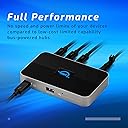
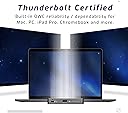
The OWC Thunderbolt 4 Hub expands your Mac, PC, or iPad connectivity with five high-speed Thunderbolt 4 ports, supporting up to three daisy chains and full device charging. Compatible with Thunderbolt 4, 3, USB-C, and USB4, it delivers professional-grade performance and reliability, backed by a 2-year warranty—perfect for multitasking millennials who demand seamless, powerful workflows.


| ASIN | B09CTHJ8T3 |
| Are Batteries Included | No |
| Best Sellers Rank | #39,896 in Computers ( See Top 100 in Computers ) #31 in Thunderbolt Adapters |
| Brand | OWC |
| Color | Black |
| Customer Reviews | 4.4 4.4 out of 5 stars (1,012) |
| Date First Available | 13 September 2021 |
| Form Factor | Portable |
| Graphics Card Description | Dedicated |
| Graphics Card Interface | AGP |
| Graphics RAM Type | 72-Pin EDO SIMM Memory |
| Hard Disk Description | HDD |
| Hard Drive Interface | ATA-4 |
| Hard Drive Size | 80 |
| Hardware Platform | Mac or PC |
| Item Weight | 200 g |
| Item model number | OWCTB4HUB5P |
| Manufacturer | OWC |
| Memory Technology | DDR3 |
| Number of USB 2.0 Ports | 1 |
| Number of USB 3.0 Ports | 1 |
| Operating System | ['Windows 10', 'Windows 7', 'macOS 11.1 Big Sur or later'] |
| Optical Drive Type | BD-R |
| Processor Socket | BGA 413 |
| Product Dimensions | 50 x 50 x 28 cm; 200 g |
| Series | OWC OWCTB4HUB5P station d'accueil Avec fil Thunderbolt Gris |
| Standing screen display size | 75 |
Q**R
I have had one of these for a year and another one purchased a week ago. Both have worked perfectly. In both cases, I used these more as docks and chargers than anything. If it works in your use case as a dock, it’s half the price to get those functions covered as the thunderbolt docks made by various companies (including OWC). USE CASE ONE: At one of my offices, I do not keep a computer but bring in either my MacBook Air M1 or my Dell XPS13. Both computers are great. At my desk, I have a 27 inch Dell 4k monitor, a stand for a laptop to the side (to also serve as second monitor), and this OWC Thunderbolt Doc. I take out which laptop I want to use for that day (one is better than other for certain things and vice versa). I plug it into this Thunderbolt Hub by one connection (the Thunderbolt 4 cable that comes with the OWC Hub). That one plug in charges laptop and connects it, of course, to all the things the hub is connected two. Those are: - TB out 1: connected to 27 4k monitor (works wonderfully), using Thunderbolt cable to display port input on monitor. I always get great resents going T4 to DP. - TB out 2: connect one of the other Thunderbolt ports (USB-C format) to a 10 outlet USB-A USB 3.1 hub. Into that I have plugged in connections to audio speakers, printer, Bluetooth dongle for mouse and MC Logitech Keyboard (fabulous keyboard), and my circle light for zoom calls, and my Logitech 922c 1080p camera. - TB out 3: connects to a TB3 cable that I use to connect external SSDs when I need one connected. I use the front facing USB-A port to connect flash drives or other temporary peripherals. This all works flawlessly, and has so for a year. Again, I open laptop, plug in one cable, and my computer is connected to, and driving, everything, and I’m ready to work with full monitor, keyboard, mouse, and other accessories. And, it’s worked every time. My TB Hub has not had the problem with the cables coming out to easily that some have commented on and I believe has fixed. This is all working so well and it’s a lot less money than a Thunderbolt Doc. But if you need the dock, I bet OWC’s i is a good one. Of course, Caldigjt makes a nice one. USE CASE TWO: In this case, I’m asking less of the hub. I use it to plug the same Dell XPS 13 noted above in at my other office. That changes computer and also connected by Thunderbolt cable to another Dell monitor which is 24 in 4k. Again, TB cable to display port in on the monitor. I have a receiver for a wireless mouse I like a lot plugged into one of the rear farting other TB ports on a dongle. Yeah, doesn’t need the bandwidth but does just what I need. That leavers a USB-C TB port out for connected an external SSD and an option USB-A port on front for whatever flash drive or other need some up. Again, I pull out my DellXPS13 and plug in one cable and it’s powered, charging, and connected to a 4k monitor and other things I use. These are great devices. They have worked well, no brainer type working well, every time. Very pleased with these devices..
I**T
Importante sapere che è compatibile con tutti gli hard disk con sistema Thunderbolt 3, ma serve utilizzare sempre e solo cavi thunderbolt 4, in caso non riconosce gli HD. In lungimiranza con la tecnologia che avanzerà verso il 4, è ottimo investimento. Lo utilizzo come Hub per collegare un Apple MacBook Pro M1 13" con scheda audio Apogee Symphony Desktop e con un Hard Disk, per esempio, ed è perfetto, non sgancia mai....meglio spendere qualcosa in più, ma state tranquilli per l'intera giornata. Ha il suo alimentatore "ingombrante", ma appunto, se funzionale....meglio così.
J**E
So far so good! Really fast, doesn’t overheat. I’m a video editor and I regularly transfer large amounts of high res files WHILE editing 4K content with playback and so far no issues. All while it keeps my MacBook Pro charged!
M**.
Excellent für MacBook, ich nutze ihn um 2 Monitore (4K) native in MacOs zu betreiben mit einem MacBook Air M4 und es funktioniert tadellos!
S**S
This is a fantastic value. I was able to eliminate two flimsy hubs and daisy chain several SSDs, an external hard drive, connect a remote portable monitor without a hiccup. The best part, from my perspective, is that I am able to plug my Lunda Display dongle directly into the hub instead of the back of the iMac 27 inch (2020) and it works seamlessly. With every other hub or dock I've tried the Luna dongle will absolutely not work unless it is plugged into the computer directly. This is a game changer and allows for easy port expansion. There is no excessive heat from the hub. It works straight out of the box and the ability to daisy chain different sections makes disk storage super easy. I love it.
Trustpilot
2 months ago
4 days ago