Buy anything from 5,000+ international stores. One checkout price. No surprise fees. Join 2M+ shoppers on Desertcart.
Desertcart purchases this item on your behalf and handles shipping, customs, and support to Sri Lanka.
🎥 Elevate your storytelling with pro-grade stability and sleek portability.
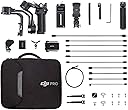
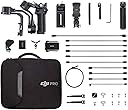
The DJI RSC 2 Pro Combo is a foldable 3-axis gimbal stabilizer designed for DSLR and mirrorless cameras up to 3kg. Featuring DJI’s Titan Stabilization Algorithm and SuperSmooth tech, it ensures ultra-smooth footage even with long zoom lenses. Its compact form factor folds smaller than an A5 sheet, making it highly portable. The integrated 1-inch OLED screen offers intuitive control, while a 14-hour battery life supports extended shooting sessions. Compatible with major camera brands, it’s the ultimate tool for professional videographers and content creators seeking flawless stabilization and versatile shooting modes.
| ASIN | B07FSZVS9F |
| Audio Recording | No |
| Battery Average Life | 14 Hours |
| Best Sellers Rank | #1,046 in Professional Video Stabilizers |
| Brand | DJI |
| Built-In Media | Camera Body & Accessories, DJI RSC 2 X 1, Carrying Case X 1, USB-C Charging Cable (40 cm) X 1, Lens Support X 1, Extended Grip/Tripod (Metal) X 1, Quick-Release Plate (Arca-Swiss/Manfrotto) X 1, Camera Riser X 1, Phone Holder X 1, Focus Motor X 1, Focus Motor Rod Mount Kit X 1, Focus Gear Strip X 1, Image Transmitter X 1, Cold Shoe to 1/4''-20 Adapter X 1, USB-C Power Cable (20 cm) X 1, Mini-HDMI … |
| Color | Black |
| Compatible Devices | Camera |
| Customer Reviews | 4.6 out of 5 stars 438 Reviews |
| Exposure Control Type | Automatic (Auto) |
| Folded Size | 260 x 210 x 75 millimeters |
| Has Self-Timer | No |
| Image stabilization | Yes |
| Item Dimensions D x W x H | 7.28"D x 6.89"W x 15.75"H |
| Item Weight | 3.15 Kilograms |
| Manufacturer | DJI |
| Manufacturer Part Number | 1 |
| Maximum Weight Recommendation | 3 Kilograms |
| Media Type | Video |
| Model Name | DJI RSC 2 Pro Combo |
| Model Number | DJI RSC 2 Pro Combo |
| Product Dimensions | 7.28"D x 6.89"W x 15.75"H |
| Screen Size | 367.7 Millimeters |
| Shooting Modes | Portrait |
| Unit Count | 1.0 Count |
| Video Capture Format | 2K DCI 1080p |
| Video Capture Resolution | 2K DCI 1080p |
| Viewfinder Type | Electronic viewfinder (EVF) |
| Water Resistance Level | Not Water Resistant |
J**E
Good gimbal
A**R
You need to buy a cheap phone to use the gimbal!
Awesome gimbal for sure! However, there are many data security concerns if you download their app from their website. As a professional in the industry I don't recommend downloading it and installing it. One solution is to buy a cheap phone and use that it. That's what I did. Is to dangerous to use an app that is not in the play store. They could be stealing your data and who knows what else.
J**Z
You can purchase for the moment or invest for the future.
FIRST OF ALL: You can purchase the cheaper version sold here by Amazon UK. I got mine from it and received it in 4 days. Amazing! I’ve been using this Gimbal for around 18 months… started using it because of a Real Estate Cliente bought it and assigned to me to film properties. Must say this was the first gimbal i ever used for cameras (only used smartphone gimbals) so for me this was the best thing at the moment…. After a few months got to try several Zhiyun gimbals and definitely: This is the best option out there (along with the RS2/RS3 which is the same but with a few pro-features). What i love about it: 1. This thing is built like a Hummer! You don’t need to lay your hands on it… just by looking at it you know the thing has a premium build. DJI doesn’t mess with that. 2. Yes, the newer ones have automatic lock as a feature, but i prefer the manual lock, ‘cause in the end you gotta ask yourself what’s the lifespan of those automatic locks ? (yes DJI builds like a rock, but still gotta ask…) And the most important point: How long does it take to lock/unlock your gimbal? For me that feature is a gimmick. 3. If you’re a Sony user (don’t know if this happens with other brands) you can zoom in/out without the need of the Focus Motor installed. I own an A6400 with the Kit Lens and even though the lens doesn’t have a Smooth Scroll feature, is nice to be able to zoom in/out thanks to the Raveneye because setting up the whole gimbal with the Focus Motor takes extra time. 4. Battery life. I’ve spend a whole weekend in a hotel filming and walking around and NEVER had to recharge the gimbal between filming. 5. Max Payload. 6.6 pounds is more than enough for the average filmmaker. I’ve used the gimbal with an A7III with an 28-70mm, Shotgun microphone and a small video light and still the gimbal worked smoothly. If you’re not a RED/BlackMagic user, you can work perfectly with this camera and your Nikon/Sony/Canon/Panasonic or whatever camera and a cage with some accessories. 6. Raveneye. I just bought the ProCombo because i could not afford to be tied to a client only to be able to use an equipment that i work with and decided to pay the extra bucks because of what i saw online with the Raveneye, and i must say that it is AMAZING!! I don’t use the gimbal without it because my Galaxy Note 10 Plus has a large screen and the app has all the feature i need so far like Focus Peaking, Activetrack and Remote operation of the gimbal. To give you an escenario where i use this the most, most hotels have a theater where they have performance every night. I can place the gimbal on a tripod and sitting in the audience i can move the camera and not bother the crowd with my presence in the front row. What i don’t like 1. The case (on the Pro Combo) is very well build but could’ve been a bit bigger. I have to rebalance one of the arms every time i need to use it because the gimbal won’t fit the case when fully balanced for my A6400 + Raveneye. 2. DJI Apps run outside GooglePlay Store. Yeah, every company sells our information, but some use more shady practices that can’t be monitored/regulated, and DJI is one of them…. i HATE that they require GPS to be able to connect to a device that is LITERALLY next to you Conclusion: My budget was good for the Ronin SC (first generation) for $280. dollars, but something a filmmaker friend told me: 1. You can purchase what you need at the moment and risk having to purchase a newer version very soon because of your fast progress in the profession, 2. you can purchase for the future and buy the most advanced equipment and risk been left with no money and the worst part, you never fully use 100% of the product features, or you can make a balanced decision: 2. Don’t purchase the cheapest option you can afford nor the most expensive one because is the newest, instead pick the one that follows the cheapest one, and can guaranteed functionality for a long time and at the same time won’t break you piggy bank.
N**E
Durable materials
Great tool to level up videography
S**O
Great gimbal, OUTSTANDING service!
If you’re on the fence about buying a the RSC2 gimbal from DJI, let me tell you – you can go ahead right now. And for two key reasons. First it delivers great footage. I’ve used it over the last 3 years to record silky smooth footage of the GB Head Table Tennis Coach, Alan Cooke, at a summer training camp. And I took it on safari recently to Tanzania where my tracking shots kept the horizon unbelievably level even when the Toyota Landcruiser was rocking and rolling like it was on the high seas. The second reason you should be reassured about buying from DJI? Gotta tell you its service and support is absolutely out of this world. I have never had such great service, with any product, from any global supplier. Full stop. During the safari I lost a screw from the roll axis of the gimbal. Didn’t notice. Lost on the floor somewhere. Came home, went online, got into chat with Oliver, 8 hours round the world in China. Oliver asked me to send a picture of where the screw sat, so I did. He contacted the Europe service centre who sent me a replacement screw. Just days later. I was just hoping for a part number so I could find a replacement myself. But I got a new screw, the exact right one. But the story – and the level of service I got from DJI– doesn’t stop there. I replaced the screw and unfortunately the roll axis was still jittery. I picked up the email thread and Kobe this time asked me to send a quick video of the jittering. I did that - and he suggested I send it to a service centre. In mainland Europe. But I’m in London. Do I part with my gimbal, trust it to parcel carrier? Will it actually be fixed, I wondered? And will I ever get it back? Well, I gave it a shot. Registered on the DJI site, got a UPS shipping label in seconds, took it to the shipping hub just 5 minutes away from my office and that part was over. Couple of days later, no more, got a call. To fix it was going to cost about £70 sterling, and I’d need to pay for the courier, but Kate in the Netherlands said they would ship me a new RSC2 gimbal. For all the trouble I’d been to. It arrived today. About a week after I shipped it to them. I’m blown away. I was a fan of DJI before. Now I’m a superfan. Full disclosure: I’m NOT connected financially in any with the company. If you’re on the fence about buying a DJI product you have my 100% support. Never experienced any support like this for anything, ever. Go ahead. You won’t regret it.
G**3
RSC 2 Pro mit der EOS M6 Mark II - es funktioniert!!
Nachdem ich wochenlang im Internet nach einem Erfahrungsbericht gesucht habe, ob die M6 auch mit dem RSC 2 funktioniert, ich aber leider nirgends etwas gefunden habe wollte ich auf diesem Wege allen M6 Mark II Besitzern mitteilen: Es funktioniert! Bin das Risiko eingegangen und habe die Kombination getestet - aber lest selbst: Erstmal zum Gimbal selbst: Die Verarbeitung ist super, das Unboxing habe ich zelebriert - extrem hochwertig und durchdacht verarbeitet. Obwohl das mein erstes Gimbal ist bin ich mit dem Ausbalancieren auch ohne Anleitung super zurecht gekommen. Alle Achsen lassen sich separat per Quicklock fixieren, so dass man sich von Achse zu Achse hangeln kann. Außerdem sind die verstellbaren Führungsschienen jeder Achse ebenfalls per Quicklock fixierbar - alles in allem viel einfacher als ich es vermutet hatte. Ok, also die M6 oben drauf, dann ausbalanciert - verdammt! Das gelieferte HDMI micro auf HDMI mini Kabel hat zu lange und steife Enden. Offensichtlich ist das Gimbal für Kameras geplant worden, die die Video- und Steuerausgänge auf der linken Seite haben.....hmm, blöd. So lassen sich durch Ausreizen der Justierschienen zwar Kamera und Gimbal verbinden, allerdings hat man dann nicht die "full range of motion" (nach vorn und hinten um 360°) da das Kabel am Gimbal hängenbleibt....ok, es muss doch eine Lösung geben....ha! Am besten ein 90° abgewinkeltes Kabel! Tja, leider gibt's da aber nix auf die Schnelle bei amazon (es gibt für jeden Blödsinn ein Kabel, nur hierfür nicht.....). War die Vorfreude verfrüht? Aufgeben gibt's nicht! Nach etwas Zeit auf google scheinbar die Lösung gefunden: "UltraThin FlachbandKabel 90° Stecker HDMI Mini zu Micro HDMI 50cm". Das Flachbandkabel wird anscheinend auch für DJI Drohnen benutzt laut Beschreibung, müsste als auch für das RSC 2 passen, oder? Bestellt, heute angekommen - funktioniert! Nun kann ich das Gimbal mit der M6 in vollem Bewegungsumfang nutzen! Jetzt wurde es natürlich spannend: Klappt die Steuerung der M6 über das Gimbal? Klappt die Verbindung zu Raveneye und die Steuerung über die App? Jaaaaaa!!!! Jackpot! Obwohl die M6 offiziell nicht unterstützt wird scheint sie inoffiziell doch kompatibel zu sein! Folgendes habe ich bisher erfolgreich getestet: - Steuerung der Kamera über das Gimbal (Gimbal zeigt auch sofort "Camera control cable connected" an, sobald man die M6 anschaltet (natürlich müssen die Kabel vorher verbunden werden) - Über das Steuerrad vorne klappt die Steuerung der ISO Werte, die Blende, der Verschlusszeit, etc. - Aufnahmestart und Bildauslöser klappt über den Rec-Knopf am Gimbal - Verbindung mit Raveneye über die App klappt - Joystickfunktion, Autotrackfunktion, Filmaufnahmen und Foto schießen klappt via App über Raveneye - Die Force Mobile Funktion funktioniert perfekt! Also die Steuerung des Gimbal über drehen und wenden des Smartphones - Die Funktionen der Raveneye Oberfläche (Farbänderung, Ausleuchtungsanzeige, etc.) funktionieren Yeah! Das einzige, was ich noch nicht getestet habe, da ich kein Objektiv ohne Autofokus habe, ist der Fokusmotor. Was aber extremst nervig war und mich fast zur Weißglut getrieben hat war die Einrichtung des Raveneye..... Zunächst mal ist nirgends eine vernünftige Beschreibung zu finden, welches Kabel mit welchem Anschluss verbunden werden muss. Vielleicht liegt es auch an mir, aber bis ich Bild und alle Funktionen gleichzeitig hatte verging einige Zeit.....war mehr Trial and Error als strukturiertes Vorgehen und hatte schon Angst, dass sich hier die befürchtete Inkompatibilität zeigt. Aber letztendlich hat's doch geklappt. Hier als Tipp meine Verkabelung: - Zusätzlich bestelltes HDMI Kabel: HDMI micro in den HDMI Output an der M6, das andere Ende des Kabels mit dem HDMI mini Stecker direkt in den HDMI mini Eingang des Raveneye - Das mitgelieferte USB-C auf USB-C Kabel, das am einen Ende einen abgewinkelten Stecker hat: Das abgewinkelte Ende in den USB-C Eingang der M6 (wichtig dass man diese Ende nimmt, sonst hat man wieder das Problem des Überstehens!). Das "normale" USB-C Ende des Kabel in den RSS Input des Gimbals (nicht den RSS Input des Raveneye!!!!) - Irgendeines der normalen mitgelieferten USB-C auf USB-C Kabel: Ein Ende in den Eingang des Raveneye mit dem Blitzsymbol (nicht in den RSS Eingang!!!!!!). Das andere Ende in den USB Port des Gimbal mit dem WLAN Symbol (nicht in den mittleren USB-C Eingang!!!) Damit erspart Ihr Euch viel Ärger...außerdem: Balanciert erst NACH der ganzen Verkabelung aus, denn das musste ich nun auch nochmal - aber das geht ja zum Glück fix. Womit ich anfangs Probleme hatte, aber vielleicht liegt das auch an meinem Smartphone (Redmi 8 Pro): Mit dem Gimbal konnte ich bis heute nur über Bluetooth verbinden, wenn ich die Gerätesuche in der App gestartet hatte und erst dann schnell das Gimbal angeschaltet habe. Nur dann wurde das Gimbal erkannt. Außerdem ging die Verbindung zum Raveneye über WLAN das eine mal, beim nächsten Mal nicht mehr....musste also öfter wiederholt werden, bis es klappte. Doch wie der Zufall es will: Heute gab es - ein Firmwareupdate des Gimbal - ein Firmwareupdate des Raveneye - ein Update der App auf eine neuere Version (was kurioserweise nicht über den Playstore passiert, sondern über eine apk) und siehe da: Die Verbindungen flutschen nun so wie es sein sollte! Zum Gimbal selbst: Die ersten Videos wirken super geschmeidig. Das RSC 2 ist schwerer als ich dachte, liegt aber super in der Hand und lässt sich auch gut mit 2 Händen führen, wenn der Standfuß eingeklappt ist. Die Haptik ist mega, kein Geräusch der Motoren zu hören und die Einstellungsmöglichkeiten sind vielfältig - von 360° Drehungen über die individuelle Einstellung der Stärke und Geschwindigkeit jeder Achse. Nach ein paar Tutorials auf youtube hatte ich auch recht schnell die quickbuttons bzw. Funktionen raus, die mit entsprechenden Klicks und Druckfolgen der Steuerknöpfe möglich sind, raus. Freue mich wahnsinnig auf die ersten größeren Projekte mit dem Teil! Hoffe, ich konnte den M6 Mark II Besitzern weiterhelfen, viel Spaß damit!
5**0
Un diez por fabricante
He comprado del segunda mano por una oferta en Amazon day en estados muy bueno , pero venía con falta de accesorio , al final lo he devuelto porque con lo que me falta al final me sale precio más cara que comprar otro , es la primera vez que uso este tipo de producto , y la verdad que va genial , y me decide de comprar el otro modelo que es mejor de la misma marca , muy recomendable pero hay que tener cuidado con los de segunda mano .
C**N
Un pur bonheur
Venant d'un Feiyu G6max, qui est déjà un très bon stabilisateur pour son prix, je suis passé au Ronin SC2 pour gagner en fluidité et en charge utile. Le stabilisateur est tout simplement parfait pour mon Sony A6400 et ses objectifs, même les zooms. Les accessoires du pack pro sont parfaits. Le raveneye marche du tonnerre, permet le tracking des cibles via smartphone. Le follow focus, que j'utilise pour controler mon zoom, est hyper réactif. Le stabilisateur gère parfaitement l'ensemble monté sur la nacelle malgré le poids. Rien à redire. 20/20
H**N
Yumusak Kamera Hareketli İçin İdeal
Rsc2 Pro küçük bir el çantasına bütün parçalarıyla sığıyor. Gimbal'ın görüntü sabitleme performansı oldukça iyi. El tutuşu ergonomik ve ağırlığı yormayacak derecede ideal. Kurulum aşamasında kamera dengesini sağlamak ilk aşamada zahmetli olsa da sonraki aşamalarda pratikleşiyor. Tele lens kullanacaksanız her mm değişiminde gimbal'ı yeniden sabitlemeniz gerekiyor. Küçük ve orta ölçekli projeler için ideal bir ekipman.
Trustpilot
1 month ago
3 weeks ago