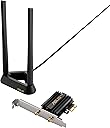
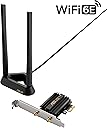
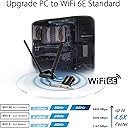


๐ Upgrade to ASUS WiFi 6E โ Because buffering is so last decade!
The ASUS PCE-AXE58BT PCIe expansion card delivers cutting-edge WiFi 6E connectivity by unlocking the pristine 6 GHz band, boosting speeds up to 5400 Mbps with WPA3 security. Featuring Bluetooth 5.2, an external magnetic antenna for superior reception, and ultra-low latency tech, itโs engineered for professionals demanding seamless, future-proof wireless performance.


| ASIN | B09RLFH6Y9 |
| Best Sellers Rank | #44 in Internal Computer Networking Cards |
| Brand | ASUS |
| Built-In Media | ASUS PCE-AXE58BT WLAN Card, Antenna Base; quick start guide, Low Profile Bracket, Motherboard USB Cable, Warranty Card |
| Color | BLACK |
| Compatible Devices | Desktop |
| Customer Reviews | 4.5 out of 5 stars 2,630 Reviews |
| Data Link Protocol | IEEE 802.11a |
| Data Transfer Rate | 5400 Megabits Per Second |
| Hardware Interface | Bluetooth, PCI |
| Item Dimensions L x W x H | 3.47"L x 0.95"W x 4.74"H |
| Item Type Name | networking router |
| Item Weight | 6.56 ounces |
| Manufacturer | ASUS |
| Mfr Part Number | PCE-AXE58BT |
| Model Number | PCE-AXE58BT |
| Product Dimensions | 3.47"L x 0.95"W x 4.74"H |
| UPC | 195553255103 |
| Warranty Description | 3 years warranty |
S**N
A+ wi-fi card
This is a great upgrade I purchased myself over the old dual 2.4 / 5 gHz ASUS card I had. It seems very well built, much sturdier. I like that the cables are thicker and joined more solidly. The antenna is very nice and bigger so I assume its going to work better in tougher conditions. The reason for my upgrade was just that the old thin cables had been removed on the card end and they never worked as good when reattached. This card is very fast / efficient indeed, I am using it just for 5 gHz wi-fi 6 and it is so good that I get A+ scores when running the waveform bufferbloat test. I have my home network optimized with SQM so its as fast and latency free as possible, but still with the old ASUS card the wi-fi on the device that needs the wi-fi card was not able to get better than a C score. Waveform say to not test over wi-fi, but just as a slight indicator on how well the card runs, I like to test it anyway! So very impressed with this card, and hopefully many years of service to come from it. I have no use for bluetooth so cannot speak of that.
T**A
Great Product!
This was my first WiFi 6 device, and the only one for now, so Iโm using it with other compatible non WiFi 6 devices, so that I canโt really comment on the WiFi 6 capabilities, but it looks like a great product, and performs well with non WiFi 6 devices. Both WiFi and Bluetooth drivers can be installed from the Windows 10 catalogs, so the supplied disc is not strictly required. I gave 4 stars for ease of installation because the Bluetooth module requires connecting to an internal USB port via a supplied cable. This may be an advantage or disadvantage depending on your use case. This means if you donโt have a free PCIe port but still have an internal USB port, you can use the device for Bluetooth functionality alone, without the WiFi function. Also, for some reason, the card didnโt align properly with both my motherboard and the casing at the same time, but this could be an issue with either my motherboard or casing, and YMMV. Havenโt truly tested the Bluetooth functionality yet, but the WiFi works great, both managed and ad-hoc, and backward compatible well with WiFi 5/ac at excellent speeds and signal strength/range. Others have noted that the supplied USB cable may not be long enough but was ok for my motherboard/configuration. The indicator LED is absent on this model. Seems like a great product, overall. Will update review once I get more WiFi 6 devices (Within the year, hopefully) to test the true power of this thing.
J**.
Great Item
The compatibly for our cpu was good. It was easy enough to install the drivers and fit it into the computer. The fit worked great. It helped the connectivity of the wifi Good durability as the plastic is decent quality.
N**T
I have had good luck with this.
I needed to purchase a wf-fi card since my ASUS motherboard did not have bluetooth and wifi built in. I first purchased another supposedly great ASUS wi-fi card but that did not include bluetooth, nor did it work well at all after a few weeks. I found this card which was cheaper, was supposedly more up to date, had bluetooth capacity built in and had more recent drivers and went with this. 1. Set-up?: This is relatively easy, though I recommend you download the driver beforehand and have it ready to go (CD provided BTW). This isa plug in card, but you knew that already. It does require a USB connector for the bluetooth connector on the motherboard. If you don't have that, bluetooth will not work. Once the card is in place, you can use either the card connectors and put the antenna (two) onto the back of the PC or use the cables and use the base unit with the two antennas and place this on the pc as the base unit has a magnet to keep it in place. 2. Use?: I have found this to be very good and stable. For some reason my speed is not what I had received from the direct ethernet, but that may also be a issue with my router rather than this product. However, the connection is quite stable. Very rarely, when gaming through a server I have lost the connection, but that is exceedingly rare. Otherwise I have had no issues whatsoever in other applications. Overall?: This is a really good product. I don't know why the other ASUS wi-fi card is more expensive and has an older wi-fi card, but that started failing for some reason after weeks. This has not given me a single real problem. So I judge this as being really good.
R**N
A must Buy!!!
As an IT professional, Iโm always in pursuit of cutting-edge technology that enhances connectivity and efficiency. The ASUS AXE5400 (PCE-AXE58BT) WiFi 6E card is a prime example of such innovation. With its support for the 6GHz band, it offers a new realm of wireless freedom with minimal interference and ultra-low latency. The cardโs 160MHz bandwidth capability ensures that youโre getting the fastest possible data rates, which is a boon for both bandwidth-intensive tasks and competitive gaming where every millisecond counts. The inclusion of WPA3 security provides the latest in encryption standards, keeping your network secure from external threats. OFDMA and MU-MIMO technologies work in tandem to provide efficient data transmission across multiple devices, ensuring that each deviceโs connectivity needs are met without compromise. The external antenna setup further enhances signal strength and range, providing stable and robust wireless coverage. Moreover, the Bluetooth 5.2 support is a welcome addition, allowing for seamless connectivity with a wide range of peripherals. The cardโs compatibility with Windows 11 and 10 (64bits) only ensures that itโs optimized for the latest operating systems, offering a hassle-free user experience. In essence, the ASUS AXE5400 (PCE-AXE58BT) WiFi 6E card is an exceptional piece of hardware that I highly recommend for anyone looking to elevate their wireless experience to the next level.
M**A
Faster then my wired connection
Just, wow! I have my main desktop hard wired with cat6 to a ROG Rapture GT-AX11000 (wifi 6 router). I was getting about 750megs down/28 up internet and the 1gig link up/down for network traffic. I got tired of the long wire running along baseboards and visible annoyance in the office. I had experience in the past with wifi cards and usually found it killed my internet speeds, so I took a chance with this since I have a wifi6 router. Hooking it up was insanely easy, I had a free USB header on my mother board that it plugged into fine. Once installed it was immediately recognized by windows. I added it to my 5ghz dedicated for TV's band. It immediately recognized the wifi6 signal and connected without issues once I stopped fat fingering my network password. I went to speedtest site and selected the fastest server in my area (that does matter when doing speed tests). I ran 4 tests and averaged 1gig with a peak of 1.1gigs down (1.3gig xfinity internet service). WOW! Who would have thought the adapter would be faster then my hard wire! For reference I'm about 23' away from the router which is in a utility room with a lot of electrical including dedicated servers, heating/ac, water heater, etc. My up/down link for network speed is about 1.9/1.9. Double what it was wired. I have not tested bluetooth or updated to latest drivers etc, will do that soon but this blew me out of the water for the speeds I'm getting with Wifi6. As a note for those getting slow speeds. Distance matters, whats between you and your router matters, and your router plays a HUGE factor. If you don't have a wifi6 router you're wasting your money as you won't get the full potential of this card.
M**N
Very solid product. Been using it for about a year now. No issues, pulls 1gb speeds consistently
Very solid product. Been using it for about a year now. No issues, pulls 1gb speeds consistently. I wanted to upgrade now for when i do start moving into the wifi7 side of the fence
J**R
Plug n' Play ready with 1 tiny bit messed up but running GREAT!
My landlord upgraded to the newer Xfinity gateway WiFi 6 generation. My previous external USB WiFi adapter wasn't compatible with WiFi 6 signal. So that led me to this product and I found that it is compatible with WiFi 6 signal. Not only that its compatible, it runs smooth, fast, and great! No micro drops. I play games and no micro drops is important! One tiny bit that messed something up. I believe this fault is on Microsoft's end. During first time use, it installed my WiFi adapter's driver...and somehow I think it messed up my video card's drivers. I simply had to go through latest driver installation for video card again via Repair option. Since then, all good. Just in case you see a problem with your video card drivers after this then it's probably this case.
S**N
ูุงู ูุงู ูุจููุชูุซ
ุฌูุฏุฉ ุนุงููุฉ ููุณุชุงูู ุงูุณุนุฑ ูุงูุตุญ ุงู ุดุฎุต ูุจุบุง ูุงู ูุงู ููุจู ุณู ูุงุฎุฐู ูู ุฏู ุงูุจููุชูุซ ูููุณ
R**.
Great product easy to install
Easy to install. Plug and play. Had to download the drivers which was expected. Now able to connect my home pc to my wifi 6e router
M**A
Intel chipset works out of the box on Linux PC
This review is for Linux on an AMD Ryzen PC with X570 chipset. The card is advertised on the box as Linux-compatible, and it works perfectly. You need an unused USB2.0 motherboard header for the Bluetooth. I'm on Arch Linux 6.2.10 and I only had to physically install the card, no driver install was necessary. I cannot speak for the Windows experience, but there are detailed instructions included for that. Definitely read them BEFORE opening your Windows PC at all. My PC shows up as a WiFi 6 client on my Unifi controller. WiFi quality is generally very bad in my house, but I'm able to get around 400 Mb/s when testing with iperf3 to a local wired computer. I used to get half that on my previous motherboard with built-in WiFi .11ac (a.k.a "WiFi 5") with a small dinky antenna. Bluetooth is the main reason I got this and is working with my Galaxy earbuds and Xbox One controller. As for the antenna itself, the base has a magnet and its strong enough to stick sideways on to my standing desk leg. The cable is very short though, it's around 2-ft. Here's the card under my lspci output: 03:00.0 Network controller: Intel Corporation Wi-Fi 6 AX210/AX211/AX411 160MHz (rev 1a)
H**I
ู ูุชุฌ ุฑููุจ ุฌุฏุง
ุงูุถู ู ูุชุฌ ุฌุฑุจุชู
N**T
Asus wifi 6e fastest
I buy this wifi 6e connection cos my old gaming pc doesn't have wifi connection. Cos now i upgrade new gaming pc have already built in wifi 6e. Thank you seller and delivery service
Trustpilot
1 day ago
2 days ago