⚙️ Elevate Your Maker Game with Pro-Level CNC Precision!
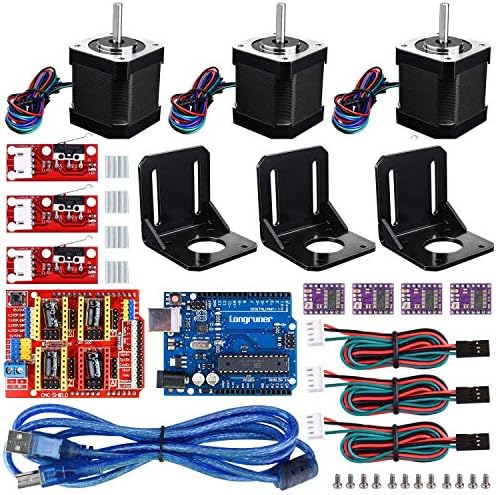
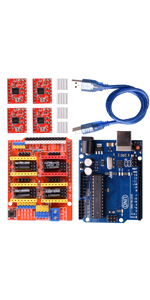
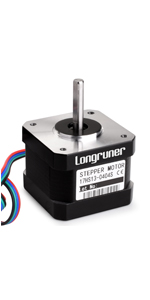
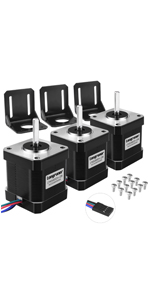
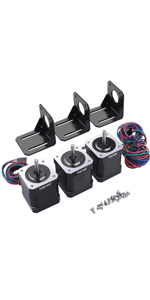
This Longruner 3D Printer CNC Controller Kit features the upgraded V3.0 CNC shield compatible with ArduinoIDE and GRBL 0.9, paired with premium DRV8825 stepper drivers equipped with heat sinks for optimal thermal management. The comprehensive kit includes Nema17 stepper motors, RAMPS 1.4 board, mechanical endstops, and all necessary components for professional-grade DIY 3D printing and CNC machining projects. Designed for both beginners and pros, it delivers reliable performance and is backed by responsive customer support.


| ASIN | B072N4FMRN |
| Best Sellers Rank | #265,260 in Industrial & Scientific ( See Top 100 in Industrial & Scientific ) #174 in 3D Printer Motors |
| Date First Available | June 14, 2017 |
| Display Type | Digital (No Physical Display) |
| Is Discontinued By Manufacturer | No |
| Item Weight | 13.4 ounces |
| Item model number | LKB02 |
| Manufacturer | Longruner |
| Product Dimensions | 0.04 x 0.04 x 0.04 inches |
B**N
I like the package. Works perfectly, no instruction manual is a minus point
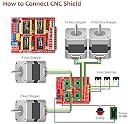
Bought July 2024. I was careful to do the set up correctly: 1. Upload grbl to arduino was OK 2. Connected heat sinks to drives making sure there are no shorts. 3. Connected drives to the CNC board making sure EN corner matches the same corner on CNC board. 4. Connected the motors. Never power on with drives without motors. 5. Add the GND - EN jumper on the CNC board. 6. Power on with a PSU of 30V and 10A with correct polarity. 7. Install the universal grbl program and send commands. Troubleshooting: My issue not getting it working was the power supply had an explicit output button that I missed xD. Some people say they contacted the seller, there is no information on how to contact. Great kit, worked as advertised after following above steps.
A**.
Everything I needed
I made my cnc plasma cutter using this setup with just a little bit of research on YouTube on how to set it all up. Works with both my old laptop and my raspberry pi as the controller
D**S
Cheap and practical way to get started into the world of CNC
A very inexpensive way to get started on the understanding of CNC. The documentation is nonexistant but there are tons of info on the net. Youtube is your friend. Everything worked straight out of the box.
R**A
It has its problems, but is a decent kit for starters
So let's start with the bad: 1. There is a bit of a misleading description. The packaging contents clearly state that there are six limit switches, but only three come with the unit. The seller has stated that it can be interpreted either way, but I dont see it. To overcome this, buy additional switches. They're cheap. Seriously, they're not only cheap, but they're pretty common models. Suggestion: they're cheap, so the seller should clear this up once and for all and just change the product so it comes with six... 2. The instructions are lacking. Since this is a beginners kit, we should expect people to not know what theyre doing. Links can be found to the electronic user manuals and worked up instructions, but people need to dig for this information. Suggestion: post the links in the product description so people know where to go. 3. Electromagnetic Interference (EMI) is a pain in the rear. Once set up, my carves would stall in the middle, rendering my machine useless. It took a long time to figure out that it was electromagnetic interference "setting off" my limit switches. I tried bonding and grounding everything and wrapped my vacuum in enough copper that i'm afraid someone's gonna steal the thing for street value. In the end, I got the machine working by just turning the limit switches off and limiting the programs by setting the workpiece in the center of the rig... Suggestion: hyperlinks to EMI troubleshooting guides and grounding/bonding guides. Also: change the limit switch wiring to shielded wiring. This will save so much time and frustration... Remember: your key demo is a group of novices trying to learn the craft... 4. Limit switch leads are not long enough for even a modest machine. Mine has a carving area of about 12"x18" and the wires were about half as long as they needed to be. I had to splice on extensions for each of the X- and Z- axis switches Suggestion: Include wire extensions for at least four of the switches 5. Only comes with 3 motors. A lot of the cnc machines serviced by this size stepper need two to run the y-axis train. Suggestion: Adding a fourth motor and stepper driver would be suitable here. 6. Doesn't support a touchpad. Well, it does if you know how to wire it, but thats not obvious and needed a lot of research to figure out how to do it. Suggestion: provide detail on how to wire a simple touchpad For all of the suggestions, even a link to a separate product kit would be helpful. These are serious shortcomings of this kit. With the whining out of the way, lets look at the good parts of this kit 1. The kit was pretty easy to install. Im a complete novice, but with some help from the internet, i quickly learned how to wire and test the steppers and drivers, install the switches and download and use the software. UGCS and Easel are my go-tos and theres very little arduino or firmware to fiddle around with. 2. Its pretty universal. Almost everyone has support for the arduino and CNC shield being used. Finding help, including videos, was pretty easy for me. 3. Its working... It may sound simple, but the fact that i was able to fumble my way through the setup process and learn as many things as I did and the machine didnt fry stepper drivers or motors says a lot. I took the rig apart a lot while setting it up and first carves are coming out pretty solid! That's pretty much it for my review. I know there are more downs than ups, but I would rate this kit a pretty solid one and recommend it for folks. It was a journey to get to where I am, but i learned a lot and am already looking at upgrades and mods. I dont think I would be where i am if those negatives didnt exist as learning experiences.
P**L
Can't find replacement drivers
The controller seems to work just fine. Unfortunately, I'm new to stepper motors, and I burned out several of the stepper motor drivers by powering the system on with the drivers connected but not the stepper motor. I tried ordering replacement DRV8825 drivers, but the motors rattle loudly like the gears are grinding when using the replacement drivers. With the one original driver that I didn't burn up, the motor doesn't rattle. One difference with the new driver is that it uses R100 resistors. The originals use R250 resistors (see picture). I can't find DRV8825 drivers anywhere that have the R250 resistors, even on the Longruner Amazon page. I also tried some A4988 drivers, and they also cause the motor to rattle. It seems I need replacement DRV8825 drivers with R250 resistors. This is the only reason I'm not giving this product 5 stars. Does anyone know where I can find these drivers? Edit: Changing from 3 to 5 stars since I found that the current supplied by the stepper motor driver to the stepper motor is dependent on that sense resistor value. So, I was likely supplying too little or too much current to the motor with the replacement driver I ordered. There actually isn't a problem with the drivers or motors that I know of, just that they are pretty unique, and I couldn't find one with that R250 resistor.
Trustpilot
5 days ago
1 month ago