Desertcart purchases this item on your behalf and handles shipping, customs, and support to Sri Lanka.
๐ Elevate your embedded projects with power, color, and mobility!
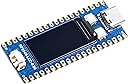
The Waveshare RP2040 MCU Board is a compact, Pico-like development board featuring the Raspberry Pi-designed dual-core Cortex M0+ processor clocked at 133 MHz. It includes a vibrant 0.96-inch 160x80 IPS LCD display, USB-C connectivity, and a lithium battery recharge/discharge header supported by a high-efficiency DC-DC buck-boost chip. Compatible with Raspberry Pi Pico add-ons and supporting C/C++ and MicroPython, it offers 26 multifunction GPIO pins and multiple communication protocols, making it a versatile choice for professional developers and hobbyists aiming to build mobile and visually interactive embedded systems.
| ASIN | B09LT5LYPD |
| Best Sellers Rank | #12,294 in Single Board Computers (Computers & Accessories) |
| Brand | waveshare |
| Connectivity Technology | I2C, USB |
| Customer Reviews | 4.4 out of 5 stars 10 Reviews |
| Manufacturer | Waveshare |
| Mfr Part Number | BC-RP2040 Board with 0.96inch LCD |
| Model Number | BC-RP2040 Board with 0.96inch LCD |
| RAM Memory Installed | 2 MB |
| RAM Memory Technology | SRAM |
| Ram Memory Installed Size | 2 MB |
| UPC | 755291678529 |
| Wireless Communication Standard | Bluetooth |
| Wireless Compability | Bluetooth |
B**2
Cool intro to the Pico
You will need to get the latest example code for this on the waveshare GitHub but it is there and works. Once my dev environment was set up, it took all of about a minute to compile the example and load it into the Pico. Shows a few splash screens and will draw things based on pico pin inputs if you hook them up. Also it looks like the display acts like the LED on the normal boards...backlight on and off for LED on and off. So far so good with this board and display.
C**R
Neat but very little documentation
It's a very nice Pico clone, but there is no example code on how to interact with the built in lcd. That being said, I'm still pretty green when dealing with hobby electronics so one with more experience may make better use of it.
R**L
Works well but can use a bit more documentation
After conducting several searches, I was able to find enough information to create a few CircuitPython examples. The examples are now on GitHub in the richteel/Waveshare-RP2040-LCD-0.96 repository. Waveshare has a wiki with some information, but it is most helpful for C, C+, and MicroPython. It is a cool product, but it is not good enough to just make a cool product for the Maker Community. You also need to include enough documentation to allow folks to be successful quickly. One con to this product is that the battery connector is not a common one used in the Maker Community. It is a MX1.25 connector rather than an JST connector. The commonly used JST battery connector has the pins separated by 2mm. The board has a connector with the pins spaced at 1.25mm. I'm unclear what the difference is between JST and MX connectors. I'm not certain but I believe either may work as I see the same connector on Amazon named MX1.25 and JST 1.25 or micro JST.
Trustpilot
3 weeks ago
2 months ago