Buy anything from 5,000+ international stores. One checkout price. No surprise fees. Join 2M+ shoppers on Desertcart.
Desertcart purchases this item on your behalf and handles shipping, customs, and support to Sri Lanka.
🖱️ Elevate your workspace with the ELECOM HUGE — where precision meets comfort in wireless style!
The ELECOM HUGE Trackball is a premium 2.4GHz wireless input device featuring a large 52mm optical trackball with adjustable DPI (500-1500), 8 customizable buttons including advanced scroll functions, and a soft ergonomic palm rest designed for right-hand use. Compatible with Windows and macOS, it offers long battery life on 2 AA batteries and delivers precise cursor control with minimal hand movement, ideal for professionals seeking comfort and efficiency in their daily computing.


| ASIN | B0735584RM |
| Additional Features | 4 Way Scrolling, Ergonomic Design, Programmable Buttons, Wireless |
| Antenna Location | Office, Personal, School |
| Are Batteries Included | Yes |
| Are Batteries Required | Yes |
| Best Sellers Rank | #11 in Computer Trackballs |
| Brand | ELECOM |
| Built-In Media | AA battery (2), Receiver, Trackball mouse, user manual |
| Button Quantity | 8 |
| Color | Black |
| Compatible Devices | Laptop, Personal Computer |
| Connectivity Technology | USB |
| Customer Reviews | 4.2 out of 5 stars 3,278 Reviews |
| Enclosure Material | Plastic |
| Global Trade Identification Number | 04953103308152 |
| Hand Orientation | Right |
| Hardware Platform | Laptop, PC |
| Item Dimensions L x W | 7.2"L x 4.5"W |
| Item Type Name | ELECOM 2.4GHz Wireless Finger-operated Large size Trackball Mouse 8-Button Function with Smooth Tracking, Precision Optical Gaming Sensor (M-HT1DRBK) |
| Item Weight | 0.57 Pounds |
| Manufacturer | ELECOM |
| Mfr Part Number | M-HT1DRBK |
| Minimum Required Operating System Version | Windows 7 |
| Model Name | M-HT1DRBK |
| Model Number | M-HT1DRBK |
| Mouse Maximum Sensitivity | 1500 Dots per Inch |
| Movement Detection | Optical |
| Movement Detection Technology | Optical |
| Number of Batteries | 1 AAA batteries required. (included) |
| Number of Buttons | 8 |
| Operating System | Windows 10, Windows 7, Windows RT8.1, Windows XP, macOS 10.12 Sierra |
| Power Source | Battery Powered |
| Range | 10.0 meters |
| Special Feature | 4 Way Scrolling , Ergonomic Design, Programmable Buttons, Wireless |
| Style Name | Wireless Trackball Mouse |
| Unit Count | 1.0 Count |
| Warranty Description | 1 year manufacturer |
N**M
As an MS Trackball Explorer user since The Win98/PS2 days, this is an excellent "replacement"
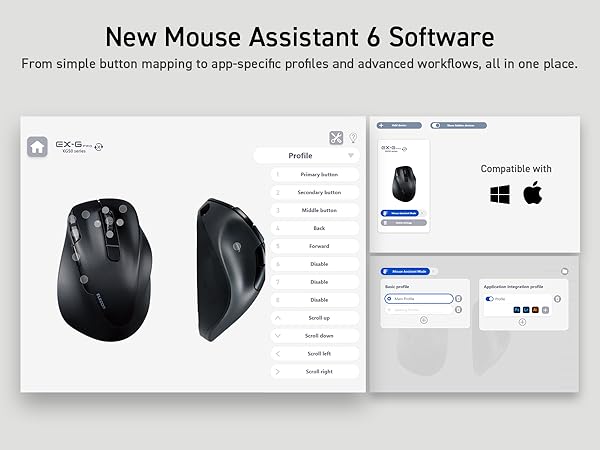
Quick Summary: MSTE users who don't have an MSTE - get this mouse as it's the closest "replacement" to date. Obviously, if one wants a mouse like the MSTE, then get an MSTE. But even a used MSTE costs a bit and you have to be careful of the cord. If one wants something Less Expensive that closely resembles the MSTE and is also cordless, then this is the best mouse on the scene since the MSTE itself. Update2: Trying to add some slightly better pictures and others that show the MS Trackball Explorer, Logitech Cordless Optical Trackmall, and the smaller Elecom "DEFT" trackball mouse. But some pictures are not loading to the site. Sorry. :( Update1: IMPORTANT NOTE: Waaay down in the comments (the oldest one at the "bottom" should be a link to the Elecom software download page and the English PDF manual. As this mouse is "very new" you *DO* need a more recent Elecom proprietary software to recognize this mouse if you wish to use it's three proprietary function buttons (F1-F3). Long Winded Review =============== This new Elecom Fingerball wireless mouse - the M-HT1DRBK - appears to have been released is June 2017 and has been available on Amazon since July 2017. In August I was about to order a second of the smaller Elecom M-DT2DRBKs when I stumbled over this new **larger** "HUGE" mouse and figured it was worth a try. The M-HT1DRBK just arrived and after giving it a ten minute test spin I just ordered two more. No clue if it will take "1-2 months" for the next batch to arrive, or if the price will drop from $85.99, but would say it is certainly worth the investment. FYI: It actually does say "HUGE" on the mouse itself. :) Comparisons to the MSTE (MS Trackball Explorer) ====================================== 1) It has a nice large "red ball" like a certain MSTE we all know and love. In fact, the Elecom ball is slightly BIGGER than the MS one. There were many reviews about the smaller Elecom mouse's "grey ball" having issues, and several people purchased a "blue" M570 ball to swap with the "grey" one. From my quick tryout of this new mouse with it's "red ball", would say that the quality looks to be significantly better than that of the smaller mouse's "grey" one. An excellent improvement. 2) This mouse is *MUCH LARGER* than the smaller "grey ball" M-DT2DRBK. Excellent for people with "larger" (aka normal sized) hands. 3) It is a bit wider than the MSTE, and Elecom moved one of the three proprietary "Function Buttons" to the right side of the ball. If you use their proprietary software, this would give you "two buttons to the right of the ball" just like the MSTE. 4) MOST IMPORTANT OF ALL. This mouse has a PALM REST. As this seems to be an alien concept to most mouse manufacturers I will state it again - this mouse actually has a place for the palm of one's hand to "rest" while using the mouse, so for the first time since the MSTE, there is actually a trackball that not only fit's one's hand, it is actually COMFORTABLE. Plus it doesn't have teeny tiny thumb-killing buttons like a certain L*git*ch Trackman. Wish I could show a decent side-view of the palm rest, but this can also be seen with via the pics on Elecom's web site. 5) ??? I would assume that being a wireless device, there may be an occasional "lag" in response times, but cannot say for certain. However there does appear to be a wired version of this mouse as well. It's part number (August 2017) is M-HT1URBK. Usage ===== Bulk of this review was written after only ten minutes of mouse use, so haven't had the time to give it an extended run, but observations so far are positive. "Weeks later" - Still great. Haven't tried the Elecom software yet myself (not using the F1-F3 buttons). - Seems to respond MUCH better than the smaller Elecom version (blue or grey ball). - Range seems to be about the same as the smaller one. About nine feet out it gets tricky and Line of Sight is critical. - The "left" button isn't as "tall" as the MSTE's, so my clumsy thumb is hitting the wheel, but this should be a minor issue. - ??? I read elsewhere that the "left" and "right" mouse buttons are "better quality" than the other buttons, that one should be able to tell the difference, that they should have made *all" the buttons "better quality", etc. Haven't noticed any difference between buttons yet. Too busy enjoying having a wireless mouse that actually fits the shape of my hand for a change. Customization - aka The Buttons ======================== So far as remapping buttons, "drivers", and support for various operating systems... Would assume this mouse works as a basic mouse in anything from XP up to Win10. You've got your Left, Right, Forward, Back and Wheel Buttons, plus the three Extra Proprietary Function Buttons F1-F3. Remapping the eight buttons and basic customization is where it gets interesting. Would assume one needs at least version 5.1.0 of Elecom's proprietary software to use/control all eight buttons. For now I am sticking with X-Mouse Button Control which allows configuration of everything except the three extra Function Buttons. Both programs allow for the use of multiple profiles for easy customization across different applications. Elecom's software (and English PDF manual) is available from their website. I will try adding possible links as a "comment" later as this review is too long as it is. Odd Future Issue (?) ================ Since the palm-rest is made of a "soft" material vs plastic, I wonder how it might hold up over time. Will it wear out? Time will tell.
J**N
High quality. Better for gaming and everyday use than other trackballs, worse for fine movements
Owned for a year and a half First the cons: 1. Uncomfortable. It takes a bit to get used to the feel of this mouse. I use it on the armrest of a recliner so it is slightly above my elbow and that can irritate my fingers after extended use. It is much more comfortable if you are using it on a desk or other surface that puts it below your elbow it is significantly more comfortable than a standard mouse. 2. Pretty heavy. If you drop it, the mouse is sturdy enough that it's not likely to break, your toes may not be so lucky. Be careful. 3. The software is definitely the biggest con. The "ELECOM MouseAssistant5" uses up an abnormally high amount of CPU so it uses up more electricity than it should, and it can slow down other programs that need a lot of processing power. Trying to find a fix for this is what made me think to leave an updated review. 4. Fine movements are difficult. I use this mouse for gaming rather than editing so it takes a while to tweak the software settings in order to get it set up to make the precise, single-pixel movements that are sometimes necessary for photo editing. (not 5) Not actually a con, just a tip. When the batteries(2xAA) get low the mouse can double click or hold your click when you don't want it to. Hopefully, none of those were deal-breakers because the Pros definitely make up the Cons in my opinion. Pros: 1. Long-life/durability. I got this mouse a year and a half ago and it is still in great shape even after a few tumbles that sounded pretty harsh. 2. Easy to clean. Occasionally you'll need to pop out the trackball to clean the sensor, ball, and bearings the ball rotates on. The ball is pretty easy to remove despite it not falling out by accident, unless it falls from high enough. You may need to use a cotton swab or other tool to remove hairs that get caught around the sensor but I never have. I've only ever had to use a swab once, otherwise, I simply blew on the sensor like it was a Nintendo cartridge and the rings of oil build-up around the bearings I just wiped out with my finger. You may want to use soap on the ball from time to time if you want it to roll as smoothly as possible. I've only done that once though because it doesn't actually improve performance by a significant amount, it does feel nice though. 3. Responsive. Most gamers recommend against wireless mouses because they can be unreliable, but unless the batteries are dying(which takes about 9 months for me) I haven't had a single issue with my cursor not responding as expected. 4. Efficient battery use. I use this mouse daily for several hours, and I turn off the mouse when I'm not using it. I've just replaced the batteries for the second time now so 2xAA have lasted me about 9 months. 5. Stays put. It's not a big deal if you only use your mouse on a flat surface, but for me, it is very convenient that the rubber pads on the bottom do so well at keeping the mouse from sliding off my armrest despite the weight of the mouse. 6. Convenient slot for the USB dongle. It seems like a minor thing but if you've ever lost a USB dongle you know just how much of a hassle that is. If you decide to take this mouse on the go you don't have to risk the USB breaking or getting lost in your bag, you can just slide it in the slot on the bottom of the mouse. I hope I've helped your decision one way or the other. :)
A**R
Excellent versatile trackball. Large ball, reminiscent of Microsoft Explorer.
The ergonomics of a trackball (or mouse, I suppose, if I ever used them) are very personal. What fits one person may not fit another. For a designer, one solution to this problem is to provide several alternative controls and a way for the user to specify what they do. This seems to be the philosophy behind the 8-button Huge model from Elecom. The Huge trackball is indeed fairly huge, and next to my Logitech M570 it seems unrealistically huge. But in fact it's almost exactly the same size as the Microsoft Explorer trackball I used for many years, until Microsoft inexplicably stopped making them. After a few others, most of which relied on clumsy rolling bars and ball-bearing races, which were rough and unresponsive, the optical trackballs arrived, notably the M570. Reluctantly, I decided perhaps my thumb could be as nimble as my index and ring fingers, and to my surprise it worked fine. I settled on that device for several years, but one problem kept recurring -- the microswitches in Logitech products are beyond cheap. They're very short-lived, at least for someone who makes their living on the computer. I've bought 6 of these compact, effective trackballs, and that's just not acceptable quality. Logitech also makes keyboards, which again, I quite like -- except their keycaps are cheap, with painted-on labeling that wears off in a year or so (the home keys, for those who touch type). A nuisance, but blank keycaps don't make the keyboard useless. Double-clicking button switches do. It was time to try another brand, and I bought an Elecom clone of the M570, and it's held up nicely in my studio, which isn't the friendliest place for precision devices. With the good performance of that trackball, I decided to see if my muscle-memory from the finger-style trackball was still functional, so I got the Huge model for my office. To my great relief, I found that switching back from thumb to forefinger control was effortless, and once the big red globe was sitting next to my K780 keyboard, I found myself unconsciously reaching for the ball with my fingers instead of my thumb. Some will disagree, but although the thumb has a bit more freedom of movement, I believe the forefingers have significantly more refinement of sensitivity and movement, and along with the much larger ball that gives me a very useful level of control. I may not convert to finger models for the four other computers I use regularly, but I suspect I can switch back and forth between thumb and forefinger models without a problem -- most of the others are used to control CNC, laser, MIDI, etc., so the pointing device isn't as critical as it is for Adobe apps and extensive writing. The specific features of the Huge are well documented elsewhere -- the buttons and wheel all work fine. I can't yet say whether the switches will last longer than the M570, but it's hard to imagine they wouldn't! Overall, I give the button action and placement a 90% score. The areas for improvement are few, but worth considering: The wheel is great in its own right, but its placement slightly obstructs the default LEFT button, and I would address this by extending the LEFT button outward a little (I might try sticking a layer of plastic on it myself). More significantly, the wheel is also a button, and in its near horizontal placement it's hard for the thumb to press it all the way to a click without bracing the fingers on the opposite side, to keep the whole device from sliding to the right. This is a problem that could only be fixed by using a much lighter spring on the wheel-switch itself. There is a similar "ease of activation" issue with the slider at the bottom left. This is used to select Low, Medium, or High wheel sensitivity, and although it works as expected, actually sliding it is much too difficult for interactive use. I can "deliberately" put it any position, but it's impossible to just "casually" slide it back and forth while actually using the pointer. That means if you need to change resolution for a moment or two and then return to normal, it's just not doable. Unfortunate, but not a big deal for my use. It would have been nice, though, and it seems odd to provide that capability and not make it effortless to slip into the needed gear. Finally, my biggest disappointment. With the M570, my wrist sits squarely on my desk, so it gets uncomfortable pretty quickly, and I resort to various pads, thick and thin, to avoid stressing that bundle of tendons, nerves, and blood vessels exposed on the bottom of the wrist. The Huge, on the other hand (pun intended), has a large wrist support area with a squashy pad on top -- perfect! Except on my unit the pad is only slightly softer than the tread on an automobile tire. It's definitely a pad, softer than wood, but not by much. If I push with my finger on a thick section (about half an inch thick in places), I can with some force get it to collapse about 1/3 of its thickness. But my wrist is a large area and the weight of my hand & forearm is far too little to produce any compression at all. It might as well be solid plastic (or tempered steel) with a thin cloth glued to it. It's only technically a pad. Realistically, it's not. I do wonder if Elecom might have replacements for the pad, perhaps with some compliance or softness. There's no cushioning value in the present one, and I'm even considering peeling it off (if possible) and replacing it with something that's actually soft. I don't know if Elecom reads these reviews, but they would have no way to contact me anyway, so I'll have to try contacting them elsewhere. My conclusion is that I like the Huge very much, I'm very satisfied with the ball action, there are buttons aplenty for my clicking needs, and with luck it will prove much, much more long-lived than the nice (but flimsy) M570 it replaced. I do recommend it highly, with the small caveats mentioned.
N**.
Amazing product, love the feel!
I love this, I have both wired and wireless versions, the former being used with my desktop computer and the latter my laptop. This has the feel of my old Microsoft TrackMan, and works very well. I'm a gamer and for me it's much easier to use than a mouse (and doesn't aggravate my carpal tunnel as much). It's simple to connect using the provided dongle that plugs into a standard USB port, and the dongle stores tightly in the bottom of the unit, so minimal chance of it coming loose and getting lost. It's plug and play, so for basic use you can use the Windows (I haven't tested it on a Mac) default mouse driver to adjust button assignments, but the manufacturer has it's own software that gives you far greater flexibility. If you have either version of this unit (wireless or wired), and travel with it, I highly recommend getting the Hermitshell case (search Amazon for M-HT1DRBK) to protect it, you won't regret it. I've been using the same case since 2018 when I bought my first of these trackballs, and it's still in fantastic shape. Note: If you have the wired version you just have to coil the cord on the bottom of the unit. The fit will be tight, but it does work. The only downside to this unit is that it will eat batteries if you have it on high performance mode. It would be much nicer if it had an internal rechargeable battery. I'm not taking anything off for that as it works perfectly well for me in the standard mode (I don't compete in e-sports any longer, so no need for high precision), and I get about 4 months out of a 1 set of batteries. It might be longer if I didn't forget to turn it off occasionally. This is a product I highly recommend, or I wouldn't have purchased 4 of them (2 of each over the years). This was a replacement for one that I'd had for a couple of years, but it got dropped and the buttons broke, otherwise I think it would still be going strong.
R**.
Huge Learning Curve
⭐⭐⭐ Extremely Comfortable, but the Learning Curve Was Too Much for Me The ELECOM HUGE Trackball M-HT1DRBK definitely lives up to the “HUGE” name. The palm rest is super comfortable, and you can tell this mouse was designed for long workstation sessions. I mainly tested it for BIM work using Autodesk Revit, Navisworks, and Bluebeam Revu. The customizable buttons are a big plus, especially compared to simpler ergonomic mice that don’t allow workflow shortcuts. That said, the biggest issue for me was the learning curve. The index finger trackball setup just never felt natural to me personally. I gave it a fair shot, but I couldn’t get fully comfortable or efficient with it during daily work. For casual use, it may be fine, but for fast-paced BIM workflows where precision and speed matter, it slowed me down more than I expected. The mouse itself isn’t bad at all—it’s actually very well built and extremely comfortable—but it ultimately just didn’t fit my workflow style. I’ll personally be sticking with the ProtoArc Balltom-style setup instead. Pros: Extremely comfortable palm rest Lots of programmable buttons Great build quality Good for reducing wrist movement Cons: Very steep learning curve Index finger control may not feel natural for everyone Large size may not fit every setup Bottom line: If you already like index-finger trackballs, you may love this mouse. But if you’re coming from a thumb-trackball or traditional mouse setup, expect a pretty major adjustment period.
M**B
Trackballs Are The Best Mouse Control Devices!!!
PRO It is a trackball which is far superior to any other mouse control on the market end of story. The large trackball makes it easy to do fine precision in graphic work. The over 7 buttons and wheel gives you the ability to do most anything any other mouse control device. I almost don't use the keyboard except when I need to create a document or email. I love having all that control in just 1 hand. Another benefit to a trackball is that it does not need much real estate. I have it on the arm of my chair and does not need anymore space cause it does not move around like a mouse. While a trackpad does not move I find it to be much slower, highly inaccurate like using finger paint, and totally horrible when trying to se fine work. Trackpads are an obscenity o technology that only a hammer can fix. Price was reasonable. CON This is a wireless which means every now and then I have to deal with batteries running low. I also have the USB version which never needs to recharge/replace any batteries which I prefer. I know some people don't mind dealing with batteries and prefer not to have wires all over the place. Wired/Wireless I'd still prefer this over any other device. I do not do gaming.
B**E
If you got big hands (Large and XL) get this!
This is the best mouse I've ever had. I have big hands (8.5 inches) and finding a mouse was so hard because all of them were so small. I tried the ones even in the stores. I look around and found this one and its one gamers use. Im in school so I just need it for my multi-screens between assignments. It works great!!. The only thing I wish it that it was bluetooth and rechargeable. Other than that, I love this thing and it work beautifully. Getting use to it took a day or so but after a few rounds you would even notice how fast you get adjusted to the fell and smoothness of the mouse. Again it big and dont recommend for medium hands but Large XL its for us. Just dont lose the usb part, I had to buy a c-port adapter to use the USB port. I connected to the adapter plugged it into my computer and it works like a charge. Smooth no noise, its awesome and I love this thing!
E**.
Best gaming trackball I've found so far
I'm one of the small minority of gamers that plays PC games with a trackball, so this review will mostly be centered around my gaming experience with the Elecom M-HT series trackballs. For a long time, I played games with a Kensington Orbit trackball, simply because there weren't many alternatives out there that offered fingertip control and a decently weighted ball. Of course, the downside of that trackball is that it only has two buttons, and the scroll wheel is unfortunately positioned where it's way too easy to hit accidentally (resulting in embarrassing weapon switches in the middle of combat). However, at the time, it's what I had. When I ran across the Elecom M-DT (Deft) series, it was a breath of fresh air, a fingertip trackball that had a decent amount of buttons and a scroll wheel that was out of the way, but easily reachable. The downside of that trackball was the ball itself. It was too light, which caused some lost accuracy when sniping and didn't give me the satisfying flick response of the Kensington. Still, overall it was an improvement, and I went with it for another year or so. When I ran across the Elecom M-HT (Huge) series, it was a no-brainer. I spent about 15 minutes looking over specs and reviews, and hit the buy button. It arrived yesterday. I immediately hooked it up, updated the mouse assistant software from Elecom, and started playing games with it. The motion of the ball is incredibly smooth, and the weight of it stabilizes the position, allowing for more accurate sniping and reliable flick moves. If anything, the ball might be slightly too heavy, causing minute amounts of lag and oversteer with rapid "twitch" moves. However, it was pretty easy to get used to, and the size and weight of the ball allowed for some very stable aiming. The finger position for the buttons has been greatly improved since the M-DT series. The right click and Fn3 buttons fit right under my ring and pinky fingers, leaving the index and middle fingers to control the ball. I usually roll the ball with my index, middle and ring fingers, pulling my hand slightly out of the "proper" position, but the integrated palm rest allows my hand to easily return to the default position without having to think about it. The integrated palm rest is another big improvement over the M-DT series. When I used a separate palm rest, the trackball would often wander out of position, especially during flick moves, which would be distracting as I would have to "reset" the position of the trackball to keep my fingers in the ideal positions for the buttons. With the M-HT, the palm rest is integrated, so the trackball doesn't move unless I actually want it to. The software (downloadable from elecom.co.jp) is pretty basic. In assigning functions to buttons, most of the basic PC user stuff is available in dropdowns. For gaming, I make use of the "arbitrary key" option, which allows for up to 3 simultaneous keypresses for each button press (such as a key and up to 2 modifiers). I haven't made use of the gesture function, which allows for a button to have more than one function using gestures on the trackball, since I wouldn't want anything to get in the way of fluid movement while gaming. The software doesn't have support for macros or sequential keypress combinations, but I'm fairly certain that could be compensated for by adding other software such as a macro manager. I'd have to say that my least-used feature is the resolution switch. One of the benefits of a trackball in gaming is that its "resolution" is inherently variable. At a low resolution setting, accurate sniping is possible, while quick moves can still be managed with "flick and tap" maneuvers or by "walking" the ball with multiple fingers. I left the switch at the middle setting, and adjusted the mouse scaling to my liking. I figured I could switch it up or down on the fly for different scenarios, such as distance sniping and CQC, but honestly I haven't needed to switch it so far. Time will tell. Pros: Smooth and stable ball motion, integrated palm rest, good button positioning Cons(?): The ball might be slightly too large and/or heavy, but it's easy to get used to. Small hands might have a more difficult time finding a comfortable position, but my hands aren't exactly huge. Summary: This is the best gaming trackball I've found so far. Additional note: It seems the ball was initially lubricated when I took it out of the package. After washing the ball as a test, the tracking was a bit "stiff". Natural oils from your hand will eventually loosen it back up, and from what I've read this is actually the best lubricant because the parts are designed to deal with this sort of scenario. (Finger oil is inevitable, and in this case it actually helps.)
S**O
ottima fattuea
vengo da anni di logitech , le ho praticamente avute quasi tutte a cavo wireless con palla da indice da pollice etc ma cercavo una trackball con piu tasti funzione e sono stato a lungo indeciso tra questa e la elecom con palla sul pollice piu simile alla trackman m70 che ho usato finora . alla fien ho optato per questa . che dire ottima fattura tanti pulsanti programmabili con il software dedicato che riconosce le varie applicazioni cosi da avere impostazioni differenti per ogni programma. sfera molto fluida e grande tasti ben raggiungibili senza dover spostare la presa. il passaggio da sfera pollice a sfera indice non è stato poi traumatico la sensibilità e precisione è regolabile sia con slide hardware che nelle impostazione software. lo trovo preciso ed efficace come l m570 che credo non rimpiangero'
I**Z
Great ergonomic mouse!
Everyday I had a constant pain in my right hand while using normal mouse. With Elecom Huge pain went away. Now my hand stay still and only fingers navigate cursor. I also like high quality Omron switches, clicks are feel really nice and satisfying. Build quality great! General advice for future users. Remove a ball once every week and clean three bearings inside. It’s super easy and take less than a minute. Also when you will get this trackball or after cleaning you might notice that ball doesn’t move smoothly, just roll ball in your hands couple of times. It will get a little grease from your palms and start roll smoothly.
�**O
Trackball japo, elegante, funcional y acolchado
Lo mejor del trackball es la cantidad de botones que tiene (programables) y que el tacto al apoyar la palma es acolchado/gomoso. Se alcanza bien con manos grandes (es mi caso) a todos los botones y a la bola. El botón izdo, que es el que quedaría a la altura del pulgar es para mí algo incómodo de alcanzar/memorizar su posición, pero no mucho. El scroll se alcanza bien una vez tienes cogida la posición con el pulgar para el botón izdo. El botón dcho. también se hace un poco raro, pero hay dos en esa zona, luego puedes tener dos configuraciones diferentes (yo uso el más apartado para "suprimir" o para "cerrar ventana", según la aplicación). Por cierto, mención especial al botón del scroll porque tiene modo "tilt" y esto sí resulta bastante poco común (esto es que le puedes aplicar al scroll movimientos laterales también, vamos izda y dcha). Para ir al grano, si queréis detalles mirad el manual buscando en google 20180405_MSC-M-HT1DR_ALL_ver.1.pdf y si no os habéis cansado podéis seguir leyendo la review. Algo que no me gusta es que el fabricante te dice que desinstales los drivers de otros ratones que puedas tener instalados. Yo tengo varios que quiero seguir usando (como el M570 de Logitech) así que no lo hice, y me toca andar extrayendo e introduciendo de nuevo el pincho usb de este dispositivo en cada reinicio del PC (Windows 10) para que lo detecte (aunque los drivers no hay que volver a instalarlos ni me han dado conflictos). Por cierto, los drivers se descargan desde la página del fabricante a la que se puede llegar escaneando el qr-code de la parte inferior del dispositivo (ver imágenes). Sobre la resolución decir que permite varias velocidades (hasta 1500 dpi) y sensibilidades. Yo le pongo la sensibilidad H (parte inferior ratón, la L es para ahorro energía) y la resolución intermedia de 1000 dpi (en caso de una pantalla en 1080 te irá bien así, si tienes 4K o más pantallas o eres gamer tal vez quieras subirla). Así que ese nivel de personalización que permite adaptarse a diferentes configuraciones (resolución, pantallas, etc.) y usuarios (que vayan a supervelocidad o en modo tortuga) también está muy bien. Sobre la duración de las pilas dependerá de su capacidad y del uso, yo recomiendo ponerle recargables de unos 2500 mAh. para que puedan durar unos meses. La bola se puede extraer para limpiar el interior fácilmente (se introduce el dedo por la parte inferior del ratón y ésta sale haciendo presión, no por la propia gravedad). Hay que limpiar de vez en cuando la zona de alrededor de los rodamientos, pero sin obsesionarse. Los rodamientos podrían ser un poco más finos ya que ofrecen algo de resistencia, no mucha, esto va sobre gustos. En definitiva, un ratón muy original y completo (le sube el precio el tema de la logística desde Japón, así que no lo tendré muy en cuenta en la valoración). Si te gustan los trackballs como a mí es uno de los que merecen la pena tener en la colección.
A**Y
Confortable et pratique
pratique et ergonomic, Je l’utilise en tant que personne avec handicap J’en suis très content et le réglage de sensibilité de la sphère est vraiment pratique. Bon appuis de la main sur la souris et confortable
M**N
PERFECT TRACKBALL !!
I have used many track balls and this is definitely my favourite- I have bought 2 spare as back ups for the future. Bundled software does not work on Macintosh but Cursor Sense works perfectly as a driver. Very comfortable for someone with big hands and much more ergonomic that a traditional mouse - very good for audio / video production professionals. Very good build quality and mapping the many buttons optimises workflow a lot. I highly recommend this mouse. Beware it is HUGE so if you have smaller hands it may not be for you. 5 stars !
Trustpilot
1 month ago
2 months ago