
DOWNLOAD THE APP


Customer Services
Copyright © 2025 Desertcart Holdings Limited
DOWNLOAD THE APP
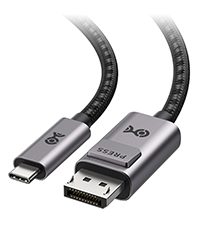
![Cable Matters Unidirectional USB C to HDMI Cable - 6ft, [4K@60Hz / 2K@144Hz], USB-C to HDMI Cable, Thunderbolt 4 / USB4 Compatible with iPhone 16/15 Pro Max Plus, MacBook, XPS 13, Surface Pro](https://m.media-amazon.com/images/I/71W8lwfRrqL.jpg)
⚡ Elevate your workspace with next-level 4K clarity and seamless connectivity!
The Cable Matters Unidirectional USB C to HDMI Cable (6ft) delivers ultra-high-definition 4K video at 60Hz and supports 2K at 144Hz, compatible with Thunderbolt 4 and USB4 devices. Designed for professionals, it connects the latest laptops, tablets, and smartphones directly to UHD displays with plug-and-play ease, featuring a durable braided design and full high-definition audio support.



| ASIN | B073H9RG9T |
| Best Sellers Rank | #4,734 in Computer Cables & Interconnects |
| Brand | Cable Matters |
| Brand Name | Cable Matters |
| Cable Type | HDMI, USB Type C |
| Color | Black |
| Compatible Devices | Tablet |
| Compatible Phone Models | Samsung Galaxy S10, Samsung Galaxy S10+, Samsung Galaxy S10e, Samsung Galaxy S9, Samsung Galaxy S9+, Samsung Galaxy S8, Samsung Galaxy S8+, Samsung Galaxy Note 9, Samsung Galaxy Note 8 Compatible Phone Models Samsung Galaxy S10, Samsung Galaxy S10+, Samsung Galaxy S10e, Samsung Galaxy S9, Samsung Galaxy S9+, Samsung Galaxy S8, Samsung Galaxy S8+, Samsung Galaxy Note 9, Samsung Galaxy Note 8 See more |
| Connector Gender | Male-to-Female |
| Connector Type | HDMI, USB Type C |
| Customer Reviews | 4.5 out of 5 stars 1,491 Reviews |
| Data Transfer Rate | 18 Gigabytes Per Second |
| Frequency | 60 Hz |
| Indoor Outdoor Usage | Indoor |
| Item Shape | Round |
| Item Weight | 96 Grams |
| Manufacturer | Cable Matters |
| Model | 201062-BLK-1.8m |
| Model Name | 201062 |
| Number of Pins | 43 |
| Other Special Features of the Product | Braided |
| Special Feature | Braided |
| Specification Met | IEEE, USB-IF |
| UPC | 818707021187 |
| Unit Count | 1 Count |
M**G
A good cable that works well
This cable works fine on both my MacBook Pro (15-inch, 2016) and my Chromebook (don't have it handy to find the model). I can get 1920x1080, 3440x1440, and 3840x2160 all fine on the MacBook Pro. I have only tried 1920x1080 and 3440x1440 on the Chromebook, but both also work fine. While there were other more expensive cables out there, these work great with no artifacts or other problems. I have two and have never had a single problem with either one of them.
A**N
Delivers as expected and no dongles were needed to drive two 4k displays at 60hz off my 2018 MBP
I originally had many issues getting both displays to run at 60hz. In the end, it seemed that one of the cables was bad and would only drive 4k at 30hz no matter what I did. This was unfortunate because I was outside of the return window so I just ate it. Fast forward a few weeks and I was having other issues with the Macbook itself. Turns out I had a faulty power supply and was not getting the full 80w that it was supposed to deliver. Apple replaced it and this magically fixed the refresh rate issue. I was shocked. I will say though, the seller reached out to me and offered to replace the cable despite the return window being closed. So good on you guys, however, I will not need a replacement at this point. To anyone out there with a 2018 MBP, just know that it will not deliver 60hz at 4k if you're not on the appropriate PSU, regardless of the cable or dongle you're running (Displayport vs HDMI 2.0). So if you're having issues, start there, especially if you're powering the Mac off some alternative method.
K**C
This 10 foot cable works great, when connecting a late-2016 MB Pro to a 4K TV.
I bought this cable to connect my 13" late-2016 MacBookPro to a 55" LG 4K TV. I had been using Airplay to display photos from Adobe Lightroom on the 4K TV, but my AppleTV is an older model which limits the resolution to 1920x1080. When I connected the TV using this cable, the MacBookPro immediately recognized the LG 4K TV, and the increase in resolution on the TV screen was easily observable. Text on signs in some of the photos, which was not readable on the TV using Airplay, was clearly readable using this cable to establish an HDMI connection. (Remember to turn off Airplay when you connect this cable, as otherwise Airplay will limit the resolution output by the MacBookPro). Some info on the web suggests that you need a 5.9 foot or shorter cable to transmit 4K across HDMI, but this 10 foot cable worked great for me (I haven't tried 4K video yet).
S**B
Does the job nicely
Very nice, it's working well so far. I like that the ring is situated lower on the body of the phone than some other cases- that makes it more functional for me.
V**E
Pixel Power!
This cable is compatible with Pixel 9 Pro XL.
A**R
Works with Surface Pro 7 and Surface Dock 2!
I went through several USB-C to HDMI 2.0 cables. All of which had unreliable connections, which I found out was a common issue with the surface docks, i.e., the surface device detects the external monitors, but monitor receives no signal, or the surface screen turning on/off as if trying to connect to an external monitor. After days of research, the commonality I found in the cables people used with no issues are gold plated. Coincidence? I'm not sure. I've replaced my surface tablet, my surface dock 2, but the issues still persisted. Changed the cables, bam...everything works seamlessly and as intended. Right now my setup includes two external monitors connected DIRECTLY to the surface dock 2, and all I do to turn my 12.3" tablet into a desktop workstation is to merely connecting my surface pro 7 to the dock. Which is the entire purpose of paying $250 for the dam dock. Before using Cable Matters USB C to HDMI Cable (USB-C to HDMI Cable) Supporting 4K 60Hz, the only way for my to use two external monitors was to connect 1 monitor to the dock and the other directly to the surface pro 7's usb-c connection. PS: I updated all systems Softwares, even spent countless hours on the phone with Microsoft product support to make sure everything was in order, and was even told by them to exchange them since they were recently purchased. In hindsight, the returned products were probably not defective.
A**N
Cable Matters seems like #1 brand when it comes to cable management
This cable was purchased to connect an iMac 24-inch. to a 2022 Sony TV model -- to use as a monitor. Previously, I had another cable (rated as 8K, from a different, reputable brand) and a USB-C to HDMI adapter from UNI (to connect to the Mac). The connection was never stable and caused me a lot of frustration -- such as when every time the Mac is rebooted, the screen's resolution would be all messed up or when the FPS would switch to 30 with no option to go to 60. I've never had any troubles with this cable, it just works as I expected. The quality of this cable seems quite good-- thick yet relatively flexible.
D**N
4K at 60Hz on 2018 Mac Mini
I tried many cables and this is the only one that can get 4K at 60Hz on my 2018 Mac Mini. The others can do only 4K at 30Hz.
Trustpilot
4 days ago
1 month ago