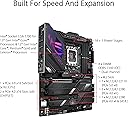
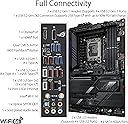
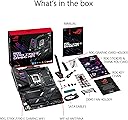
🔥 Power your play with ASUS ROG Strix Z790-E – where speed meets smart tech!
The ASUS ROG Strix Z790-E Gaming WiFi 6E motherboard supports Intel 12th, 13th, and 14th Gen processors with cutting-edge PCIe 5.0 and DDR5 memory up to 7800 MHz. Featuring an 18+1 power stage design, AI-enhanced overclocking and cooling, plus ultra-fast WiFi 6E and 2.5 Gb Ethernet, it’s engineered for high-performance gaming and future-ready builds.


| ASIN | B0BG6KQPWD |
| Best Sellers Rank | #38 in Computer Motherboards |
| Brand | ASUS |
| CPU Model | Core i7 |
| CPU Socket | LGA 1700 |
| Chipset Family | Intel Z790 |
| Chipset Type | Intel Z790 |
| Compatible Devices | 12th, 13th & 14th Gen Intel Core, Personal Computer |
| Compatible Processors | 14th, 13th, 12th Gen |
| Customer Reviews | 4.2 out of 5 stars 661 Reviews |
| Graphics Card Interface | PCI Express |
| Item Dimensions L x W x H | 3.03"L x 13.5"W x 10.75"H |
| Item Type Name | Gaming Desktop Motherboard |
| Item Weight | 0.34 kg |
| Main Power Connector Type | 24-Pin |
| Manufacturer | ASUS |
| Memory Clock Speed | 7800 MHz |
| Memory Slots Available | 1 |
| Memory Storage Capacity | 128 GB |
| Mfr Part Number | ROGSTRIXZ790-EGAMINGWIFI |
| Model Name | ROG STRIX Z790-E GAMING WIFI |
| Model Number | ROG STRIX Z790-E GAMING WIFI |
| Number of Ethernet Ports | 1 |
| Number of Items | 1 |
| Number of Ports | 16 |
| Platform | Windows |
| Processor Socket | LGA 1700 |
| RAM Memory Technology | DDR5 |
| Ram Memory Maximum Size | 128 GB |
| S/PDIF Connector Type | Optical |
| System Bus Standard Supported | Serial ATA/600 |
| Total Number of HDMI Ports | 1 |
| Total PCIe Ports | 4 |
| Total SATA Ports | 4 |
| Total Usb Ports | 12 |
| UPC | 195553938532 |
| USB 2.0 | 2 |
| Warranty Description | 3 year |
M**L
Still Rockin' in 2025!!!
REVIEW - NOVEMBER 2025 I bought this motherboard along with a Intel 13700K (both from Amazon) back in Mid 2023. 2+ years later, I'm here to report this board and CPU have worked perfectly for me and are still running strong. I have no intentions of upgrading anytime soon because, frankly, there's no reason to. The latest Intel CPUs are barely any improvement of the 13700K and this motherboard offers me literally everything most people could possible want, even 2+ years later. The newer CPUs are twice the price too! For what? A 3-7% increase in power you won't even notice? Higher power consumption? Higher temps? Ummm, No! This CPU and MB hit the sweet spot beautifully. It's not often you buy a tech product that lasts this long and remains viable. This combo does! Even two years after buying this, I still recommend price-conscious buyers pick these up and run them. They are incredibly powerful for gamers and workstation users alike. Save your money and buy a higher-end GPU where your cash will make a real difference rather than a minor CPU / MB upgrade from this pair. GOOD LUCK!
R**W
Good board, but arrived DOA
The board that I received was DOA with a dead CPU socket and was missing a CMOS battery. However, the customer service team from that I bought the board from went above and beyond to help troubleshoot the issues. Once it was determined that all troubleshooting steps failed, they offered me a refund, and even filed a complaint with Asus as well to ensure these kinds of things don’t happen again. Always ensure you are buying a new product, instead of a used or refurbished, as Amazon’s “condition” category can be easy to miss if you are in a rush. Outstanding customer service on the merchants end
J**E
Top of the line
I recently upgraded my gaming rig with the ASUS ROG Strix Z790-E Gaming WiFi 6E motherboard, and I must say, it's been a fantastic experience! Here's a detailed review of its features and performance: **Performance** The motherboard supports Intel's 14th, 13th, and 12th Gen processors, which means it's future-proof for a while. The PCIe 5.0 support is a game-changer, providing blazing-fast data transfer speeds for my NVMe SSDs and graphics card. The DDR5 memory support is also impressive, allowing for higher speeds and better performance compared to DDR4. **Connectivity** One of the standout features is the WiFi 6E support, which offers faster and more reliable wireless connections. The 2.5 Gb LAN is perfect for online gaming, ensuring minimal lag and quick response times. The Thunderbolt 4 support is a bonus, providing additional high-speed connectivity options for external devices. **Build Quality** The build quality of the motherboard is top-notch. The robust 18+1 power stages ensure stable power delivery, even under heavy loads. The heatsinks on the M.2 slots help keep my SSDs cool, which is crucial for maintaining peak performance. **Design** The design of the motherboard is both functional and aesthetically pleasing. The translucent shrouds and RGB ignition panel give it a sleek look that fits well with my gaming setup. The Q-Release button for the PCIe slot and Q-Latch for the M.2 slots make installation and upgrades a breeze. **User-Friendly Features** The BIOS FlashBack feature is incredibly convenient, allowing for easy BIOS updates without needing a CPU or memory installed. The Clear CMOS button is also handy for resetting BIOS settings to factory defaults. The on-board LED panel displaying diagnostic codes is a great troubleshooting tool. **Pros** - **Future-Proof:** Supports Intel 14th, 13th, and 12th Gen processors. - **High-Speed Connectivity:** PCIe 5.0, WiFi 6E, and Thunderbolt 4. - **Robust Power Delivery:** 18+1 power stages and heatsinks on M.2 slots. - **User-Friendly Design:** Q-Release, Q-Latch, and BIOS FlashBack features. **Cons** - **Limited SATA Ports:** Only 4 SATA ports, which might be a limitation for some users. Overall, the ASUS ROG Strix Z790-E Gaming WiFi 6E motherboard is a solid choice for gamers and enthusiasts looking for high performance and future-proofing. Its combination of cutting-edge features, excellent build quality, and user-friendly design make it a worthy investment for any high-end gaming setup.
I**T
DO NOT BUY ASUS, WORST COMPANY EVER!!!
I WOULD NOT RECOMMEND ANY ASUS PRODUCT TO ANYONE FOR ANY REASON! ASUS IS A TERRIBLE COMPANY THAT DOES NOT CARE ABOUT ITS CUSTOMERS! My experience with this motherboard has been the worst computer related experience in my life. Not only does the motherboard not perform as advertised, but my customer experience dealing with ASUS has been one of the slowest and worst customer experiences in my life. When I first got the motherboard, I had gotten some RAM that was on the QVL for this motherboard, but none of the default XMP settings worked at all. I tried getting a different brand of RAM, a new CPU and even a new graphics card. Nothing worked, so it must be the motherboard. When I submitted a warranty request to the seller, they said I should reach out to the manufacturer, ASUS, directly, so I did. After a few back and forths, they accepted that this would be covered under the warranty and that they would sent me a new motherboard. That waws well over a month ago and I still do not have my replacement board. Communication with the "office of the CEO" representative that I have been emailing back and forth with has been EXTREMELY SLOW, if I even get a response at all. I was told I qualified for the Advanced Replacement Program, which just means they charge my credit card, send me the new one first, then I send the old one back so that I don't go a day without a computer. I went through the process exactly as they had told me to. My card had a temporary charge put on it (I verified this with my bank) and I was expecting to receive the motherboard at some point to continue the process. I did not get any confirmation whatsoever from ASUS that they had gotten my card charge. When I emailed the "office of the CEO" about it, I got no response. This morning I come to find the charge has been removed from my card, which is not supposed to happen until I send the old motherboard back. Still no communication from ASUS at all. At this point, I am just appalled at the shear lack of communication, professionalism, or any sense or care or urgency about this serious product issue and terrible customer service. Because of this experience, unless ASUS immediately remedies this issue without delay, they have lost a customer. I will never buy another ASUS product and I will recommend with passion to everyone I talk to that they never buy another ASUS product either.
A**R
Exceptional purchase
It is one of the best gaming motherboards out there without having to shell out a huge amount of money for one from the HERO series. I like that it has a button to release the video card from the PCIe slot, also that it has 5 slots for m.2 ssds. However, it should be noted that if the main m.2 PCIe 5.0 slot is used, the main PCIe slot of the video card remains working in x8 mode. It is not a problem, since if you have an m.2 PCIe 4.0 you place it from the second slot. As for the rest, it is noticeable that this is a high-quality product. It has plenty of high-speed USB ports. I also like that it still has the 5 audio jacks, so you can use 5.1 or 7.1 sound if you have an analog audio surround system (other brand boards or those with a Z890 chipset are no longer featuring these connectors). I recommend updating the BIOS as soon as you take out of the box.
H**L
Awesome!
Super stoked over this board. Plug-n-play w/I9-13900K, 64GB G.Skill Trident Z5 RGB DDR5 (6400MT/s), MSI Radeon RX 6950 XT, 1TB WD SN850X NVMe SSD x2, Corsair RM1000x PSU and Win11. It's fast, looks sick and works w/no fuss. Worth noting, a fresh install of Win10 Pro didn't have compatible network drivers and although ASUS has available Win10 drivers, the initial install didn't recognize compatibility when I tried to install them. I'm sure w/Microsoft updates it would have but w/o the adapters working, I couldn't get the Microsoft updates, LOL. Once I installed Win11, everything worked as advertised. Great motherboard! Update: Those reporting the Intel NIC is defective, just update the driver. The second or third driver updated by the Asus Armory Crate software, was bad...disconnects, lag, speed inconsistency...etc. I bypassed AC, downloaded the latest drivers manually, ran the installer and all was right again. Mine is connected to a Netgear RAXE300 at 2.5 Gbps and data transfers couldn't be better.
T**R
Better than previous socket set
First MOBO was DOA- and I haven't seen a DOA since 1997, and it was an MSI. I have over 30 years building experience and professionally using computers since 1988. ASUS has always been stable, reliable and lasts for years. Builders should know how to test their PSU, and other items to trouble shoot, in case they every get a DOA board. Prime came through as always, and with their return policy- you need that extra assurance with PC hardware. I exclusively use ASUS, and with my last build, a Z390, I almost switched brands, because of the nightmare problems with hardware, bios, and windows 10 Pro. I eventually worked those kinks out over time, and got the bios and windows 10 Pro to play nice with each other. I did not have those problems this time with the Z790-E. This build was CPU'd with an i9-12900K. I read all the problems with with the 13th and 14th gen CPU's and didn't want to be bothered with their problem chips, and getting the MOBO to play nice with it. Not knowing what to expect I cautiously updated the BIOS, one at a time. I found a bios setting a year ago, before they started dealing with the 13th and 14th Gen intel chip problems, and left it alone. It's stable, runs fine, and likes Windows 10 Pro. This time it recognized my mouse, keyboard, and GPU. The Bios was a much easier and smoother to work with than my previous build. Only issue I had was Bios recognizing the hard drives initially. It should have been a much smoother experience with that, but not a major problem. Pros - Solid MOBO with sound ports, for my 5.1 speaker system. New Ver only has two ports. - Back Panel Connector and Ports- very solid, shrouded, beefy, and quality. - M2 slots are tool less this time! - Two front panel USB 3.1 connectors. I use both! - Bios was very stable with Windows 10 Pro and flashing worked well. I didn't use USB bio flash. - Two SATA cables, a couple of mount options for 40mm Ram fans. - Worked with Windows 10 Pro, like they were meant to be together. - Didn't have to deal with turning off colorized lights, fans, or other crazy bios settings to optimize. Cons - Cost (way over priced). - No mounting hard ware. For the price it should come with it, like they used to. - No 40mm fans (small enough to provide) that came with mounts. No necessarily a con, but have to wait to build. - Bloat Ware! Stop it ASUS!! You can opt out on Bios, but if you forget, it's default. The last Con, I have real issues with. I call it, the "Crate of Death." ASUS, WE don't want your programs running the background! Colorize lights and fans They deep root it, so you can't just easily uninstall it. I have real issues with that. Years ago, ASUS had programs that ran smoothly and independently in their execution. Close them out, and you were done. Now they want to bloat you to death! NO ASUS, just stop it! I don't know how it stacks up against other brands, but so far, besides the first board being DOA, this has been a very easy setup. Unless their quality goes sideways, I will continue to use their MOBO's. Overall, I would buy again, unless problematic. -1 star for cost and deep rooted Bloat Ware.
M**L
Perfect Asus motherboard!
A gorgeous motherboard. Works great with my i9 12900ks. I tried with an i7 13700k but it has very high temperatures even after updating the bios but that is the fault of the defective 13th and 14th gen intel processors. If error 98 is displayed on the motherboard when starting for the first time, just disconnect the HDMI or DisplayPort cable from the GPU and connect it to the motherboard and restart the computer. The BIOS image will be displayed and then you can connect the cable again to the GPU. The number that is displayed once the system starts is the CPU temperature. I clarify this because there is no information about this in the motherboard manual. I hope this review is helpful.
D**T
Well worth the money
Easy to install and is running my system super fast and without any issues. Feels a huge improvement from my previous setup.
A**A
ممتازه
شغاله معي تمام واداء ممتاز
J**L
Exceptional Performance and Connectivity - ASUS ROG Strix Z790-E Gaming WiFi 6E Motherboard
I recently acquired the ASUS ROG Strix Z790-E Gaming WiFi 6E motherboard to build a high-end gaming rig, and it has exceeded my expectations in terms of performance and features. This motherboard is designed to accommodate Intel's 12th and 13th generation processors and offers an impressive array of cutting-edge technologies. Pros: 1. **Exceptional Performance**: The ASUS ROG Strix Z790-E Gaming WiFi 6E motherboard delivers top-tier performance, thanks to its support for PCIe 5.0 and DDR5 memory. My system runs smoothly, and I've witnessed significant improvements in gaming and productivity applications. 2. **Robust Power Delivery**: With 18+1 power stages, this motherboard ensures stable and efficient power delivery to your CPU, even during overclocking. This is crucial for demanding tasks and gaming sessions. 3. **Connectivity Galore**: The inclusion of 2.5 Gb LAN, Thunderbolt 4, and multiple M.2 slots means you won't be lacking in high-speed connectivity options. This is ideal for online gaming, content creation, and fast data transfers. 4. **PCIe 5.0 M.2 Slot**: The dedicated PCIe 5.0 M.2 slot provides lightning-fast data transfer speeds for your NVMe SSD, allowing for quick access to your files and faster game loading times. 5. **Front Panel USB 3.2 Port**: The front panel USB 3.2 port is convenient for connecting external devices quickly and easily. It's a thoughtful addition for those who need easy access to USB ports. Cons: 1. **Price**: This motherboard falls on the higher end of the price spectrum. While it offers exceptional features, it might not be within everyone's budget. 2. **Size**: The ATX form factor is large, which can be a concern for users with limited space in their PC cases. Ensure your case can accommodate this motherboard before purchasing. In summary, the ASUS ROG Strix Z790-E Gaming WiFi 6E motherboard is an outstanding choice for enthusiasts and gamers who demand the best in terms of performance, connectivity, and reliability. While it comes at a premium price, the features it offers are well worth the investment, making it an excellent choice for those looking to build a top-tier gaming or productivity rig.
Z**R
Carte mère haut de gamme, complète et ultra fiable
Excellente carte mère pour une configuration performante. Très complète : DDR5, PCIe 5.0, WiFi 6E, 2.5 GbE et plusieurs ports M.2 pour le stockage. Rien ne manque pour une config moderne. Alimentation solide, idéale pour des CPU puissants, avec des options d’overclocking bien pensées. Montage facile grâce aux systèmes pratiques ASUS. Bonne qualité de fabrication, stable et fiable au quotidien. Points négatifs : prix élevé et format assez imposant. Globalement, une valeur sûre pour du haut de gamme.
R**A
Que funcionaba
Estaba nuevo, cuando lo compré, se montó y funcionaba pero al cabo de un mes y pocos días se paró dejó de funcionar, ya era tarde para devolverlo y en ASUS no puedo entrar en mi cuenta ni cogen el teléfono, nadie me da una solución, así que dinero a la basura.
Trustpilot
2 days ago
2 months ago