⚡ Elevate every keystroke—where precision meets power in a compact design.
The GK GAMAKAY TK75 HE is a premium 75% mechanical keyboard featuring Hall Effect magnetic switches for silent, ultra-responsive typing. It supports Bluetooth, 2.4GHz wireless, and wired connections across multiple devices, with fully customizable key travel and trigger points. Designed for esports and professional use, it offers RGB lighting, dynamic multi-action keystrokes, and a compact 81-key layout with N-key rollover, blending cutting-edge tech with sleek aesthetics.


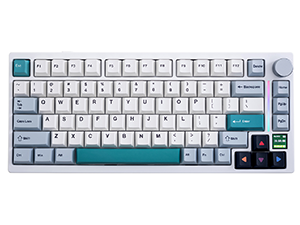

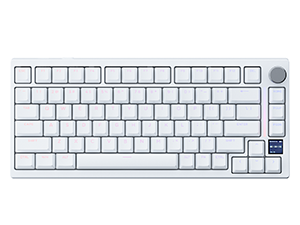
| ASIN | B0CWPJ3P2K |
| Are Batteries Included | No |
| Best Sellers Rank | #15,553 in Videogames ( See Top 100 in Videogames ) #695 in PC Gaming Keyboards |
| Brand | GK GAMAKAY |
| Color | metallic |
| Customer Reviews | 4.4 4.4 out of 5 stars (146) |
| Date First Available | 20 May 2024 |
| Hardware Platform | PC |
| Item Weight | 1.1 Kilograms |
| Item model number | TK75 HE |
| Manufacturer | GK GAMAKAY |
| Number of Batteries | 1 |
| Operating System | Mac OS, Windows |
| Package Dimensions | 36.4 x 17.91 x 4.9 cm; 1.1 kg |
| Power Source | Battery Powered |
| Series | TK75 HE |
M**F
Très très très bon clavier pour le prix (moins de 90€ quand je l'ai acheté). Les touches sont hyper satisfaisantes (j'ai pris la version silent), le logiciel est pratique, et le fait de pouvoir le connecter en bluetooth ou en 2.4Ghz c'était même pas obligé mais ils l'ont fait. Je l'ai pris pour "Travailler" et je peux vous dire que j'en ai gagné des games sur "Excel". Après faut dire qu'au début je trouvais les touches un peu trop soft mais je me suis habitué et maintenant j'imagine mal taper sur un autre clavier. Ah et j'aurais aussi préféré que les fonctions "Fn" soit écrites sur les touches, au lieu de chercher dans le manuel, mais bon une fois qu'on les connait c'est bon.
B**S
So....are you wanting to get into the hobby of building and modding your own keyboard? If that is the case then do some more research and look into some switches and keycaps that fit your style because this is limiting. What's that you say? You don't care about that and just want a solid keyboard that functions and looks and feels nice? Well this one is probably for you. Out of the box this keeb is solid for the price. Might I add. pop off the skirt and take the pcb out (super easy, like seriously.....the easiest). Cut of some foam of your choice and line the bottom of the tray. This actually made a significant improvement in sound on this keeb. Keep calm and type on friends.
M**O
Premetto che dopo averla testata me ne sono innamorato: questi switch sono silenziosi, estremamente reattivi e rappresentano un grande punto a favore, soprattutto per chi sceglie questa tastiera per il gaming. Tuttavia, devo essere sincero, ho riscontrato una qualità piuttosto deludente del software. Il software permette di personalizzare diversi aspetti come i livelli di attivazione della pressione, le modalità, l'illuminazione RGB, le macro e altro ancora. Il problema è che, a volte, il software si blocca e smette di funzionare, rendendolo inutilizzabile e facendo perdere tutte le impostazioni e le personalizzazioni salvate in precedenza, comprese le luci. Se riuscirò a trovare una soluzione a questo problema, aggiornerò sicuramente questa recensione.
J**Y
I would consider myself somewhat of a keyboard enthusiast. I own the Wooting 60HE, two custom keyboards, and two old Gamakay keyboards (non Hall effect). At the very bottom I will leave a TL;DR (too long, didn’t read) pros and cons. The performance of this keyboard is second place to all of my boards that I have tried. This is expected since it does utilize Hall effect switches. Now how does it compare to the Wooting 60HE (the keyboard regarded as the holy grail of Hall effect keyboards)? Personally, from my testing I found it to be slightly worse than the Wooting. Keep in mind I did not use professional tools to do accurate tests. The Hall Effect sensors just seemed to be slightly less consistent at their most sensitive setting. When I had the Gamakay at the most sensitive setting, it occasionally wasn’t consistent. But, when I played at like 0.3 press and 0.5mm release, I didn’t have much issues. I tested the keyboard on Valorant, Fortnite, and Geometry Dash. On Valorant, when it was at its lowest settings, sometimes my directional movements were inconsistent. Same thing on Fortnite. On Geometry Dash I found that if it was too sensitive then your presses would last too long. So, if you’re going to use this keyboard for games, I recommend not using the most sensitive settings. I actually recommend just staying on their default GAME profile if you aren’t bothered to experiment. That one works perfect. It’s 0.5mm on both press and release I believe. It’s just very consistent and you don’t really feel much difference. If you’re an Osu! player, I feel like it’d be the same. Just don’t use very sensitive settings and you’ll be fine. I also tested on other games to see if there were any bugs/problems. I tested Apex Legends, csgo, and Minecraft to see how the movement felt. They all felt good on the GAME profile to me. That’s enough of the performance, now let’s talk about the aesthetic, feel, and sound. The looks of the keyboard are very nice. These keycaps beat the plain black keys that the Wooting comes with. Granted, I have modified my Wooting, but comparing them stock, the Gamakay has better looks for sure. The case silhouette also goes to Gamakay here. The sound is a toss up. The stabilizers on the Gamakay stock aren’t the best. The space bar could be better. I haven’t tried to open the keyboard yet as I wanted to give my review of it stock. The silent switches are SILENT. I’d say the sound is mostly consistent, with the keys on the A key row slightly louder. The feel is great as well. If I remember correctly, this feels sort of how my stock Wooting felt. I’d say the one con of the feel now is that the springs are a bit heavy. I have lighter springs on my Wooting switches that feel better (for additional cost, so it’s not a fair comparison). Another pro is that this is a 75% keyboard. Function (F keys) are very nice to have. This also has arrow keys, and a volume knob. The Wooting 60HE does not have any of these. Wooting are releasing/released a new board at 80% layout, but for over DOUBLE the price. This price beats that easily. You can use the Fn key on the Wooting to have access to those keys, but when you have to input a 3 key+ shortcut, it can be annoying. The software is okay, I guess? Could be greatly improved. I mainly spent my time fiddling with the rapid trigger section. I do like that they have a Share tab where people can share their RGB presets. You can also share macros I believe? I didn’t dive deep on the RGB besides looking at the presets already included with the software. Now what really is a big pro to this keyboard is its multi-platform support via multi-mode connectivity. This keyboard supports wired connection (USB-A to USB-C), Bluetooth, and Wireless 2.4Ghz via a USB-A dongle. I’m not aware if there are other Hall effect keyboards with these connection capabilities. The Wooting keyboards are only wired connection. Working on a mobile device on Word or Docs? This could be great to type an essay, report, etc. In case you’re wondering, these Gamakay switches do not work on the Wooting. I believe the Lekkers do work, but you would have to cut off the stems off of them. In case you were also wondering, this board does have south facing LED’s. The packaging isn’t anything special. It’s what you’d expect really. Comes with a braided USB-A to USB-C cable. Unfortunately, I don’t know the length of it, but it’s very close to 4.5 feet if I had to guess. A keycap puller and switch puller is also included. I’m going to cap this review off by mentioning probably the most important thing: the value. As a sub $100 Hall effect keyboard, this is undefeated in that category. The Wooting60he+ costs $175, and the Wooting80he costs $200. The Gamakay is amazing value compared to those boards. TL;DR: Pros (in descending order from what I believe is the best): - The Price: This keyboard is priced amazingly compared to its competitors. It is cheap for a Hall effect keyboard. Good keyboard to upgrade to if you want an actual Hall effect rapid trigger keyboard. This is my major decider on my star rating. - Multi-platform/Multi-mode connectivity: This keyboard supports Wired, Bluetooth, and 2.4Ghz Wireless connectivity via a USB-A dongle. You can connect to mobile devices via Bluetooth which is a great pro. Competitors don’t really offer these things. - 75% layout, and looks: Great layout for a keyboard. It’s not full size, but includes all the important keys. Also has a volume knob which is very handy. The keycaps are better visually than most stock keyboards. - RGB: If you love it. Cons (no order): - Sound of stabilizers: The sound of the stabilizers aren’t the greatest. I wouldn’t consider this a con, but it’s a disclaimer: Performance at lowest settings can be inconsistent. Note that I said “lowest settings”. By this, I mean 0.2mm and like 0.3mm sensitivities (not sure if the right word is lowest or highest lol…). When I had the lowest possible settings, the keyboard worked very good, but occasionally it would feel like my clicks were ending even when I wasn’t lifting my fingers at all. The keyboard worked fine when I used the presets “Sensitive” and “GAME”. Experiment yourself, as your keyboard might work perfectly at the lowest possible settings. Overall, I give the keyboard my approval. I’ll be using it for the Bluetooth and 2.4Ghz on my laptop, but for my desktop, I’ll be sticking to my Wooting.
S**O
El teclado es muy bonito, buen tacto en las teclas, pero si lo vas a utilizar con conexión bluetooth, en ocasiones se desconecta y su respuesta para volver a conectar no es muy buena. Las luces led solo son de adorno, no sirve de retro iluminación, no se ve prácticamente nada en sitios oscuros.
Trustpilot
3 weeks ago
2 weeks ago