Desertcart purchases this item on your behalf and handles shipping, customs, and support to Sri Lanka.
🔇 Silence your workspace, amplify your focus.
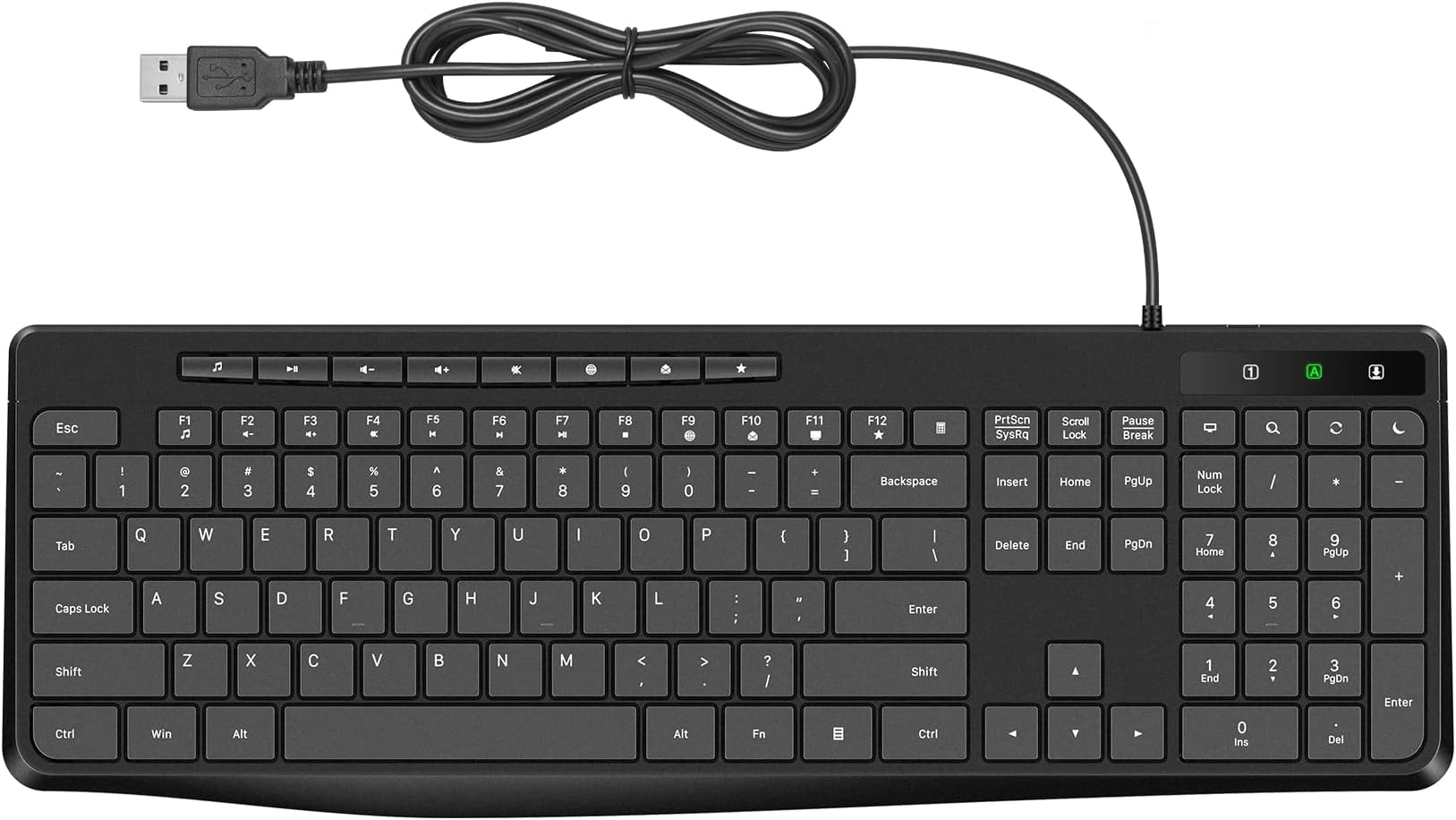
The Virfour Wired USB Computer Keyboard is a full-size, spill-resistant, and ultra-quiet membrane keyboard designed for professionals who demand seamless plug-and-play USB connectivity, ergonomic comfort, and enhanced productivity with dedicated multimedia keys. Compatible across Windows, Mac, and Linux, it reduces typing noise by 50% and features a waterproof sealed circuit to protect against accidental spills.


| ASIN | B0BJDPT8V3 |
| Additional Features | Customized Multimedia, Ergonomic, Full Size Computer Keyboard, Quiet USB Keyboard, Spill Proof, Waterproof |
| Antenna Location | Business, Education, Everyday Use, Multimedia, Personal, Photo Editing, Programming, Student, Video Editing |
| Best Sellers Rank | #100 in Computer Keyboards |
| Brand | Virfour |
| Built-In Media | USB Cable |
| Button Quantity | 117 |
| Color | Black |
| Compatible Amazon Tablet Models | Amazon Fire 5th Generation, Amazon Fire 7 5th Generation, Amazon Fire HD 10 5th Generation, Amazon Fire HD 8 5th Generation, Amazon Kindle Fire 2nd Generation, Amazon Kindle Fire HD 2nd Generation |
| Compatible Devices | Windows 11/10/8/7/XP/VISTA, Mac OS, Chrome OS, Linux |
| Compatible Operating System Family | Windows |
| Compatible Tablet Computer Models | Amazon Fire 7 9th Generation, Amazon Fire HD 10 9th Generation |
| Connectivity Technology | USB, USB-A |
| Customer Reviews | 4.2 out of 5 stars 932 Reviews |
| Enclosure Material | Plastic |
| Hand Orientation | Ambidextrous |
| Item Highlight | Virfour Silent Keyboard with Low Profile Chiclet Keys,Spill-Resistant, Anti-Wear Letters,Full Size for Laptop,Desktop |
| Keyboard Description | Stylish Quiet SpillProof Wired Multimedia Keyboard |
| Keyboard Layout | QWERTY |
| Manufacturer | Virfour |
| Mfr Part Number | VE-MOM9-3L81 |
| Minimum Required Operating System Version | Mac OS X 10.0 Cheetah, Windows 1 |
| Number of Items | 1 |
| Number of Keys | 117 |
| Number of Packs | 1 |
| Number of Sections | 3 |
| Recommended Uses For Product | Business, Education, Everyday Use, Multimedia, Personal, Photo Editing, Programming, Student, Video Editing Recommended Uses For Product Business, Education, Everyday Use, Multimedia, Personal, Photo Editing, Programming, Student, Video Editing See more |
| Special Feature | Customized Multimedia, Ergonomic, Full Size Computer Keyboard, Quiet USB Keyboard, Spill Proof, Waterproof Special Feature Customized Multimedia, Ergonomic, Full Size Computer Keyboard, Quiet USB Keyboard, Spill Proof, Waterproof See more |
| Style Name | Contemporary |
| Switch Type | Membrane |
| UPC | 650971131670 |
| Unit Count | 1 Count |
| Water Resistance Level | Water Resistant |
J**Y
truely silent keyboard
This is probably the first keyboard I ever bought that is truly quiet, silent keyboard. super quiet, almost no noise at all. There are a couple problems, maybe just me. 1st, function keys are a little too close to the next row of number/special characters keys. Very easy to accidentally press a function key, especially above backspace is calculator key. It's so easy to constantly press on that calculator key. 2nd, it requires a bit of strength to press on a key, sort of like a bit sticky, not like very easy, very light touch. It does prevents accidental key press, but also may cause missing key press since it's a little sticky, I may not notice that I didn't actually press down the key, especially when I'm typing very fast. Overall, this is a very great keyboard. If you are looking for a silent keyboard, this is the one. After using it for a while, I found it has a little serious problem. All keycaps are flat and slippery, too smooth, actually easy to press two adjacent keys. Another annoying problem is Fn keys are too close to keys below, the calculator key is so easy to be pressed accidentally, very annoying, Usually Fn keys are divided into several groups, 4 keys a group, but this keyboard has all Fn keys in one row without any separation, difficult to find certain Fn key. Although it IS super quiet, but its drawbacks is bigger than benifits. I wouldn't recommend it til it is improved. Key caps should be a little concave and surface not very smooth/slippery, Fn keys should be divided into four groups like traditional keyboard, and be separated from keys below. I don't dislike the calculator key if it's far away from other keys. On top of numpad, there's a sleep key. I truelly don't understand why design this key. I've accidentally pressed on that key many times, making computer suddenly go out while working, it's so annoying. I think that key is more harmful than any usefulness. But to be honest, these similar quite keyboards all have a big problem. They never be close to Apple keyboard(2007). That is, typing on that keyboard is crispy and easy. While this and other silent keyboards require a bit of force to press down keys though not very much, giving me a feeling of walking in mud, lagging and fear that I missed a key press so I have to type slowly to make sure I didn't miss anything.
G**S
Silent
Keyboard way quieter than my old one . Also, I can control the volume with it too. Love the Keyboard !
A**N
Super quiet, takes a little time to get used to using
I got this keyboard specifically for my work. I wanted a silent keyboard as I work over the phone with individuals discussing sensitive and emotional topics, and wanted to take notes in a way that wasn't distracting to them, as some folks have told me in the past they could hear me typing. This works! I have been told no one can hear me typing over the phone now, which makes me feel like I can provide a more peaceful environment for those I work with. The keyboard itself is a little uncomfortable to use, and I have found that it takes a bit more effort to push down the keys, especially if using a weaker finger like the pinky. Sometimes I still don't quite get the key to depress and have to go back and edit a bit more frequently than I normally would, but to me it's still well worth it. The format of the keyboard is a little odd, with the function keys being nonstandard and with symbols I'm not used to. For my purposes though, basically just simple typing, it works just fine.
H**R
Great wired keyboard
This keyboard is a great value for the money. It works perfectly and is quiet. It's easy to hook up and use. The only reason I reduced it by one star is that 4 letters have faded from the keys (I use this keyboard all day every day). I purchased it in June 2025 and it's now 10 mos later and the letters: E, A, I and S are almost gone from the keyboard. Since I don't need the letters in order to type, it's not a big issue for me but in case that is an issue for someone else, I just wanted to mention it. I do recommend the keyboard overall, but maybe consider getting one of those keyboard covers to protect the letters on the keys.
G**S
Best Keyboard I have ever had & Silent
This Keyboard is Fantastic - never knew Keyboards like this existed. It is super quiet and easy to type on. In fact, for those of us use to having to hit the keys hard - when you first get this keyboard it takes some getting us to as it is so silent. The space below the space bar is nice for resting your thumbs. I like that the num pad LIGHT and the Cap lock LIGHT and the Scroll LIGHT are easy to see - many keyboards I have had in the past the lght is so tiny it is hard to see. MINOR item that I need to just get us to - there is an extra set of keys above the num pad. Since I was use to hitting the upper right most button for the " - " (minus) key - now I have to look before I hit the minus key. But overall this is just a training issue for me. This is by far the nicest keyboard I have ever had - and as a retired CPA that is saying something.
D**R
Read the ONE STAR reviews and RECONSIDER for a different keyboard
Similar to another reviewer - the biggest CONS - This keyboard has the "sleep" key (crescent moon) in the upper right corner above the hyphen ( - ) on the numeric keypad. I use the numeric keypad a lot, and I've hit the "sleep" key several times and immediately the computer goes to sleep. My work computer is fairly new with a fast processor and lots of ram so it's quick when starting up, so I am back within less than a minute but it's still an inconvenience when it happens. This keyboard causes me to have to focus when using that hyphen key instead of not being an issue whatsoever. UPDATE: You can stop the Sleep feature under the Settings for Power, Sleep, and Battery settings to deactivate the Sleep button on the keypad from working - Several keys - the number 4 key on the keypad and the space bar are not working every time and I would not be surprised to experience some of the other reviewer keyboard issues - Less than a month and the keys already show signs of wear like I've had this thing from years - The worst part is the issues did not occur until a week or so after the return window closed - There is virtually NO WARRANTY listed in the description, troubleshoot assistance, or customer service from the vendor PROS: - I appreciate the numeric, caps, and scroll locks glow when they are on is real nice. - The keys are quiet, but not completely. - The additional extra keys to access certain apps and actions are really nice but takes time to learn their placement on the keyboard. And I agree with the other reviewer about them not being set apart - this PRO is actually a moot point now that the keyboard issues have surfaced I will attempt to contact the vendor outside of Amazon to see if they will honor their 18 month guarantee and lifetime support found on other similar items
K**A
yes it's quiet
Such a joy to buy myself a cheap, clean new keyboard and it's really quiet! I don't mind the cord as I'm using it at work. The keys feel good - not clicky but you can feel them. Not raised or too flat - they are like on a good laptop. There's a calculator button that opens a simple little calculator function which I've ended up using daily. My biggest complaint is that the CAPS light is useless (I even was sure to remove the plastic film over that row of LEDs). I figured what's the harm at $16 but putting that gross, noisy, 20-year-old company issued keyboard in a drawer felt so empowering it was sad. Buy yourselves new keyboards, people. Get what you want.
C**A
PERFECT EXCEPT the sleep key right about the - on the number pad side
To be honest, this is the BEST quiet keyboard I have ever bought. I have been on the hunt for a quiet keyboard for so long. Of course there are many that market themselves as such, but I'm pretty picky with quiet keys and it's hard to explain what I'm EXACTLY looking for. I have bought a few off amazon, but none of them are as good as this one. Some say quiet, but it's not that quiet. Or it is, but after a while, the switches will become worn (perhaps) and it becomes very loud clicks. This keyboard feels very good. It has a nice weight to it (of course, not THAT HEAVY, but heavier than my other keyboards) that is very good for the price. Good size, keys are good size. I don't feel the keyboard is overly large or small. There are some that you cant really tell the size until you have it in front of you and then I have to get used to the sizing. Not a big deal, but in the beginning it is slightly annoying that there are more typos than usual. Everything about this keyboard is perfect and I am very excited to keep using this to see how long it lasts, because if it lasts a good while, I WILL 100% purchase this again. HOWEVER, the one flaw for me is the sleep (moon) key above the - on the number pad. It is enough for me to make this a three star review. The fact this keyboard is perfect, but I have hit that key a few times already. Not too big of a deal, EXCEPT it directly affects my work. My job deals with numbers and I use the number pad every day. I believe I would be in the minority, using number pad and also sometimes I will have long nails (tbh, not very long even). But, when I do hit the sleep button, it pretty much causes my software to "malfunction/error", where when I log back into the computer (the sign in screen of a microsoft computer), the software is still signed in, but once i press anything on the software it causes a malfunction and I have to force quit. This software is not like Word where it auto saves and actually, what I'm working on, you can't save until you type EVERYTHING. So I have had to start over my work multiple times already. And unfortunately the software does NOT save anything you're working on. It's very frustrating. The fact this is the perfect keyboard, but the one flaw makes me lose all of my work... If this company ever makes or remakes this keyboard WITHOUT the sleep key above the - on the number pad, I will be the first in line to buy. I would say the best placement for the four "shortcut keys" above the number pad would be (from left to right)= sleep, monitor, refresh, and search. DO NOT put the SLEEP and REFRESH key as the last key above the -. Imagine you're trying to submit an application online that says do not refresh the page... that gives me just about the same anxiety as having the sleep button there and losing all my work. I pressed the search key (magnifying glass) on a web page and just on my computer, and it just brings up a search page on the web or the search bar on my taskbar. No problems with that. *Obviously those people who don't lose their work or lose much of anything when pressing the sleep button, won't really care about it being there. I just thought I would share how I use the keyboard. The pros and cons. There are multiple pros. And only ONE con for me, but like I said, it makes me lose all my work. I have pretty good accuracy while looking and not looking at the keyboard (and don't say that I'm just too confident about my typing abilities, I literally know people who look at the keyboard and still accidentally press the wrong keys; I have seen it). This is my longest review in amazon history, but i really like this keyboard. Right now, I would say I press it maybe less than 10 times in a 5 day work week, but if you think about it that I might possibly lose what I'm working on and it's not saved... I already recommended to some people, but if they have the same typing habits as I do, I'm not sure how much they would be able to withstand that sleep button. If you ever do make/remake/redesign those keys, let me know, i'll repurchase. 100% truth.
O**.
Clavier numérique brisé
Très bon clavier et très silencieux. Cependant, j'ai perdu l'usage du clavier numérique après environ 1 an. Il y a dezchiffre qui deviennent non fonctionnel et d'autre qui reste enfoncés. Il faut prendre une épingle et les soulever pour arrêter la copie sans fin. Je me serait attendu a une duré de vie plus longue. Je vais payer plus chers pour une meilleur qualité. C'est domage car les touches vont vraiment bien.
Trustpilot
3 days ago
2 weeks ago