Desertcart purchases this item on your behalf and handles shipping, customs, and support to Sri Lanka.
๐ Elevate your office game with speed, savings, and seamless wireless printing!
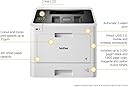
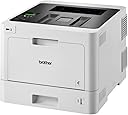
The Brother HL-L8260CDW is a compact, professional wireless color laser printer designed for busy offices. It delivers fast print speeds of up to 31 ppm with high-quality 2400 x 600 dpi resolution, supports automatic duplex printing, and offers versatile connectivity options including Wi-Fi, Ethernet, and USB. With a standard 300-sheet capacity expandable to 1,050 sheets and optional high-yield toners, it balances efficiency and cost-effectiveness for high-volume printing needs.


| ASIN | B071YHF67Q |
| Additional Printer Functions | Scan |
| B&W Pages per Minute | 31 ppm |
| Best Sellers Rank | 6,963 in Computers & Accessories ( See Top 100 in Computers & Accessories ) 24 in Laser Printers |
| Box Contents | Brother HLL-8260CDW; Cables: AC |
| Brand | Brother |
| Brand Name | Brother |
| Color Depth | 24 bpp |
| Color Pages per Minute | 31 ppm |
| Colour | Black,Grey |
| Compatible Devices | Laptops, PCs, Smartphones, Tablets |
| Connectivity technology | Ethernet, USB, Wi-Fi |
| Control Method | App |
| Controller Type | Application based |
| Customer Reviews | 4.6 out of 5 stars 311 Reviews |
| Display Type | LCD |
| Dual-sided printing | Yes |
| Duplex | Automatic |
| EU Spare Part Availability Duration | 3 Years |
| Global Trade Identification Number | 04977766774123 |
| Hardware Interface | USB 2.0 |
| Initial Page Print Time | 2 Sekunden |
| Ink Colour | Black |
| Item Dimensions D x W x H | 51.5D x 53.5W x 62H centimetres |
| Item Type Name | Colour Laser Printer |
| Item Weight | 21.8 Kilograms |
| Manufacturer | Brother |
| Maximum Copies Per Run | 100 |
| Maximum Copy Resolution Black and White | 600 dpi |
| Maximum Copy Resolution Color | 2400 x 600 dpi |
| Maximum Copy Speed Black and White | 31 ppm |
| Maximum Print Resolution Black and White | 2400 dpi |
| Maximum Sheet Capacity | 300 |
| Maximum Supported Paper Size | A4 |
| Maximum print Resolution Color | 2400 x 600 dpi |
| Model Name | HLL-8260CDW |
| Model Number | HLL8260CDWG1 |
| Model Series | HL-L8200CDW |
| Model name | HLL-8260CDW |
| Network Connectivity Technology | Ethernet, USB, Wi-Fi |
| Number of Drivers | 2 |
| Number of Trays | 1 |
| Other Special Features of the Product | Auto-Duplex(Auto-Duplex), Display Screen(Display Screen), Energy Star(Energy Star), Internal Memory(Internal Memory), Network-Ready(Network-Ready), Paper tray media types: Bond paper,Glossy paper,Plain paper,Recycled paper,Thin paper |
| Output sheet capacity | 150 |
| Paper Size | 210 x 297 Millimetres |
| Power Consumption Size | 580 Watts |
| Print media | Paper (plain) |
| Printer Output Type | Colour |
| Printer Type | Laser |
| Printing technology | Laser |
| Processor Count | 1 |
| Product Warranty | 1 year |
| Resolution | 2400 x 600 |
| Scanner Type | Flatbed |
| Series Number | 8200 |
| Special feature | Auto-Duplex(Auto-Duplex), Display Screen(Display Screen), Energy Star(Energy Star), Internal Memory(Internal Memory), Network-Ready(Network-Ready), Paper tray media types: Bond paper,Glossy paper,Plain paper,Recycled paper,Thin paper Special feature Auto-Duplex(Auto-Duplex), Display Screen(Display Screen), Energy Star(Energy Star), Internal Memory(Internal Memory), Network-Ready(Network-Ready), Paper tray media types: Bond paper,Glossy paper,Plain paper,Recycled paper,Thin paper See more |
| Specific Uses For Product | General office document printing and high-volume printing in a workgroup environment |
| Total USB 2.0 Ports | 1 |
| Total USB Ports | 1 |
| UPC | 606449129625 |
| Unit Count | 1.0 count |
| Warranty Type | limited warranty |
| Wattage | 580 watts |
N**Y
High quality printing, easy to set up, Iโd recommend purchasing!
Started a PGCE so lots of prep for classes needed and having this has been a game changer. It connects to WiFi wirelessly which means I can print from both my phone and laptop without a cable, I just downloaded the brother printer app on my phone. Iโve been using it for 4 months and I havenโt had to replace the cartridges yet. The print quality is excellent and it love that it lets me print on both sides without having to reload. It prints quietly and has a deep tray for paper which means that you donโt have to keep adding paper. I had researched a lot of printers before purchasing and Iโm delighted to say that I havenโt had any issues, itโs very easy to use.
E**R
Good Double Sided Colour Laser Printer for small office / home office
My first double sided colour laser was a Samsung (think it had tie in with Kyrocera?). It was big. It was fien for text but less good with photos. I used to print a third to a half of documents which were hard copies of PowerPoint workshop presentation for classroom candidates. It accepted non-Samsung toners but photos were even worse; the gradations were blotchy. Nevermind, got a Canon A3 photoprinter to print the certificates for candidates so as to avoid them feeling cheated of their course fees. Years later moved onto an all-in-one printer scanner by Canon. The photos and certificates output were fine especially once laminated but of course nowhere near the A3 photo printer quality. after 12 years the Canon won't print more than one sheet at a time. It served longer than its useful life and was not worth a service & repair cost. This was 2021 / 2022 and I was going to buy a HP colour laser as replacement, not cecessarily all-in-one. Had in mind a HP because of all the 40 or so my work assignments sent me to during the previous decades, one by one, brands stopped producing PC's etc. One by one, Sony VAIO, Toshiba, they disappeared. However HP brand remains the consistent brand one could find in countries few have heard of. But then in computer magazines I came across articles reporting HP (among others) have started putting recognition micro-chip onto inkjet cartridges. So a year later upon reading reviews by others here they kindly reminded me situation is same on laser toners. Thus no rush, spent a few months on and off reading as many reviews as possible to select replacement. It was thanks to other reviews that I chose this Brother for I would not have given Brother another thought. All I knew before this printer was Brother made sewinng machines, well in Asia where Singer didn't have as big a presence. Some good points of this Brother HL-L8260CDW. Partly due to it being just a printer rather than all-in-one, I could manually handle it to the first floor office by myself. However, the footprint size is still the same. It is also fortunate that the ventilation slots is on the right hand side because its placement is right angles on top of a filing cabinet (but unfortunately the button are therefore on the inside (butt against a wall)). No worries - saved by the fact that the machine sleeps and wakes very quickly. The Canon multifunction printer used to take couple minutes to wake up, warm up before able to print. This Brother can do it is about 15 seconds, not sure, but certainly far faster than booting up the laptop. So switch it on at the start of day and forget and it won't use much energy. The best aspect of this printer ? Yes indeed, it can use non-Brother toners. Amazon cookies popped Cool Toner. It even tempted me to buy it at a discount price of about ยฃ60 for a set of 4 colours. When setting up the printer, took out (almost tempted to bin the original Brother toners but didn't because that would not be responsible); anyway put the 3rd party toner cartridges instead. No complaints. Works fine but of course can't tell you now how good compared to original Brother toner. This was going too good to be true.Always wanted to get rid of the cable and cable protector around the office. So let's try wireless connection for printing. Not being a computer geek, here was the first hurdle. Owing tom company security policies and therefore the privacy settings used with FireFox browser, most things are disabled so as to prevent data leak of clients' data. Thus could not get onto the website support page indicated by the Brother documention which came with the printer. Nevermind. With different search engines and different browsers eventually found U-Tube tutorials. However, not quite enough tuturials to lead me by the hand to set it up. What is SSID and what is router? Is it any different with was supplied by the ISP? No mention. So using logic and thought it backwards, the laptops, all out laptops, could only connect wirelssly to one connection at a time. So deduced the wirelss printing facility must use this same "circuit". Thus what the tutorials referred to were what the ISP supplied (as I had not changed them). Hurray it worked. One after another got each laptop connected. They were Win7-64 Home, Win7-64 Pro, Win8.1, Win10, and Win11 operating systems. All connected 5 hours after unpacking the Brother printer. Would I recommend it ? Yes with one reservation. When taking old Canon to local municipal tip for disposal, they would not accept it - told me to take it to a waste business machine disposal company. But the local tip would have taken a smaller inkjet printer for disposal. This Brother would be the same but nevermind, the ยฃ saved on ink by using laser toner would go towards proper disposal come ??? 10+ years time.
D**G
A pig to set up, but, a fantastic printer
This is a large printer, so it is probably best to double check that it will fit in the space available. This is NOT one of the small desktop laser printers. Out of the box, you remove some plastic clips and some tape with excellent instructions and then you can turn it on. Now the fun begins. The instruction for setting up WiFi in no way relate to the process. I was able to find a YouTube video, and then setup was a breeze. Why these steps were not in the instruction only the Head of Customer Confusion at Brother would know. Once set up on your WiFi network away you go. The print quality is exceptional, with strong, solid colours, and a very fast print speed. Would I buy it again? Yes, without hesitation. For the quality of print, and speed of print the price is exceptional value. This review is based on the single function (print) version of the HL-L8260CDW. Talking of which, why do printer manufacturers give their printers such stupidly long code names. But that is another rant, for another time. Hope this was helpful.
M**K
Still the best cost per print machine in the Brother range. Good BK text & colour with grapths
The quality of ther prints of this 8260 range of printers is adequate for my needs. But the real advantage is the cost per print. Replacement toners are not the most expensive in the Brother lineup, but have double the capacity of the smaller but more expensive toners for the smaller brother machines. It is also at 32ppm one of the fastest in the line up with the 3240 having similar speed. However because the 8260 has a larger footprint it is able to duplex two sheets at a time. The 8260 is suitable if you do mainly coloured work. If most of your output is black, do not buy this machine because all the drums come as one unit and has to be replaced as such. This is the second purchase of this model. The first printer has developed a logic board fault which means it can't eject the paper into the copy tray. Having made a mod to the printer I can manually assist the machine when in duplex mode. This is fine for my needs as I do an awful amount of single (two-sided) prints for backup and proofing purposes. Althougth it has only done 14,000 the drum unit is now down to 50%. (50,000 in the maintenance schedule) And will get rid of it when it comes to replacement cycle.
S**T
Good printer that does the job
I've had this for a couple of weeks now and it's working just as expected. OK, so i'm not a heavy print user and have done some basic testing and printed some of my regular documents all without issue. I have setup Google Cloud print and can now print from my Android phone almost anywhere - especially useful for printing tickets etc without having to use the computer connected to the printer. It is quite a big unit in terms of height (i think to accommodate the colour toner cartridges) and a slightly larger footprint compared to the B&W laser printer it has replaced. Speed of printing is good and not too noisy either. Print quality is good and the colours are also good. I'm not expecting to print photos, just documents and flyers etc with a bit of colour. The printer setup was surprisingly easy - connected to PC with USB cable then ran the supplied CD to install drivers and configure with my home wifi. I was expecting to have to search and enter an IP address but none of that. A big bonus was the Brother promotion where I received ยฃ50 cashback and a free label printer.
J**H
Awesome printer, really easy to set up
Amazing printer! It arrived a day late, and was heavier than expected due to packaging. However, it's really easy to set it up, and works amazingly! The print quality is great, much better than an inkjet. It was easy to connect to WiFi, and is definitely worth the price. You can print all sorts with it, and do automatic double sided printing, which is hard to find with cheap inkjet printers, so it's very versatile.
A**R
Good , efficient printer.
Very efficient colour laser printer. Would buy again.
M**S
Excellent product.
Excellent product in very good condition.love it . Has changed the way I work. A+++
Trustpilot
4 days ago
2 months ago