Buy anything from 5,000+ international stores. One checkout price. No surprise fees. Join 2M+ shoppers on Desertcart.
Desertcart purchases this item on your behalf and handles shipping, customs, and support to Sri Lanka.
๐ฑ๏ธ Elevate your workspace with precision and comfort โ donโt settle for less!
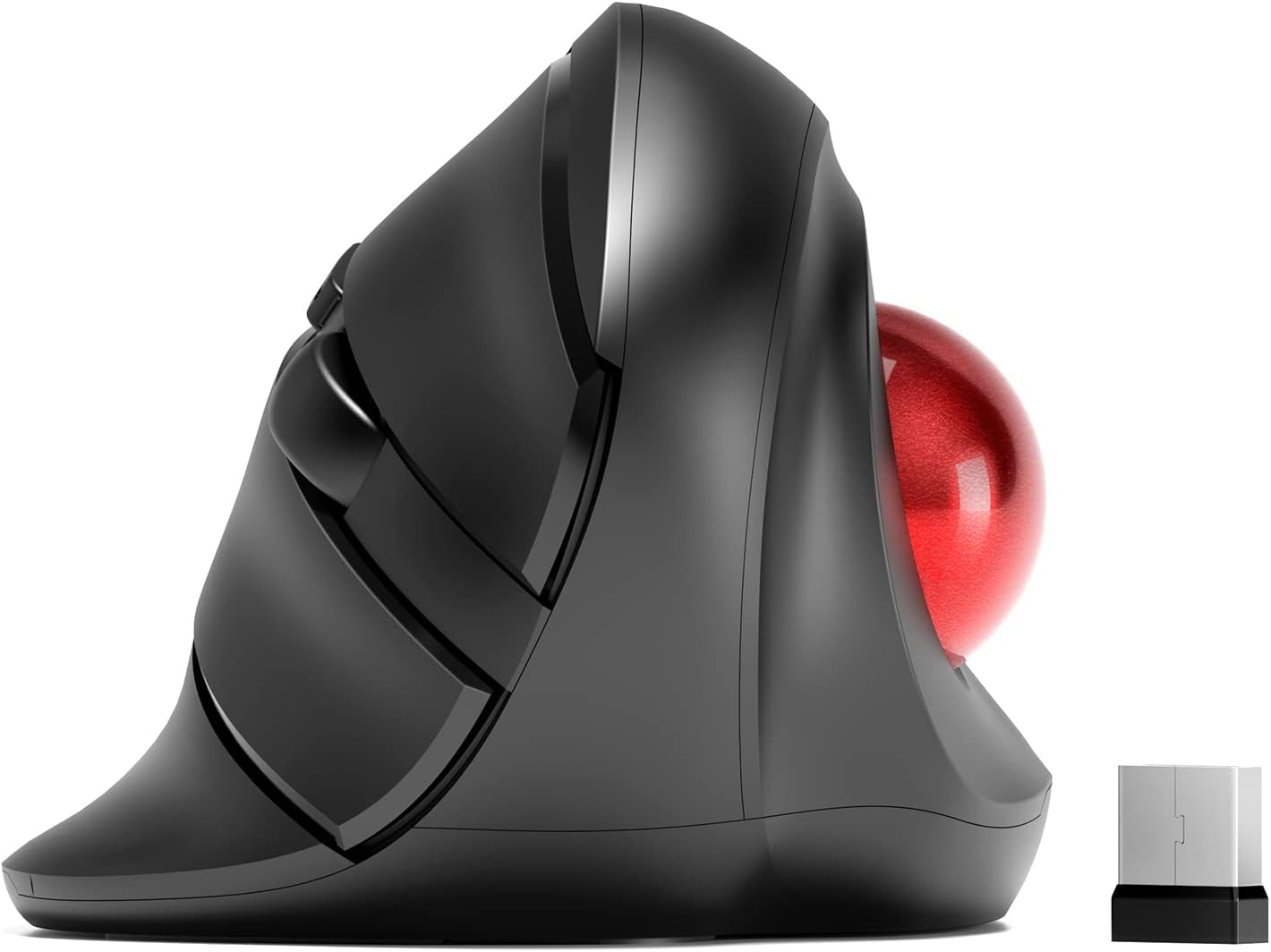
The MicroPack Trackball Wireless Mouse combines a vertical ergonomic design with a smooth trackball for precise cursor control. Featuring customizable DPI settings up to 2400, a 10-meter 2.4G wireless range, and silent clicking, itโs engineered for professionals seeking comfort and accuracy. Ideal for larger hands, this mouse reduces wrist strain and offers easy maintenance with a removable trackball.


| Additional Features | Wireless |
| Antenna Location | Gaming |
| Are Batteries Included | No |
| Are Batteries Required | Yes |
| Asin | B0BRX75KQ1 |
| Battery Average Life | 6 months |
| Best Sellers Rank | #64,586 in Computers (See Top 100 in Computers) #1,866 in Computer Mice |
| Brand | MICROPACK Digitally Yours |
| Built In Media | Mouse, USB receiver, possibly a battery |
| Button Quantity | 3 |
| Color | Black With Trackball |
| Compatible Devices | Laptop, Personal Computer |
| Connectivity Technology | 2.4G Wireless |
| Customer Reviews | 3.8 3.8 out of 5 stars (561) 3.8 out of 5 stars |
| Embellishment Feature | Button |
| Enclosure Material | Plastic |
| Finish | Matte |
| Hand Orientation | Right |
| Hardware Platform | Linux, Mac, PC |
| Item Dimensions L X W | 12.1L x 7.8W centimeters |
| Manufacturer | MICROPACK Digitally Yours |
| Mfr Part Number | V02 |
| Model Name | V02 |
| Model Number | V02 |
| Mouse Maximum Sensitivity | 1600 Dots per Inch |
| Movement Detection | Trackball |
| Number Of Batteries | 1 AA batteries required. |
| Operating System | Linux, Windows XP |
| Power Source | Battery Powered |
| Range | 10 meters |
| Style Name | Modern |
| Theme | Ergonomic Wireless Trackball Mouse |
User
Would be perfect if I could run 2 or 3 devices on it.
BUT the ball moves if it's not level. I don't yet have a level surface for my input devices, but since I like this one I'll make it happen. If you let it tilt to the left a little bit the cursor will move when you take your thumb off the ball because the ball will move slightly. This can lead to mis-clicks. All of you using a proper desk or table should never have this issue. I compute from my couch with a big rounded armrest--and is why I had to quit using mice. I did have trouble getting it up to speed on one system to I swapped it to the other one where it works fine. If it weren't for this I'd buy a second one for the other system, but a new release of Mint should fix that, and it's up. I just haven't done the upgrade.
User
More comfortable than Elecom EX-G it replaces.
Had a little wrist discomfort - and after some testing - I decided that I needed a variety of hand positions to reduce the discomfort. I needed a high-resolution track ball and one that turned my hand quite far.Enter this device: It is easy to use. Has variable resolutions and a few buttons - I don't need a dozen programmable buttons. So far so good. It has made using the trackball much more comfortable.I would like the option to tilt the tackball still further - and its ok for small medium hands - but I would like it slightly larger. Or expandable!The Elecom served me well. This is the evolution of it.Top tip: I installed Mac Mouse - a programme for adapting any mouse. Cheap and effective, it added some customisable features that make this cheap trackball as flexible as many much more expensive options.
User
Track ball pops out, and bulky
It's pretty bulky and large for me, so it might be for larger hands. But the track ball keeps getting stuck to my thumb when I let go to type or something, moving the cursor.The ball is also very light and offers very little resistance, making it hard to select at times.There was also a tab to pull out the USB that bend the cover out of shape at the clasp.
User
Not a mouse, not remotely ergo.
Not a mouse. Itโs an awkward vertical trackball. The ad made it seem like it was both, which seemed interesting, but it has no mousing functionality. Only awkward thumb only trackball.THIS IS THE WORST POSSIBLE THING FOR ANYONE LOOKING AT A VERTICAL MOUSE FOR ERGONOMIC REASONS IN CASE ANY MANUFACTURERS MAY BE LISTENING.KNOW YOUR MARKET.Missed the return window.
User
For Carpal Tunnel Relief
I've used trackballs for years. For me they allow easier and more precise control. I suffer from right wrist carpal tunnel and after a half hour or so of computer use my right hand goes to sleep. My doctor suggested a handshake type mouse is a more natural position and might offer some relief. Following a fairly exhaustive Amazon search I purchased both of the MicroPack Ergonomic Wireless Mouse's or more correctly Mice on offer. I was looking for a wired model but could not find one meeting my requirements . The Micropack Wireless Models were the ony ones I could find that could address the carpal tunnel. I'm keeping both but I like the other one best. It gives you the option of rolling on top or on the side which is good because when my carpal tunnel kicks in, the thumb does not cooperate. However, I like both of them.
Trustpilot
1 month ago
3 weeks ago