Buy anything from 5,000+ international stores. One checkout price. No surprise fees. Join 2M+ shoppers on Desertcart.
Desertcart purchases this item on your behalf and handles shipping, customs, and support to Sri Lanka.
🚀 Upgrade Your Desktop WiFi Game — Stay Ahead, Stay Connected!
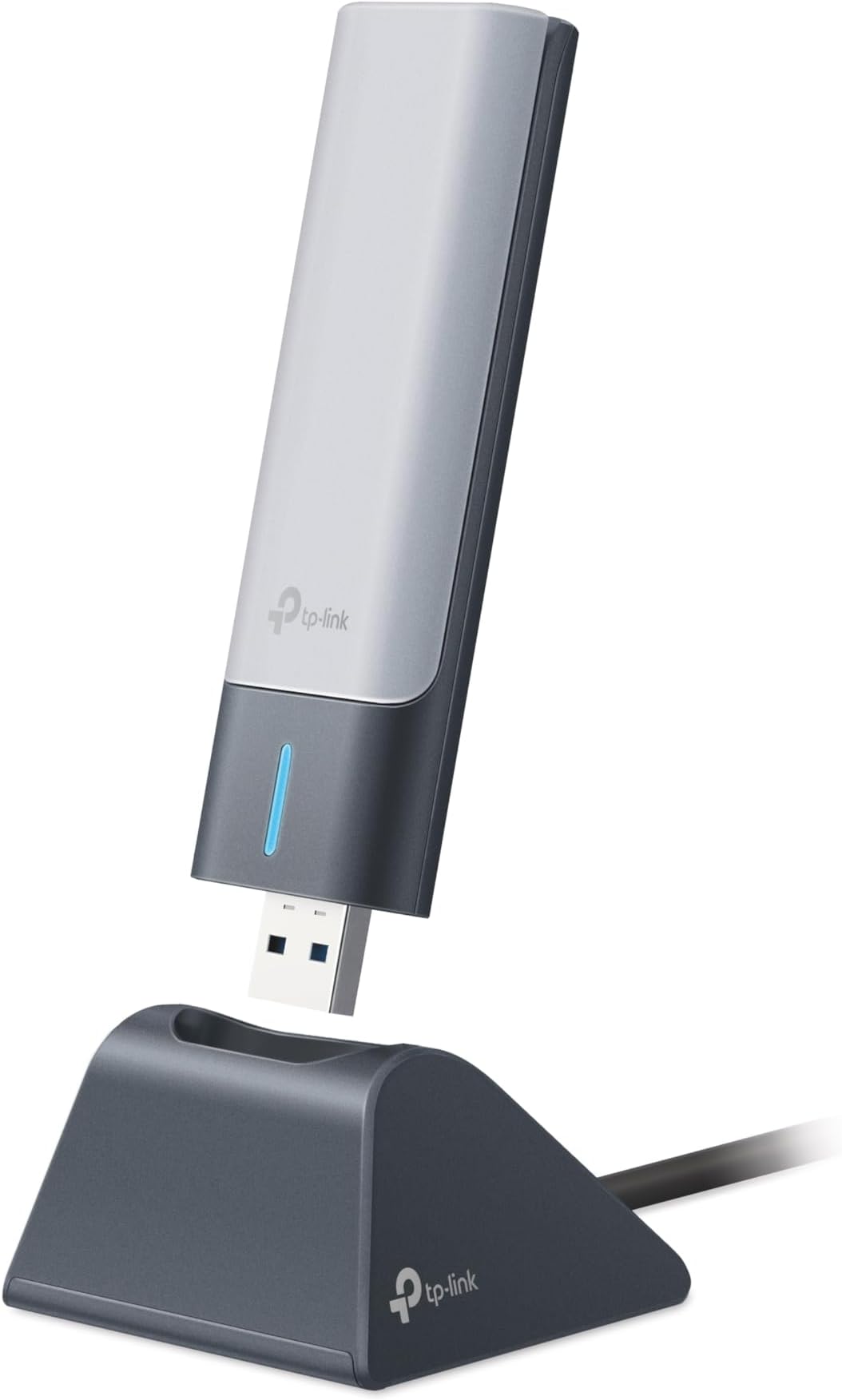
The TP-Link Archer TX21UH AX1800 WiFi 6 USB Adapter delivers cutting-edge wireless speeds up to 1.8 Gbps with dual band support (2.4GHz & 5GHz). Featuring MU-MIMO and OFDMA for efficient multi-device connectivity, high gain dual antennas for extended range, and WPA3 security for next-level protection, it’s designed for Windows 10/11 desktops. USB 3.0 ensures fast data transfer and easy setup, making it the ultimate upgrade for professionals craving reliable, high-speed internet.


| ASIN | B0BZJRXT7X |
| Best Sellers Rank | #3 in USB Computer Network Adapters |
| Brand | TP-Link |
| Built-In Media | Archer TX21UH, Quick Installation Guide, USB 3. |
| Color | Black |
| Compatible Devices | Desktop, Laptop |
| Compatible Operating System Family | Windows |
| Customer Reviews | 4.2 out of 5 stars 567 Reviews |
| Data Link Protocol | USB |
| Data Transfer Rate | 1800 Megabits Per Second |
| Hardware Interface | USB |
| Item Dimensions L x W x H | 1.2"L x 0.58"W x 4.4"H |
| Item Type Name | WiFi Adapter |
| Item Weight | 0.28 Pounds |
| Manufacturer | TP-Link |
| Mfr Part Number | Archer TX21UH |
| Minimum Required Operating System Version | Windows 10 |
| Model Number | Archer TX21UH |
| Product Dimensions | 1.2"L x 0.58"W x 4.4"H |
| UPC | 840030706394 |
| Unit Count | 1.0 Count |
| Warranty Description | Manufacture's 2-year warranty |
S**Y
PnP with Driver ready to install on Windows 10 Pro.
Check the box/container label for Version Number as there are 2 versions 1.0 or 1.6 If you remove/uninstall the Driver just go to the TP-Link website to download and reinstall. the Extension antenna is made of thin and lightweight plastic which can easily break. Construction of the device could have used a more rigid enclosure as if stepped on will be crushed. It may take a few extra seconds to connect to your Wi-Fi signal while the PC is first turned on. I don't use the mount/stand as the AX1800 USB adapter is plugged into the rear USB 3.0 port on my desktop. For me , it just one less wire and an item I don't have to fidget with. Wi-Fi 7 should be incoming by 2026 or start to become more popular. Hopefully 6G will become available to replace 5G permitting Wi-Fi 7 to take advantage of better transfer of data. Depending on your Internet Provider and Data Speed if under 800Mbps then Wi-Fi 5 is the most you will need. As Wi-Fi 6 is up to 1.2Gbps and provides new security feature WPA-3. The TP-Link AX1800 (Archer TX21UH) adapter performs well and highly recommended for those with very fast internet speeds up to 1.2Gbps. Bought mine while discounted for the holiday season and it's worth it.
D**R
Great speeds
This adapter works great and offers good speeds.
S**S
Super easy setup
Bought this because my WiFi driver corrupted. Plugged this in, downloaded the driver and was able to connect to the WiFi router effortlessly! Was concerned about printer not connecting to computer but that was not an issue. Printed on first try. Would recommend and buy again!
J**I
Just died while stored.
Unit came in, tested it, worked fine on my desktop PC that lacked integrated WiFi, to use with my Starlink (Floridian, storms take out both power and cable regularly). After satisifed that it would work, I stored it for several months, in a secure drawer indoors in my climate controlled house. Had a cable outage, so deployed my Starlink during a cable outage and it was dead, Jim. No power at all, in the cradle or direct to any number of USB ports, including on a laptop.
L**O
Good Signal/Fast Connection but it can be jittery and the ping is inconsistent.
Overall the download speed is great and it is a lot better than my laptop's wifi card however the ping is inconsistent. It also has a problem of randomly disconnecting and reconnecting with seemingly no cause. Good for downloads/steaming but for low ping I wouldn't buy it.
J**Z
Buena conexión
Lo mejor que he comprado, después de esto no tuve mas problemas con el internet
B**3
Impressive TP-Link AX1800 WiFi 6 USB Adapter - 5/5 Rating
I recently purchased the TP-Link AX1800 WiFi 6 USB Adapter for Desktop PC (Archer TX21UH), and I'm genuinely impressed with its performance. I would confidently rate it a perfect 5 out of 5 stars. This WiFi 6 USB adapter offers a seamless wireless network experience, providing support for both 2.4GHz and 5GHz frequencies. The inclusion of advanced features like MU-MIMO and OFDMA further enhances the efficiency of data transfer and reduces latency, ensuring a smooth and reliable connection. The high-gain dual-band 5dBi antenna significantly improves signal strength and coverage, contributing to a more consistent and robust wireless connection. The WPA3 security protocol adds an extra layer of protection to your network, enhancing overall security. The compatibility with Windows 11 and Windows 10 ensures that it integrates seamlessly with your desktop PC's operating system. While I found the TP-Link AX1800 WiFi 6 USB Adapter to be an excellent choice for enhancing wireless connectivity, I eventually returned it. My decision was solely based on my personal preference for a WiFi 6E-capable adapter. However, I must emphasize that this TP-Link adapter offers exceptional value for its price point. In conclusion, the TP-Link AX1800 WiFi 6 USB Adapter (Archer TX21UH) is a high-performing and cost-effective solution for upgrading your desktop PC's wireless capabilities. While I opted for a different adapter with WiFi 6E capabilities, I wholeheartedly recommend this TP-Link adapter to anyone seeking an outstanding WiFi 6 experience without breaking the bank. Sincerely, Mark
D**K
Great speed, ping issues - not ideal for online gaming
Speed wise - I was impressed. I got my entire bandwidth over wifi in the same room as the modem. However, I had persistent issues with ping spikes during online gaming. I have no issues on other wifi- enabled devices, so I suspect it is this adapter. I followed many suggestions online and in the reviews for solutions, but to no avail. Ultimately went to Ethernet and am keeping this as a backup.
J**R
Works great. Had one hiccup during installation of driver software.
Works great. Had one hiccup during installation of driver software. This happens if you insert the USB adapter while a Windows update is waiting in the queue. For some reason the installation of the Wifi driver fails. After installing the Windows Update the Wifi Adapter does not show the installer anymore. When this happens copy the installer to a folder on your computer before running the Windows Update. If you forget this step, you can download the installer from the TP-Link website. URL is in the small document that comes with the Wifi Adapter.
Trustpilot
2 weeks ago
2 weeks ago