Buy anything from 5,000+ international stores. One checkout price. No surprise fees. Join 2M+ shoppers on Desertcart.
Desertcart purchases this item on your behalf and handles shipping, customs, and support to Sri Lanka.
🚀 Unlock storage power that keeps pace with your ambition
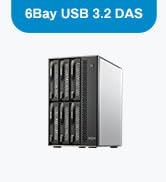
The TERRAMASTER D6-320 is a premium external hard drive enclosure featuring USB 3.2 Gen2 Type-C connectivity for blazing 10Gbps transfer speeds. It supports up to six 3.5" or 2.5" SATA drives, delivering a massive combined capacity of up to 132TB. Designed for professionals, it offers hot-swappable bays, broad OS compatibility, and an intelligent cooling system to ensure optimal performance and reliability in demanding environments.


| ASIN | B0BZHSK29B |
| Best Sellers Rank | #23 in Enclosures #1,345 in Data Storage |
| Brand | TERRAMASTER |
| Built-In Media | Hard Drive Enclosure |
| Compatible Devices | Windows, Mac, Linux |
| Connectivity Technology | SATA, Thunderbolt, USB |
| Customer Reviews | 4.2 out of 5 stars 509 Reviews |
| Data Transfer Rate | 10 Gigabits Per Second |
| Enclosure Material | Metal |
| Hard Disk Form Factor | 3.5 Inches |
| Hardware Interface | USB 3.2 Gen 2 |
| Hardware Platform | Windows, Mac, Linux |
| Item Dimensions L x W x H | 8.58"L x 5.12"W x 8.9"H |
| Item Weight | 4.1 Kilograms |
| Manufacturer | TERRAMASTER |
| Material | Metal |
| Mfr Part Number | D6-320 |
| Model Number | D6-320 |
| Product Dimensions | 8.58"L x 5.12"W x 8.9"H |
| Supported Devices Quantity | 1 |
| Warranty Description | 2 Years |
K**Z
Excellent and worth the extra coins over the competition. Self-hosting game changer for me.
Better than others by far. This is about the fourth or fifth one of these enclosure things I've bought and this one is the best by far. Build quality is excellent and made of thick plastic (quieter than aluminum). Stay away from the Mediasonic brand ones if you are using it for a server - I've gifted away two of those because the power button always had to be pressed after power loss and the usb controller was shared by all the drives (it also was weird with device naming). I'm using the TerraMaster with a Raspberry Pi 5 8GB running OMV 8, with one 8TB CMR hdd and two 6TB SMR hdd. It has a USB controller for each disk slot and I was pulling full read write speeds from the disks simultaneously. I also didn't have any disk sleeping issues (after disabling SMART monitoring and using HD-idle instead of OMV's built-in stuff). The power button is last state; it powers back ON after power loss if it was ON before the power loss. I found the trays easy to install my disks into and the latching click is very satisfying. The fan is quiet enough for my application. I used it in Unraid as well for some testing and everything looked fine on that too - including the device naming. I was copying over 400MB/s to it using a btrfs raid0 array of SMR disks over plain old usb 3.0.
Z**S
Great 4-disk enclosure
The self-noise is very quiet although there isn’t much dampening for hard drive noise so the actual drives may be very audible. The fans work great and keep my drives consistently below 40C. The case feels a bit cheap because of all the plastic but I kind of prefer this since it’s so light weight. Despite the plastic case, it feels really solid. The case should hold up for years. The lights on the front are really helpful to confirm disk activity. I only have two complaints: how the drives show up in windows and the quality of the USB-C connector. Each drive shows up individually which is great for software RAID, but ejecting the drives means each one has to be removed from windows separately. I wish there was a way to eject them all as one device before I disconnect the enclosure. The USB-C connector also could be stronger. If something accidentally bumps into the cable while it’s in, it can disconnect from the host even if the cable looks like it should still be connected. Despite these concerns, I’m very happy with this enclosure.
J**H
Fatal Flaw to what could be the solution for photographers
Update 3/26/2026 Sorry for the false alarm below. The issue was with the power supply, not with the device. The power supply had the same brand name and appeared virtually identical, so I just plugged the new one into the same power supply, but then out of abundance of caution I glanced at the fine print on the old power supply and realized it says 72 watts (W) of output, and then I glanced at the new one, but it said 120 W of output. A huge difference, clearly. After carefully untangling the cables needed to take out the old power supply from my double-layered set of Bluetti and CyberPower battery backups, and put in the new power supply, the 6-bay model does work flawlessly, and has enough power to spin up all four drives at once. Just a note of caution, since 72 W of power is NOT enough for four drives, this means each drive probably needs at least 20 W apiece to spin up (for Exos enterprise drives). Thus, six drives would likely need at least 120 W total, meaning that the new power supply may or may not be enough power to actually spin of six drives. When I do ever sometime install six drives at once, I might run into the same issue of not having enough power to spin all the bays up that the machine is rated for, just like I experienced with the 4-bay version not having enough power to spin up all of its bays. But for now, when I am only using my four drives in this 6-bay unit, and with its correct PSU included in the box, rather than the prior one, it does have enough power to spin up the four drives with two of the bays empty. It's kind of an extreme cost cutting measure that the PSU included saves like 15 cents of cost by only putting out 72 W for one model and only 120 W for another model, but I respect the right of a company to just include the bare minimum to make its product work. Although the prior 4-bay model did NOT work with 4 drives loaded in it, and it still awaits to be seen whether the 6-bay model will work with a full load of 6 drives in it as well. Other than this power issue, this unit has worked flawlessly and perfectly for over a year on my MacBook Pro M4 Max, and hopefully it will keep doing the same on my new MacBook Pro M5 Max. Update 3/26/2026 For the past year, I have been stuck with hot swapping the 4th drive after powering up this model just so that it can boot, as it powers off from a voltage deficiency over and over in an infinite loop when 4 drives are loaded. So today, in the spring sale, my package arrived with the new 6-bay version. Obviously, with 6 bays, it should have more voltage to be able to spin up just by 4 existing drives, right? Wrong. I am attaching a video showing the infinite loop STILL happening of trying to spin up just four drives, then failing, which happens on the 6-bay model, just the same as on the 4-bay model. DO NOT BUY THIS PRODUCT. IT CANNOT LOAD MORE THAN 3 PHYSICAL HARD DRIVES AT A TIME, EVEN THOUGH IT CLAIMS TO SUPPORT SIX. The package has been opened and all the screws taken out, but hopefully I can still do a return and go back to my 4-bay model, and keep on living with this terrible situation of loading in the 4th drive after waiting for the first 3 to spin up. I live in daily terror that at some point my timing will be off, and my computer will see the missing drive as a corrupted software RAID array, instead of getting the timing just right so that my computer thinks there is just a small delay in loading up the fourth drive from the enclosure, instead of seeing it as a missing drive/corrupted RAID. Original Update: when used with 4 seagate 28 TB drives, it cannot spin up because inadequate voltage. One drive has to be slid out partway when turning on, then slid back in after the first 3 spinup. Otherwise, still works great. Only this drive so far can't spin up with 4 drives inside. Other drives don't need so much voltage, apparently. -- I generate over 20 TB of media a year as a photographer, and I now use software raid only after way too many unrecoverable hardware raid failures. And I also use backups on additional DAS devices, never trusting just raid alone for safety. But I have always been frustrated that good enclosures are close to $300 or even $1000, just to provide a decent 1000 MB/sec of combined speed from multiple drives. Lots of DAS devices are available, but until this one, it was always close to $300 or far more just to get true drive speed like 250 MB/sec for one drive times four = 1000 MB/sec total. Why should I pay the price of an entire new PC just to provide a SATA connection and power cable to my drives that doesn't bottleneck my speed when accessing more than one drive at once with RAID? Finally this one is available for half the cost, and it really works. I've bought four and will buy more.
R**.
intrinsically works but with issues
D2-320 arrived and looked good. solid construction high quality cables, parts fit well together. Installation is intuitive. So simple, in fact, I had it installed with 2 SSDs, THEN looked at the installation instructions. Transfer speeds are pretty good. USB 3.2 is a speedy boy, even with both drives hammering large (700G) transfers at the same tiime. Now, the issues. It has an EXTREMELY small supported product list. Trust me if your device isnt on the compatiibility list, its probably not going to work well. Support, while available pretty much 24 x 7, are extremely slow to respond in live chat...and in fact one of them went for an hour meeting while in chat with me without saying so. Support attitude is poor, at best. In regards to knowledge, they didnt tell me anything of value other than obvious things like "change what bays the drive is in"... well duh...rocket science. They even said that "Sharing" a drive via standard windows file sharing required a NAS rather than a DAS. sorry...wrong... Despite their fumbling support and extremely restrictive compatibiility list, I AM still using the product, and its functioning pretty much as good as it looks (which is pretty boring, but thats a good thing with computer hardware. boring means its working). I managed to sort out the issues myself, which werent really attributable directly to the product other than it not supporting faster, newer SSDs, and very few of the older generation drives. Would I recommend it? Probably not. Spend a little more. Update - New Samsung 870 EVO 1Tb drives arrives. Inserted into the DAS which proceeded to not see them. Windows Disk Manager did, however see them both and proceeded with addiing them and letting me format them. The DAS automatically detected the drives once they were partitioned and formatted. Setup Windows shares and they work perfectly across the network to another Win 11 machine and a Win 10 machine. Care must be taken on shares if you are hot swapping disks since it seems to be the slot in the DAS uniit that gets the share name and permissions rather than the actual disk. This is NOT the fault of the D2-320 but a windows thiing. Rating increased from 2 to 4 stars.
R**.
The RAID1 functions as expected.
I purchased the D2-320 2-bay RAID enclosure with USB 3.2 Gen 2 10 Gbps My purpose with this unit was to mirror (RAID1) two 6TB WD Reds with a Linux machine. I’m not familiar with this brand, so I decided to test it a little before copying a lot of my files over to the D2-320. Getting everything working was pretty easy. I pulled out each bay, installing the drive was pretty easy, no screws needed. They provide a video on it if you’re unsure. I set the selector on the back of the unit to RAID1, shoved in both drives, connected the USB (drives are powered but won’t spin up until the USB is connected), then held the RESET button with the provided pin until the disk lights flashed. The system found one drive - as it should have. I wrote approximately 18K files and directories of various sizes to the array and then without disconnecting the USB or turning off the power, I pulled out one drive. I then connect the pulled drive directly to another computer to see that the files were in fact written to the drive. They were. All good to go. I replaced the drive. Both lights are green. Since no changes had been made to either drive, this is perfect, it didn’t try to rebuilt the array Next, I pulled the second drive out hot. Then connected that drive to the other computer and checked to make sure all files were also written to this drive as well. They were! It is working as it should be. I then created a couple files on the other drive and then replaced the pulled drive back into the D2-320. One drive light was blinking green, the other blinking yellow. According to the online documentation, this means it is rebuilding the RAID1 mirror. Perfect .. Everything is performing as expected. It did take a few hours to rebuild .. but these are 6TB drives, so that was expected. The USB cable provided seems adequate, USB C on both ends. If you need a different cable, consider that when purchasing. Average 1G file write 156 MB/s, average 1G read 221MB/s. Slow but these are mechanical drives connected via USB. Acceptable. Later, I watched a video using Jellyfin and reading, transcoding, and streaming worked perfectly fine. The large fan is quiet and seems to keep the drives cool. Airflow looks to be sufficient. How noisy the unit will be will depend on your drives. Some are louder than others. These drives will be part of a system I have in place which will be up and running 24/7. I’ll be very interested in seeing how well the Terramaster D2-320 performs in the long run. I’ll post updates after I have used them for some time.
F**C
Works not quite as I hoped and despite irrelevant reviews
First of all, the reviews are conflating many different devices. The devices reviewed have notably different firmware and are designed and built differently. So the overall review is not really relevant. You'll have to wade though all reviews to find the ones applicable to the product you're considering. I'm just updating my review. I have been fighting for a few months to get it to work right. Thing is, no mater what, if you happen to transfer big files, or try simultaneous transfers, it will just fail to work properly and the USB control will be reset. The reset takes some time, so forget about any kind of throughput. The kernel messages seem to indicate errors in the processing of NCQ. Trying to disable it or limiting the queue depth is not allowed. I guess the firmware doesn't implement correctly those features. Another update. I have been writing firmware for devices for years. I would be embarrassed and ashamed to unleash a product that poorly done. It is missing key features that would make the product easy and reliable to use. For example, you don't seem to be able to get each disk unique identifier, the WNN. I could go further, but at that point you figured that the device is only half baked. Sure, it will work with a basic workflow and LOTS of hand holding. The heat is not extravagant, but substantial. Al in all a device where they cut so many corners to lower the price, that it is missing its usage target. I would NOT recommend it as a D.A.S.. Or anything else for that matter.
L**N
Now my Mac M4 Mini NAS is good enough to go live.
Exactly what I needed... yes, it's shaped like a NAS.... but it's 1/2 the price while having the same design, I assume. This was replacing an external drive dock that I had which didn't reduce the noise of the two white label disks I had in them. This one doesn't make it fully soundproof but it is noticeably quieter... to the point where it doesn't make a loud annoying beep... but just turns on. No USB-3 B connector... a USB-C cable.... Performance is very good and while it's not 100% quiet, it's far better than the cheap unknown brand I had before. It fits and looks nice on a shelf.... and by default, the unit comes in Single configuration which has each disk as an independent disk... no RAID or JBOD (one logical disk with two disks....) In "single" mode, it worked how I wanted it with two separate mounts to where I could easily swap out 3.5" disks as needed (which I hopefully won't need)... but nice to have the option. So it's basically like a NAS that I would have bought but it's hooked into my Mac Mini M4 which is a far better NAS interface for what I want to do with it.
R**Y
Supports 6 x 26TB HDD's
In an effort to consolidate my external HDD management, I finally opted to purchase a proper HDD enclosure. I have a NAS for other uses, but I needed something that was a DAS (Data Attached Storage) for different drives that I would be rotating or didn't need on a network. This enclosure suited my needs. USB-C connectivity to my PC. 6 drive bays. Independent power and connectivity; that part is key. With the other 4-bay style top-loading HDD bays, if you pull one drive, the entire unit disconnects all the drives and you have to wait for Windows to detect what is in the other bays. With this particular enclosure, you can disconnect the drive in Windows, and the other drives remain powered and accessible. That's true hot swappablility. It's also going to let you transfer files as fast as the drives you have in there will let them. I should have gotten this sooner. Can't recommend it enough.
G**E
DAS perfect for my use case
I'd been waiting for this DAS to appear on Amazon since it was announced in March. I have a plex server with a number of 2.5" USB SSD drives dangling in the wind. This DAS helped keep me consolidate everything and organized my rack. Moreover, the server was already acting as a NAS for my larger network so this was a no-brainer for my use case. The USB 3.1 connection is very speedy with my SSDs. I'm impressed. Installation of 3.5" hard drives is tool-less and easy. 2.5" drives require some screws for mounting and quite a few of them come with this DAS. It looks like all of the SMART data (or the ones that I care about) of the hard drives are passed through to the host computer. The unboxing of the DAS was straightforward and simple. It came with 2 USB cables (C-C and A-C) and a power adapter. The fans are a bit loud, but it's racked in my basement so no one hears it. The DAS should have come with some cage nuts/screws but fortunately I had a few kicking around. Was it worth the price? For me it was, but just barely so - it helped me utilize some old 14TB 3.5" drives that I had laying around while keeping some of my larger SSDs. I may buy another one as my storage requirements increase, or perhaps consider a dedicated Terramaster NAS in which I could also utilize this DAS.
P**E
A reliable DAS
I have been running this in my NAS setup since July last year with four NAS and data centre drives. It runs continuously and has been very stable. No disconnects, no dropouts or no drive detection issues. I also do not notice the fan noise and cooling has been fine with all bays filled. A simple and a reliable storage expansion. I'm planning to buy another for further expansion.
H**R
Justo lo que necesitaba a precio adecuado
En la mayoría de artículos este podría decir que se ajusta a muchas de mis necesidades, un adecuado precio y me sirvió como extensión de mi NAS, creando más habías para acoplar mas discos NAS y no tener que cambiar todo mi equipo. Con la conexión USB C logra buenas velocidades y al ser RAID da la posibilidad de acoplar de la mejor manera los discos. Creando un RAID para tenerlos como discos separados o discos unidos y visualizar una sola unidad (aunque con dicha configuración se pierden TB de almacenaje) Lo que me llamo la atención es que hace juego con mi NAS negro en lugar de desentonar el color con los clásicos blancos o grises
A**R
A perfect storange solution for desktop with powerful mini PC or home lab!
It is exactly as described in the description of product. No second thoughts on buying. Using it as partial RAID and simple storage for homelab. For mounting SSDs, screws are provided, this information is missed out in the product package contents. R/W Speeds match the described information.
C**N
Terramaster
Muy buen producto, agregando discos duros podemos tener bastante almacenamiento
Trustpilot
4 days ago
3 weeks ago